1. Ifihan
Thank you for choosing the anyloop Smart Watch. This manual provides detailed instructions on how to set up, operate, and maintain your new device. Please read this manual carefully before use to ensure optimal performance and longevity of your smartwatch.

Figure 1.1: The anyloop Smart Watch, showcasing awọn oniwe-aso oniru ati ki o larinrin àpapọ.
2. Eto Itọsọna
2.1 Package Awọn akoonu
Ṣaaju ki o to bẹrẹ, jọwọ rii daju pe gbogbo awọn nkan wa ninu package:
- anyloop Smart Watch
- Ngba agbara USB
- Itọsọna olumulo
2.2 Ngba agbara si Ẹrọ
For first-time use, fully charge your smartwatch. Connect the magnetic charging cable to the charging contacts on the back of the watch and plug the USB end into a power adapter (not included) or a computer's USB port.

Figure 2.1: The smartwatch display showing battery level and charging indicators. A full charge typically takes 1-1.5 hours.
A full charge provides approximately 5-7 days of normal use or up to 21 days in standby mode.
2.3 App fifi sori ati so pọ
To unlock the full potential of your smartwatch, download the dedicated "Fitbeing" app on your smartphone.
- Scan the QR code in the manual or search for "Fitbeing" in your smartphone's app store (compatible with iPhone iOS 13.0+ and Android 9.0+).
- Install and open the "Fitbeing" app.
- Ṣẹda iroyin tabi wọle.
- Mu Bluetooth ṣiṣẹ lori foonuiyara rẹ.
- In the app, navigate to "Device" or "Add Device" and select your smartwatch from the list of available devices.
- Jẹrisi ibeere sisopọ lori mejeeji foonuiyara rẹ ati smartwatch naa.

Figure 2.2: The Fitbeing app interface, used for managing health data, notifications, and watch settings.
3. Awọn ilana Iṣiṣẹ
3.1 Ipilẹ Lilọ kiri
- Afi ika te: Swipe left/right, up/down to navigate through menus and screens. Tap to select.
- Side Button/Digital Crown: Press to wake/sleep the screen, return to the home screen, or access the app menu. Rotate the digital crown to scroll through lists or adjust settings.

Figure 3.1: Key physical features of the smartwatch, including the digital crown for navigation.
3.2 Bluetooth Ipe Išė
With Bluetooth 5.3 technology, you can make and receive calls directly from your wrist.
- Ensure your smartwatch is connected to your smartphone via Bluetooth.
- Tí ìpè bá wọlé, aago náà yóò fi ìdánimọ̀ olùpè hàn. Tẹ̀ àmì aláwọ̀ ewé láti dáhùn tàbí àmì pupa láti kọ̀.
- During a call, you can use the watch's built-in microphone and speaker for hands-free communication.
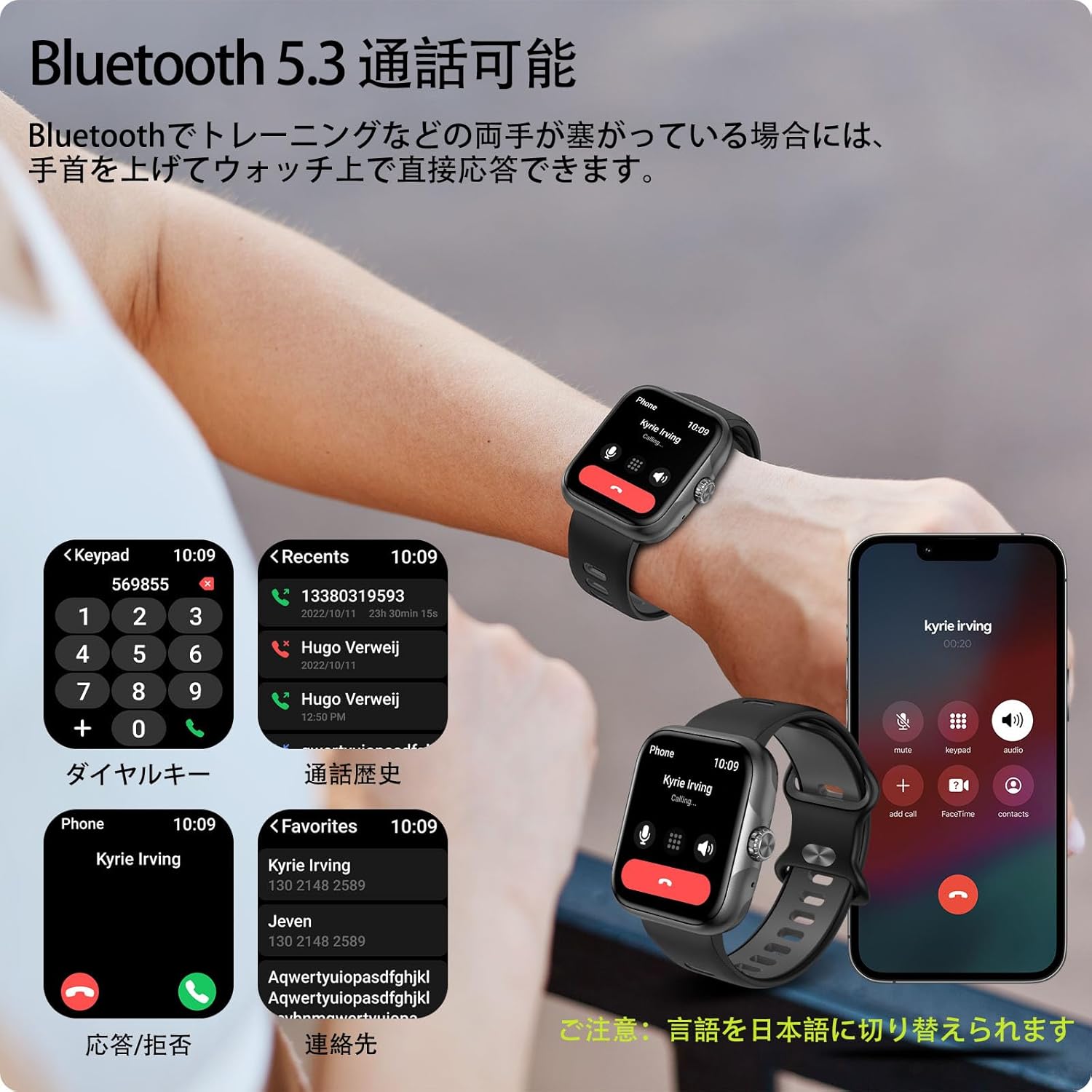
Figure 3.2: Hands-free calling feature, showing call interface on the watch and smartphone.
The advanced noise-canceling technology ensures clear audio quality during calls.
3.3 iwifunni
Receive real-time notifications for calls, SMS, and various social media apps (LINE, Twitter, etc.) directly on your watch.
- Ensure notifications are enabled in the Fitbeing app and your smartphone's settings.
- Rọra lati oke oju aago naa si isalẹ view to šẹšẹ iwifunni.

Figure 3.3: Smartwatch receiving notifications from various applications.
4. Key Awọn ẹya ara ẹrọ
4.1 Ifihan
The smartwatch features a 1.78-inch high-resolution AMOLED display (368x448 pixels), providing vivid colors and excellent clarity. The large screen and intuitive touch interface make it easy to read and operate.

Figure 4.1: The 1.78-inch AMOLED display offers superior visual quality.
4.2 Titele iṣẹ & Awọn ipo ere idaraya
Track your daily activities and exercise performance with precision. The watch records steps, exercise duration, distance, and calories burned. With built-in GPS, it can accurately map your outdoor activities.
- Awọn ọna Idaraya 60+: Supports various activities including running, swimming, yoga, and more.
- GPS Titele: Visualize your running or cycling routes on a map within the app.
- Wiwo Data: The Fitbeing app provides detailed analysis of your performance, helping you set and achieve fitness goals.

Figure 4.2: GPS tracking in action during an outdoor run, displaying real-time data.

Figure 4.3: Detailed activity data and route mapping available through the Fitbeing app.
4.3 Abojuto Ilera
The smartwatch provides comprehensive health monitoring features to help you stay informed about your well-being.
- Erin Oṣuwọn Ọkàn: Máa ń ṣe àkíyèsí ìlù ọkàn rẹ nígbà gbogbo ní gbogbo ọjọ́.
- Blood Oxygen Concentration: Ṣe iwọn awọn ipele atẹgun ẹjẹ rẹ.
- Titele orun: Ṣe itupalẹ awọn ilana oorun rẹ, pẹlu oorun jijinlẹ, oorun ina, ati awọn akoko ji.
- Abojuto Wahala: Ṣe iranlọwọ fun ọ ni oye ati ṣakoso awọn ipele wahala rẹ.
- Itọju Ilera Awọn Obirin: Provides features for menstrual cycle prediction and ovulation reference.

Figure 4.4: Health monitoring features including heart rate, blood oxygen, and women's health tracking.

Figure 4.5: Detailed sleep data recording and analysis.
4.4 isọdi
Personalize your smartwatch with a wide range of watch faces and interchangeable bands.
- 100+ Awọn oju Wiwo: Choose from a rich selection of watch faces available in the Fitbeing app to match your style or mood.
- Awọn oju Wiwo DIY: Upload your favorite photos (family, pets, loved ones) to create unique, personalized watch faces.
- Awọn ẹgbẹ Iyipada: The watch supports standard 22mm bands, allowing for easy replacement with commercially available options.

Figure 4.6: Customize your watch with over 100 watch faces or your own photos.
4.5 Omi Resistance
The smartwatch boasts 3ATM water resistance, making it suitable for daily use, including sweating during workouts, washing hands, and even unexpected rain. It is not recommended for hot water activities or deep diving.

Figure 4.7: The smartwatch is suitable for swimming and other water-related activities due to its 3ATM water resistance.
4.6 Miiran Smart Awọn iṣẹ
The smartwatch integrates various practical features to enhance your daily life:
- Àfojúsùn ojú ọjọ: Gba awọn imudojuiwọn oju ojo ni akoko gidi.
- Itaniji: Ṣeto awọn itaniji taara lati ọwọ ọwọ rẹ.
- Olurannileti Iduroṣinṣin: Ti gba ọ laaye lati gbe lẹhin awọn akoko aiṣiṣẹ.
- Wa Foonu: Ṣe iranlọwọ lati wa foonu alagbeka rẹ ti ko tọ.
- Iṣakoso Orin: Ṣakoso ṣiṣiṣẹsẹhin orin lori foonuiyara rẹ (mu ṣiṣẹ, da duro, fo awọn orin).
- Iṣakoso kamẹra: Lo aago rẹ gẹ́gẹ́ bí ohun tí ó ń dènà àgbékalẹ̀ fún kámẹ́rà fóònù rẹ.
- Iṣẹ SOS: Fun awọn ipo pajawiri.
- Oluranlọwọ ohun: Control watch functions using voice commands.

Figure 4.8: A variety of smart functions available on the smartwatch.
5. Itọju
- Ninu: Regularly clean the watch screen and strap with a soft, dry cloth. For stubborn dirt, use a slightly damp asọ ati ki o gbẹ daradara.
- Awọn olubasọrọ gbigba agbara: Ensure the charging contacts on the back of the watch are clean and free of debris to ensure proper charging.
- Ibi ipamọ: Nigbati o ko ba wa ni lilo fun awọn akoko ti o gbooro sii, tọju aago naa ni itura, aaye gbigbẹ.
- Yago fun Awọn iwọn otutu to gaju: Má ṣe fi aago náà sí ibi tí ó gbóná tàbí tí ó rẹlẹ̀ gan-an, nítorí pé èyí lè ní ipa lórí ìgbésí ayé batiri àti iṣẹ́ rẹ̀.
- Awọn kemikali: Avoid contact with harsh chemicals, detergents, or solvents, as they may damage the watch's finish or internal components.
6. Laasigbotitusita
| Isoro | Owun to le Solusan |
|---|---|
| Wiwo ko tan. | Ensure the watch is fully charged. Press and hold the side button for a few seconds. |
| Ko le ṣe alawẹ-meji pẹlu foonuiyara. |
|
| Awọn iwifunni ko gba. |
|
| Dátà ìṣiṣẹ́ tí kò péye. | Ensure the watch is worn snugly on your wrist. Calibrate settings in the Fitbeing app if available. |
| Aye batiri kukuru. |
|
7. Awọn pato
| Ẹya ara ẹrọ | Ẹ̀kúnrẹ́rẹ́ |
|---|---|
| Orukọ awoṣe | Smart Watch B0FC627FXZ |
| Brand | anyloop |
| Ifihan | AMOLED 1.78-inch (ìpinnu 368x448) |
| Asopọmọra | Bluetooth 5.3 |
| Agbara Batiri | 350mAh litiumu Iwon |
| Igbesi aye batiri (Lilo Aṣoju) | 5-7 ọjọ |
| Igbesi aye batiri (Iduroṣinṣin) | Titi di ọjọ mẹwa 21 |
| Omi Resistance | 3ATM |
| Ibamu | iPhone iOS 13.0+, Android 9.0+ |
| Awọn iwọn | 28.6 x 9.3 x 1.9 cm; 180 g (Package Size) |
| Iwọn Iwọn | 22mm (Standard) |
| Awọn irinše to wa | Smart Watch |
8. Atilẹyin ọja ati Support
For warranty information and customer support, please refer to the contact details provided with your purchase or visit the official anyloop webojula. Tọju iwe-ẹri rira rẹ bi ẹri rira fun awọn iṣeduro atilẹyin ọja.
If you encounter any issues not covered in this manual, please contact our customer support team for assistance.