
1. Ifihan
This manual provides detailed instructions for the installation, operation, and maintenance of your GAMEMAX N90 BG ATX PC Case. The N90 BG features a modular dual-chamber design, a 512-LED matrix display, and panoramic curved glass. It is designed for BTF motherboards, offering a cable-free interior, efficient 270° cooling, and includes six ARGB PWM fans. Please read this manual thoroughly before beginning assembly to ensure proper setup and optimal performance.

olusin 1: Iwaju-ẹgbẹ view of the GAMEMAX N90 BG ATX PC Case, showcasing its panoramic curved glass, internal components, and the integrated LED display.
2. Package Awọn akoonu
Verify that all components are present before proceeding with the installation:
- GAMEMAX N90 BG ATX PC Case
- Apoti ẹya ẹrọ (awọn skru, awọn iduro, awọn asopọ okun)
- Six pre-installed ARGB PWM fans
- Afowoyi Olumulo (iwe-ipamọ yii)
3. Eto ati fifi sori
Follow these steps for proper assembly of your PC components within the GAMEMAX N90 BG case.
3.1. Ngbaradi Ọran naa
- Ṣii silẹ: Fi iṣọra yọọ kuro ninu apoti rẹ.
- Yiyọ igbimọ: The panoramic curved glass and side panels can be removed for easier access. Refer to Figure 2 for an interior view.

olusin 2: inu ilohunsoke view of the GAMEMAX N90 BG case, highlighting the spacious motherboard tray and fan mounting locations.

olusin 3: Apa view of the case with the panel removed, providing access to the internal structure for component installation.
3.2. Modaboudu fifi sori
The N90 BG supports ATX motherboards, including BTF (Back-To-the-Future) motherboards for a cable-free aesthetic. Install the necessary standoffs for your motherboard size, then carefully place the motherboard and secure it with screws.

olusin 4: Ti abẹnu view demonstrating potential component placement and cable routing paths.
3.3. Fifi sori Ipese Agbara
The case features a bottom mount for the power supply. Install your power supply unit (PSU) into the designated compartment at the bottom of the case and secure it with screws from the rear.

olusin 5: Ẹyìn view of the case, illustrating the power supply mounting area and expansion slots.
3.4. Fifi sori ẹrọ Awakọ Ibi ipamọ
Utilize the available drive bays for 2.5-inch SSDs or 3.5-inch HDDs. Refer to the accessory box for specific mounting hardware.
3.5. Fifi sori ẹrọ afẹ́fẹ́ ati radiator
The case comes with six pre-installed ARGB PWM fans for efficient 270° cooling. Additional fans or radiators can be mounted in various positions (top, side, rear) as needed. Ensure proper airflow direction for optimal cooling.

Figure 6: Top-down interior view, showing available mounting points for additional fans or liquid cooling radiators.
3.6. Iṣakoso USB
The dual-chamber design and BTF motherboard compatibility facilitate excellent cable management, allowing for a clean, cable-free interior. Route all cables through the designated cutouts and secure them using the provided cable ties in the rear chamber.
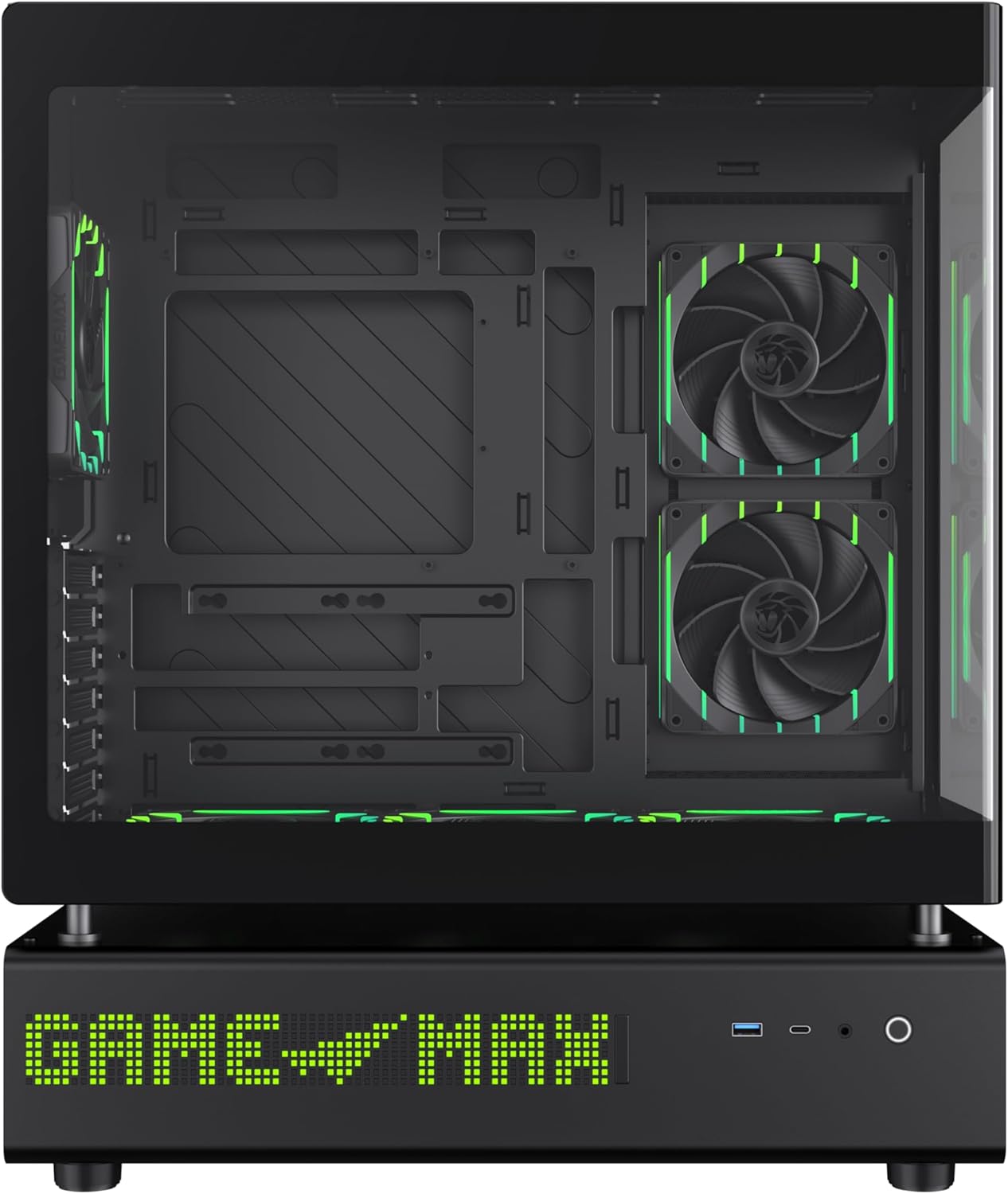
olusin 7: Apa view of the case, illustrating the solid panel that conceals the cable management area.
4. Awọn ilana Iṣiṣẹ
4.1. Agbara Lori
After all components are installed and cables are connected, close all panels. Connect the power cable to your PSU and press the power button located on the front panel of the case.
4.2. 512-LED Matrix Display
The integrated 512-LED matrix display on the front panel can be customized to show various information or patterns. Refer to your motherboard's software or the GAMEMAX utility (if applicable) for configuration options.
4.3. ARGB PWM Fans
The six pre-installed ARGB PWM fans are connected to a controller or directly to your motherboard. Fan speed and RGB lighting can typically be controlled via motherboard software (e.g., ASUS Aura Sync, MSI Mystic Light, Gigabyte RGB Fusion) or a dedicated fan controller.
5. Itọju
Regular maintenance ensures the longevity and optimal performance of your PC case.
- Awọn Ajọ Eruku: Periodically clean the dust filters located on the intake areas of the case. Gently remove them and clean with compressed air or water (ensure they are completely dry before reinstallation).
- Ode Ninu: Wipe the exterior surfaces, including the panoramic curved glass, with a soft, damp asọ. Yago fun abrasive ose.
- Ninu inu: Use compressed air to remove dust from internal components and fans. Ensure the system is powered off and unplugged before cleaning.
6. Laasigbotitusita
Ti o ba pade awọn ọran, tọka si awọn igbesẹ laasigbotitusita ti o wọpọ wọnyi:
- Ko si Agbara:
- Rí i dájú pé PSU ti tan-an àti pé a so mọ́ ibi tí a ti ń ta ohun èlò náà dáadáa.
- Verify all power cables (24-pin ATX, CPU, GPU) are securely connected to the motherboard and components.
- Check the front panel power switch connection to the motherboard.
- Àwọn afẹ́fẹ́ tí kò yí / Àwọn LED tí kò tan ìmọ́lẹ̀:
- Confirm fan and ARGB cables are correctly connected to the motherboard headers or fan controller.
- Check motherboard BIOS/UEFI settings or software for fan and RGB control.
- Awọn oran Ifihan:
- Ensure your monitor is connected to the graphics card, not the motherboard's integrated graphics (unless using integrated graphics).
- Daju awọn eya kaadi ti wa ni daradara joko ninu awọn oniwe-PCIe Iho ati ki o ni deedee agbara.
For further assistance, consult your motherboard manual or the GAMEMAX support resources.
7. Awọn pato
| Ẹya ara ẹrọ | Sipesifikesonu |
|---|---|
| Brand | GAMEMAX |
| Orukọ awoṣe | GAMEMAX N90 BG |
| Nọmba Awoṣe Nkan | N90 BG |
| Modaboudu Ibamu | ATX |
| Iru Irú | Ile-iṣọ Mid |
| Àwọ̀ | Dudu |
| Ohun elo | Glass, ABS Plastic |
| Awọn iwọn Ọja (LxWxH) | 17.28 x 9.65 x 20.87 inches |
| Iwọn Nkan | 28.5 iwon (12.95 kilo) |
| Nọmba ti USB 3.0 Ports | 1 |
| Agbara Ipese Iṣagbesori Iru | Isalẹ Oke |
| Ọna Itutu | Air (with 6 pre-installed ARGB PWM fans) |
| Niyanju Lilo | Ere |
8. Atilẹyin ọja ati Support
GAMEMAX stands behind the quality of its products. While specific warranty details may vary by region, GAMEMAX products are designed for reliability and performance.
For technical support, warranty claims, or further inquiries, please visit the official GAMEMAX store or contact their customer service. You can find more information and support resources at the GAMEMAX Store on Amazon.