
1. Ifihan
This manual provides essential information for setting up, operating, maintaining, and troubleshooting your OnePlus Nord CE5 smartphone. Please read this guide thoroughly to ensure optimal performance and longevity of your device.
2. Ohun ti o wa ninu Apoti
Upon unboxing your OnePlus Nord CE5, verify that all the following items are included:
- Foonu alagbeka OnePlus Nord CE5
- Foonu Case
- Adapter agbara
- SIM Atẹ ejector
- Aabo iboju (ti a ti lo tẹlẹ tabi ninu apoti)
- Okun USB (Iru-C)

Image: Contents of the OnePlus Nord CE5 retail box.
3. Ẹrọ Loriview
Familiarize yourself with the physical components of your OnePlus Nord CE5.
3.1 Iwaju View

Aworan: Iwaju view of the OnePlus Nord CE5, highlighting the display and front camera.
The front of the device features the 6.77-inch AMOLED display and the 16 MP front-facing camera.
3.2 Ẹyìn View

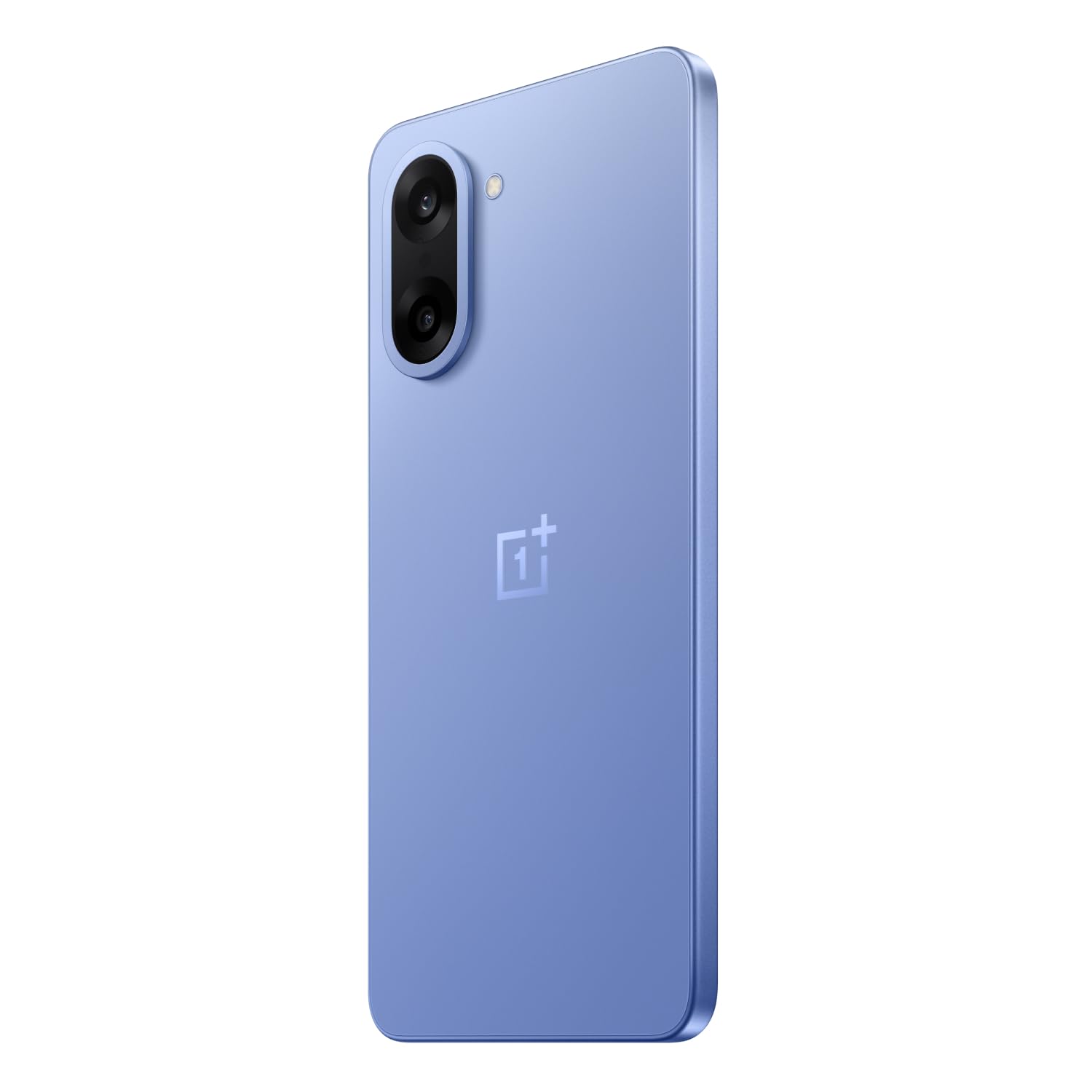
Aworan: Ẹyin view of the OnePlus Nord CE5 in Nexus Blue, featuring the dual camera system and OnePlus branding.
The rear panel houses the 50 MP main camera with OIS and an 8 MP ultra-wide angle lens, along with the LED flash.
3.3 Ẹgbẹ View
Aworan: Apa view of the OnePlus Nord CE5, illustrating the placement of the power button and volume controls.
The side of the device includes the power button and volume control buttons. The SIM card tray is also located on one of the sides.
4. Eto
4.1 Fifi Awọn Kaadi SIM sii
- Wa atẹ kaadi SIM ni ẹgbẹ ẹrọ rẹ.
- Fi SIM atẹ ejector ọpa sinu kekere iho tókàn si awọn atẹ ki o si tẹ ṣinṣin titi ti atẹ yoo jade.
- Place your Nano SIM cards into the designated slots on the tray. Ensure the gold contacts face downwards.
- Ni ifarabalẹ tun fi kaadi SIM sii sinu ẹrọ naa titi ti o fi tẹ sinu aaye.
4.2 Ibẹrẹ Agbara Lori
Press and hold the power button located on the side of the device until the OnePlus logo appears. Follow the on-screen instructions to complete the initial setup, including language selection, Wi-Fi connection, and Google account setup.
4.3 Ngba agbara si Ẹrọ
Connect the USB Type-C cable to the charging port at the bottom of the phone and the other end to the provided power adapter. Plug the adapter into a power outlet. The device supports 80W SUPERVOOC fast charging.
5. Ṣiṣẹ ẹrọ rẹ
5.1 Ifihan ati Lilọ kiri
The OnePlus Nord CE5 features a 6.77-inch 120Hz AMOLED display with Ultra HDR. Navigate the OxygenOS 15 interface using touch gestures. The Aqua Touch feature allows for confident swiping even with wet or oily fingers.
5.2 batiri Management
Your device is equipped with a massive 7100mAh battery. To optimize battery life:
- Utilize the 80W SUPERVOOC charger for rapid charging.
- Enable Bypass Charging during extended gaming sessions to reduce battery stress and heat.
- Ṣàtúnṣe ìmọ́lẹ̀ ojú ìbojú kí o sì ṣe àtúnṣe ìwọ̀n ìtúnṣe bí ó ṣe yẹ.
- Ti awọn ohun elo abẹlẹ ti a ko lo pa.

Image: Illustration of the 7100mAh battery and 80W SUPERVOOC charging capability.

Image: Explanation of Bypass Charging, which directs power to the phone's system instead of the battery during use.
5.3 kamẹra Lilo
Ẹrọ naa ṣe ẹya eto kamẹra to wapọ:
- Kamẹra Tẹhin: 50 MP Sony main sensor with Optical Image Stabilization (OIS) and an 8 MP ultra-wide angle lens. Supports 4K video recording at 60 FPS.
- Kamẹra iwaju: 16 MP sensor for selfies and video calls.
Open the Camera app to access various modes, including Photo, Video, Portrait, Night, and more. Tap on the screen to focus and use the zoom controls for magnification.

Aworan: Alaye view of the OnePlus Nord CE5's dual rear camera setup.

Image: The device's capability to record 4K video at 60 frames per second.
5.4 Iṣẹ́ àti eré
The OnePlus Nord CE5 is powered by the MediaTek Dimensity 8350 Apex processor, offering high performance for demanding applications and gaming. The device supports gaming at up to 120 FPS for a smooth experience.

Image: The MediaTek Dimensity 8350 Apex processor, emphasizing its performance capabilities.

Image: Gaming experience on the OnePlus Nord CE5 at 120 frames per second.
5.5 AI Awọn ẹya ara ẹrọ
The OnePlus Nord CE5 integrates various AI-powered features to enhance user experience:
- AI Kamẹra: Includes AI Eraser for removing unwanted objects, AI Perfect Shot for optimal photo capture, AI Reflection Remover, and AI Reframe for improved composition.
- AI Productivity: Features AI VoiceScribe for in-app call summaries and real-time translation, AI Translation for global communication, and AI Call Assistant for in-call translation and summaries.
- Google Gemini: A personal AI assistant for writing, planning, learning, and more.

Image: Demonstration of AI Camera features, showing an object removed from a photo.
Image: AI VoiceScribe interface for call summaries and translation.
5.6 Multitasking pẹlu Ṣii kanfasi
The Open Canvas feature allows for enhanced split-screen multitasking, extending apps beyond the physical display. This includes flexible resizing, screencap for split-screen, drag-and-drop sharing, and refreshed floating windows.

Image: Open Canvas feature showing two applications running side-by-side on the display.
6. Itọju
6.1 Software imudojuiwọn
Ṣayẹwo nigbagbogbo fun ati fi awọn imudojuiwọn sọfitiwia sori ẹrọ lati rii daju pe ẹrọ rẹ ni awọn ẹya tuntun, awọn abulẹ aabo, ati awọn ilọsiwaju iṣẹ. Lọ si Settings > About device > OxygenOS lati ṣayẹwo fun awọn imudojuiwọn.
6.2 Ninu ẹrọ rẹ
Use a soft, lint-free cloth to clean the screen and body of your phone. Avoid using harsh chemicals or abrasive materials. For the charging port and speaker grilles, use a soft brush to gently remove dust.
6.3 Ibi Management
Lorekore tunview your device's storage to free up space. Delete unnecessary files, uninstall unused apps, and clear cache data. You can check storage usage in Eto > Ibi ipamọ.
6.4 itutu System
The device features a 7041mm² VC cooling system to manage heat during intensive use. To ensure optimal cooling, avoid blocking the phone's vents (if any) and do not use the device in direct sunlight for extended periods.

Aworan: Ti abẹnu view ifihanasing the 7041mm² VC cooling system for heat dissipation.
7. Laasigbotitusita
This section addresses common issues you might encounter with your OnePlus Nord CE5.
7.1 Ẹrọ Ko Nṣiṣẹ Tan-an
- Ensure the battery is charged. Connect the device to the charger and wait a few minutes before attempting to power it on again.
- Press and hold the power button for at least 10-15 seconds to force a restart.
7.2 Apps jamba tabi didi
- Clear the cache and data of the problematic app via Eto> Awọn ohun elo> [Orukọ Ohun elo]> Ibi ipamọ> Ko kaṣe kuro/Pa data kuro.
- Ṣe àtúnṣe sí àpù náà sí àtúnṣe tuntun rẹ̀ láti Google Play Store.
- Tun ẹrọ rẹ bẹrẹ.
7.3 Ko dara batiri Life
- Ṣayẹwo lilo batiri ni Eto > Batiri lati ṣe idanimọ awọn ohun elo ti ebi npa agbara.
- Dín ìmọ́lẹ̀ ojú ìbojú kù kí o sì ṣètò àkókò ìjáde ojú ìbojú kúkúrú.
- Mu Wi-Fi, Bluetooth, ati GPS ṣiṣẹ nigbati o ko ba wa ni lilo.
- Ensure background app refresh is limited for non-essential apps.
7.4 Network Asopọmọra Oran
- Yipada Ipo ofurufu tan ati pa.
- Tun ẹrọ rẹ bẹrẹ.
- Ṣayẹwo boya o ti fi kaadi SIM rẹ sii daradara.
- Reset network settings via Settings > System settings > Reset phone > Reset Wi-Fi, mobile & Bluetooth.
8. Awọn pato
Key technical specifications for the OnePlus Nord CE5:
| Ẹya ara ẹrọ | Sipesifikesonu |
|---|---|
| Brand | OnePlus |
| Awoṣe | Nord CE5 |
| Eto isesise | Android 15, OxygenOS 15 |
| isise | MediaTek Dimensity 8350 Apex (3.35 GHz) |
| Àgbo | 8 GB |
| Ibi ipamọ inu | 128 GB |
| Ifihan | 6.77 Inches AMOLED, 2392 x 1080 Pixels, 120Hz Refresh Rate |
| Kamẹra ẹhin | 50 MP (Main) + 8 MP (Ultra-wide), OIS, 4K 60 FPS Video |
| Kamẹra iwaju | 16 MP |
| Agbara Batiri | 7100 mAh |
| Gbigba agbara | Supervooc 80W |
| Kaadi SIM Iru | Meji Nano SIM |
| Asopọmọra | 5G, Bluetooth, USB Type-C, Wi-Fi |
| Biometric Aabo | Idanimọ itẹka |
| Awọn iwọn | 16.4 x 7.6 x 0.8 centimeters |
| Iwọn | 199 giramu |
| Omi Resistance | Omi sooro |
9. Atilẹyin ọja ati Support
9.1 atilẹyin ọja Alaye
Your OnePlus Nord CE5 comes with a 1 Odun olupese atilẹyin ọja from the date of purchase. This warranty covers manufacturing defects. Additionally, OnePlus offers a Atilẹyin ọja Ifihan Aye-aye for industry-wide green line issues. Please retain your proof of purchase for warranty claims.

Image: Lifetime Display Warranty information.
9.2 Onibara Support
For technical assistance, service, or warranty inquiries, please contact OnePlus Customer Service:
- Nọmba olubasọrọ: 1800 102 8411
- WhatsApp: + 91-9289606888
- Olupese: OPPO Mobiles India Private Limited, PLOT-NO.1, SECTOR ECOTECH-VII, GREATER, NOIDA, UTTAR PRADESH, India-201306