
1. Ọja Ipariview
The MENERESAS 3-in-1 Mini Wireless Lavalier Microphone system provides high-quality audio recording for various devices. Designed for ease of use, it features automatic pairing, multiple audio modes, and broad compatibility.
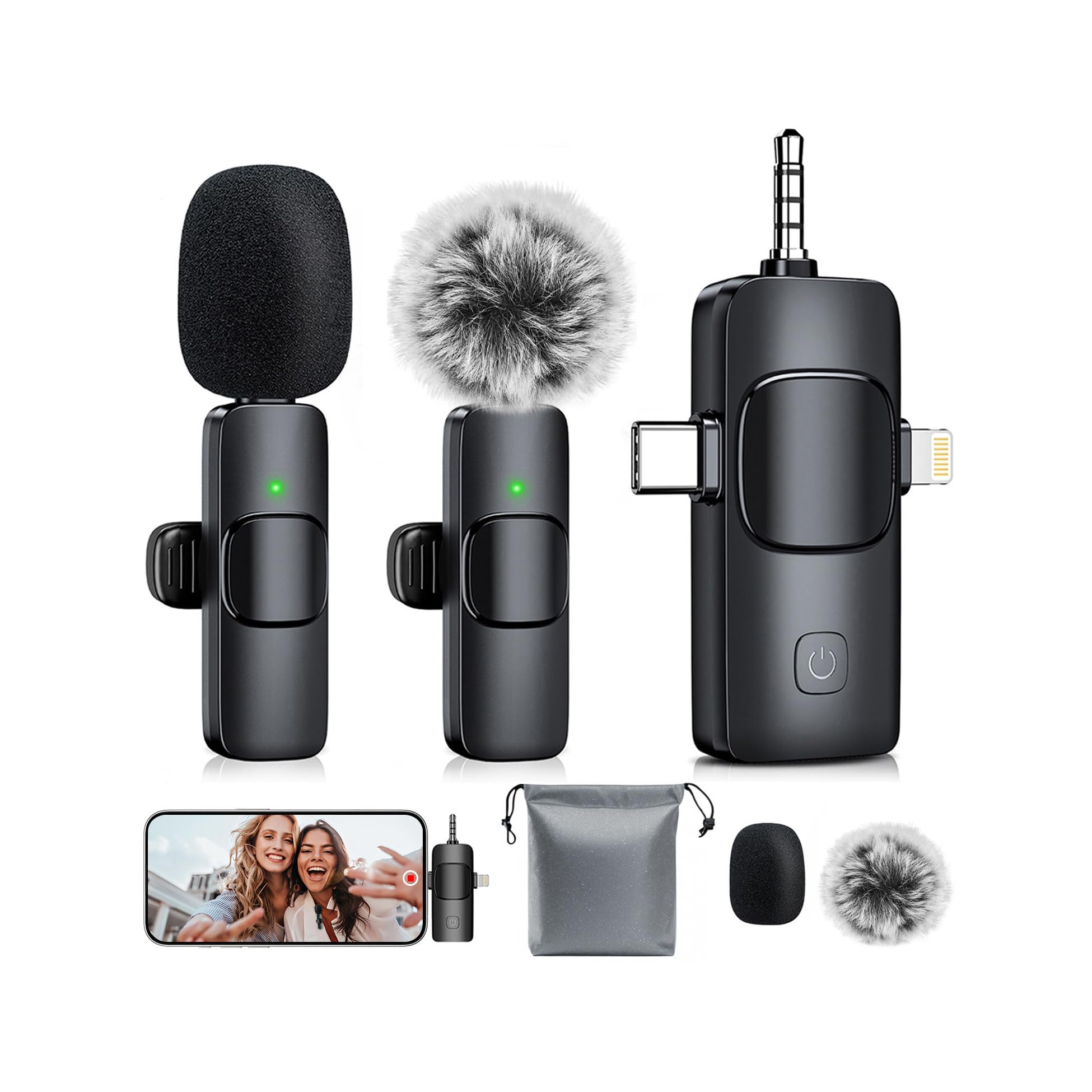
Image: The MENERESAS 3-in-1 Mini Wireless Lavalier Microphone system, showing the receiver and two microphones.
Awọn ẹya pataki:
- Pulọọgi ati Ṣiṣẹ: No application or Bluetooth pairing is required. Simply connect the receiver to your device, power on the microphones, and they will automatically pair.
- Multi-Mode Switching: Features three intelligent audio modes: default noise canceling, mute mode (double-click), and reverb mode (triple-click) for adaptable recording.
- Abojuto Olohun-gidi-gidi: Connect Type-C headphones to the receiver to monitor audio input in real-time.
- Awọn ẹya ara ẹrọ ti o ni kikun: Includes replaceable sponge heads, windproof fur ball covers, clips, a waterproof storage bag, and a Type-C charging cable.
- Ibamu gbooro: The 3-in-1 universal receiver supports Android smartphones, iPhones (including iPhone 16), iPads, laptops, PCs, and cameras.

Image: A visual representation of the microphone's wide compatibility with phones (iOS/Android), tablets, laptops, and cameras.
2. Awọn ilana iṣeto
Follow these steps to set up your MENERESAS wireless microphone system:
- Awọn ẹrọ gbigba agbara: Ensure both the wireless microphones and the receiver are fully charged using the provided Type-C charging cable.
- Identify Receiver Connector: The universal receiver features multiple connectors. Select the appropriate connector for your device: Lightning for iOS devices, Type-C for Android/other devices, or the 3.5mm jack for cameras/PCs.
- Olugba Sopọ: Plug the receiver firmly into your recording device's port.
- Agbara Lori Awọn gbohungbohun: Press and hold the power button on each microphone for approximately 3 seconds until the indicator light illuminates.
- Sisọpọ Aifọwọyi: The microphones and receiver will automatically pair. A solid green light on the microphone typically indicates a successful connection.
- So gbohungbohun pọ mọ: Clip the microphone securely to your clothing, ensuring it is positioned close to your mouth for optimal sound capture.
- (Optional) Add Wind Protection: For outdoor use or to reduce plosives, attach a windproof fur ball cover or a sponge head to the microphone.
- (Optional) Real-Time Monitoring: If real-time audio monitoring is desired, plug Type-C headphones into the designated port on the receiver.

Image: Step-by-step visual guide for connecting the receiver and powering on the microphones for automatic pairing.
3. Awọn ilana Iṣiṣẹ
Once set up, operate your microphone system as follows:
- Bẹrẹ Gbigbasilẹ: Open your preferred recording application (e.g., camera app, voice recorder, streaming software) on your device and begin recording. The microphone audio will be captured automatically.
- Switch Audio Modes:
- Ipo aiyipada: Noise Canceling is active by default, reducing environmental sounds.
- Ipo Mute: Double-click the power button on the microphone to mute the audio input. Double-click again to unmute.
- Ipo Reverb: Triple-click the power button on the microphone to activate reverb effects. Triple-click again to deactivate.
- Abojuto Igba-gidi: If headphones are connected to the receiver, you will hear the audio being recorded in real-time. Adjust microphone position or speaking volume as needed based on monitoring feedback.
- Lilo Gbohungbohun Meji: Both included microphones can be used simultaneously for recording two separate audio sources.
- Gbigba agbara lakoko lilo: The microphones and receiver can be charged while in operation, ensuring continuous recording for extended sessions.

Image: Demonstrates the three audio modes (Noise Cancellation, Reverb, Mute) and their applications.

Image: Shows two individuals using separate microphones connected to a single receiver, with one person monitoring audio via headphones.
Video: Official product video demonstrating the features and usage of the MENERESAS 3-in-1 Mini Microphone for iPhone.
Fídíò: Ìfihàn fídíò ọjà tí a fọwọ́ síasing an updated version of the MENERESAS 3-in-1 Mini Microphone for iPhone.
4. Itọju
Proper maintenance ensures the longevity and optimal performance of your microphone system:
- Ninu: Use a soft, dry cloth to wipe the microphones and receiver. Avoid using liquids or abrasive cleaners.
- Ibi ipamọ: Store the microphone system in the provided waterproof storage bag when not in use to protect it from dust and moisture.
- Iyipada Ẹya ẹrọ: Replace the sponge heads or windproof fur ball covers if they become worn or damaged to maintain sound quality and protection.
- Itọju Batiri: Charge the devices regularly, even if not in frequent use, to preserve battery health. Avoid fully depleting the battery for extended periods.
5. Laasigbotitusita
Ti o ba pade awọn iṣoro, tọka si awọn solusan ti o wọpọ wọnyi:
| Isoro | Owun to le Fa | Ojutu |
|---|---|---|
| Gbohungbohun ko so pọ mọ | Microphone or receiver not powered on; low battery; connection issue. | Ensure both microphone(s) and receiver are powered on. Check battery levels and charge if necessary. Unplug and replug the receiver. |
| Ko si ohun ti o gbasilẹ | Microphone muted; receiver not fully connected; incorrect device audio input settings. | Double-click the microphone power button to toggle mute. Ensure the receiver is fully and correctly plugged into your device. Verify your device's audio input settings. |
| Poor sound quality (e.g., muffled, static, wind noise) | Microphone too far from source; no wind protection; environmental interference; obstructions. | Position the microphone closer to the sound source. Use the windproof fur ball cover for outdoor recording. Ensure no physical obstructions between mic and receiver. Reduce environmental noise if possible. |
| Aye batiri kukuru | Incomplete charging; frequent use of dual microphones; extreme temperatures. | Ensure devices are fully charged before use. Note that using two microphones simultaneously consumes more power. Avoid using or storing in extreme hot or cold conditions. |
6. Awọn pato
Detailed technical specifications for the MENERESAS 3-in-1 Mini Wireless Lavalier Microphone:
- Brand: MENERESAS
- Orukọ awoṣe: AG01
- Nọmba awoṣe: K15
- Imọ-ẹrọ Asopọmọra: Wireless (2.4 GHz transmission)
- Orisi Asopọmọra: 3.5 mm Jack, Lightning, Type-C (Universal 3-in-1 Receiver)
- Awọn ẹya pataki: 1-Touch Recording, Noise Reduction, Real-time Monitoring, Multi-mode Switching (Noise Canceling, Mute, Reverb)
- Awọn ẹrọ ibaramu: Camera, Laptop, Smartphone (iOS/Android), PC, iPad
- Àwọ̀: Abyssal black
- Awọn eroja to wa: Microphone receiver, Mini microphone (x2), Noise reduction covers (sponge heads x2), Storage bag, Windproof fur ball covers (x2), Type-C charging cable
- Àpẹẹrẹ Pola: Omnidirectional
- Okunfa Fọọmu Gbohungbohun: Mini (Clip-on)
- Orisun Agbara: Agbara Batiri
- Nọmba Awọn Batiri: 3 Nonstandard Battery batteries required (typically 2 for mics, 1 for receiver)
- Platform Hardware: Camera, PC, Smartphone
- Nọmba awọn ikanni: 1
- Ohun elo Apoti: Irin, Ṣiṣu
- Ìwọ̀n Nkan: 0.08 kilo
- Ibiti Gbigbe Alailowaya: Titi de 82 ẹsẹ (25 mita)
- Igbesi aye batiri: Up to 10 hours (single microphone use), up to 5 hours (dual microphone use)
- Akoko gbigba agbara: O kere ju wakati 1.5 lọ

Image: Visual details on battery life (10 hours for single mic) and charging duration (1.5 hours).

Image: Illustrates the wireless transmission range of 82 feet (25 meters).
7. Atilẹyin ọja & Atilẹyin
Alaye Atilẹyin ọja:
This product comes with a limited warranty. For specific details regarding warranty coverage, duration, and terms, please refer to the documentation included with your purchase or contact MENERESAS customer service directly.
Atilẹyin Onibara:
For technical assistance, troubleshooting guidance, or any other inquiries regarding your MENERESAS 3-in-1 Mini Wireless Lavalier Microphone, please contact MENERESAS customer support. You can typically find contact information on the product packaging, the official MENERESAS webojula, tabi nipasẹ rẹ alagbata.