
1. Ifihan ati Loriview
Thank you for choosing the Mcezdy M5C-2(BLE)-6-Pin Ebike LCD Display. This advanced cycling computer is designed to provide essential riding data, smart connectivity, and convenient features for your electric bicycle. Please read this manual thoroughly before installation and use to ensure proper function and safety.

Figure 1: Mcezdy M5C-2 Ebike LCD Display showing current speed, pedal assist level, and battery voltage.
2. Key Awọn ẹya ara ẹrọ
- Vibrant Color Screen: Provides clear and easy-to-read riding data.
- Personalized Control: Features walk-assist mode, cruise control, real-time trip and total mileage tracking, voltage display, and adjustable bike parameters (wheel diameter, speed limits).
- Asopọmọra Smart: Syncs with cycling applications via Bluetooth for route recording and statistics.
- Gbigba agbara Lori-lọ: Integrated Type-C charging port (5V/500mA output) for mobile devices.
- Ikole ti o tọ: IPX65 waterproof rating, rugged ABS and PC housing, tempered glass screen, and nylon bracket for all-weather use.
- Jakejado Voltage ibamu: Supports 24V, 36V, 48V, and 60V battery systems.

Olusin 2: Pariview of M5C-2 display functions.
3. Pataki ibamu Akọsilẹ
This Ebike LCD display operates exclusively with controllers using the UART No. 2 protocol. It is not compatible with other UART protocols. Ensure your Ebike controller supports UART No. 2 to avoid compatibility issues.
How to Determine Your Ebike's Communication Protocol:
- Consult your Ebike's user manual or technical documentation.
- Check your existing Ebike display for protocol information.
- Contact your Ebike manufacturer for specific details.

Figure 3: Compatibility warning and connector types (5-Pin and 6-Pin).
4. Awọn alaye ọja
| Sipesifikesonu | Ẹ̀kúnrẹ́rẹ́ |
|---|---|
| Brand | Mcezdy |
| Orukọ awoṣe | M5C-2(BLE)-6-Pin |
| Ifihan Iru | LCD |
| Asopọmọra Technology | Bluetooth |
| Ilana | UART No. 2 |
| Voltage ibamu | 24V, 36V, 48V, 60V |
| Mabomire Rating | IPX65 |
| Ohun elo | ABS, PC, Tempered Glass, Nylon |
| Iṣagbesori Iru | Handlebar Mount (22.2mm, 25.4mm, 28.6mm, 31.8mm) |
| Awọn irinše to wa | LCD Display, User's Manual, Fault Code Description |
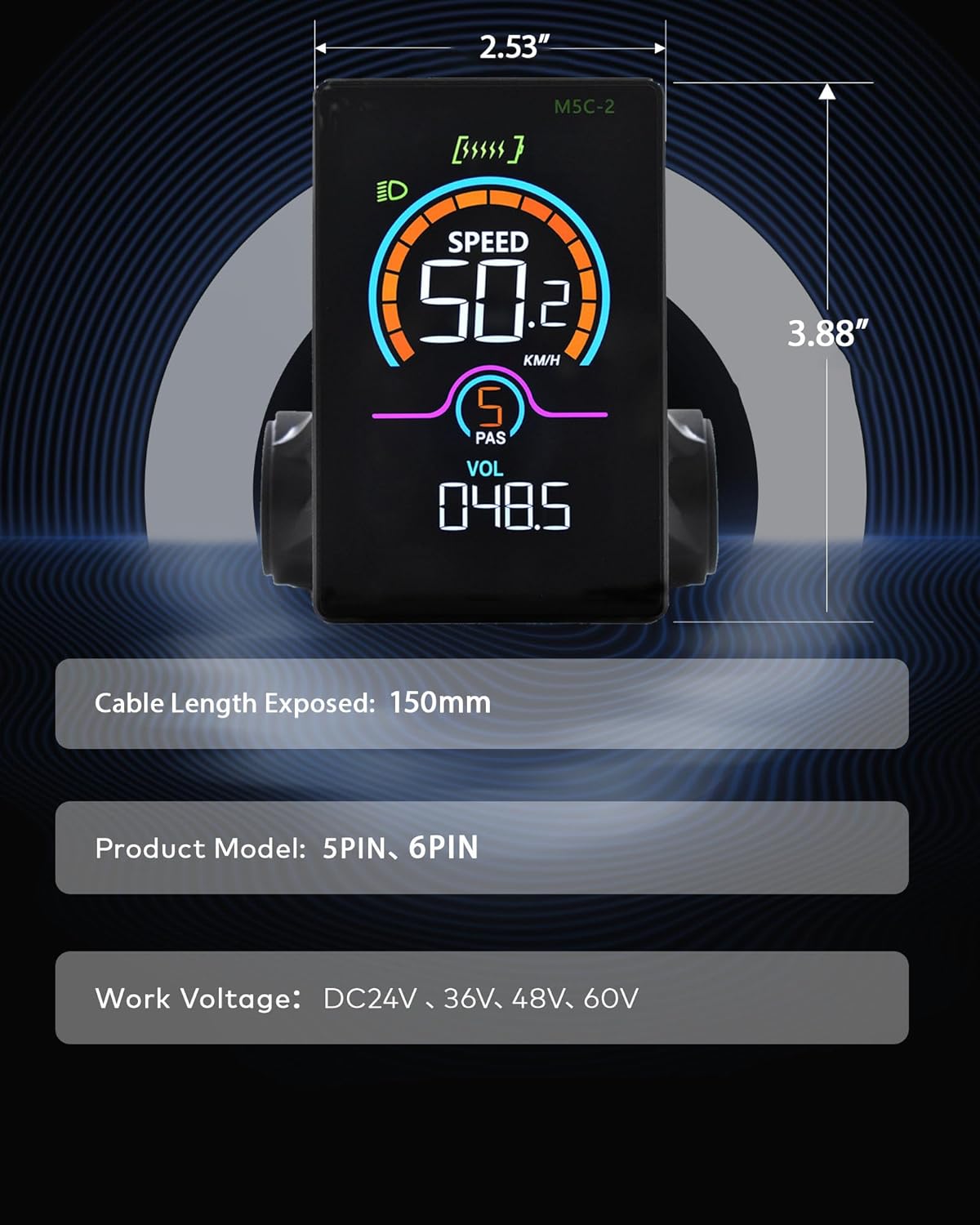
Figure 4: M5C-2 display dimensions and cable length.
5. Eto ati fifi sori
Follow these steps to properly install your Mcezdy LCD Display on your Ebike.
5.1 Iṣagbesori Ifihan
- Loosen the screws on the display's handlebar mount.
- Position the display on your Ebike's handlebar. The adjustable mount accommodates handlebar diameters of 22.2mm, 25.4mm, 28.6mm, and 31.8mm.
- Tighten the screws securely to prevent movement during riding.

Figure 5: Display mounted on a handlebar, demonstrating adjustable fit.
5.2 Nsopọ awọn okun
- Identify the display's cable connector (either 5-Pin or 6-Pin).
- Locate the corresponding connector on your Ebike's controller or wiring harness.
- Carefully align and connect the display cable to the Ebike's system. Ensure a firm connection.
Video 1: This video demonstrates the physical installation and initial power-on sequence of the Mcezdy Ebike Display, including mounting and cable connections.
6. Awọn ilana Iṣiṣẹ
Familiarize yourself with the display's controls and functions.
6.1 Agbara Tan / Pa
- Lati Fi agbara: Press and hold the power button (usually marked with a power symbol) on the control pad for a few seconds until the display illuminates.
- Lati Paarẹ: Tẹ bọtini agbara naa ki o si di i mu lẹẹkansi titi ti ifihan naa yoo fi pa.
6.2 Switching Assistance Modes (PAS Levels)
Use the '+' and '-' buttons on the control pad to adjust the pedal assist (PAS) level. Higher numbers indicate more motor assistance.
6.3 Toggling Display Parameters
Briefly press the power button to cycle through different display parameters such as Trip Distance, Odometer (ODO), Max Speed, Average Speed, Range, Calorie Consumption, and Cadence.
6.4 App Connection (Bluetooth)
The M5C-2 display supports Bluetooth connectivity for integration with cycling applications. This allows you to record routes, track stats, and potentially adjust settings via your smartphone.
- Download the recommended cycling app (e.g., 'LINGHUI' as indicated in product images) from your smartphone's app store.
- Rii daju pe Bluetooth ti ṣiṣẹ lori foonuiyara rẹ.
- Power on the Ebike display.
- Open the cycling app and follow the in-app instructions to connect to your M5C-2 display.
Video 2: This video demonstrates the Bluetooth connection process between the Mcezdy Ebike Display and a smartphone application.

Figure 6: Smartphone app interface for M5C-2 display.
7. Awọn Eto To ti ni ilọsiwaju
The display allows for customization of various parameters to suit your riding preferences.
7.1 Wọle si Akojọ aṣyn akọkọ
To enter the main menu, press and hold the '+' and '-' buttons simultaneously for a few seconds. Navigate through the menu using the '+' and '-' buttons, and confirm selections with the power button.
7.2 Customizable Parameters (ExampTHE)
- Wheel Iwọn: Adjust for accurate speed and distance readings.
- Opin Sisare: Set the maximum assisted speed according to local regulations or personal preference.
- Imọlẹ: Adjust display backlight intensity.
- Akoko Aifọwọyi Paa: Configure the time before the display automatically shuts off due to inactivity.
- Aṣayan Ẹka: Switch between metric (km/h) and imperial (mph) units.
- Atunto irin ajo: Reset trip distance data.
8. Itọju
Proper maintenance ensures the longevity and optimal performance of your display.
- Ninu: Wipe the display screen with a soft, damp asọ. Yago fun abrasive ose tabi epo.
- Ifihan omi: While IPX65 rated for water resistance, avoid prolonged submersion or high-pressure water jets. Ensure the Type-C charging port cover is securely closed when not in use.
- Ibi ipamọ: Store the Ebike and display in a dry, cool place away from direct sunlight when not in use.
- Ayẹwo USB: Periodically check all cables and connectors for any signs of wear, damage, or loose connections.
9. Laasigbotitusita
Tọkasi apakan yii fun awọn ọran ti o wọpọ ati awọn ojutu wọn.
9.1 Display Not Powering On
- Ensure the Ebike battery is charged and properly connected.
- Check all cable connections between the display and the controller for looseness or damage.
- Rí i dájú pé a tẹ bọ́tìnì agbára náà tí a sì di mú fún àkókò tí a fẹ́.
9.2 Incorrect Speed/Distance Readings
- Access the advanced settings menu and verify that the wheel diameter is correctly set for your Ebike.
- Ensure the speed sensor on your Ebike is properly installed and functioning.
9.3 Displaying Error Codes
If the display shows an error code, refer to the 'Fault Code Description' document included with your product for specific meanings and troubleshooting steps. Common issues may include motor, controller, or sensor malfunctions.
9.4 Awọn iṣoro Asopọmọra Bluetooth
- Ensure the display is powered on and within range of your smartphone.
- Restart both the display and your smartphone.
- Check the app's settings to ensure it has permission to use Bluetooth.
10. Atilẹyin ọja ati Support
The Mcezdy M5C-2(BLE)-6-Pin Ebike LCD Display comes with a 1-Odun olupese atilẹyin ọja.
For technical support, warranty claims, or further assistance, please contact Mcezdy customer service through the retailer where you purchased the product or visit the official Mcezdy webojula.