
Donner MAMP2
Donner MAMP2 Sitẹrio Audio Amplifier Afowoyi olumulo
Awoṣe: MAMP2
Ọrọ Iṣaaju
This user manual provides detailed instructions for the operation, setup, and maintenance of your Donner MAMP2 Sitẹrio Audio Amplifier. Please read this manual thoroughly before using the product to ensure proper functionality and safety.
The Donner MAMP2 is a versatile 600W peak 2-channel stereo audio amplifier receiver designed for a superior audio experience. It features a wide range of input options and customizable sound controls, making it suitable for various home audio, karaoke, and theater speaker setups.
Ọja Pariview

The Donner MAMP2 amplifier, shown here with its multi-functional remote control, is a compact and powerful unit. The front panel features various controls and input ports, while the rear panel provides speaker terminals and additional input/output options. The included remote allows for convenient control of all amplifier functions from a distance.
Awọn ẹya pataki:
- 600W Peak Power (60W x 2 RMS): Delivers robust audio output for an enhanced listening experience.
- 2-Channel Independent Control: Supports up to 2 groups of speakers (4 speakers, 4-8Ω) and one subwoofer.
- Multi-Input Modes: Includes Bluetooth 5.3, USB (up to 64G), RCA, 2 microphone inputs, AUX IN, FM radio, digital fiber, coaxial, and Phono input for turntables.
- Customizable EQ Control: Independent treble, midrange, and bass adjustments via both amplifier and remote. Settings are automatically saved.
- Dual Microphone Interface: Ideal for karaoke and public speaking with a talk-over function to lower background music.
- Upgraded FM Function: Allows quick selection of favorite FM frequencies by direct number input.
Ṣeto
Awọn akoonu idii:
- Donner MAMP2 Sitẹrio Audio Ampitanna
- Multi-functional Remote Control
- Okun agbara
- Afowoyi Olumulo (iwe-ipamọ yii)
Awọn Agbọrọsọ Nsopọ:
Awọn MAMP2 supports up to 4 passive speakers (4-8Ω) and one active subwoofer. Ensure correct polarity (+ to + and - to -) when connecting speaker wires to the amplifier's speaker terminals.
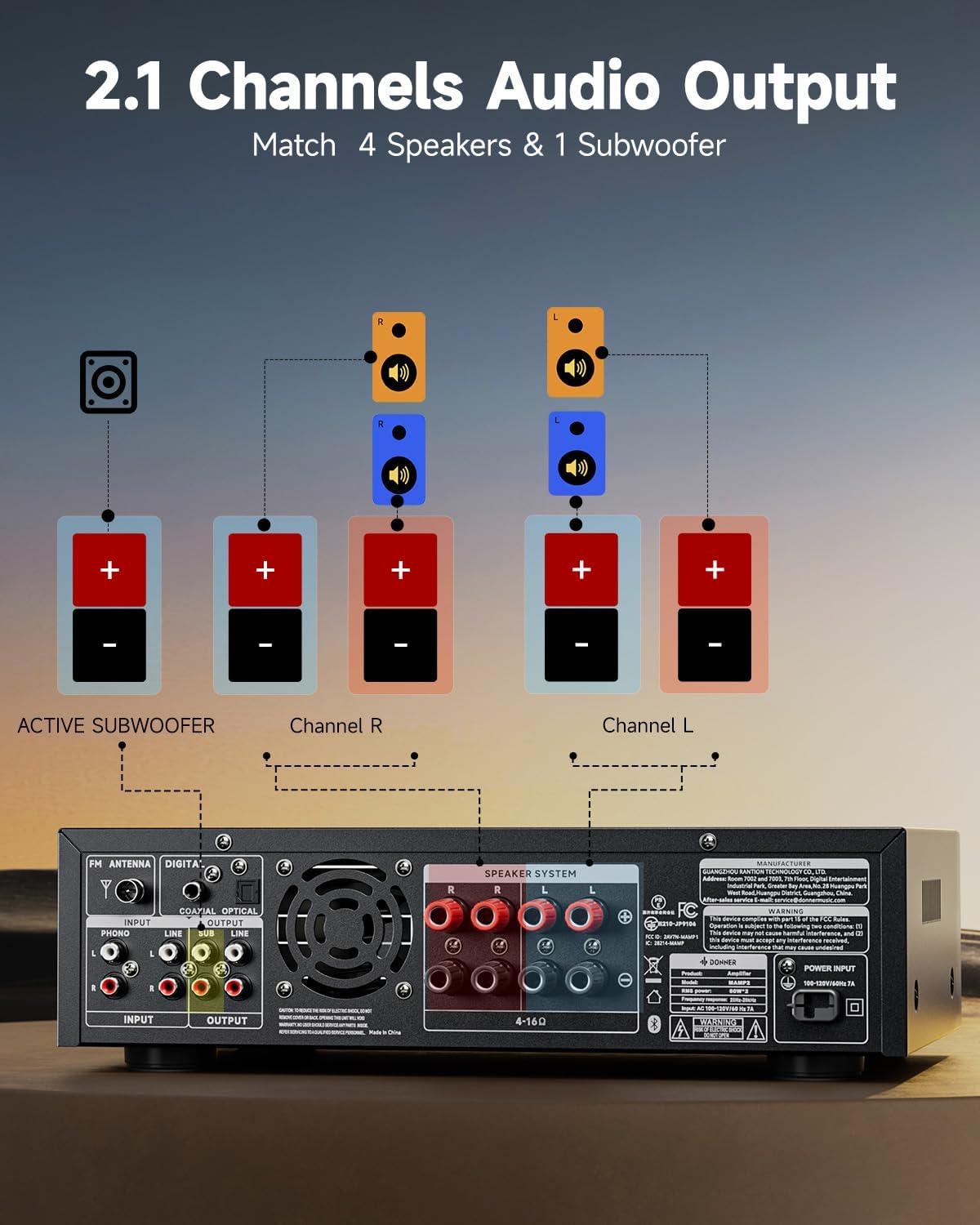
This diagram illustrates the connection of speakers and an active subwoofer to the Donner MAMP2 amplifier. Connect your main left and right speakers to the "Channel L" and "Channel R" terminals respectively. An active subwoofer can be connected to the dedicated "ACTIVE SUBWOOFER" output for enhanced bass.
Nsopọ awọn orisun ohun:
Awọn MAMP2 offers a variety of input options. Choose the appropriate cable and port for your device.

Awọn amplifier supports multiple input sources. For digital audio, use the Optical or Coaxial inputs, suitable for smart TVs. For analog devices, use the RCA or AUX IN ports. A dedicated Phono input is available for turntables. USB input supports media playback up to 64GB. Two 1/4'' microphone inputs are provided for vocal use. FM antenna connection is also available for radio reception.
- Bluetooth 5.3: Fun asopọ alailowaya lati awọn fonutologbolori, awọn tabulẹti, tabi awọn kọnputa.
- USB: Insert a USB drive (up to 64GB) for direct audio playback.
- RCA/AUX IN: Connect traditional audio devices like CD players, DVD players, or other media players.
- Microphone Inputs (1/4''): Connect up to two microphones for karaoke or public address.
- Redio FM: So eriali FM ti o wa ninu rẹ pọ fun gbigba redio.
- Digital Optical/Coaxial: Connect smart TVs or other digital audio sources for high-quality sound.
- Iṣawọle phono: Connect a turntable directly to this input.
Awọn ilana Iṣiṣẹ
Titan/Apapa:
Tẹ awọn Agbara bọtini lori panẹli iwaju tabi iṣakoso latọna jijin lati yi pada amplifier tan tabi pa.
Aṣayan igbewọle:
Lo awọn MODE button on the front panel or the remote to cycle through available input sources (Bluetooth, USB, RCA, AUX, FM, Optical, Coaxial, Phono).
Iṣakoso iwọn didun:
Ṣatunṣe awọn Titunto si iwọn didun koko lori ni iwaju nronu tabi lo awọn VOL + / VOL- buttons on the remote control to set the overall sound level.
Atunṣe EQ:
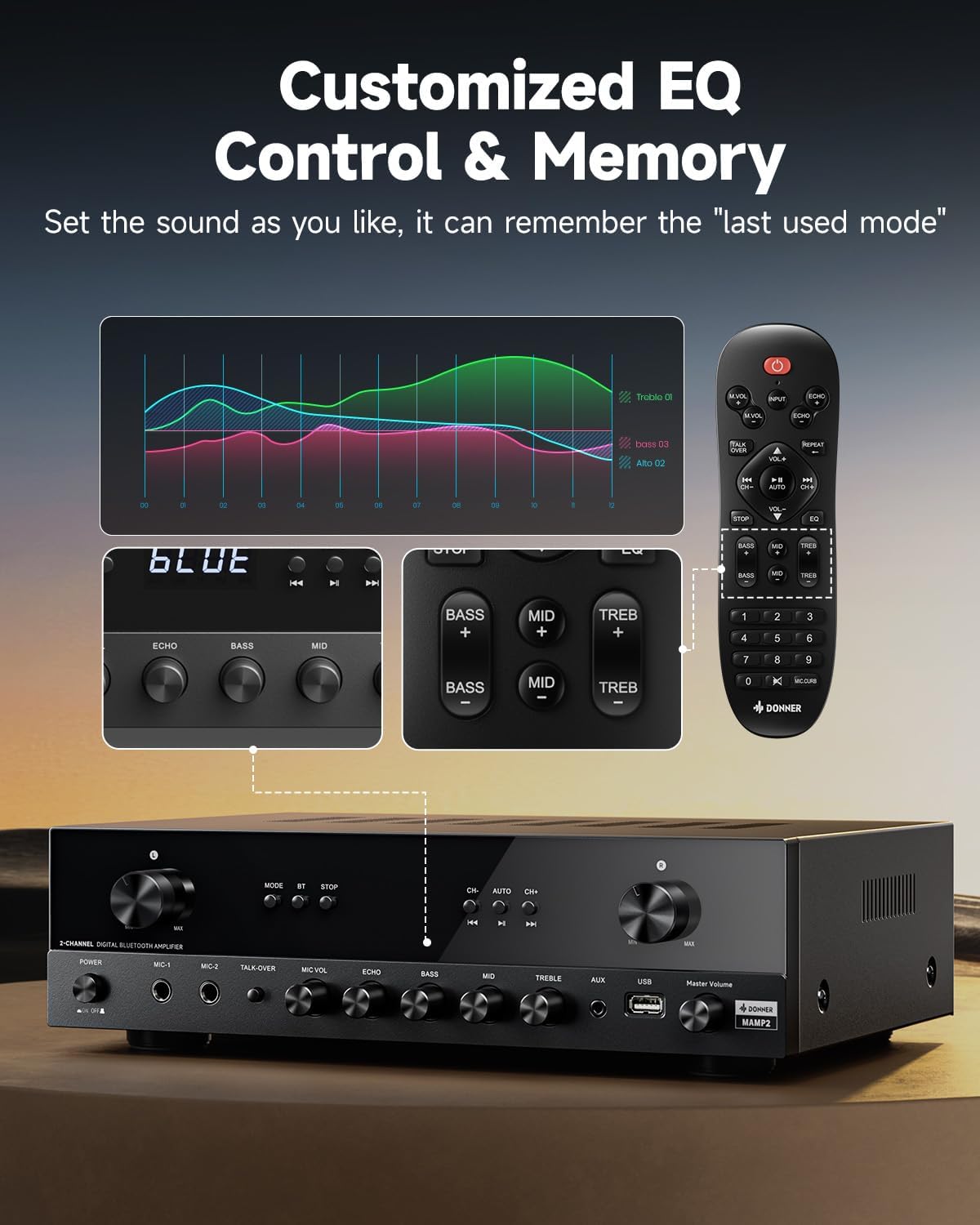
The Donner MAMP2 allows for precise sound customization. Use the dedicated knobs on the front panel or the EQ buttons on the remote control to adjust Bass, Aarin, ati Treble levels. The amplifier automatically saves your preferred EQ settings for the next use.
Iṣẹ Bluetooth:
- Yan Bluetooth mode using the MODE button. The display will show "BLUE".
- On your device (smartphone, tablet), enable Bluetooth and search for "Donner MAMP2".
- Select "Donner MAMP2" to pair. Once connected, the display will indicate a successful connection.
Iṣẹ Redio FM:
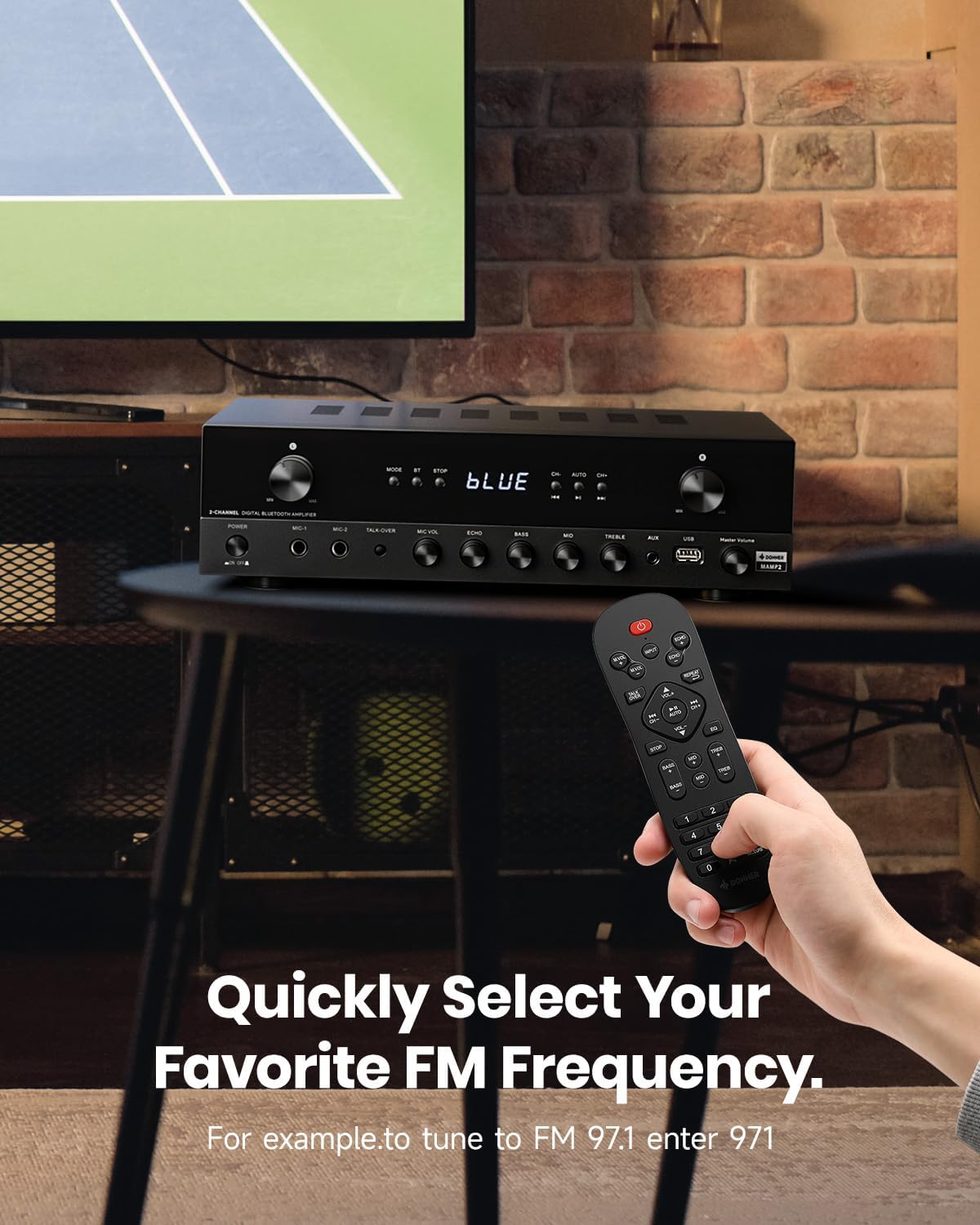
To tune into FM radio, select the FM mode. You can use the CH+/CH- buttons to scan through stations or directly enter your desired frequency using the number pad on the remote control (e.g., for FM 97.1, enter 971).
Microphone and Karaoke Functions:
- Connect microphones to the 1/4'' MIC inputs on the front panel.
- Ṣatunṣe MIC vol ati ECHO levels using the respective knobs.
- Mu ṣiṣẹ naa TALK-OVER function to automatically lower background music when speaking into the microphone.
Itoju
To ensure the longevity and optimal performance of your Donner MAMP2 amplifier, tẹle awọn itọnisọna itọju wọnyi:
- Ninu: Lo asọ ti o gbẹ lati mu ese ita ti awọn ampìfọ́mọ́. Má ṣe lo àwọn ohun èlò ìfọ́mọ́ omi tàbí àwọn ohun èlò ìfọ́mọ́, nítorí wọ́n lè ba ìparí tàbí àwọn ohun èlò inú jẹ́.
- Afẹfẹ: Rii daju pe amplifier náà ní afẹ́fẹ́ tó péye. Má ṣe dí àwọn ihò afẹ́fẹ́ ní òkè tàbí ẹ̀gbẹ́ ẹ̀rọ náà. Má ṣe gbé e sí àwọn ibi tí a ti há mọ́ láìsí afẹ́fẹ́.
- Ibi ipamọ: Nigbati o ko ba wa ni lilo fun awọn akoko ti o gbooro sii, tọju awọn amplifier ni itura, aye gbigbẹ kuro lati orun taara ati awọn iwọn otutu to gaju.
- Agbara: Always disconnect the power cord from the wall outlet before cleaning or if the unit will be unused for a long time.
Laasigbotitusita
If you encounter issues with your Donner MAMP2 amplifier, tọka si awọn iṣoro ti o wọpọ ati awọn ojutu wọnyi:
| Isoro | Owun to le Fa | Ojutu |
|---|---|---|
| Ko si agbara | Okun agbara ko sopọ; Agbara iṣan ti ko tọ | Rí i dájú pé okùn agbára náà wà ní ààbò; Gbìyànjú ọ̀nà agbára mìíràn. |
| Ko si ohun jade | Incorrect input selected; Volume too low; Speaker wires loose or incorrectly connected; Muted | Select the correct input source; Increase volume; Check speaker wire connections and polarity; Ensure unit is not muted. |
| Bluetooth ko sopọ | Amplifier not in Bluetooth mode; Device too far; Interference | Yipada amplifier to Bluetooth mode; Move device closer to ampolùdínà; Dín ìdènà láti ọ̀dọ̀ àwọn ẹ̀rọ aláilowaya mìíràn kù. |
| Gbohungbohun ko ṣiṣẹ | Microphone not plugged in correctly; MIC VOL too low; Microphone faulty | Ensure microphone is fully inserted into the MIC input; Increase MIC VOL; Test with another microphone if available. |
| Isakoṣo latọna jijin ko ṣiṣẹ | Batteries drained; Obstruction between remote and amplifier; Remote sensor blocked | Replace batteries; Remove any obstructions; Ensure remote sensor on ampolùgbéga náà ṣe kedere. |
If the problem persists after trying these solutions, please contact Donner customer support for further assistance.
Awọn pato
| Ẹya ara ẹrọ | Ẹ̀kúnrẹ́rẹ́ |
|---|---|
| Brand | Donner |
| Nọmba awoṣe | MAMP2 |
| Agbara Ijade | 600W Peak (60W x 2 RMS) |
| Nọmba ti awọn ikanni | 2 |
| Asopọmọra Technology | Bluetooth 5.3, USB, RCA, AUX, FM, Optical, Coaxial, Phono |
| Awọn ẹrọ ibaramu | Awọn agbọrọsọ |
| Awọn igbewọle Gbohungbohun | Dual 1/4'' |
| USB Support | Titi di 64GB |
| Ọja Mefa | 35 x 24.8 x 9.8 cm |
| Iwọn Nkan | 4.7 kg |
| Pataki Ẹya | Compact Design, Customizable EQ, Talk-Over Function |
Atilẹyin ọja ati Support
Donner products come with a standard manufacturer's warranty. For specific warranty terms and conditions, please refer to the warranty card included with your product or visit the official Donner webojula.
For technical support, troubleshooting assistance beyond this manual, or warranty claims, please contact Donner customer service:
- Webojula: www.donnerdeal.com
- Imeeli: support@donnerdeal.com
- Foonu: Please check the Donner webAaye fun agbegbe awọn nọmba olubasọrọ.
When contacting support, please have your product model number (MAMP2) and purchase information ready.
Ask a question about this manual
Ask about setup, troubleshooting, compatibility, parts, safety, or missing instructions. Manuals+ will review the question and use this page’s manual context to help answer it.