
1. Ifihan
This manual provides essential information for the safe and effective use of your PRITECH RSM-2444 Electric Foil Shaver. Please read these instructions carefully before using the device and retain them for future reference.
The PRITECH RSM-2444 is designed for men's facial shaving, offering a close and comfortable experience. Key features include:
- Àwọn Abẹ́ Tó Ń Léfó Mẹ́ta: Independently moving blades adapt to facial contours for a smooth shave without tugging.
- Skin-Friendly Blade Architecture: Ultra-thin titanium mesh captures stubble gently, suitable for sensitive skin.
- Ifihan LED: Shows exact battery percentage for convenient power monitoring.
- Titiipa Irin-ajo: Ó ń dènà ìṣiṣẹ́ àìròtẹ́lẹ̀ nígbà tí a bá ń gbé e lọ.
- Ngba agbara USB-C: Universal charging port for convenience.
- Akoko Iṣiṣẹ pipẹ: Up to 150 minutes of cordless shaving on a 2-hour charge.
- IPX7 mabomire: Suitable for both wet and dry use, and easy cleaning under running water.
2. Alaye Aabo
For your safety and to ensure proper operation, please observe the following precautions:
- Always keep the charger dry and do not use it near water or in damp awọn agbegbe.
- Exercise caution when handling the shaver, especially around the blades, to prevent injury.
- Utilize the travel lock feature correctly to prevent unintended activation, particularly when traveling.
- Adhere strictly to the cleaning and maintenance instructions provided in this manual to prevent bacterial growth and maintain optimal performance.
- Ohun elo yii kii ṣe ipinnu fun lilo nipasẹ awọn eniyan (pẹlu awọn ọmọde) pẹlu idinku ti ara, imọlara tabi awọn agbara ọpọlọ, tabi aini iriri ati imọ, ayafi ti wọn ba ti fun wọn ni abojuto tabi itọnisọna nipa lilo ohun elo nipasẹ eniyan ti o ni iduro fun aabo wọn.
- Awọn ọmọde yẹ ki o wa ni abojuto lati rii daju pe wọn ko ṣere pẹlu ohun elo naa.
3. Ohun ti o wa ninu Apoti
Upon unpacking your PRITECH RSM-2444 Electric Foil Shaver, please ensure all items listed below are present:
- Electric Foil Face Shaver × 1
- USB Iru-C USB × 1
- Fọlẹ ti nfọ mọ × 1
- Ilana itọnisọna × 1
- Apoti iṣakojọpọ × 1

Image: Contents of the PRITECH Electric Foil Shaver package.
4. Eto
4.1 Ngba agbara si Shaver
Before first use, fully charge the shaver. The LED display will indicate the battery percentage.
- Connect the provided USB Type-C cable to the charging port at the bottom of the shaver.
- Plug the other end of the USB cable into a compatible USB power source (e.g., power bank, car charger, laptop, or wall adapter).
- The LED display will show the charging progress. A full charge typically takes 2 hours and provides 120-150 minutes of runtime.
- Ni kete ti o ba ti gba agbara ni kikun, ge asopọ irun ori lati orisun agbara.
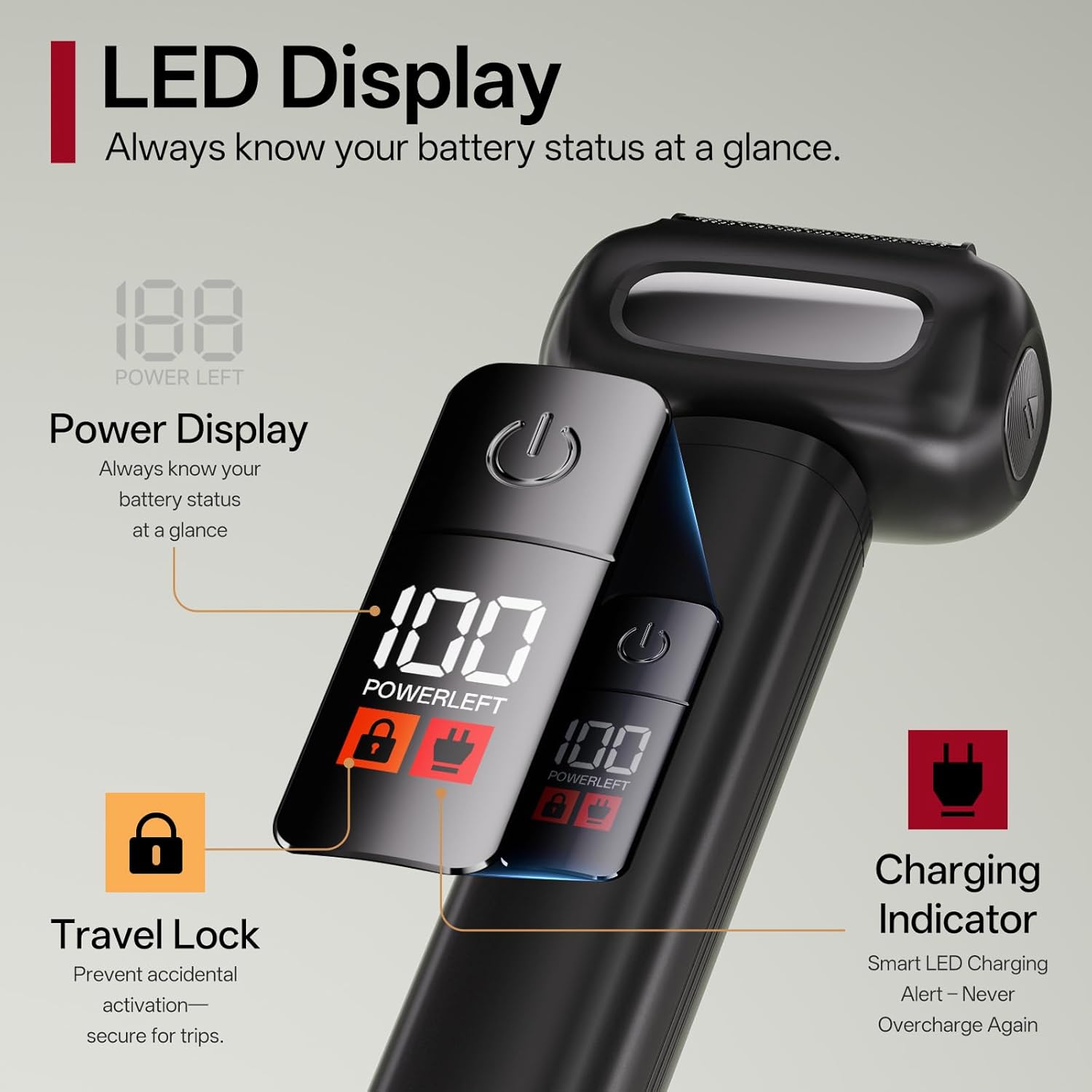
Image: LED Display, Travel Lock, and USB-C charging port on the shaver.

Image: Shaver connected for USB-C charging, illustrating battery life.
4.2 Activating/Deactivating Travel Lock
The travel lock prevents the shaver from accidentally turning on during travel.
- Lati muu ṣiṣẹ: Press and hold the power button for 3 seconds until the lock icon appears on the LED display.
- Lati mu maṣiṣẹ: Press and hold the power button for 3 seconds until the lock icon disappears.
Video: Demonstrates the PRITECH Electric Razor for men, including its features and operation. This video is provided by PRITECH BEAUTY CARE.
5. Ṣiṣẹ Shaver
5.1 Wet and Dry Shaving
The PRITECH RSM-2444 is IPX7 waterproof, allowing for both wet and dry shaving.
- Gbigbe Gbigbe: Fun irun ti o yara ati irọrun, lo irun ori lori awọ gbigbẹ.
- Irun omi tutu: For a more comfortable and closer shave, you can use the shaver with shaving foam or gel, even in the shower.

Image: Illustration of dry and wet shaving methods with the PRITECH shaver.
5.2 Irun Technique
For optimal results and to minimize skin irritation:
- Ensure your skin is clean. For wet shaving, apply shaving foam or gel evenly.
- Tan ohun-irun.
- Mu ohun irun naa ni igun ọtun (awọn iwọn 90) si awọ ara rẹ.
- Rọra na awọ ara rẹ pẹlu ọwọ ọfẹ lati jẹ ki awọn irun duro ni pipe.
- Gbe irun-irun ni kukuru, awọn iṣipopada iyika tabi awọn iṣọn taara si itọsọna ti idagbasoke irun.
- The 4 floating blades and ultra-thin blade net are designed to follow your facial contours and provide a close shave.
- Do not press too hard, as this can cause irritation. The pressure-sensitive blades retract to protect your skin.

Image: Detail of the 4 floating blades and their pressure-sensitive design.

Image: Ultra-thin blade net for smooth and comfortable shaving.
6. Itọju
6.1 Ninu awọn Shaver
Ṣiṣe mimọ nigbagbogbo ṣe idaniloju iṣẹ ti o dara julọ ati mimọ.
- Pa ohun mimu ṣaaju ki o to sọ di mimọ.
- Press the release button (if applicable) or gently pull to detach the cutter head from the shaver body.
- Rinse the detached cutter head and the underlying blades thoroughly under running water.
- Use the provided cleaning brush to remove any stubborn hair particles from the blades and foil.
- Allow all parts to air dry completely before reattaching the cutter head.
- Do not use abrasive cleaners or harsh chemicals, as these can damage the shaver.

Image: Detachable cutter head for easy cleaning and maintenance.
6.2 Ibi ipamọ
Store the shaver in a cool, dry place, away from direct sunlight and out of reach of children. Ensure the protective cover is placed over the shaver head when not in use to prevent damage to the foils.
7. Laasigbotitusita
| Isoro | Owun to le Fa | Ojutu |
|---|---|---|
| Shaver ko ni tan. | Battery is depleted. / Travel lock is active. | Charge the shaver. / Deactivate the travel lock by pressing and holding the power button for 3 seconds. |
| Irun irun ti ko dara. | Blades/foils are dirty or worn. / Incorrect shaving technique. | Clean the shaver head thoroughly. If performance does not improve, consider replacing the shaver head. / Ensure you are shaving against the grain and stretching the skin. |
| Irun awọ ara lẹhin irun. | Pressing too hard. / Dry shaving on sensitive skin. | Apply less pressure. / Try wet shaving with foam or gel. Ensure skin is clean before shaving. |
8. Awọn pato
- Orukọ awoṣe: RSM-2444
- Nọmba Awoṣe Nkan: US-RSM-2444-Black
- Brand: PRITECH
- Orisun Agbara: Agbara Batiri (batiri AA kan pẹlu)
- Awọn ẹya pataki: Fast Charging, High Efficiency, Low Noise, Rechargeable, Travel Lock
- Awọn lilo ti a ṣe iṣeduro: Irungbọn, Oju
- Idiwon ti ko ni omi: IPX7
- Akoko ṣiṣe: Titi di iṣẹju 150
- Akoko gbigba agbara: wakati meji 2
- Iyara mọto: 8,800 RPM
- Olupese: Wenzhou Pritech Industrial Co., Ltd.
- Awọn iwọn idii: 7.48 x 3.54 x 2.24 inches
- Ìwọ̀n Nkan: 9.91 iwon
9. Atilẹyin ọja ati Support
For warranty information and customer support, please refer to the contact details provided on the product packaging or visit the official PRITECH webojula. Tọju iwe-ẹri rira rẹ bi ẹri rira fun eyikeyi awọn ibeere atilẹyin ọja.
For any issues or questions not covered in this manual, please contact PRITECH customer service.