
1. Ifihan
This manual provides detailed instructions for the safe and efficient assembly, operation, and maintenance of your SpeaKa Professional SP-TVS-600 TV Floor Stand. Please read this manual thoroughly before installation and retain it for future reference.
The SP-TVS-600 is designed to support televisions and monitors ranging from 37 to 86 inches, with a maximum load capacity of 45 kg. It features tool-free tilt adjustment, adjustable height for the screen (900 to 1100 mm), and an integrated cable management system. An additional height-adjustable storage shelf (200 to 910 mm) is included for media devices.
2. Alaye Aabo
IKILO: Failure to read, understand, and follow all instructions can result in serious personal injury, property damage, or voiding of your warranty.
- Ensure the floor stand is placed on a stable, level surface.
- Maṣe kọja agbara fifuye ti o pọju ti 45 kg (99 lbs).
- Verify that your TV's VESA mounting pattern is compatible with the stand (100x100 to 600x400 mm).
- Always use two people for lifting and positioning the TV onto the stand.
- Pa awọn ọmọde ati awọn ẹranko mọ kuro ni ibi iduro lakoko apejọ ati iṣẹ-ṣiṣe.
- Do not hang on the stand or TV.
- Regularly check all screws and connections to ensure they remain secure.
- Danu awọn ohun elo iṣakojọpọ ni ifojusọna.
3. Package Awọn akoonu
Please check that all components are present and undamaged before beginning assembly. If any parts are missing or damaged, contact your retailer.
- TV Floor Stand (disassembled components)
- Ilana Afowoyi (iwe yii)
- Aabo Data Dì
- Hardware Kit (screws, washers, spacers, tools for assembly)

olusin 1: Iwaju view of the SpeaKa Professional SP-TVS-600 TV Floor Stand.
4. Eto ati Apejọ
Follow these steps carefully to assemble your TV floor stand. It is recommended to have a second person assist with assembly, especially when mounting the television.
- Yọ awọn ohun elo kuro: Ni ifarabalẹ yọ gbogbo awọn ẹya kuro ninu apoti ki o si gbe wọn si ori rirọ, dada mimọ lati ṣe idiwọ awọn itọ.
- Ṣepọ ipilẹ: Attach the main support column to the base plate using the provided screws and tools. Ensure all connections are tight and secure.
- Fi awọn bracket TV sori ẹrọ: Attach the VESA mounting brackets to the back of your television using the appropriate screws, washers, and spacers from the hardware kit. Refer to your TV's manual for specific screw requirements. Ensure the brackets are level and securely fastened.
- Gbe TV naa soke: With assistance, carefully lift the television and hook the TV brackets onto the main support column's mounting plate. Secure the TV in place using the safety screws or locking mechanisms provided.
- So Selifu naa: Install the media shelf onto the main support column at your desired height. Secure it with the designated fasteners.
- Iṣakoso USB: Route all TV and device cables through the integrated cable management system within the stand's column for a tidy appearance.
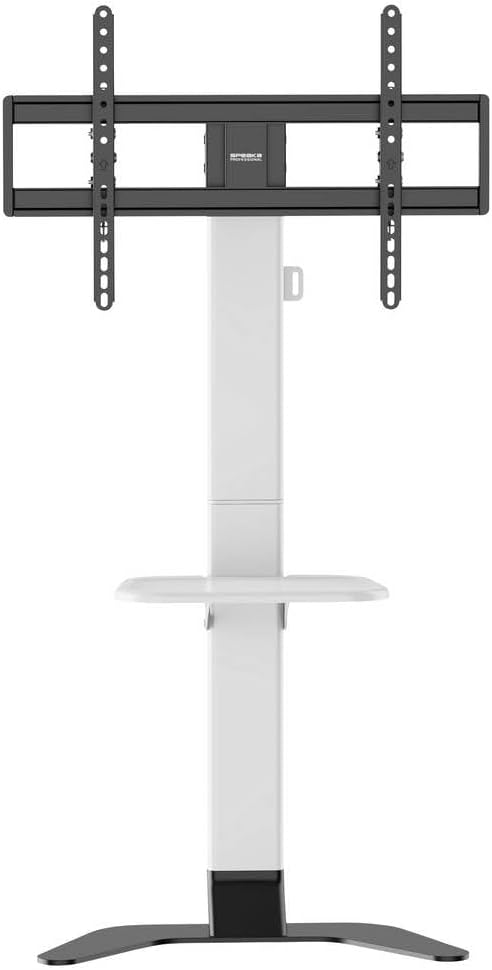
olusin 2: Iwaju view of the stand showing the adjustable shelf.

olusin 3: Apa view of the stand, illustrating the profile ati iduroṣinṣin.
5. Awọn ilana Iṣiṣẹ
5.1 Ṣíṣe àtúnṣe Gíga Tẹlifíṣọ̀n
The TV mounting plate can be adjusted in height from 900 mm to 1100 mm. To adjust, loosen the height adjustment screws on the main column, carefully slide the TV to the desired height (with assistance), and then securely tighten the screws.
5.2 Adjusting TV Tilt
The stand features tool-free tilt adjustment. Gently push or pull the top or bottom of the TV to achieve your desired viewing angle. The mechanism will hold the TV in place.
5.3 Siṣàtúnṣe selifu Giga
The media shelf can be adjusted in height from 200 mm to 910 mm. Loosen the shelf adjustment screws, move the shelf to the preferred height, and then re-tighten the screws firmly.
6. Itọju
- Ninu: Use a soft, dry cloth to clean the stand. For stubborn marks, a slightly damp cloth with mild detergent can be used, followed by drying. Avoid abrasive cleaners or solvents.
- Awọn ayẹwo igbakọọkan: Regularly inspect all screws, bolts, and connections to ensure they are tight and secure. Re-tighten if necessary.
- Bibajẹ: Tí apá kan nínú àpótí náà bá bàjẹ́, dáwọ́ lílò dúró lẹ́sẹ̀kẹsẹ̀ kí o sì kan sí ìrànlọ́wọ́ àwọn oníbàárà fún àtúnṣe àwọn ẹ̀yà tàbí ìmọ̀ràn.
7. Laasigbotitusita
| Isoro | Owun to le Fa | Ojutu |
|---|---|---|
| Iduro jẹ riru tabi riru. | Screws are loose; stand is on an uneven surface; weight capacity exceeded. | Ensure all assembly screws are tightened. Move stand to a level surface. Verify TV weight is within 45 kg limit. |
| TV does not tilt smoothly or stays in position. | Tilt mechanism needs adjustment or is obstructed. | Check for any obstructions. Ensure the tilt mechanism is clean. |
| Awọn okun ko ni iṣakoso daradara. | Cables not routed through the designated channels. | Tun awọn okun waya pada nipasẹ eto iṣakoso okun waya ti a ṣe sinu ọwọn akọkọ. |
8. Awọn pato
- Awoṣe: SP-TVS-600
- Nọmba apakan: SP-13382656
- Brand: SPEAKA PROFESSIONAL
- Iru fifi sori: Iduro pakà
- Iru gbigbe: Tiltable
- Ohun elo: Alloy Irin
- Àwọ̀: Funfun/dudu
- Awọn iwọn TV ibaramu: 37 - 86 inches (94.0 cm - 218.4 cm)
- Ibamu VESA: 100x100, 200x100, 200x200, 300x200, 400x200, 300x300, 400x300, 400x400, 600x400 mm
- O pọju fifuye: 45 kg (99 lbs)
- TV Height Adjustment: 900 - 1100 milimita
- Ṣíṣe àtúnṣe Gíga Sọ́fítì: 200 - 910 milimita
- Awọn ẹrọ ibaramu: Tẹlifíṣọ̀n, Atẹle
- Ìwọ̀n Nkan: 12.505 kg (12505 Giramu)
- Ilu isenbale: China
9. Atilẹyin ọja ati Support
9.1 atilẹyin ọja Alaye
This SpeaKa Professional product comes with a 2-year manufacturer's warranty. Please refer to the terms and conditions provided with your purchase or visit the official SpeaKa Professional website for full details. Keep your proof of purchase for warranty claims.
9.2 Onibara Support
For technical assistance, missing parts, or warranty inquiries, please contact your retailer or SpeaKa Professional customer support. Contact information can typically be found on the product packaging or the official brand webojula.