
1. Ifihan
This manual provides detailed instructions for the proper use and maintenance of your OnePlus Buds 4 Wireless Earbuds. Please read this manual thoroughly before using the product to ensure optimal performance and longevity.
Package Awọn akoonu
Jẹrisi pe gbogbo awọn ohun kan wa ninu package:
- OnePlus Buds 4 Earbuds (Left and Right)
- Ngba agbara Case
- USB-C Ngba agbara Cable
- Multiple Ear Tip Sizes (S, M, L)
- Afowoyi Olumulo (iwe-ipamọ yii)

Image: Contents of the OnePlus Buds 4 retail package, showing the earbuds, charging case, USB-C cable, and various ear tip sizes.
2. Eto
2.1 Gbigba agbara akọkọ
Before first use, fully charge the OnePlus Buds 4 and their charging case. Connect the provided USB-C charging cable to the charging port on the case and a power source. The indicator light on the case will show charging status.
- A full charge provides extended playback time.
- Ọran gbigba agbara ni agbara batiri 530mAh kan.

Image: OnePlus Buds 4 earbuds in their open charging case, highlighting the extended battery life capability.
2.2 Sisopọ pẹlu ẹrọ kan
- Rii daju pe awọn afikọti wa ninu apoti gbigba agbara ati pe ideri wa ni sisi.
- Press and hold the function button on the charging case until the indicator light flashes white, indicating pairing mode.
- On your device (smartphone, tablet, etc.), go to Bluetooth settings and select "OnePlus Buds 4" from the list of available devices.
- Once connected, the indicator light will turn solid white or off.
The OnePlus Buds 4 utilize Bluetooth 5.4 for stable connectivity and support Fast Pair for quick setup with compatible Android devices.

Image: OnePlus Buds 4 earbuds and charging case with a Bluetooth signal icon, illustrating stable connectivity via Bluetooth 5.4.
2.3 Wọ awọn Earbuds
Choose the ear tips that provide the best seal and comfort for your ears. A proper fit is crucial for optimal sound quality and effective Active Noise Cancellation.
- Fi àwọn ètí ìró náà sínú ihò etí rẹ pẹ̀lú ìrọ̀rùn.
- Yí wọn padà díẹ̀díẹ̀ títí tí wọ́n fi ní ààbò àti ìtùnú.
3. Awọn ilana Iṣiṣẹ
3.1 Fọwọkan Iṣakoso
The OnePlus Buds 4 feature intuitive touch controls on the stem of each earbud.
| Iṣe | Išẹ |
|---|---|
| Fọwọ ba Nikan | Mu ṣiṣẹ/sinmi orin, Dahun/pari ipe |
| Fọwọ ba lẹẹmeji | Orin tó tẹ̀lé, Kọ̀ láti pe |
| Fọwọ ba Meteta | Ti tẹlẹ orin |
| Tẹ mọlẹ (Osi/Ọtun) | Switch Noise Control Mode (ANC/Transparency) |
| Swipe Up/Down (Stem) | Ṣatunṣe Iwọn didun |

Image: Close-up of OnePlus Buds 4 earbuds showing the area for volume swipe control on the stem.
3.2 Ìpo Ìfàsẹ́yìn Ariwo Aláìṣiṣẹ́ (ANC) àti Ìpo Ìfihàn
The earbuds feature advanced Active Noise Cancellation to reduce ambient noise and a Transparency Mode to allow you to hear your surroundings.
- Ifagile Ariwo Nṣiṣẹ: Reduces external sounds for an immersive listening experience.
- Ipo akoyawo: Amplifies ambient sounds, allowing you to stay aware of your environment without removing the earbuds.
- Ipo imudara: Intelligently switches between ANC and Transparency modes based on your environment.
Switch between these modes by pressing and holding the touch area on either earbud.

Image: A person wearing OnePlus Buds 4 earbuds outdoors, illustrating the effect of Active Noise Cancellation.
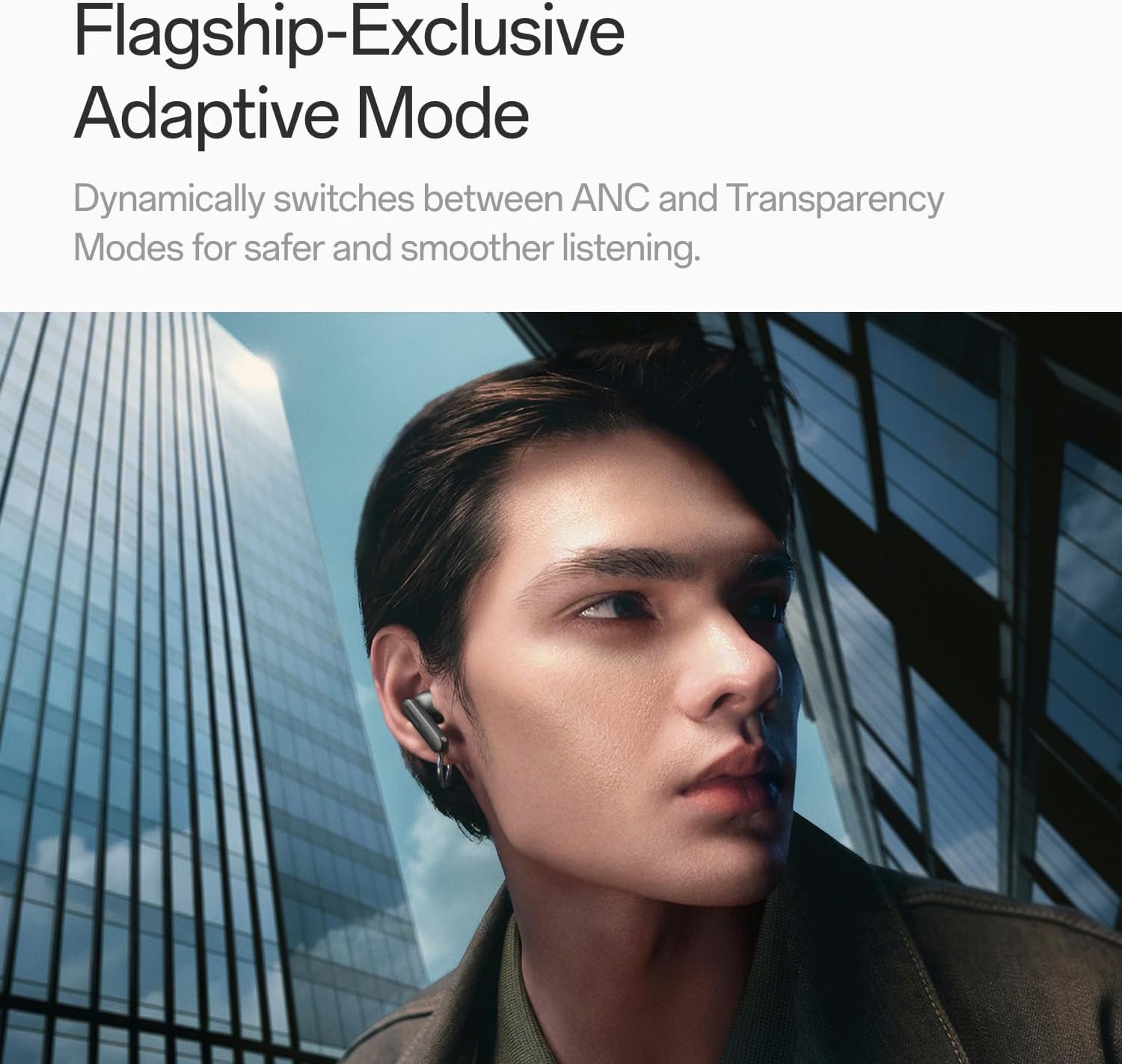
Image: A person wearing OnePlus Buds 4 earbuds in a city setting, highlighting the Adaptive Mode feature.
3.3 Audio Awọn ẹya ara ẹrọ
The OnePlus Buds 4 deliver high-quality audio with advanced technologies.
- 11mm Audio Drivers: Provide balanced, true-to-life acoustics.
- Hi-Res Audio & LHDC 5.0: For detailed, studio-grade sound reproduction.
- Immersive 3D Spatial Audio: Creates a richer, surrounding sound experience.

Image: OnePlus Buds 4 earbuds with Hi-Res Audio and LHDC 5.0 branding, emphasizing advanced audio capabilities.

Image: OnePlus Buds 4 earbuds depicted with a visual effect suggesting immersive 3D Spatial Audio.

Aworan: Ohun exploded view diagram of a OnePlus Buds 4 earbud, highlighting its internal sound components and drivers.
3.4 ipe Awọn ẹya ara ẹrọ
The earbuds are equipped with features to enhance call clarity.
- Ìfagilé Ariwo Ipe AI 3-mikrofoonu: Filters out noise and wind for clear calls in various environments.
- 3x Voice Cancellation: Reduces vocal distractions in noisy settings like cafes or trains.

Image: A person lying down with OnePlus Buds 4 earbuds, representing the effect of voice cancellation for undisturbed listening.
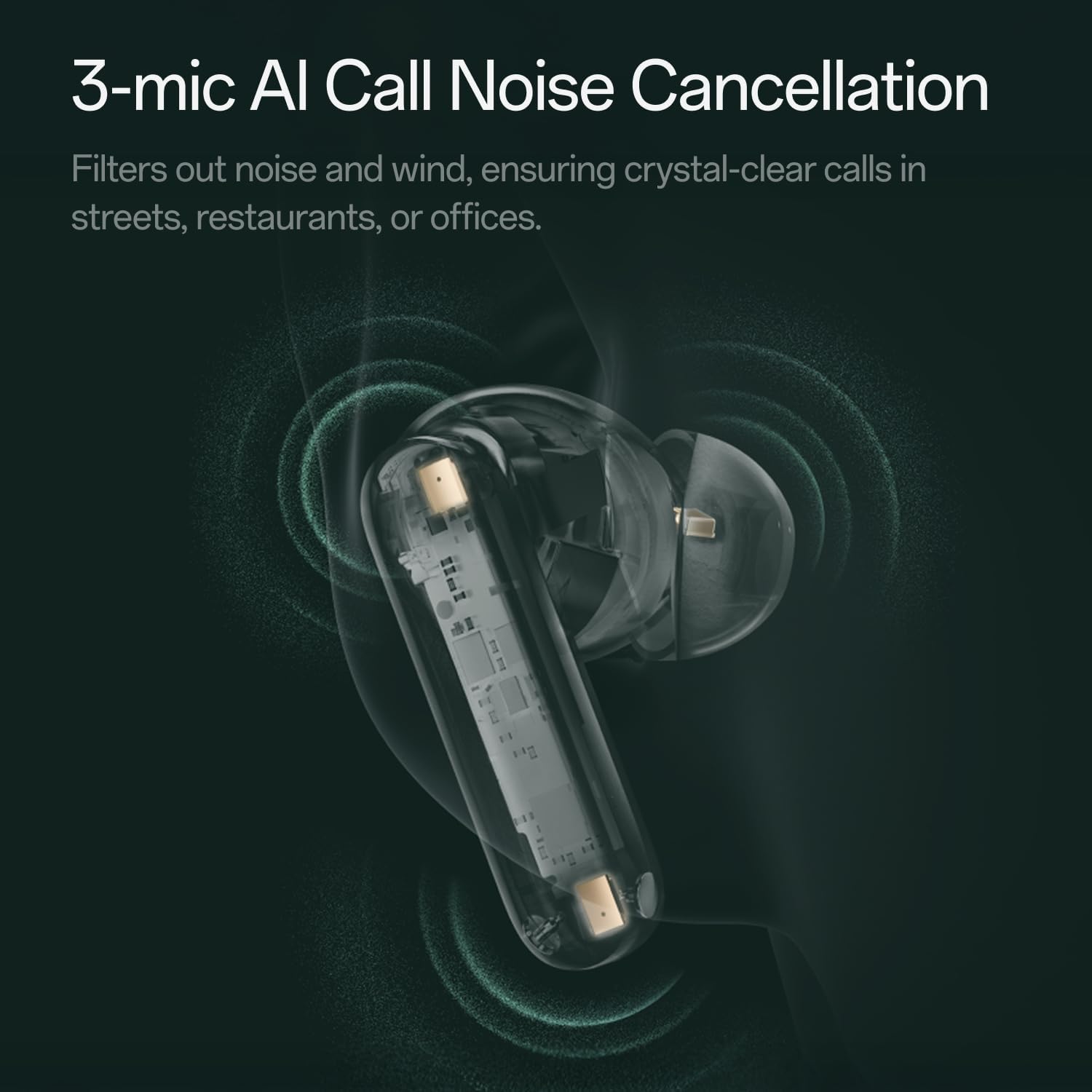
Aworan: A sihin view of a OnePlus Buds 4 earbud, highlighting the 3-mic system for AI Call Noise Cancellation.
3.5 Ìtumọ̀ AI
With a compatible OnePlus phone, the earbuds can facilitate real-time conversations in multiple languages.
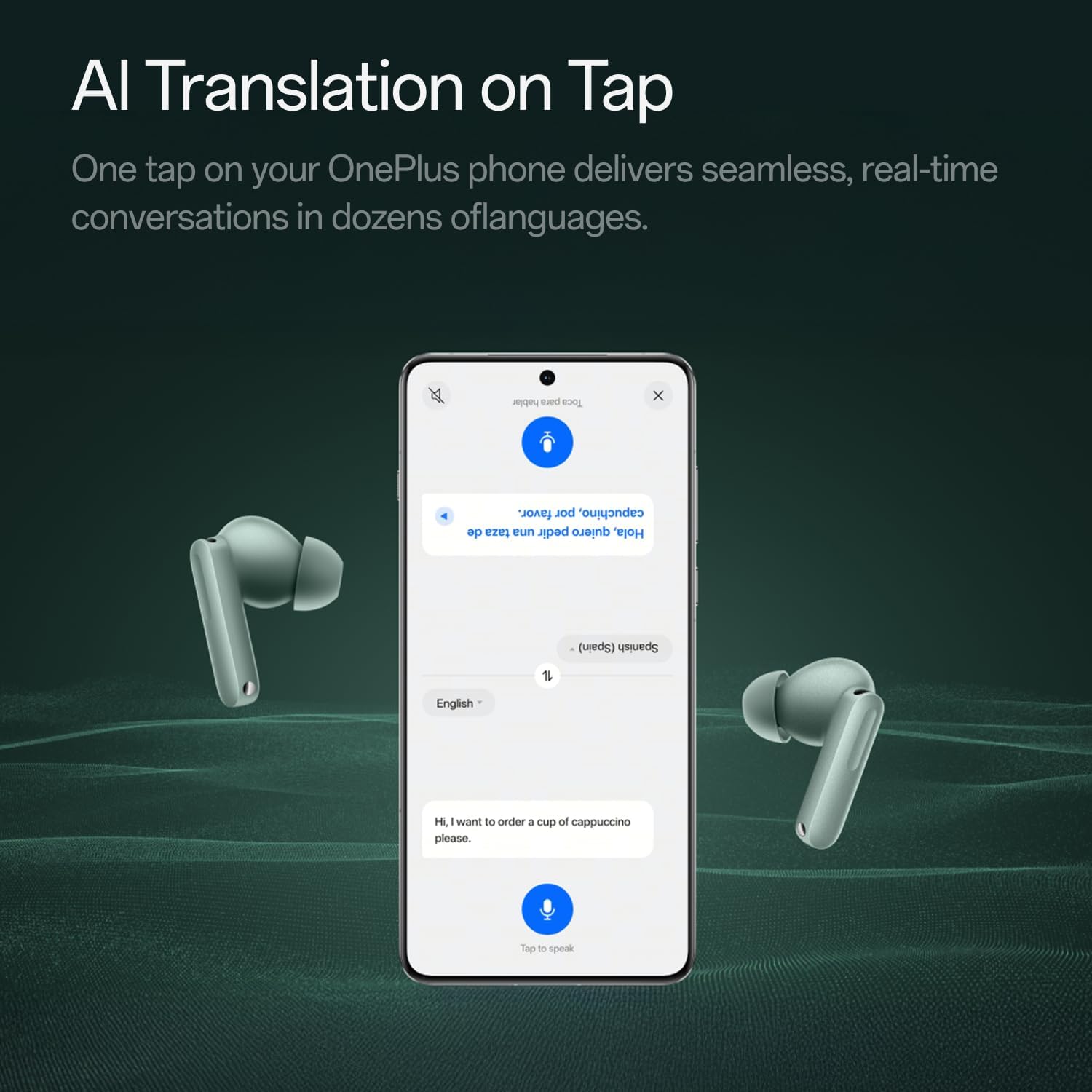
Image: OnePlus Buds 4 earbuds alongside a smartphone screen demonstrating AI translation functionality.
4. Itọju
4.1 Ninu
- Mọ awọn afikọti nigbagbogbo ati apoti gbigba agbara pẹlu asọ ti o gbẹ, asọ ti ko ni lint.
- Yọ etí etí kúrò kí o sì fi omi àti ọṣẹ díẹ̀ fọ̀ wọ́n bí ó bá ṣe pàtàkì, kí o sì rí i dájú pé wọ́n gbẹ pátápátá kí o tó tún so wọ́n pọ̀ mọ́ ara wọn.
- Do not use abrasive materials or harsh chemicals.
4.2 Omi Resistance
The OnePlus Buds 4 are water resistant. This means they can withstand splashes and sweat, making them suitable for workouts. However, they are not waterproof and should not be submerged in water.
4.3 Ibi ipamọ
Nigbati ko ba si ni lilo, tọju awọn afikọti sinu apoti gbigba agbara wọn lati daabobo wọn ati rii daju pe wọn wa ni idiyele.
5. Laasigbotitusita
If you encounter issues with your OnePlus Buds 4, refer to the following common solutions:
5.1 Sisọ ọrọ
- Ensure the earbuds are charged and in pairing mode (flashing white light).
- Paa ati tan Bluetooth lori ẹrọ rẹ.
- Forget the device in your Bluetooth settings and attempt to pair again.
- Gbìyànjú láti tún àwọn ètí ìró náà ṣe (wo ìwé ìtọ́ni gbogbo fún àwọn ìtọ́ni pàtó kan nípa àtúntò).
5.2 Ohun Issues
- Check the earbud fit and try different ear tip sizes.
- Clean the ear tips and speaker meshes to remove any debris.
- Ensure the volume on both your device and earbuds is adjusted correctly.
5.3 Awọn ọran gbigba agbara
- Verify the charging cable is securely connected to both the case and power source.
- Rii daju pe awọn olubasọrọ gbigba agbara lori awọn agbekọri ati inu ọran naa jẹ mimọ ati laisi idilọwọ.
- Gbiyanju okun USB-C ti o yatọ tabi ohun ti nmu badọgba agbara.
6. Awọn pato
| Ẹya ara ẹrọ | Ẹ̀kúnrẹ́rẹ́ |
|---|---|
| Orukọ awoṣe | OnePlus Buds 4 |
| Nọmba awoṣe | E513A |
| Brand | OnePlus |
| Àwọ̀ | Zen Green |
| Gbigbe Eti | Ninu Eti |
| Fọọmù ifosiwewe | Ninu Eti |
| Ariwo Iṣakoso | Ti nṣiṣe lọwọ Noise Ifagile |
| Audio Driver Iwon | 11 millimeters |
| Audio Driver Type | Yiyi Awakọ |
| Idahun Igbohunsafẹfẹ | 40 Hz |
| Ifamọ | 100 dB |
| Ipalara | 18 ohm |
| Asopọmọra Technology | Bluetooth |
| Imọ-ẹrọ Ibaraẹnisọrọ Alailowaya | Bluetooth |
| Ẹya Bluetooth | 5.4 |
| Bluetooth Ibiti | 33 Ẹsẹ |
| Ọna Iṣakoso | Fọwọkan |
| Adarí Iru | Awọn iṣakoso ifọwọkan |
| Gbigba agbara Case | 530mAh |
| Omi Resistance Ipele | Omi sooro |
| Iwọn Nkan | 0.15 kilogram (5.3 iwon) |
| Awọn irinše to wa | Cable, Charging Case, Eartip, User Manual |
7. Atilẹyin ọja ati Support
7.1 Olupese ká atilẹyin ọja
The OnePlus Buds 4 are backed by a one-year manufacturer warranty. This warranty covers defects in materials and workmanship under normal use. For specific terms and conditions, please refer to the warranty card included in your product packaging or visit the official OnePlus support webojula.
7.2 Onibara Support
For further assistance, technical support, or warranty claims, please contact OnePlus customer service through their official webaaye tabi alaye olubasọrọ ti a pese ninu iwe ọja rẹ.
Ile itaja OnePlus osise: Ile itaja OnePlus lori Amazon