
1. Ifihan
Thank you for choosing the Ekrist HX100A5 Magnetic Portable Charger. This device is designed to provide convenient and versatile charging for your mobile devices, including iPhones with MagSafe, Apple Watches, and other USB-C and Lightning compatible devices. Please read this manual thoroughly before use to ensure proper operation and to maximize the product's lifespan.

Aworan 1: Pariview of the Ekrist HX100A5 Magnetic Portable Charger's charging capacity for various devices.
2. Package Awọn akoonu
Rii daju pe gbogbo awọn nkan wa ninu apo rẹ:
- Ekrist HX100A5 Magnetic Portable Charger
- USB-C Ngba agbara Cable
- Afowoyi Olumulo (iwe-ipamọ yii)
3. Awọn ẹya ara ẹrọ
- Dual Magnetic Wireless Charging: Compatible with MagSafe for iPhone 12-17 series and dedicated charging for Apple Watch (Series 1-10/Ultra).
- Awọn okun ti a ṣe sinu: Integrated Lightning and USB-C cables for direct wired charging.
- Awọn Ibudo Ijade lọpọlọpọ: Additional USB-A and USB-C ports for versatile wired charging.
- Agbara giga: 10800mAh battery provides extended power for multiple charges.
- 25W PD+QC4.0 Fast Charging: Supports rapid charging for compatible devices, reaching 50% iPhone charge in approximately 30 minutes.
- Ifihan oni-nọmba LCD: Clear screen shows real-time battery percentage.
- Iwapọ ati Apẹrẹ to gbe: Ideal for travel and daily use.
- Awọn Idaabobo Aabo pupọ: Built-in safeguards against overheating, overcharging, overdischarge, short circuit, overvoltage, overcurrent, and overload.

Image 2: Diagram illustrating the multiple security protections integrated into the power bank.
4. Eto
4.1 Gbigba agbara akọkọ ti Bank Power
- Connect the provided USB-C charging cable to the USB-C input port on the power bank.
- Plug the other end of the USB-C cable into a compatible USB wall adapter (not included).
- The LCD digital display will show the charging status and battery percentage. Allow the power bank to fully charge before first use. Full recharge typically takes 3-5 hours.
4.2 Lílóye Ìfihàn LCD
The LCD display shows the current battery percentage of the power bank. When charging devices or being recharged, the display will illuminate to show the status. Press the power button briefly to check the battery level.
5. Awọn ilana Iṣiṣẹ
5.1 Charging iPhone via MagSafe (Wireless)
- Rí i dájú pé iPhone rẹ bá MagSafe mu (iPhone 12 jara tabi tuntun).
- Align the back of your iPhone with the magnetic charging pad on the power bank. The magnets will snap into place, and charging will begin automatically.
- For optimal magnetic connection and charging efficiency, use an iPhone without a case or with a MagSafe-compatible case.
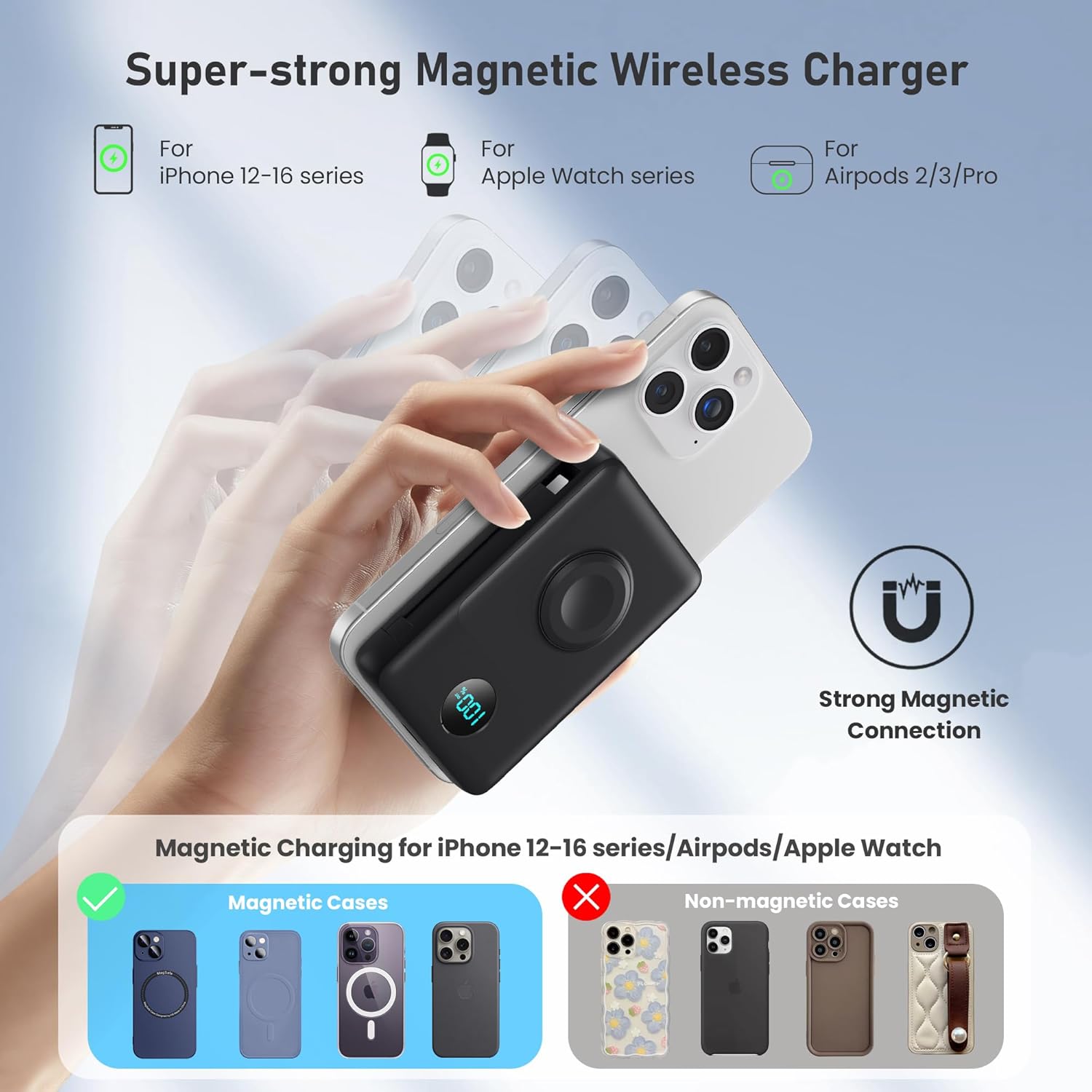
Image 3: Illustration of the strong magnetic connection for wireless charging with an iPhone, showing compatibility with MagSafe cases.
5.2 Charging Apple Watch (Wireless)
- Place your Apple Watch onto the dedicated Apple Watch charging module on the power bank.
- Rí i dájú pé aago náà wà ní ìbámu dáadáa kí agbára tó bẹ̀rẹ̀.
5.3 Charging via Built-in Cables
- Pull out the integrated Lightning cable or USB-C cable from its storage slot.
- Connect the appropriate cable to your device's charging port. Charging will start automatically.

Image 4: The power bank demonstrating simultaneous charging of multiple devices using its built-in cables and wireless pads.
5.4 Charging via USB-A/USB-C Ports
- Use your own USB-A or USB-C charging cable.
- Plug one end into the USB-A or USB-C output port on the power bank.
- So awọn miiran opin si ẹrọ rẹ.

Image 5: The power bank illustrating 25W PD + QC4.0 fast charging capabilities for wired connections.
6. Itọju
- Jeki banki agbara kuro lati omi, ina, ati awọn iwọn otutu to gaju.
- Yago fun sisọ silẹ tabi tẹriba ẹrọ si awọn ipa to lagbara.
- Nu dada mọ pẹlu asọ asọ, gbẹ. Maṣe lo awọn kẹmika lile tabi awọn ohun elo abrasive.
- Tọju ni itura, ibi gbigbẹ nigbati ko si ni lilo.
7. Laasigbotitusita
7.1 Ẹrọ Ko Ngba agbara
- Ensure the power bank is sufficiently charged. Check the LCD display.
- Verify that the charging cable (built-in or external) is securely connected to both the power bank and your device.
- For wireless charging, ensure proper alignment of your device on the charging pad. Remove any non-MagSafe cases that may interfere.
- Try using a different cable or port to rule out a faulty connection.
7.2 Ngba agbara lọra
- Ensure your device supports fast charging and that you are using a compatible cable and port (e.g., USB-C PD).
- Wireless charging is generally slower than wired fast charging.
- High ambient temperatures can affect charging speed.
7.3 LCD Ifihan Ko Ṣiṣẹ
- Tẹ bọtini agbara fun igba diẹ lati mu ifihan naa ṣiṣẹ.
- If the issue persists, try fully recharging the power bank.
8. Awọn pato
| Nọmba awoṣe | HX100A5 |
| Agbara Batiri | 10800 mAh |
| Ọja Mefa | 4.37 x 2.8 x 1.02 inches |
| Iwọn Nkan | 10.5 iwon |
| Asopọmọra Iru | 2*Wireless Charging + Built-in 2 Cables (Lightning, USB-C) + USB-C Port |
| Pataki Awọn ẹya ara ẹrọ | Dual magnetic portable charger, Built-in Cables, iWatch charger, 25W Power Delivery Fast Charging for iPhone/Apple Watch, LCD Digital Display, Wireless Charger |
| Olupese | Dongguan Yuanhaoxun Technology Co., Ltd. |
| Ọjọ Akọkọ Wa | Oṣu Kẹfa Ọjọ 20, Ọdun 2025 |
9. Atilẹyin ọja ati Support
The Ekrist HX100A5 Magnetic Portable Charger comes with a standard manufacturer's warranty. For detailed warranty information, product support, or technical assistance, please refer to the contact information provided on the product packaging or visit the official Ekrist webojula. Jọwọ ṣe idaduro ẹri rira rẹ fun awọn iṣeduro atilẹyin ọja.