
Ọrọ Iṣaaju
The Lian Li Hydroshift II LCD-C 360N is a fanless All-In-One (AIO) liquid cooling system designed for efficient CPU thermal management. This model integrates water cooling tubes with a radiator, featuring a semi-tubeless design for a streamlined appearance and improved compatibility within PC cases. It includes an advanced LCD display on the pump head for real-time system monitoring and customizable ARGB lighting.

Lapapọ view of the Lian Li Hydroshift II LCD-C 360N AIO liquid cooler, showcasing its radiator and pump head with ARGB lighting.
Awọn ẹya pataki:
- Semi-Tubeless Design: Features side mounting with integrated water cooling tubes and radiator for a compact and efficient setup.
- Ifihan LCD ilọsiwaju: The water cooling head incorporates a 2.1-inch round IPS LCD screen with a resolution of 480 x 480 pixels for displaying system information.
- Compact Radiator: Radiator dimensions are 400 x 122 x 24 mm, optimized for compatibility with various PC cases.
- Awọn ọna Iṣiṣẹ lọpọlọpọ: Offers three distinct modes: Offline Mode (no USB connection), Wireless Mode (no USB connection), and Advanced Wireless Mode (with USB connection) for flexible control.
- Isẹ Ailopin: Designed for silent cooling without integrated fans on the radiator.
Eto ati fifi sori
Proper installation is crucial for optimal performance. This AIO cooler is designed for side mounting within your PC case. Ensure your case has adequate space for a 360mm radiator.
Radiator Placement:
The radiator measures 400mm in length, 122mm in width, and 24mm in thickness. It is designed to be mounted on the side of your PC case, utilizing its semi-tubeless structure to minimize tube length and improve aesthetics. Verify that your case supports a 360mm radiator in the side-mount configuration.
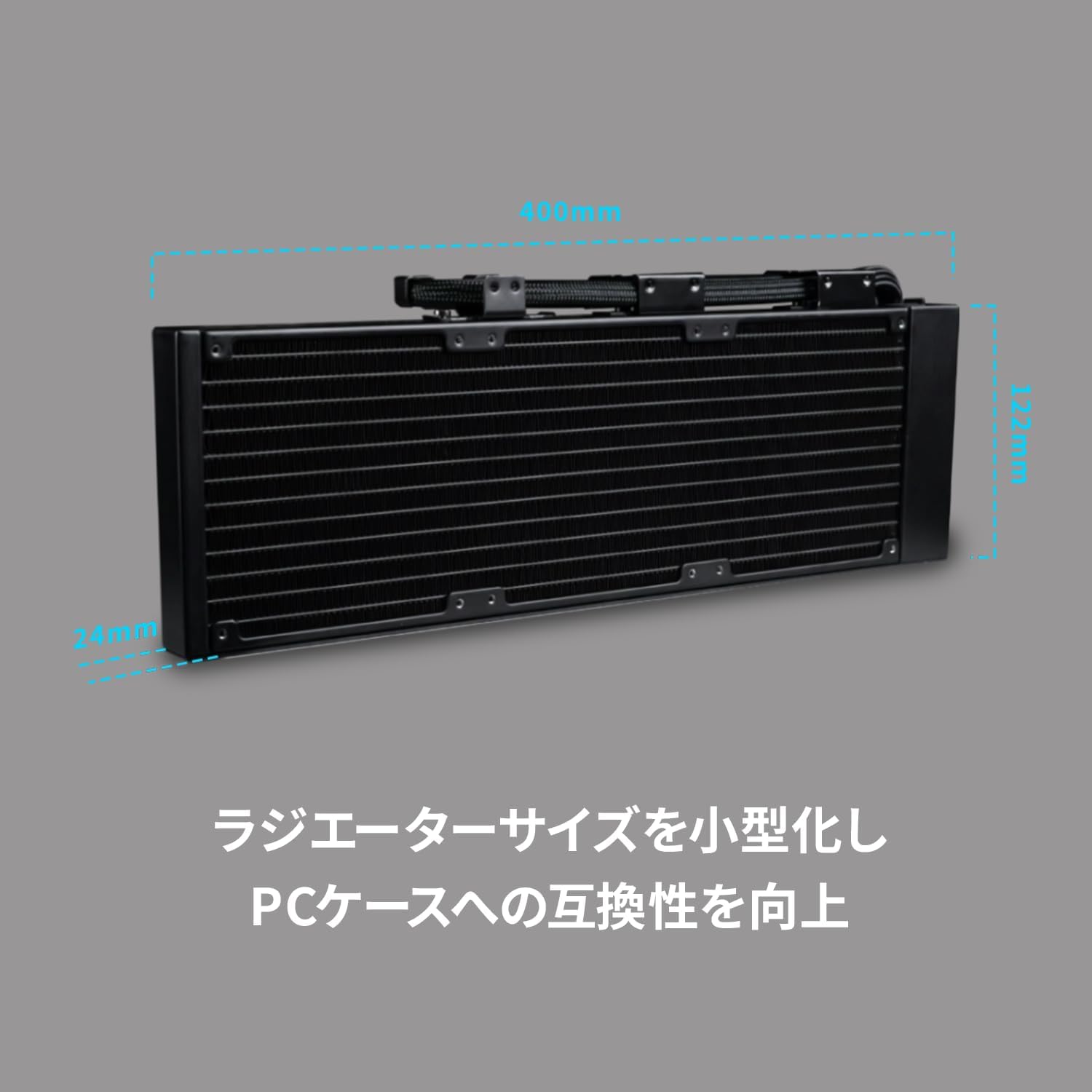
Radiator dimensions: 400mm length, 122mm width, 24mm thickness.
Pump Head Installation:
Attach the pump head securely to your CPU socket according to the instructions provided with your motherboard and CPU mounting bracket. Ensure even pressure for optimal thermal contact. The pump head features a rotatable ARGB ring, allowing you to adjust its orientation for desired lighting effects and display alignment.
Awọn Isopọ USB:
- Connect the 4-pin power connector from the pump to an available CPU_FAN or AIO_PUMP header on your motherboard.
- For ARGB lighting control and advanced LCD display features, connect the USB cable from the pump head to an internal USB 2.0 header on your motherboard.
- Rí i dájú pé gbogbo àwọn ìsopọ̀ náà dúró ṣinṣin tí wọ́n sì gbé wọn kalẹ̀ dáadáa.
Awọn ilana Iṣiṣẹ
The Hydroshift II LCD-C 360N offers flexible operation modes and a customizable LCD display.
LCD Display and ARGB Control:
The 2.1-inch round IPS LCD screen on the pump head provides real-time monitoring of CPU temperature, pump RPM, and other system metrics. The surrounding ARGB ring can be customized for various lighting effects. You can easily change the lighting effect and display template by rotating the ARGB ring part.

The LCD pump head displaying CPU temperature and pump speed.
Awọn ọna ṣiṣe:
The cooler supports three operational modes, configurable via the L-CONNECT 3 software (when USB connected):
- Offline Mode (No USB Connection): The cooler operates with default settings for pump speed and ARGB lighting. Basic cooling functionality is maintained.
- Wireless Mode (No USB Connection): Allows for basic control of pump speed and ARGB lighting via a wireless controller (if included or purchased separately).
- Advanced Wireless Mode (With USB Connection): Provides full control over pump speed, LCD display content, and ARGB lighting effects through the L-CONNECT 3 software. This mode offers the most customization options.

L-CONNECT 3 software interface for advanced control and customization.
Itoju
Regular maintenance ensures the longevity and optimal performance of your AIO liquid cooler.
- Yiyọ eruku kuro: Periodically inspect the radiator fins for dust accumulation. Use compressed air to gently clear dust from the fins to maintain efficient heat dissipation.
- Àyẹ̀wò Ọpọn Irin: Check the cooling tubes for any signs of kinks, leaks, or damage. Ensure they are not pressing against other components, which could restrict flow.
- Pump Head Cleaning: Gently wipe the pump head and LCD screen with a soft, dry, anti-static cloth to remove dust and fingerprints. Avoid using harsh chemicals.
- Coolant Check: While AIO coolers are sealed systems, monitor for any unusual noises from the pump or significant temperature increases, which could indicate a coolant issue.
Laasigbotitusita
If you encounter issues with your Lian Li Hydroshift II LCD-C 360N, refer to the following common troubleshooting steps:
- Awọn iwọn otutu Sipiyu ti o ga:
- Ensure the pump head is securely mounted to the CPU with adequate thermal paste.
- Check that the pump is receiving power and operating (listen for a faint hum or check software).
- Nu eruku eyikeyi kuro ninu awọn imu imooru.
- LCD Display Not Working/Incorrect:
- Verify the USB cable connection from the pump head to the motherboard.
- Ensure the L-CONNECT 3 software is installed and up-to-date.
- Restart the L-CONNECT 3 software or your computer.
- Àwọn Ìṣòro Ìmọ́lẹ̀ ARGB:
- Check the ARGB cable connection to the motherboard or controller.
- Use the L-CONNECT 3 software to adjust lighting effects.
- Ensure the ARGB ring on the pump head is correctly rotated.
- Awọn Ariwo Alailẹgbẹ:
- A faint hum from the pump is normal. Gurgling sounds might indicate air in the loop, which usually resolves itself over time.
- If loud grinding or rattling occurs, power down your system and contact support.
Awọn pato
| Ẹya ara ẹrọ | Ẹ̀kúnrẹ́rẹ́ |
|---|---|
| Brand | LIANLI |
| Awoṣe | LL-HS2-LCD-360-N-BK |
| Ọna Itutu | Liquid (Water) |
| Radiator Dimensions | 400 x 122 x 24 mm |
| Pump Head Display | 2.1-inch Round IPS LCD (480 x 480 resolution) |
| Ariwo Ipele | 28 Decibels (Pump) |
| Iru Asopọ Agbara | 4-pin |
| Awọn ẹrọ ibaramu | Computer (Various CPU Sockets) |
| Iwọn Nkan | 1900 giramu |
Alaye atilẹyin ọja
Lian Li products are covered by a manufacturer's warranty. Please refer to the official Lian Li website or the warranty card included in your product packaging for specific terms, conditions, and duration of the warranty for the Hydroshift II LCD-C 360N. Keep your proof of purchase for warranty claims.
Atilẹyin
For technical assistance, troubleshooting beyond this manual, or warranty inquiries, please contact Lian Li customer support through their official channels:
- Osise Webojula: Ṣabẹwo www.lian-li.com fún àwọn ohun èlò ìrànlọ́wọ́, àwọn ìbéèrè tó máa ń wáyé nígbà gbogbo, àti ìwífún nípa àwọn ènìyàn.
- Imeeli Atilẹyin: Refer to the Lian Li webojú-òpó wẹ́ẹ̀bù fún àdírẹ́sì ìmeeli ìrànlọ́wọ́ tó yẹ.
- Awọn apejọ ori ayelujara: Engage with the Lian Li community for peer support and shared solutions.
When contacting support, please have your product model (LL-HS2-LCD-360-N-BK) and proof of purchase readily available.