
1. Ọja Ipariview
Thank you for choosing the Lekaby S50 Wireless Earbuds. This manual provides essential information for setting up, operating, and maintaining your new earbuds.
1.1 Package Awọn akoonu
- Lekaby S50 Earbuds (2 units)
- Ọran gbigba agbara (ẹyọkan 1)
- Okun Ngba agbara USB Iru-C (ẹyọkan 1)
- Silicone Ear Tips (S/M/L sizes, 6 units total)
- Itọsọna olumulo (ẹyọkan 1)
1.2 Key Awọn ẹya ara ẹrọ
- Ohùn Immersive: Equipped with 14.2mm dynamic drivers for deep bass and clear sound.
- Akoko Idaraya: Up to 6-8 hours on a single charge, and up to 40-48 hours total with the charging case.
- Ifihan Agbara LED Meji: Digital display on the charging case shows battery levels for both earbuds and the case.
- Bluetooth 5.3 Asopọmọra: Ensures fast, stable, and low-power connections with a range of up to 33 feet.
- Apẹrẹ Ergonomic: Lightweight (4g per earbud) and comfortable fit with three ear tip sizes (S/M/L).
- IPX7 mabomire: Resistant to sweat and rain, suitable for sports and outdoor activities.
- ENC Noise Cancelling Microphone: Imudara pipe pipe nipa idinku ariwo ayika.
- Iṣakoso Fọwọkan Smart: Intuitive touch sensors for managing music, calls, and voice assistant.
- Iru-C Gbigba agbara Yara: Quick charging capability; 10 minutes of charge provides up to 1 hour of playback.
2. Eto
2.1 Gbigba agbara akọkọ
Ṣaaju lilo akọkọ, gba agbara ni kikun awọn agbekọri ati apoti gbigba agbara.
- Gbe awọn afikọti mejeeji sinu ọran gbigba agbara.
- Connect the USB Type-C charging cable to the charging port on the case and a power source (e.g., USB wall adapter, computer USB port).
- The LED digital display on the case will show the charging status. Ensure both earbuds and the case are fully charged before proceeding.
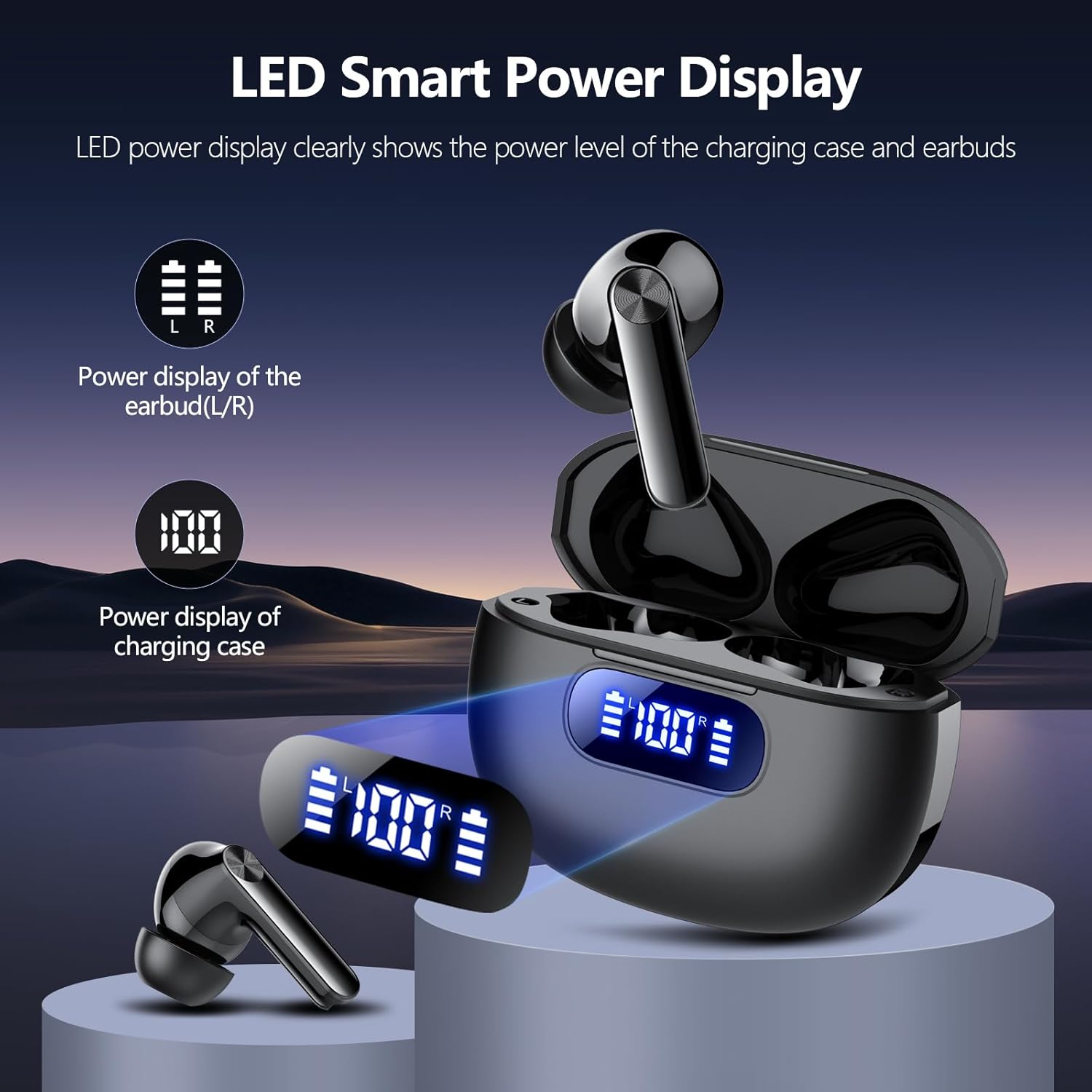
Image: The charging case with earbuds inserted, displaying LED indicators for battery levels of both earbuds and the case. The display shows "100%" for the case and individual battery bars for the left and right earbuds.

Image: A visual representation of the Lekaby S50 earbuds and charging case, highlighting the LED power display. Icons indicate 8 hours single charge, 48 hours with charging case, and 1 hour quick charge.
2.2 Yíyan àti Ìbámu Títẹ́tí
Choosing the correct ear tip size is crucial for optimal sound quality and comfort.
- Experiment with the provided S, M, and L silicone ear tips.
- Select the size that forms a snug seal in your ear canal and feels comfortable for extended wear. A good seal enhances bass response and noise isolation.
- Gently insert the earbuds into your ears and rotate them slightly to ensure a secure and comfortable fit.

Image: A person wearing the Lekaby S50 earbuds, illustrating the ergonomic design and touch control area. Below, three different sizes (S, M, L) of silicone ear tips are shown.
2.3 Sisopọ Bluetooth
The earbuds will automatically enter pairing mode when removed from the charging case for the first time.
- Ṣii apoti gbigba agbara ki o yọ awọn agbekọri mejeeji kuro. Wọn yoo tan-an laifọwọyi ati gbiyanju lati ṣe alawẹ-meji pẹlu ara wọn.
- Lori ẹrọ rẹ (foonuiyara, tabulẹti, ati be be lo), jeki Bluetooth.
- Wa fun "S50" in the list of available Bluetooth devices and select it to connect.
- Ni kete ti o ba ti sopọ, iwọ yoo gbọ ohun orin idaniloju, ati awọn agbekọri yoo ṣetan fun lilo.
- Fun awọn lilo atẹle, awọn agbekọri yoo sopọ laifọwọyi si ẹrọ ti o so pọ ti o kẹhin nigbati o ba yọ kuro ninu ọran naa.

Image: A smartphone screen displaying Bluetooth settings, showing "S50" as an available device for pairing. The Lekaby S50 earbuds are shown next to their open charging case.
3. Awọn ilana Iṣiṣẹ
3.1 Smart Fọwọkan idari
The Lekaby S50 earbuds feature intuitive touch controls on the outer surface of each earbud.
| Iṣe | Agbekọti Osi | Ọtun Earbud |
|---|---|---|
| Mu ṣiṣẹ/Danu Orin duro | Fọwọ ba ẹyọkan | Fọwọ ba ẹyọkan |
| Orin t'okan | Tẹ ni kia kia meteta | Tẹ ni kia kia meteta |
| Orin ti tẹlẹ | Fọwọ ba lẹẹmeji | Fọwọ ba lẹẹmeji |
| Idahun/Pari Ipe | Fọwọ ba ẹyọkan | Fọwọ ba ẹyọkan |
| Kọ Ipe | Tẹ gun (aaya 2) | Tẹ gun (aaya 2) |
| Mu Oluranlọwọ Ohun ṣiṣẹ (Siri/Oluranlọwọ Google) | Tẹ gun (aaya 2) | Tẹ gun (aaya 2) |
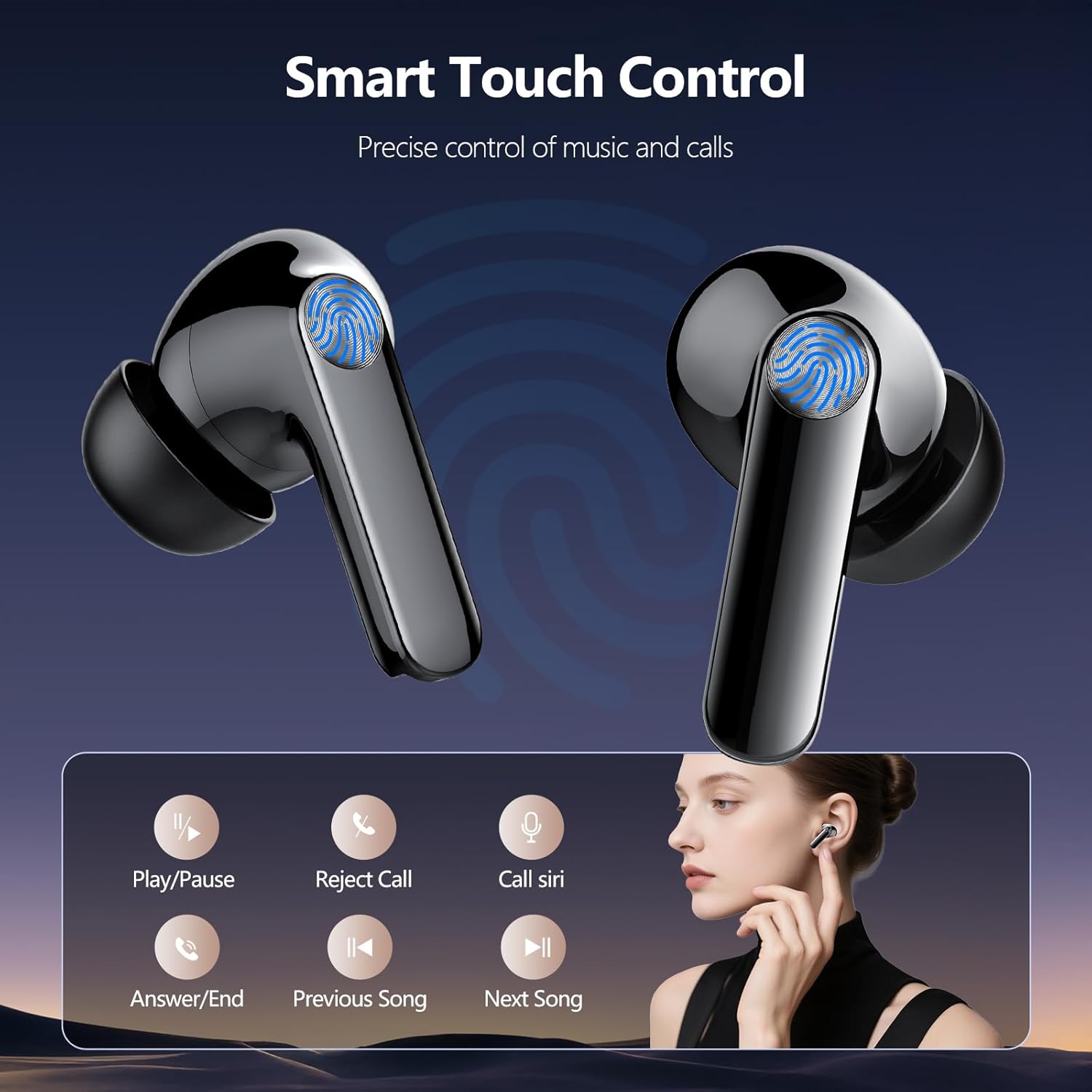
Image: A diagram showing the touch-sensitive area on the earbuds and icons representing various functions like Play/Pause, Reject Call, Call Siri, Answer/End Call, Previous Song, and Next Song.
3.2 Agbara Tan / Pa
- Agbara Tan: Yọ awọn agbekọri kuro lati apoti gbigba agbara. Wọn yoo mu ṣiṣẹ laifọwọyi.
- Agbara Pa: Gbe awọn agbekọri naa pada sinu apoti gbigba agbara. Wọn yoo pa agbara laifọwọyi ati bẹrẹ gbigba agbara.
4. Itọju
4.1 Ninu
- Regularly clean the earbuds and charging case to ensure optimal performance and hygiene.
- Lo asọ ti o gbẹ, asọ ti ko ni lint lati nu awọn aaye ti awọn agbekọri ati apoti gbigba agbara.
- For ear tips, remove them from the earbuds and clean with a mild soap solution if necessary, then rinse thoroughly and allow to dry completely before reattaching.
- Má ṣe lo àwọn ohun ìfọṣọ, ọtí líle, tàbí àwọn kẹ́míkà líle.
- Yago fun gbigba ọrinrin sinu eyikeyi awọn ṣiṣi.
4.2 Ibi ipamọ
- Nigbati ko ba si ni lilo, tọju awọn afikọti nigbagbogbo sinu apoti gbigba agbara wọn lati daabobo wọn ati jẹ ki wọn gba agbara.
- Tọju ẹrọ naa ni itura, aye gbigbẹ, kuro lati awọn iwọn otutu ti o ga julọ ati oorun taara.
5. Laasigbotitusita
| Isoro | Owun to le Fa | Ojutu |
|---|---|---|
| Earbuds ko so pọ pẹlu ẹrọ | Bluetooth is off on device, earbuds not in pairing mode, or previously paired device interfering. |
|
| Agbekọri agbekọri kan ṣoṣo ti n ṣiṣẹ | Earbuds not properly connected to each other, or one earbud has low battery. |
|
| Iwọn kekere tabi didara ohun ko dara | Incorrect ear tip size, ear tips dirty, low battery, or device volume too low. |
|
| Ngba agbara ko gba agbara | Faulty cable, power source issue, or dirty charging port. |
|
6. Awọn pato
| Ẹya ara ẹrọ | Ẹ̀kúnrẹ́rẹ́ |
|---|---|
| Orukọ awoṣe | S50 |
| Ẹya Bluetooth | 5.3 |
| Bluetooth Ibiti | Titi de 33 ẹsẹ (10 mita) |
| Audio Driver Iwon | 14.2mm Yiyi Driver |
| Akoko Ere Earbud Nikan | 6-8 wakati |
| Lapapọ akoko ere (pẹlu Ọran Gbigba agbara) | Titi di wakati 40-48 |
| Gbigba agbara Port | USB Iru-C |
| Gbigba agbara kiakia | Agbara iṣẹju 10 fun ṣiṣiṣẹsẹhin wakati kan |
| Omi Resistance Rating | IPX7 |
| Ariwo Iṣakoso | Environmental Noise Cancellation (ENC) for calls |
| Iwuwo Earbud | Isunmọ. 4g fun agbekọri |
| Awọn ẹrọ ibaramu | iOS, Android, Windows, and other Bluetooth-enabled devices |
7. atilẹyin ọja Information
Lekaby products are designed and manufactured to the highest quality standards. This product is covered by a limited warranty from the date of purchase. Please refer to the official Lekaby website or contact customer support for detailed warranty terms and conditions specific to your region.
8. Onibara Support
If you encounter any issues or have questions regarding your Lekaby S50 Wireless Earbuds, please do not hesitate to contact our customer support team. For the fastest assistance, please visit the official Lekaby webAaye fun FAQs, awọn itọnisọna laasigbotitusita, ati alaye olubasọrọ.
Atilẹyin Ayelujara: Visit the Lekaby Store on Amazon