
1. Ifihan
This manual provides detailed instructions for the safe and effective use of the CEM ILDM-150 Laser Distance Measure. The ILDM-150 is a precision instrument designed for accurate distance, area, and volume measurements, featuring Bluetooth connectivity for data transfer and management via the Meterbox Pro application. Please read this manual thoroughly before operating the device to ensure proper functionality and safety.

Figure 1.1: CEM ILDM-150 Laser Distance Measure and included accessories.
2. Awọn ẹya Ọja
The CEM ILDM-150 Laser Distance Measure offers a range of features designed for efficiency and accuracy:
- Yiye giga: Utilizes a Class II Laser with 1mW output, providing accuracy up to ±1/16 inch (1.5mm) over a measuring range of up to 229 feet (70 meters).
- Awọn ọna Wiwọn Ọpọ: Supports single distance, continuous measurement, area, volume, and Pythagorean (three-point) calculations.
- Yipada Ẹka: Easily switch between meters (M), inches (In), and feet (Ft).
- Bluetooth 4.0 Asopọmọra: Seamlessly transfer measured data to a smartphone or tablet using the Meterbox Pro application for analysis and sharing.
- Ibi ipamọ data: Stores up to 99 groups of measurement data, with manual deletion capability.
- Imọlẹ ẹhin LCD: Large backlit screen for improved visibility in low-light conditions.
- Paarẹ Eto: Option to turn the measurement beep on or off for use in quiet environments.
- Apẹrẹ ti o tọ: IP54 rated for water and dust resistance, featuring a hard rubber body for enhanced grip and protection.
- Nfi agbara pamọ: Automatic shut-down after 150 seconds of inactivity to conserve battery life.
- Itọkasi Batiri Kekere: Alerts the user when batteries need replacement.

Olusin 2.1: Pariview of CEM ILDM-150 key features.
3. Alaye Aabo
The CEM ILDM-150 is a Class II laser product. Adhere to the following safety guidelines:
- Maṣe wo taara sinu ina ina lesa.
- Maṣe ṣe ifọkansi tan ina lesa si eniyan tabi ẹranko.
- Avoid using optical instruments (e.g., binoculars, telescopes) to view ina lesa.
- Jeki ẹrọ naa kuro ni arọwọto awọn ọmọde.
- Ma ṣe gbiyanju lati yipada tabi tu ẹrọ naa.
- Lo awọn batiri kan pato.
4. Bibẹrẹ (Eto)
4.1 Package Awọn akoonu
Nigbati o ba ṣii package, rii daju pe gbogbo awọn nkan wa:
- CEM ILDM-150 Laser Distance Measure
- 1.5V AAA Batteries (Note: While typically included, please check the packaging upon receipt as specifications may vary.)
- Apo to šee gbe
- Itọsọna olumulo
- Okun Ọwọ
- Apoti akopọ
4.2 Fifi sori batiri
The ILDM-150 requires 1.5V AAA batteries for operation.
- Wa ideri iyẹwu batiri ni ẹhin ẹrọ naa.
- Gbe ideri ṣi silẹ ni itọsọna ti itọka tọka si.
- Insert the AAA batteries, ensuring correct polarity (+/-) as marked inside the compartment.
- Pa ideri batiri naa ni aabo.
4.3 Titan / Pa a
- Lati Fi agbara: Tẹ awọn MEAS bọtini. Ifihan naa yoo tan imọlẹ.
- Lati Paarẹ: Tẹ mọlẹ CLR/OFF button for approximately 2 seconds. The device will also automatically shut down after 150 seconds of inactivity.
5. Awọn ilana Iṣiṣẹ
5.1 Ipilẹ wiwọn
To perform a single distance measurement:
- Tọka lesa ni aaye ibi-afẹde.
- Tẹ awọn MEAS bọ́tìnì lẹ́ẹ̀kan. Lésà náà yóò ṣiṣẹ́.
- Tẹ awọn MEAS bọtini lẹẹkansi lati ya awọn wiwọn. Abajade yoo han loju iboju.
5.2 Unit Yipada
To change the measurement unit (M/In/Ft):
- Tẹ awọn Ẹyọ bọ́tìnì náà leralera títí tí a ó fi fi ẹ̀rọ tí a fẹ́ hàn.
5.3 Backlight and Mute Settings
- The backlight automatically activates when the device is in use.
- To toggle the measurement beep (mute/unmute), refer to the specific button or menu option in your device's interface, typically indicated by a speaker icon.
5.4 Awọn ọna wiwọn ilọsiwaju
The ILDM-150 supports various measurement functions:
- Wiwọn agbegbe: Press the Area/Volume button once. Follow the on-screen prompts to measure length and width. The device will calculate and display the area.
- Iwọn Iwọn: Press the Area/Volume button twice. Follow the on-screen prompts to measure length, width, and height. The device will calculate and display the volume.
- Iwọn Pythagorean (Iwọn aiṣe-taara): Use this mode to calculate distances indirectly (e.g., height of a building). Press the Pythagorean button. Follow the on-screen prompts to take the required measurements (e.g., hypotenuse and one leg). The device will calculate the unknown side.
- Wiwọn Tesiwaju (Titele): Tẹ awọn MEAS button and hold it down. The device will continuously measure and display the distance as you move it, showing real-time minimum and maximum values. Release the button to stop.
- Afikun ati Iyokuro: After taking a measurement, use the '+' or '-' buttons to add or subtract subsequent measurements from the current total.

Figure 5.1: Multiple measurement modes supported by the ILDM-150.
5.5 Tailstock Function
The multi-functional tailstock allows for measurements from corners or edges, ensuring accuracy when the device cannot be placed flush against a surface.

Figure 5.2: Multi-functional use of the tailstock.
6. Bluetooth Connectivity & App
The ILDM-150 features Bluetooth 4.0 for seamless data transfer to your smartphone or tablet via the Meterbox Pro application.
6.1 Installing Meterbox Pro
- Wa fun "Meterbox Pro" in your device's app store (iOS App Store or Google Play Store).
- Ṣe igbasilẹ ati fi sori ẹrọ ohun elo naa.
6.2 Sisopọ ẹrọ naa
- Rii daju pe Bluetooth ti ṣiṣẹ lori foonuiyara/tabulẹti rẹ.
- Power on the ILDM-150.
- Open the Meterbox Pro application. The app should automatically detect and connect to the ILDM-150.
- A Bluetooth icon on the ILDM-150's display will indicate a successful connection.

Figure 6.1: Bluetooth connectivity with Meterbox Pro app.
6.3 Data Transfer and Management
Once connected, measurements taken with the ILDM-150 can be transferred to the Meterbox Pro app. The app allows you to:
- View and organize measurement data.
- Create reports or charts.
- Share data via email, social media, or other applications.

Figure 6.2: Convenient data analysis and sharing via Meterbox Pro.
6.4 Data Storage on Device
The device can store up to 99 groups of historical data values.
- Recalling Data: Use the memory buttons (e.g., up/down arrows) to scroll through stored measurements.
- Npaarẹ data: Tẹ awọn CLR button to manually delete the currently displayed data.
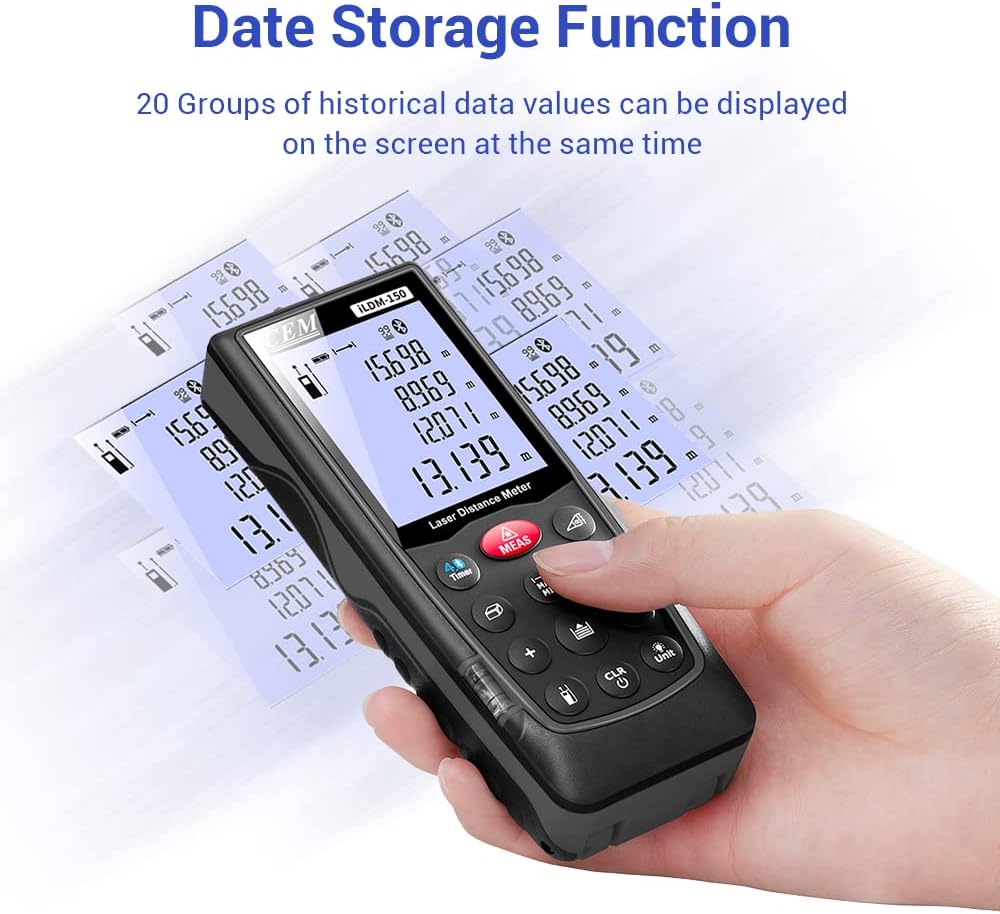
Figure 6.3: On-device data storage and display.
7. Itọju ati Itọju
Proper maintenance ensures the longevity and accuracy of your ILDM-150.
- Ninu: Lo asọ, damp cloth to clean the device. Do not use abrasive cleaners or solvents. Pay special attention to the laser lens, cleaning it gently with a lens cloth if necessary.
- Ibi ipamọ: Store the device in its portable bag in a cool, dry place when not in use. Avoid extreme temperatures and direct sunlight.
- Itọju Batiri: Yọ awọn batiri kuro ti ẹrọ naa ko ba ni lo fun igba pipẹ lati ṣe idiwọ jijo.
- Idaabobo Ipa: While durable, avoid dropping the device or subjecting it to strong impacts.

Figure 7.1: The ILDM-150 features IP54 water and dust protection.
8. Laasigbotitusita
If you encounter issues with your CEM ILDM-150, refer to the following table for common problems and solutions:
| Isoro | Owun to le Fa | Ojutu |
|---|---|---|
| Ẹrọ naa ko ṣiṣẹ. | Batiri ti o kere tabi ti o ti ku; Fifi batiri ti ko tọ sori ẹrọ. | Replace batteries; Ensure correct polarity. |
| Awọn wiwọn ti ko pe. | Laser lens dirty; Unstable measurement surface; Device not held steady; Measurement taken over reflective or transparent surfaces. | Clean laser lens; Ensure stable placement; Use a target plate for difficult surfaces. |
| Asopọ Bluetooth kuna. | Bluetooth off on smartphone; Device out of range; App not running. | Enable Bluetooth; Ensure device is within 10m range; Restart Meterbox Pro app. |
| Ifihan ti wa ni baibai tabi unreadable. | Low battery; Extreme temperature. | Replace batteries; Operate within specified temperature range. |
| Ẹ̀rọ náà máa ń pa láìròtẹ́lẹ̀. | Auto-off feature activated; Low battery. | This is normal after 150 seconds of inactivity; Replace batteries if low battery indicator is on. |
9. Imọ ni pato
Detailed specifications for the CEM ILDM-150 Laser Distance Measure:
| Sipesifikesonu | Iye |
|---|---|
| Brand | CEM |
| Orukọ awoṣe | ILDM-150 |
| Nọmba apakan | CEM ILDM-150 |
| Àwọ̀ | dudu 1 |
| Iwọn Iwọn | 229 ẹsẹ tabi 70 mita |
| Yiye | ±1/16 inch (1.5mm) |
| Lesa Kilasi | Kilasi II, <1mW |
| International Idaabobo Rating | IP54 (Waterproof, Dust-proof) |
| Ohun elo | Double Injection Molding Machine, Plastic |
| Iwọn Nkan | 203 giramu |
| Batiri Iru | Alkaline (AAA) |
| Pa laifọwọyi | Awọn aaya 150 (isunmọ) |
| Memory data | 99 awọn ẹgbẹ |
| Ẹya Bluetooth | 4.0 |
| Awọn Iwọn Nkan (L x W x H) | 5.31 x 2.09 x 1.18 inches |
| UPC | 887327150034 |
| Olupese | Shenzhen Everbest Machinery Industry Co.,Ltd. |
| Ọjọ Akọkọ Wa | Oṣu Keje 9, Ọdun 2018 |

Figure 9.1: Dimensions of the ILDM-150.
10. Atilẹyin ọja ati Support
10.1 atilẹyin ọja Alaye
The CEM ILDM-150 Laser Distance Measure comes with a 12-osu atilẹyin ọja from the date of purchase. This warranty covers defects in materials and workmanship under normal use. It does not cover damage caused by misuse, accidents, unauthorized modifications, or improper maintenance.
10.2 Onibara Support
For technical assistance, warranty claims, or further inquiries, please contact CEM customer support through their official website or the contact information provided with your purchase documentation. Please have your model number (ILDM-150) and purchase date ready when contacting support.