
1. Ifihan
This manual provides detailed instructions for the safe and efficient operation of your KIANO Vision 2 Full HD Projector. Please read this manual thoroughly before using the device and retain it for future reference. The KIANO Vision 2 is a portable Full HD projector designed for home cinema and outdoor movie experiences, featuring native 1080p resolution, Android 11, and versatile connectivity options.
2. Alaye Aabo
Ṣe akiyesi awọn iṣọra ailewu atẹle lati yago fun ibajẹ si pirojekito ati rii daju aabo olumulo:
- Ma wo taara sinu pirojekito lẹnsi nigbati awọn lamp wa lori.
- Rii daju pe fentilesonu to dara lati ṣe idiwọ igbona. Ma ṣe dina awọn ṣiṣi atẹgun.
- Lo oluyipada agbara ti a pese nikan.
- Jeki pirojekito kuro lati omi, ọrinrin, ati awọn iwọn otutu to gaju.
- Maṣe gbiyanju lati ṣajọpọ tabi tun ẹrọ pirojekito naa funrararẹ. Kan si oṣiṣẹ iṣẹ ti o peye.
- Jeki kuro ni arọwọto awọn ọmọde.
3. Package Awọn akoonu
Jẹrisi pe gbogbo awọn ohun kan wa ninu package:
- KIANO Vision 2 Projector
- External Battery (if included with your model)
- Apo gbigbe
- Isakoṣo latọna jijin
- Okun agbara
- Okun Asopọ Batiri
- Ninu Asọ
- Itọsọna olumulo
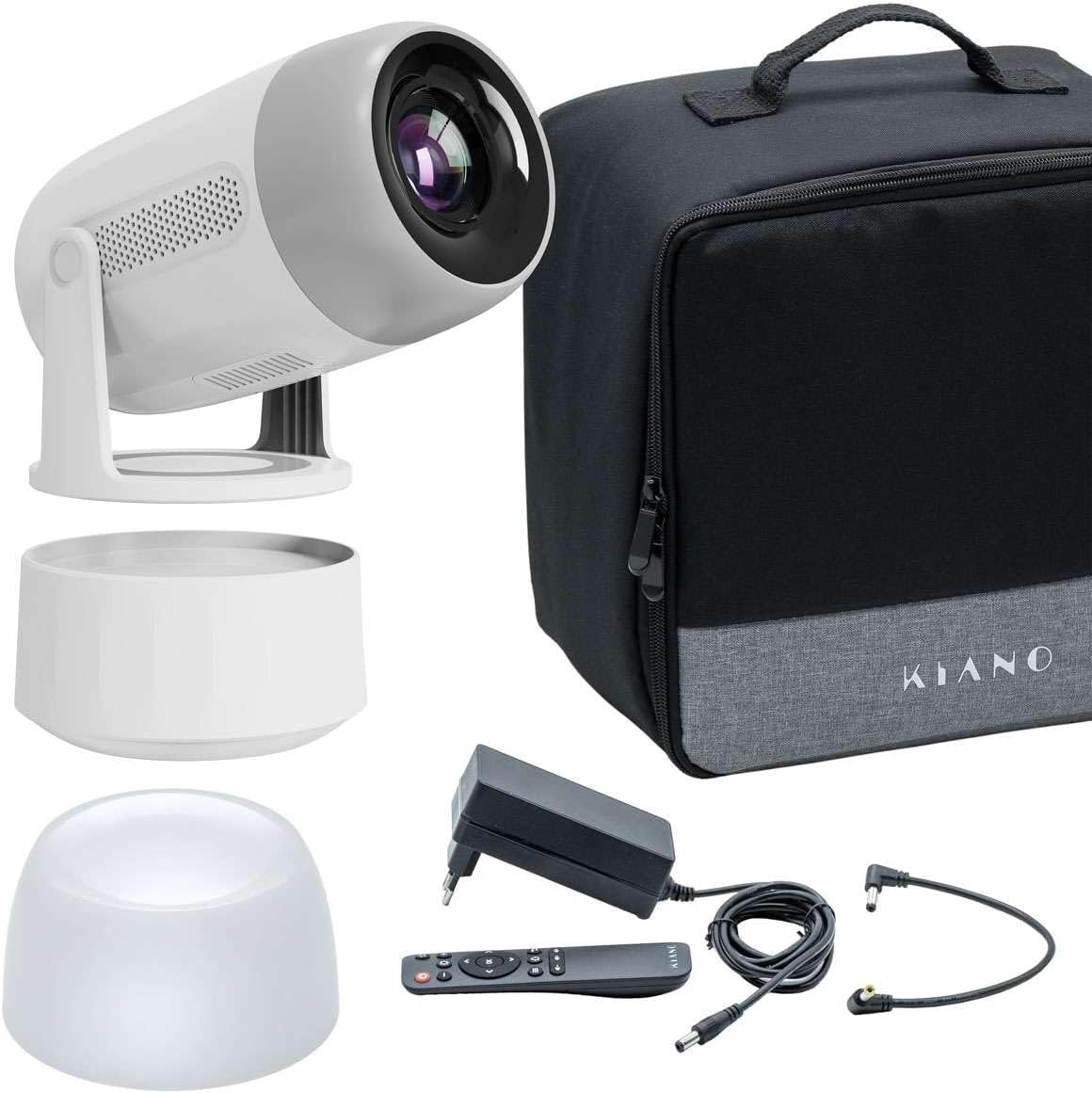
Image: KIANO Vision 2 Projector, external battery, carrying bag, remote control, and cables.
4. Ọja Ipariview
Mọ ara rẹ pẹlu awọn paati pirojekito ati awọn ebute oko oju omi.
4.1 Iwaju View

Aworan: Iwaju view of the KIANO Vision 2 Projector, highlighting the projection lens and front speaker grilles.
4.2 Ẹyìn View ati Ports

Aworan: Ẹyin view of the KIANO Vision 2 Projector, displaying the USB port, HDMI input, 3.5mm audio output, and DC power input.
- Ibudo USB: Fun sisopọ awọn ẹrọ ipamọ USB.
- Input HDMI: For connecting external video sources (e.g., laptop, game console).
- 3.5mm Audio Jade: Fun sisopọ awọn agbohunsoke ita tabi agbekọri.
- DC NINU: Power input for the projector.
- Bọtini agbara: Láti tan/pa pirojekito naa.
5. Eto
5.1 Titan / Pa a
- Connect the power cable to the DC IN port on the projector and then to a power outlet. If using the external battery, connect it between the projector and the power source, or directly to the projector if charged.
- Press and hold the Power button on the projector or the remote control to turn it on.
- To turn off, press and hold the Power button again until the projector shuts down.
5.2 Ibi
Place the projector on a stable, flat surface. The KIANO Vision 2 features a 180° rotatable stand, allowing for flexible projection angles, including ceiling projection.

Image: Diagram showing the KIANO Vision 2 Projector's 180-degree rotation capability and automatic keystone correction feature.
5.3 Idojukọ ati Atunse Keystone
- Idojukọ: Adjust the manual focus wheel (usually located near the lens) until the projected image is clear.
- Atunse okuta bọtini: The projector supports automatic keystone correction. If manual adjustment is needed, navigate to the settings menu using the remote control to correct image distortion.
6. Ṣiṣẹ
6.1 Awọn ẹrọ Nsopọ
- HDMI: Connect an HDMI cable from your source device (e.g., laptop, game console) to the HDMI input port on the projector. Select the HDMI input source from the projector's menu.
- USB: Fi awakọ filasi USB sinu ibudo USB lati mu media ṣiṣẹ files taara.
6.2 Asopọmọra Alailowaya
- Wi-Fi: Navigate to the Wi-Fi settings in the Android 11 operating system. Select your network and enter the password to connect to the internet.
- Bluetooth: Pair Bluetooth devices like external speakers or headphones via the Bluetooth settings menu.
- Screen Mirroring (AirPlay/Miracast/DLNA): Use the built-in casting features to mirror content from compatible smartphones, tablets, or computers. Access these options from the main menu or dedicated app.
6.3 Android OS Lilọ kiri
The KIANO Vision 2 runs on Android 11. Use the remote control to navigate the interface, launch applications, and adjust settings. You can download additional apps from the pre-installed app store.
6.4 Audio wu
The projector has integrated 2 x 3.2W stereo speakers. For enhanced audio, connect external speakers via the 3.5mm audio output or Bluetooth.

Image: A person relaxing on a couch, watching a movie projected onto a wall by the KIANO Vision 2 Projector in a home setting.
7. Itọju
7.1 Ninu
- Lẹnsi: Use the provided cleaning cloth or a soft, lint-free cloth specifically designed for optical lenses. Do not use abrasive cleaners.
- Òde: Fi aṣọ rírọrùn àti gbígbẹ nu ìta ẹ̀rọ ìfihàn náà. Fún àmì líle díẹ̀, fi díẹ̀ rẹ́ampen awọn asọ pẹlu omi.
- Afẹfẹ: Periodically check and clean the ventilation openings to ensure unobstructed airflow.
7.2 Ibi ipamọ
When not in use, store the projector in its carrying bag in a cool, dry place, away from direct sunlight and extreme temperatures.

Image: The KIANO Vision 2 Projector, its carrying bag, and the external battery unit placed on a wooden table, ready for storage or transport.
8. Laasigbotitusita
| Isoro | Owun to le Fa | Ojutu |
|---|---|---|
| Ko si aworan akanṣe | Power not connected, incorrect input source, lens cap on. | Check power connection, select correct input source (HDMI, USB), remove lens cap. |
| Aworan jẹ blurry | Focus not adjusted, projector too far/close. | Adjust the manual focus wheel. Ensure projector is within optimal projection distance. |
| Aworan ti daru (apẹrẹ trapezoid) | Pirojekito ko papẹndikula si iboju. | Use automatic or manual keystone correction in the settings menu. |
| Ko si ohun | Volume too low, external audio device not connected/selected, source device mute. | Increase projector volume. Check external audio connections. Ensure source device is not muted. |
| Isakoṣo latọna jijin ko ṣiṣẹ | Batteries low/dead, obstruction, not pointed at IR receiver. | Rọpo awọn batiri. Rii daju pe ko si awọn idiwọ. Tọkasi latọna jijin taara ni olugba IR ti pirojekito. |
9. Awọn pato
| Ẹya ara ẹrọ | Sipesifikesonu |
|---|---|
| Brand | Kiano |
| Awoṣe | Iranran 2 |
| Ipinnu abinibi | 1920 x 1080 HD ni kikun |
| Imọlẹ | 270 ANSI Lumens |
| Iwọn Isọtẹlẹ | 40-150 inches |
| Eto isesise | Android 11 |
| Alailowaya Asopọmọra | 2.4/5 GHz Wi-Fi, Bluetooth 5.2 |
| Atilẹyin Simẹnti | AirPlay, Miracast, DLNA |
| Ohun | 2 x 3.2W Awọn Agbọrọsọ Sitẹrio |
| Awọn ibudo | HDMI, USB, 3.5mm Audio Out, DC IN |
| Pataki Awọn ẹya ara ẹrọ | Automatic/Manual Keystone Correction, Manual Focus, 180° Rotatable Stand, Integrated Speaker |
| Awọn ẹrọ ibaramu | Smartphone, Laptop, Game Console, Tablet, External Speaker |
10. Atilẹyin ọja ati Support
For warranty information and technical support, please refer to the warranty card included with your product or visit the official Kiano website. If you encounter any issues not covered in this manual, please contact Kiano customer service for assistance.