
1. Ifihan
O ṣeun fun riraasing the SODLK T21 40W Portable Bluetooth Speaker. This manual provides essential information for setting up, operating, and maintaining your speaker. Please read it carefully before use to ensure optimal performance and longevity of the product.
2. Awọn ẹya Ọja
- 6D stereo surround sound for an immersive audio experience.
- Strengthened deep bass with 2pcs vibrating diaphragm.
- 4pcs built-in driver unit (2pcs bass driver unit + 2pcs Mids & Tweets) for balanced sound.
- 5Play model: Supports TF card slot, U disk, AUX input, Bluetooth, and TWS connection.
- 2pcs power amplifier for robust audio output.
- Integrated LED light for visual ambiance.
- Inbuilt 3600mAh battery for extended playtime.
- TWS (True Wireless Stereo) function to connect two speakers for amplified stereo sound.
3. Package Awọn akoonu
Lẹhin ṣiṣi silẹ, jọwọ rii daju pe gbogbo awọn nkan ti o wa ni isalẹ wa ati ni ipo to dara:
- SODLK T21 Portable Bluetooth Speaker
- USB Iru-C Ngba agbara USB
- Itọsọna olumulo

Image: The SODLK T21 Portable Bluetooth Speaker, highlighting its ultra-portable design and key features like IPX7 waterproof rating, BT 5.3, punchy bass, voice assistant, Type-C port, 18 hours playtime, stereo pairing, and hands-free calls.
4. Awọn iṣakoso ati Awọn Atọka
Familiarize yourself with the speaker's control panel for easy operation:
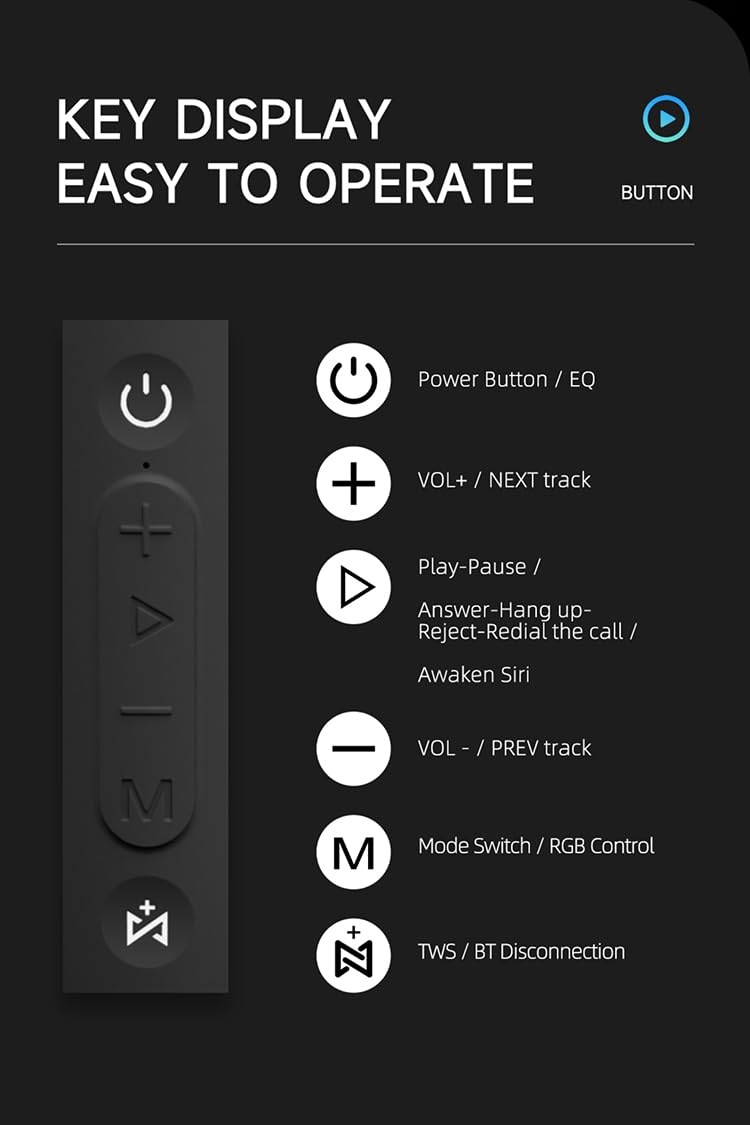
Aworan: A alaye view of the SODLK T21 speaker's control panel, showing buttons for Power/EQ, Volume Up/Next Track, Play/Pause/Answer/Hang Up/Reject/Redial/Awaken Siri, Volume Down/Previous Track, Mode Switch/RGB Control, and TWS/BT Disconnection.
- Power Button / EQ: Press and hold to power on/off. Short press to cycle through EQ modes.
- VOL+ / NEXT track: Tẹ kukuru lati mu iwọn didun pọ si. Tẹ gun lati fo si orin ti o tẹle.
- Play-Pause / Answer-Hang up-Reject-Redial the call / Awaken Siri: Short press for play/pause. Short press to answer/hang up calls. Long press to reject calls. Double press to redial. Triple press to awaken Siri (or other voice assistant).
- VOL- / PREV track: Tẹ kukuru lati dinku iwọn didun. Tẹ gun lati lọ si orin ti tẹlẹ.
- Mode Switch / RGB Control: Short press to switch between input modes (Bluetooth, TF card, U disk, AUX). Long press to control RGB lighting effects.
- TWS / BT Disconnection: Short press to initiate TWS pairing. Long press to disconnect Bluetooth.
5. Eto ati isẹ
5.1 Gbigba agbara si Agbọrọsọ
Before first use, fully charge the speaker. Connect the provided USB Type-C cable to the speaker's charging port and the other end to a compatible USB power adapter (5V/1A recommended). The charging time is approximately 3-4 hours.
5.2 Agbara Tan / Pa
Tẹ mọlẹ Bọtini agbara for 2-3 seconds to turn the speaker on or off. An audible prompt will indicate the power status.
5.3 Sisopọ Bluetooth
- Tan agbohunsoke. Yoo tẹ ipo sisopọ pọ si Bluetooth laifọwọyi, ti a fihan nipasẹ ina LED didan.
- Mu Bluetooth ṣiṣẹ lori ẹrọ rẹ (foonuiyara, tabulẹti, ati bẹbẹ lọ).
- Wa fun "SODLK T21" in the list of available Bluetooth devices and select it to connect.
- Once connected, the LED light will become solid, and you will hear a confirmation tone.
5.4 Ìsopọ̀ TWS (Stéréó Aláìlókùn Tòótọ́)
To achieve stereo sound, you can connect two SODLK T21 speakers together:

Image: Two SODLK T21 speakers shown side-by-side with a TWS icon and dashed lines indicating a wireless connection, illustrating the stereo pairing feature.
- Ensure both SODLK T21 speakers are powered on and not connected to any other Bluetooth device.
- On one speaker (this will be the primary speaker), short press the Bọtini TWS. The speaker will enter TWS pairing mode.
- The two speakers will automatically connect to each other. A confirmation tone will sound once TWS pairing is successful.
- Bayi, so ẹrọ rẹ pọ si agbọrọsọ akọkọ nipasẹ Bluetooth gẹgẹbi a ti ṣalaye ni apakan 5.3. Awọn agbohunsoke mejeeji yoo mu ohun ṣiṣẹ ni sitẹrio.
5.5 Ipo Yipada
Kukuru tẹ awọn Mode Switch Button (M) to cycle through available input modes: Bluetooth, TF Card, U Disk, and AUX. The speaker will announce the current mode.
Iṣakoso Imọlẹ RGB 5.6
Gun tẹ awọn Mode Switch Button (M) to change or turn off the RGB lighting effects.

Image: The SODLK T21 speaker displaying a vibrant rainbow light show, illustrating its 16.8 million color RGB light effect feature.
6. Itọju
- Sọ agbọrọsọ mọ pẹlu asọ asọ ti o gbẹ. Ma ṣe lo abrasive ose tabi epo.
- Jẹ́ kí agbọ́rọ̀sọ náà jìnnà sí ooru tó le koko, oòrùn tààrà, àti ọrinrin.
- Ma ṣe gbiyanju lati ṣajọ tabi tun agbọrọsọ naa ṣe funrararẹ. Eyi yoo sọ atilẹyin ọja di ofo.
- Tọju agbohunsoke ni itura, ibi gbigbẹ nigbati o ko ba lo fun awọn akoko gigun.
7. Laasigbotitusita
| Isoro | Owun to le Fa | Ojutu |
|---|---|---|
| Agbọrọsọ ko ni tan. | Batiri kekere. | Gba agbara si agbọrọsọ ni kikun. |
| Ko le so pọ nipasẹ Bluetooth. | Agbọrọsọ ko si ni ipo sisopọ tabi ti sopọ tẹlẹ si ẹrọ miiran. | Ensure the speaker is in pairing mode (flashing LED). Disconnect from other devices. Restart both speaker and device. |
| Ko si ohun. | Volume too low, incorrect input mode, or device not playing. | Increase volume on both speaker and device. Check input mode. Ensure audio is playing on the connected device. |
| TWS sisopọ kuna. | Àwọn agbọ́hùnsọ̀kan ti jìnnà jù tàbí wọ́n ti so pọ̀ mọ́ àwọn ẹ̀rọ mìíràn tẹ́lẹ̀. | Ensure speakers are within close proximity. Disconnect both speakers from any other Bluetooth devices before initiating TWS pairing. |
8. Awọn pato

Image: The SODLK T21 speaker with its dimensions (232mm height, 100mm width) and a table of specifications including model number, color, BT version, output, waterproof rating, play time, charging time, working distance, input, speaker size, and speaker weight.
| Ẹya ara ẹrọ | Ẹ̀kúnrẹ́rẹ́ |
|---|---|
| Awoṣe No. | T21 |
| Àwọ̀ | Dudu |
| Ẹya BT | BT5.3 |
| Abajade | 40W |
| Mabomire | IPX7 |
| Play Time | Titi di wakati 18 |
| Akoko gbigba agbara | 3-4 wakati |
| Ijinna iṣẹ | Titi di 18M |
| Iṣawọle | 5V/1A |
| Iwọn Agbọrọsọ | 232mm * 100mm |
| Iwọn Agbọrọsọ | 1.12KG |
9. Atilẹyin ọja ati Support
The SODLK T21 Portable Bluetooth Speaker comes with a standard manufacturer's warranty. Please refer to the warranty card included in your package for specific terms and conditions. For technical support or service inquiries, please contact your retailer or the SODLK customer service team.