
1. Ọja Ipariview
The Vetroo M06 is a compact mid-tower PC case designed for Micro-ATX and Mini-ITX motherboards. It features a high-airflow mesh front panel to ensure efficient cooling for gaming and high-performance systems. The chassis offers a capacity of approximately 25 liters, making it suitable for various desktop environments.

Figure 1: Vetroo M06 PC Case with approximate dimensions (15.5"D x 7.8"W x 13.0"H).
2. Eto ati fifi sori
2.1 Ibamu Apakan
This case supports Micro-ATX and Mini-ITX motherboards. Ensure your components adhere to the following maximum dimensions:
- Gigun GPU: Ti o de 355mm
- Iwọn otutu Sipiyu: Ti o de 165mm
- PSU Length: Up to 160mm (adjustable mounting)
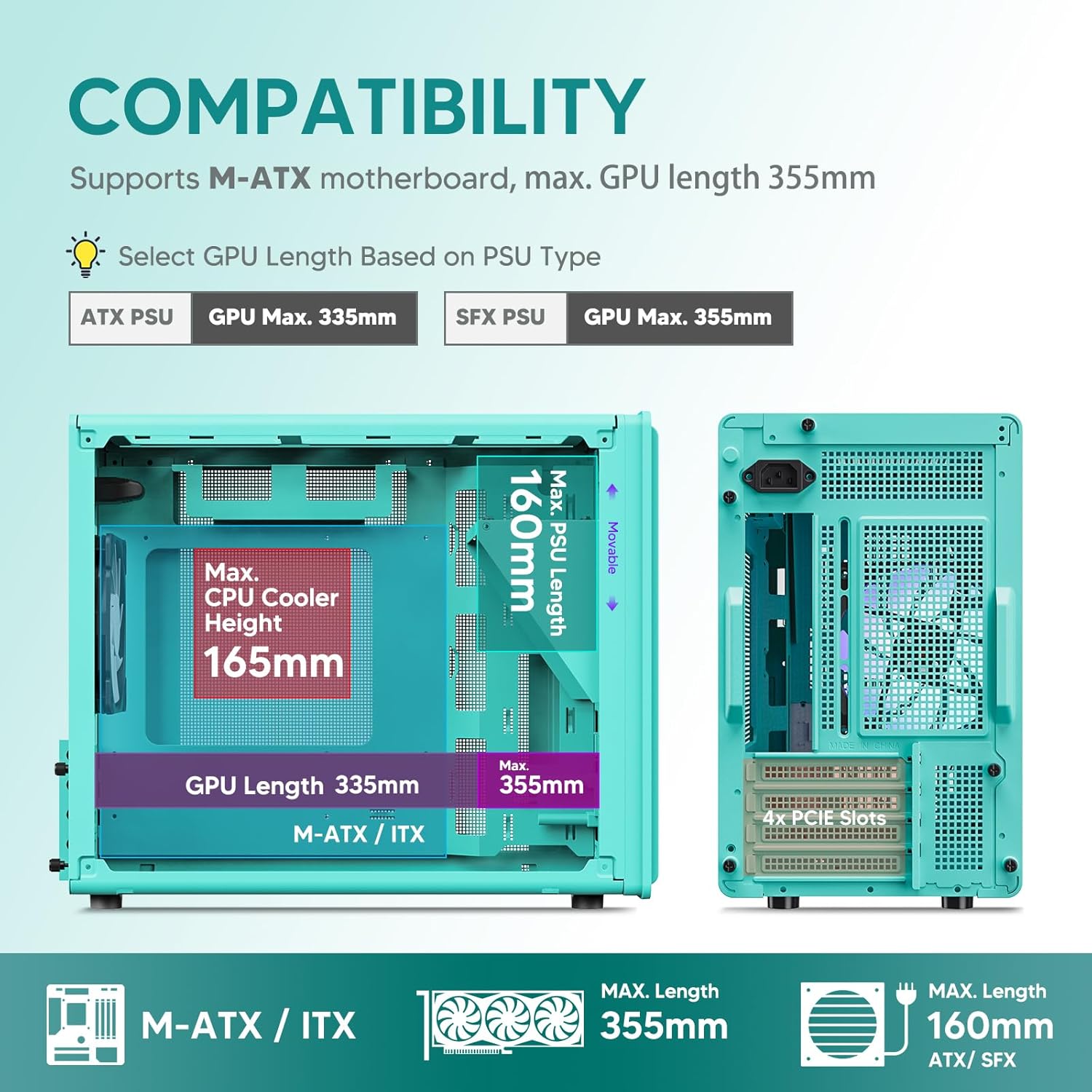
Figure 2: Component compatibility and maximum dimensions within the M06 case.
2.2 Fifi sori modaboudu
- Remove the side panels by unscrewing the captive screws.
- Fi I/O shield sinu ẹhin šiši ọran naa.
- Align your Micro-ATX or Mini-ITX motherboard with the standoffs inside the case.
- Ṣe aabo modaboudu pẹlu awọn skru ti a pese.
2.3 Graphics Card (GPU) fifi sori
- Yọ awọn ideri PCIe pataki ti o yẹ lati ẹhin ọran naa.
- Insert the GPU into the primary PCIe slot on your motherboard.
- Secure the GPU to the case with screws.
2.4 Power Ipese Unit (PSU) fifi sori
The M06 case features an adjustable PSU mount to accommodate different power supply sizes and cable management needs.
- Determine the optimal mounting position (Location 1, 2, or 3) for your PSU based on its length and your cable routing plan.
- If using an SFX PSU, attach the included SFX bracket to the PSU.
- Slide the PSU into the chosen mounting location and secure it with screws from the rear of the case.

Figure 3: Adjustable PSU mounting options and SFX bracket.
2.5 Itutu eto sori
The case supports various cooling configurations to maintain optimal temperatures.
- Awọn ololufẹ: Títí dé àwọn onífẹ̀ẹ́ 5x 120mm.
- Radiator: Supports a 240mm liquid radiator at the top.

Figure 4: Cooling system layout with fan and radiator support.
2.6 Fifi sori ẹrọ Ibi ipamọ
The M06 case provides mounting options for both HDDs and SSDs.
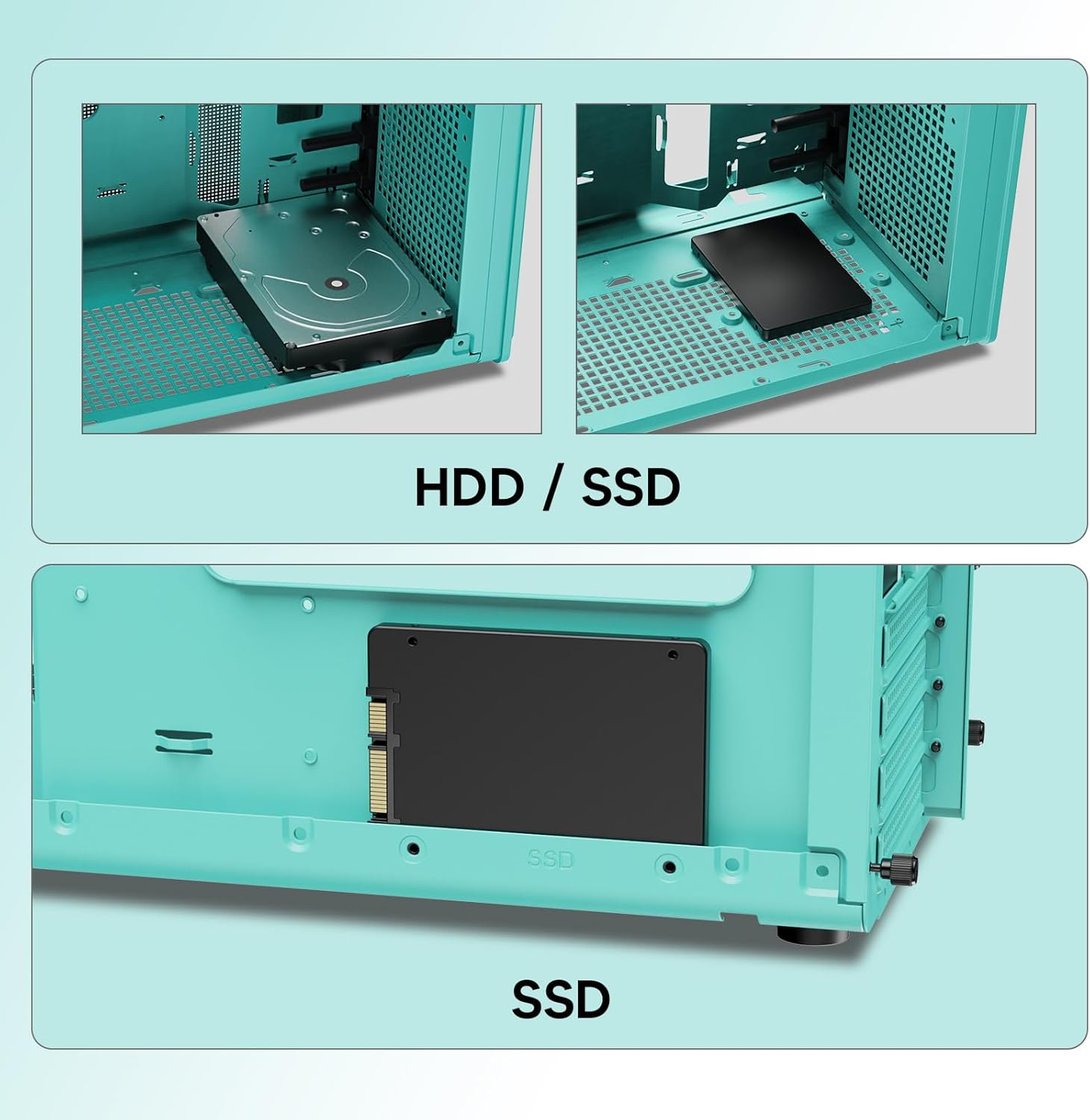
Figure 5: HDD and SSD mounting locations.
2.7 Iwaju Mo / Eyin Panel Awọn isopọ
So awọn okun iwaju paneli pọ mọ awọn akọle ti o baamu lori modaboudu rẹ.
- Bọtini agbara: For turning the system on/off.
- Bọtini atunto: For restarting the system.
- Ibudo USB 3.0: Fun ga-iyara data gbigbe.
- Àwọn Jack ohùn HD: For headphones and microphone.
- Ibudo Iru-C USB: For modern peripheral connectivity.

Figure 6: Front I/O Panel layout.
3. Awọn ilana Iṣiṣẹ
Once all components are installed and connected, ensure all cables are properly routed and secured. Close the side panels. Connect your monitor, keyboard, mouse, and power cable to the rear of your PC. Press the power button on the front I/O panel to start your system.
Fidio 1: Pariview of the Vetroo M06 Micro-ATX Computer Case in Mint Green, demonstrating its features and compact design.
4. Itọju
4.1 Ninu
Regular cleaning helps maintain optimal airflow and component longevity. Use compressed air to clear dust from the mesh panels and internal components. For external surfaces, a soft, damp asọ ti wa ni niyanju.
4.2 Airflow Optimization
The M06 case is designed for excellent airflow. Ensure that fan orientations are correct (intake/exhaust) to create a positive or neutral pressure system, minimizing dust buildup and maximizing cooling efficiency.

Figure 7: Excellent airflow design of the M06 case.
5. Laasigbotitusita
- Eto Ko Titan:
Check all power connections, including the PSU to the wall outlet, PSU to motherboard (24-pin and CPU 8-pin), and front panel power switch cable to the motherboard header. Ensure the PSU switch is in the 'ON' position. - Ko si Abajade Ifihan:
Verify that your monitor is connected to the graphics card (GPU) and not the motherboard's integrated graphics ports (unless you are using integrated graphics). Reseat the GPU and RAM modules. - Àwọn Èròjà Tí Ó Ń Gbóná Jù:
Ensure all case fans and CPU cooler fans are spinning correctly. Verify proper thermal paste application on the CPU. Check for obstructions to airflow and clean any dust buildup. - Awọn ibudo iwaju paneli ko ṣiṣẹ:
Confirm that all front panel I/O cables (USB 3.0, USB Type-C, HD Audio) are securely connected to the correct headers on your motherboard. - Awọn ọran Ibamu Ẹka:
Refer to Section 2.1 for maximum component dimensions. If a component does not fit, verify its specifications against the case's limits. For PSU, ensure the adjustable mount is set correctly.
6. Awọn pato
The following table details the technical specifications of the Vetroo M06 PC Case:
| Ẹya ara ẹrọ | Sipesifikesonu |
|---|---|
| Brand | Vetroo |
| Orukọ awoṣe | M06 |
| Iru Irú | Ile-iṣọ kekere |
| Modaboudu Ibamu | Micro ATX, Mini ITX |
| Awọn iwọn Ọja (D x W x H) | 15.55" x 7.87" x 13.07" |
| Ohun elo | Acrylonitrile Butadiene Styrene (ABS), SPCC Steel (0.8mm) |
| Gígùn GPU (Púpọ̀ jùlọ) | 355mm |
| Gíga Itutu Sipiyu (Púpọ̀ jùlọ) | 165mm |
| Gígùn PSU (Púpọ̀ jùlọ) | 160mm (Adjustable) |
| Ọna Itutu | Afẹfẹ |
| Fan Support | Up to 5x 120mm fans |
| Radiator Support | 1x 240mm (Top) |
| Iwaju Awọn Ibudo I / O | 1x USB 3.0, 1x USB Type-C, HD Audio, Power, Reset |
| Internal Bays Quantity | 5 (for HDD/SSD) |

Figure 8: Illustration of the 0.8mm steel plate construction.
7. Atilẹyin ọja ati Support
7.1 atilẹyin ọja Alaye
The Vetroo M06 PC Case comes with a 1-odun atilẹyin ọja from the date of purchase. This warranty covers manufacturing defects and issues arising from normal use. It does not cover damage caused by misuse, accidents, unauthorized modifications, or improper installation.
7.2 Onibara Support
For technical assistance, warranty claims, or any questions regarding your Vetroo M06 PC Case, please refer to the official Vetroo webaaye tabi kan si atilẹyin alabara wọn taara. Jeki ẹri rira rẹ fun ijẹrisi atilẹyin ọja.