
1. Ifihan
This manual provides essential instructions for the safe operation, setup, and maintenance of your FINOTI D27 Pro MAX GPS Drone. The D27 Pro MAX is an advanced quadcopter featuring an 8K EIS HD camera, 5G WiFi FPV transmission, 360° obstacle avoidance, and GPS-assisted flight modes. Please read this manual thoroughly before operating the drone to ensure proper function and to prevent damage or injury.

Image: The FINOTI D27 Pro MAX GPS Drone with its remote control, showcasing its design and integrated screen.
2. Awọn Itọsọna Aabo
Adherence to these safety guidelines is crucial for preventing accidents, injuries, and damage to the drone or property.
- Ayika: Operate the drone in open areas, away from people, animals, buildings, and power lines. Avoid flying in strong winds, rain, or other adverse weather conditions.
- Ijinna: Maintain a safe distance from the drone during operation. Do not attempt to catch the drone while it is flying.
- Aabo Batiri: Keep batteries away from naked flames or direct heat sources. Use only the provided charger and batteries. Do not overcharge or puncture batteries.
- Ṣiṣayẹwo Ọkọ ofurufu-ṣaaju: Always perform a pre-flight check to ensure all components are securely attached and functioning correctly.
- Ibamu Ofin: Be aware of and comply with all local regulations regarding drone operation, including airspace restrictions and privacy laws.
- Ihamọ ọjọ-ori: This product is not suitable for children without adult supervision.
3. Package Awọn akoonu
Jẹrisi pe gbogbo awọn ohun kan wa ninu package:
- D27 Pro MAX GPS Drone
- Remote Control with 4.5-inch Screen
- Flight Battery (3.7V 3000mAh) - Quantity may vary based on purchase (Single, Dual, or Triple Battery variant)
- Okun Ngba agbara USB
- Awọn ategun apoju (awọn ege mẹrin)
- Itọsọna olumulo
- Storage Box/Bag
4. Eto
4.1. Awọn batiri gbigba agbara
Before first use, fully charge the drone's flight battery and the remote control's internal battery.
- So okun gbigba agbara USB pọ mọ batiri drone ati adapter agbara USB ti o yẹ (ko si ninu rẹ).
- Connect the USB charging cable to the remote control's charging port.
- Charging indicators will show the charging status. Disconnect once fully charged.
4.2. Propeller fifi sori
Ensure propellers are correctly installed on the corresponding motor shafts. Match 'A' propellers with 'A' motors and 'B' propellers with 'B' motors. Incorrect installation will prevent flight.
4.3. Igbaradi Iṣakoso Latọna jijin
Power on the remote control. The integrated 4.5-inch screen will activate. Ensure the remote control's battery is sufficiently charged.
4.4. App Download ati Asopọ
For advanced features and real-time FPV, download the dedicated drone application to your smartphone. Refer to the QR code in the quick start guide or search for the app name in your device's app store.
- Agbara lori drone ati iṣakoso latọna jijin.
- On your smartphone, connect to the drone's Wi-Fi network (usually named 'D27-XXXXXX').
- Open the drone application. The live video feed should appear.
5. Awọn ilana Iṣiṣẹ
5.1. Pre-Flight Ayẹwo
- Rii daju pe drone ati awọn batiri isakoṣo latọna jijin ti gba agbara ni kikun.
- Check that propellers are securely attached and undamaged.
- Verify that the camera lens is clean.
- Confirm GPS signal acquisition (if flying outdoors).
- Check for any obstructions in the flight path.
5.2. Mu-pa ati ibalẹ
After powering on the drone and remote, and completing calibration (refer to the quick start guide for calibration steps), you can initiate take-off.
- Ìṣípò Pàtàkì Kan: Press the dedicated take-off button on the remote control. The drone will automatically ascend to a safe altitude and hover.
- Gbigba afọwọṣe: Push both joysticks simultaneously to the bottom-outer corners to unlock motors, then slowly push the left joystick up to ascend.
- Ibalẹ bọtini Ọkan: Press the dedicated landing button. The drone will descend and land automatically.
- Ibalẹ pẹlu ọwọ: Slowly pull the left joystick down to descend.
5.3. Awọn ipo ofurufu ati Awọn ẹya ara ẹrọ
The D27 Pro MAX offers several intelligent flight modes:
- Ìtọpinpin Ọlọ́gbọ́n GPS: The drone will automatically follow the remote control or a designated target.
- Image Tracking: Identify a target on the screen, and the drone will automatically track its movement.
- Idanimọ afarajuwe: Within 1-3 meters of the drone, perform specific hand gestures towards the camera to trigger photo or video recording.
- Ọ̀nà Ìṣètò Òpópónà Púpọ̀: Use the app to set multiple waypoints on a map. The drone will fly autonomously along the pre-set route.
- Yika Ojuami Ti o wa titi: Select a central point on the map, then set a desired radius. The drone will orbit the central point at the specified distance.

Image: Illustration of the GPS homing feature, showing the drone returning to a designated home point.

Image: The drone maintaining a stable hover using optical flow positioning, depicted over a scenic waterfall.
5.4. Idiwo
The D27 Pro MAX is equipped with 360° omnidirectional obstacle avoidance sensors. These sensors detect obstacles in the drone's path and automatically adjust its flight to prevent collisions. While highly effective, it is not a substitute for careful piloting and visual observation.

Image: Visual representation of the drone's 360° obstacle avoidance system detecting and reacting to its surroundings.
5.5. Return to Home (RTH) Function
The drone features multiple Return to Home functions for enhanced safety:
- GPS One-Click Return: Press the RTH button on the remote control, and the drone will return to its recorded take-off point.
- Ipadabọ Agbara Kekere: If the drone's battery level becomes critically low, it will automatically initiate RTH.
- Ko si ipadabọ ifihan agbara: If the connection between the drone and remote control is lost, the drone will automatically initiate RTH.
5.6. Camera Operation (8K EIS HD)
The D27 Pro MAX is equipped with an 8K EIS (Electronic Image Stabilization) HD camera for high-quality aerial photography and videography.
- Aworan/Fidio: Lo awọn bọtini iyasọtọ lori isakoṣo latọna jijin tabi wiwo app lati ya awọn fọto tabi bẹrẹ/da gbigbasilẹ fidio duro.
- Gbigbe Aworan: The 5G image transmission system provides a real-time view on the remote control's screen or connected smartphone.
- Pipin: Photos can be shared individually or in batches. Videos can be shared separately after recording.
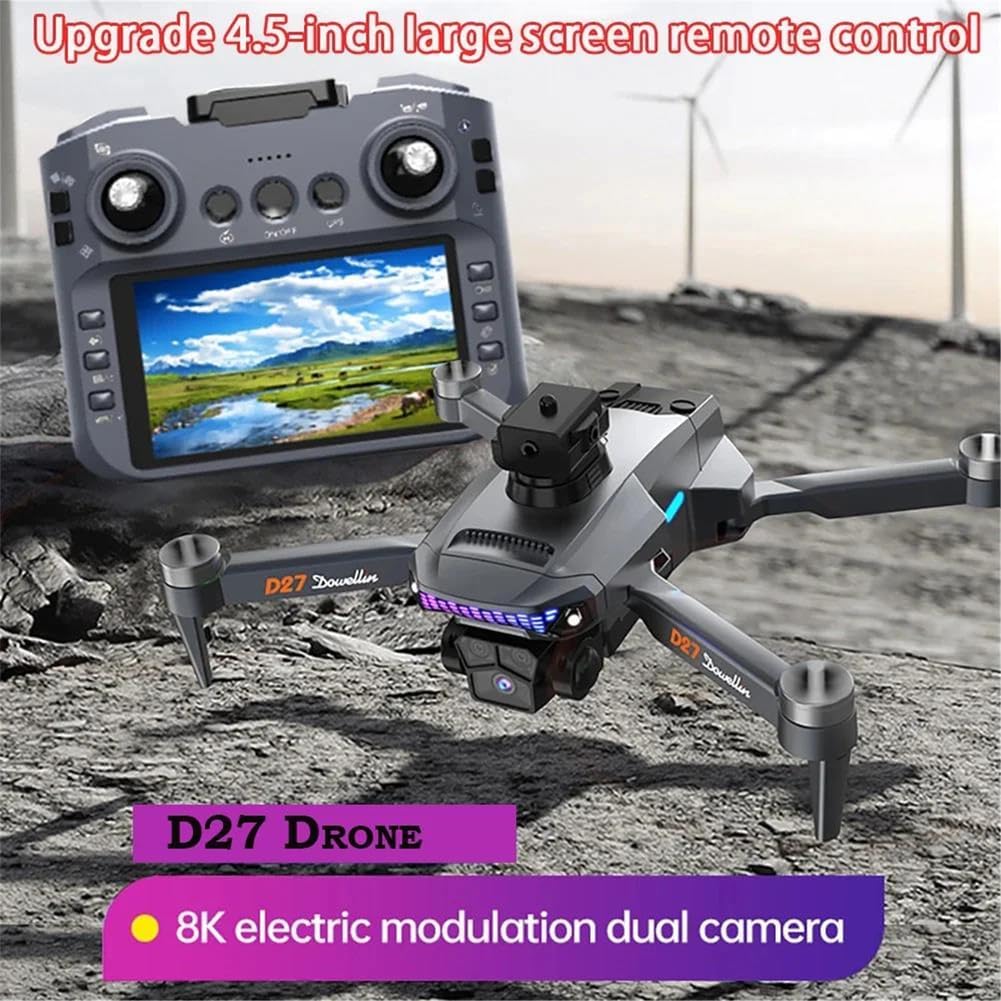
Image: The FINOTI D27 Pro MAX drone and its remote control, highlighting the 8K electric modulation dual camera system.
6. Itọju
6.1. Ninu
Regular cleaning helps maintain performance and longevity.
- Wipe the drone body and remote control with a soft, dry cloth.
- Use a soft brush or compressed air to remove dust from motors and sensors.
- Clean the camera lens with a lens cleaning cloth.
6.2. Rirọpo propeller
Inspect propellers for cracks or damage before each flight. Replace damaged propellers immediately using the provided spare parts. Ensure correct 'A' and 'B' propeller placement.
6.3. Itọju Batiri ati Ibi ipamọ
- Store batteries in a cool, dry place, away from direct sunlight and heat.
- Do not store fully charged or completely depleted batteries for extended periods. Charge to approximately 50-60% for long-term storage.
- If the drone will not be used for an extended period, remove the flight battery.
7. Laasigbotitusita
| Isoro | Owun to le Fa | Ojutu |
|---|---|---|
| Drone ko ni agbara lori | Low battery; Battery not connected | Gba agbara si batiri; Tun batiri pọ ni aabo |
| Drone cannot take off | Motors not unlocked; Incorrect propeller installation; Calibration error | Unlock motors (joysticks to bottom-outer); Check propeller orientation; Perform calibration |
| Poor image transmission/FPV feed | Weak Wi-Fi signal; Interference; Distance too far | Ensure strong Wi-Fi connection; Fly in open areas; Reduce distance to drone |
| Drone drifts nigba flight | Improper calibration; Strong wind | Recalibrate gyroscope/compass; Avoid flying in strong winds |
| Yẹra fun idiwo ko ṣiṣẹ | Sensors obstructed/dirty; Feature disabled | Clean sensors; Ensure feature is enabled in app/remote settings |
8. Awọn pato
- Awoṣe: D27 Pro MAX
- Brand: FINOTI
- Kamẹra: 8K EIS HD Lens
- Gbigbe Aworan: 5G WiFi FPV
- Isakoṣo latọna jijin: 4.5-inch Large Screen Remote Control
- Yẹra fun Idiwo: 360° Ìtọ́sọ́nà gbogbo-ẹ̀yà
- Iru mọto: Aini fẹlẹ
- Batiri ofurufu: 3.7V3000mAh
- Positioning System: GPS + Ìṣàn Ojú
- Awọn iṣẹ ọgbọn: GPS One-Click Return, Low Power Return, No Signal Return, GPS Intelligent Tracking, Image Tracking, Gesture Recognition, Route Multi-Point Planning, Fixed Point Surround, Aircraft Search Function.

Aworan: Isunmọ view of the low-noise brushless motor, emphasizing stability and wind resistance.