
Ọrọ Iṣaaju
Welcome to your new HITRENDS Pink Tower Power Strip. This device is designed to provide convenient power distribution and surge protection for your electronic devices. Please read this manual carefully before use to ensure safe and optimal operation and to understand its features and functions.
Ọja Awọn ẹya ara ẹrọ
- 12 AC Outlets + 5 Smart USB Ports: Power multiple devices simultaneously. USB ports provide 5V/2.4A output per port.
- Apẹẹrẹ Ilé Gogoro Tí Ó Ń Fi Ààyè Pamọ́: Vertical build with 360° outlet spacing prevents blocked outlets and fits efficiently in tight spaces.
- Awọn Idaabobo Aabo To ti ni ilọsiwaju: Features 1050 Joules surge protection, overload protection, short-circuit protection, over-current protection, and fire-resistant casing.
- Integrated Power Switches: Two independent ON/OFF switches control different sections of AC outlets for energy saving and safety.
- Heavy-Duty Extension Cord: Equipped with a 16AWG, 10-foot (3-meter) extension cord designed to resist overheating.
- Wall-Mountable Base: Allows for secure, clutter-free installation.
- AMẸRIKA Voltage Standards: Compatible with 110-125V, 13A, 1625W MAX electrical systems.

Olusin 1: Pariview of the HITRENDS Pink Tower Power Strip, highlighting its 12 AC outlets, 5 USB ports, two ON/OFF switches, and overall dimensions. The 10-foot power cord is also shown.
Awọn Itọsọna Aabo pataki
Lati dinku eewu ina mọnamọna, ina, tabi ipalara, nigbagbogbo tẹle awọn iṣọra aabo ipilẹ wọnyi:
- Do not exceed the maximum power rating of 1625W or 13A. Overloading the power strip can cause overheating and fire.
- This device is for indoor use only. Do not expose to moisture or use in wet environments.
- Má ṣe tú tàbí ṣe àtúnṣe sí ìlà iná mànàmáná náà. Tọ́ka gbogbo iṣẹ́ ìtọ́jú náà sí àwọn òṣìṣẹ́ tó péye.
- Keep children away from the power strip and connected devices.
- Ensure the power cord is fully extended and not coiled or covered when in use to prevent heat buildup.
- Má ṣe so ìlà agbára kan pọ̀ mọ́ òmíràn.
- The red button on the bottom is an overload reset button, not an LED indicator. If the power strip stops working, press this button to reset after reducing the load.

Figure 2: Illustration of the multi-protection features including 1050J surge protection, overload protection, short-circuit protection, over-current protection, and over-heating protection. The bottom of the power strip with the reset button and model information is also visible.
Eto Itọsọna
- Yọọ kuro: Farabalẹ yọ okun agbara kuro ninu apoti rẹ.
- Ibi: Choose a dry, indoor location for the power strip. Its compact tower design is ideal for desks, nightstands, or entertainment centers. Ensure adequate ventilation around the unit.
- Iṣagbesori Odi (Aṣayan): The power strip features a wall-mountable base. Use appropriate screws (not included) to secure the base to a wall or desk underside, then attach the power strip.
- Sopọ si Orisun Agbara: Plug the power strip's 10-foot extension cord into a standard 3-prong 110-125V AC wall outlet.
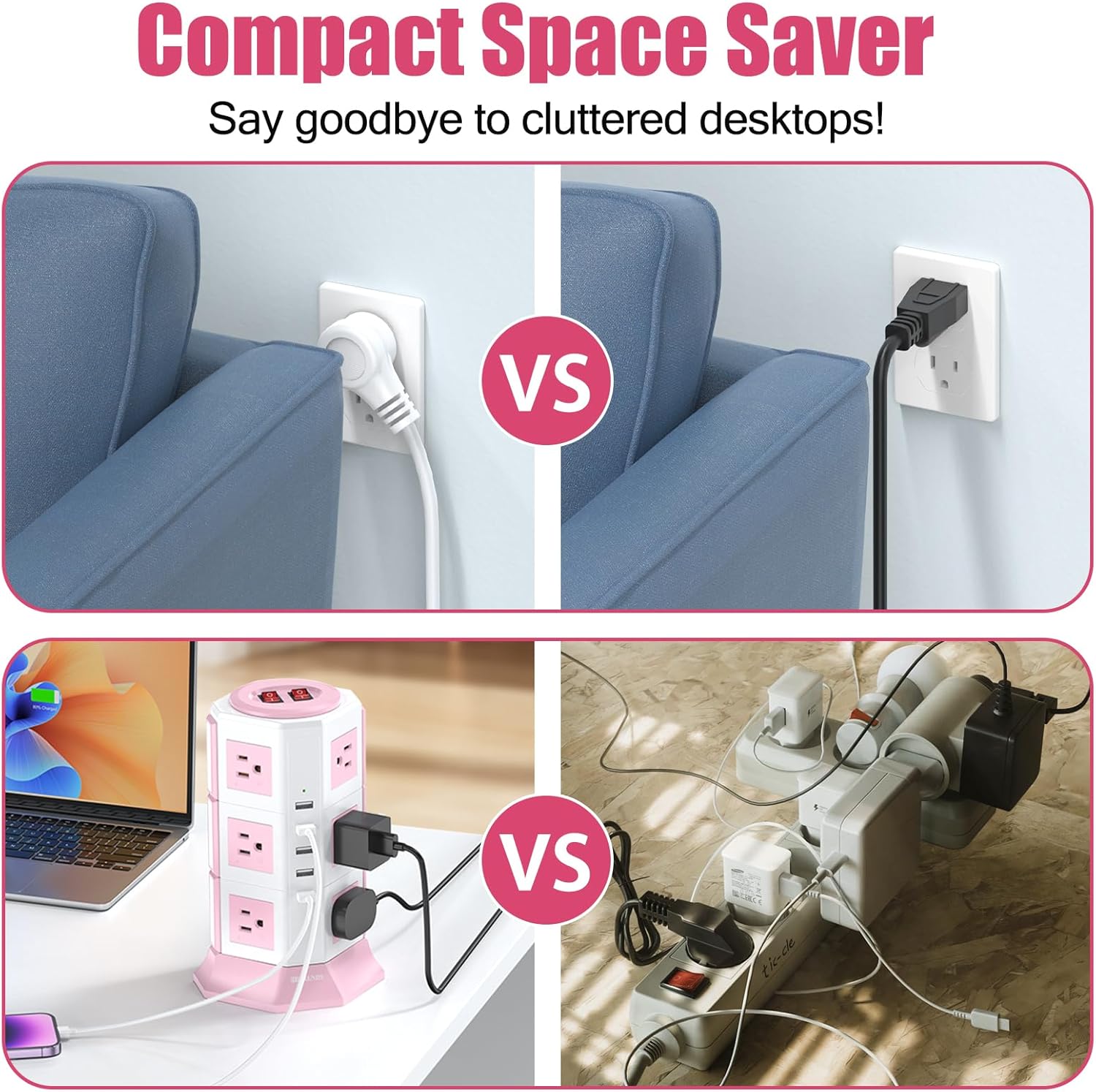
Figure 3: Visual comparison demonstrating how the tower power strip saves space compared to standard wall outlets and cluttered traditional power strips, making it suitable for various environments like offices and homes.
Awọn ilana Iṣiṣẹ
- Titan/Apapa: The power strip has two independent ON/OFF switches located on the top. Each switch controls a specific set of AC outlets. Press a switch to the 'ON' position to supply power to its corresponding outlets. The switch will illuminate when active.
- Sísopọ̀ àwọn ẹ̀rọ AC: Plug your electronic devices into any of the 12 AC outlets. The wide spacing accommodates larger power adapters without blocking adjacent outlets.
- Nsopọ awọn ẹrọ USB: Plug your USB-powered devices (e.g., smartphones, tablets) into any of the 5 USB ports. The smart USB ports will automatically detect and deliver the optimal charging current up to 2.4A per port.
- Awọn imọlẹ Atọka: Small green indicator lights near the USB ports confirm active USB power.

Figure 4: The power strip actively in use on a desk, demonstrating multiple devices such as a laptop, tablet, and phone charging simultaneously via AC outlets and USB ports.

Nọmba 5: Alaye views of key components: the overload protection reset button on the bottom, the indicator light for USB ports, the two main power switches, and the anti-slip pads on the base for stability.
Itoju
- Ninu: Yọ okun ina kuro ninu ibudo ogiri ṣaaju ki o to nu. Lo aṣọ rirọ ati gbigbẹ lati nu ita. Maṣe lo awọn ohun elo afọmọ omi tabi awọn ohun elo fifọ.
- Ibi ipamọ: Tí o kò bá lò ó fún ìgbà pípẹ́, tọ́jú ẹ̀rọ agbára náà sí ibi gbígbẹ tí ó tutù, tí kò sí ìmọ́lẹ̀ oòrùn àti ọ̀rinrin.
- Ayewo: Periodically inspect the power cord and the power strip for any signs of damage, such as frayed wires or cracked casing. If damage is found, discontinue use and contact customer support.
Laasigbotitusita
- No Power to Outlets/USB Ports:
- Rii daju pe rinhoho agbara ti wa ni edidi ni aabo sinu iṣan ogiri ti n ṣiṣẹ.
- Check if the ON/OFF switches on the top of the power strip are pressed to the 'ON' position and illuminated.
- The power strip may have experienced an overload. Locate the red reset button on the bottom of the unit. Unplug some devices to reduce the load, then press the reset button firmly to restore power.
- Rí i dájú pé ihò ìtajà ògiri náà ń ṣiṣẹ́ nípa fífi ẹ̀rọ mìíràn sí i.
- Slow USB Charging:
- Ensure your USB cable is not damaged and is suitable for your device.
- Some devices may require higher charging currents than the 2.4A maximum per USB port.
- Surge Protection Indicator (if applicable): This model does not have a dedicated surge protection indicator light. If a major surge occurs, the internal protection may be compromised, and the unit may cease to function. In such a case, replace the power strip.
Imọ ni pato
| Sipesifikesonu | Iye |
|---|---|
| Nọmba awoṣe | TP-VA5U12S |
| AC iletslets | 12 |
| Awọn ibudo USB | 5 |
| Ijade USB | 5V / 2.4A (per port, total 4.2A) |
| Voltage Rating | 110-125V~ |
| O pọju Lọwọlọwọ | 13 Amps |
| Agbara to pọju | 1625W |
| gbaradi Idaabobo Rating | 1050 ayokele |
| Okun Gigun | 10 ft (mita 3) |
| Iwọn okun | 16AWG |
| Pulọọgi Iru | Iru B - pin 3 (Ariwa Amerika) |
| Ohun elo apade | Acrylonitrile Butadiene Styrene, Rubber (Fire-resistant) |
| Pataki Awọn ẹya ara ẹrọ | Light Indicator, On And Off Switch, Surge Protection, Wide Spaced Outlet |

Figure 6: Technical parameters of the HITRENDS Pink Tower Power Strip, including material, current, voltage, power, frequency, USB output, product size, and safety protection details.
Atilẹyin ọja ati Onibara Support
This HITRENDS power strip is backed by a 1-Odun olupese atilẹyin ọja lati ọjọ ti o ra. Atilẹyin ọja yi ni wiwa awọn abawọn ninu awọn ohun elo ati iṣẹ ṣiṣe labẹ lilo deede.
For warranty claims, technical assistance, or any questions regarding your product, please contact HITRENDS customer support. Refer to the product packaging or the official HITRENDS webojula fun awọn julọ lọwọlọwọ alaye olubasọrọ.
Please have your model number (TP-VA5U12S) and purchase information ready when contacting support.