
Ọrọ Iṣaaju
Thank you for choosing the pTron Studio Evo Wireless Over-Ear Headphones. This manual provides essential information for setting up, operating, and maintaining your headphones to ensure optimal performance and longevity. Please read these instructions carefully before use.

Aworan: Pariview of pTron Studio Evo features including sound quality, battery life, driver size, controls, charging, and connectivity modes.
Ṣeto
1. Unboxing ati irinše
Carefully remove all items from the packaging. The box should contain:
- pTron Studio Evo Wireless Over-Ear Headphones
- USB Iru-C Ngba agbara USB
- 3.5mm Audio Cable (Aux-in)
- Afowoyi Olumulo (iwe-ipamọ yii)
2. Ngba agbara si awọn Agbekọri
Before first use, fully charge your headphones. Connect the provided USB Type-C cable to the charging port on the headphones and the other end to a compatible USB power source (e.g., wall adapter, computer USB port).
- Akoko gbigba agbara: O fẹrẹ to awọn wakati 2 fun idiyele ni kikun.
- Igbesi aye batiri: Up to 70 hours of playtime on a single full charge.

Image: pTron Studio Evo headphones highlighting 70 hours of playtime and Type-C fast charging.
3. Agbara lori / Paa
- Lati Fi agbara: Tẹ mọlẹ bọtini agbara fun isunmọ awọn aaya 3 titi ti Atọka LED yoo tan imọlẹ.
- Lati Paarẹ: Tẹ mọlẹ bọtini agbara fun isunmọ awọn aaya 3 titi ti itọkasi LED yoo wa ni pipa.
4. Sisopọ Bluetooth
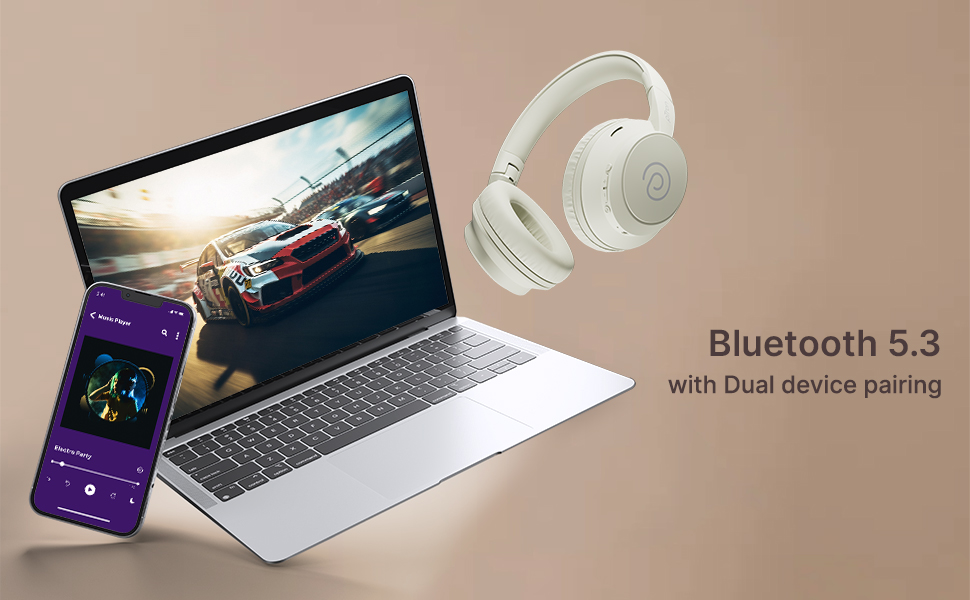
The pTron Studio Evo headphones utilize Bluetooth 5.3 for stable wireless connectivity.
- Rii daju pe awọn agbekọri ti wa ni pipa.
- Tẹ bọtini agbara ki o si di mu fun awọn aaya 5-7 titi ti ifihan LED yoo fi tan pupa ati buluu ni ọna miiran, ti o fihan ipo isopọmọ.
- Lórí ẹ̀rọ rẹ (fóònù alágbéka, kọ̀ǹpútà alágbèéká, àti bẹ́ẹ̀ bẹ́ẹ̀ lọ), mu Bluetooth ṣiṣẹ́ kí o sì wá àwọn ẹ̀rọ tó wà.
- Select "pTron Studio Evo" from the list of found devices.
- Ni kete ti a ti sopọ, Atọka LED yoo tan buluu to lagbara tabi filasi buluu laiyara.
Pipọpọ Ẹrọ Meji: These headphones support connecting to two devices simultaneously. After pairing with the first device, disable Bluetooth on that device, then pair with the second device. Re-enable Bluetooth on the first device, and the headphones should connect to both. You can then switch audio playback between the two devices.

Image: Headphones connected to both a phone and a laptop, demonstrating Bluetooth 5.3 dual device pairing.
5. Wired Connection (Aux-in)
For a wired connection, use the provided 3.5mm audio cable. Plug one end into the headphone's 3.5mm jack and the other end into your audio source's auxiliary output. The headphones will automatically switch to wired mode when the cable is connected.
Awọn ilana Iṣiṣẹ
1. Awọn iṣakoso Loriview
The headphones feature integrated buttons for easy control of music, calls, and modes.
Aworan: Alaye view of the integrated control buttons on the pTron Studio Evo headphones.
- Bọtini agbara: Tẹ ki o si dimu mọ lati tan/pa ina. Tẹ kukuru lati mu/danu orin tabi dahun/pari awọn ipe.
- Iwọn didun soke (+): Tẹ kukuru lati mu iwọn didun pọ si. Tẹ gun fun orin atẹle.
- Iwọn didun isalẹ (-): Tẹ kukuru lati dinku iwọn didun. Tẹ gun fun orin iṣaaju.
- Bọtini EQ: Short press to cycle through EQ modes (Bass, Movie, Pop, Vocal).
2. Awọn ọna EQ
The pTron Studio Evo headphones offer multiple low-latency EQ modes optimized for different audio experiences:
- Ipo Ere: Din idaduro ohun silẹ fun iriri amuṣiṣẹpọ diẹ sii.
- Ipo Fiimu: Enhances dialogue clarity and cinematic sound effects.
- Ipo Orin: Pese pro iwe ohun iwọntunwọnsifile fun gbogboogbo orin gbigbọ.
- Ipo Bass: Boosts low frequencies for a deeper bass response.
- Ipo Póòpù: Optimized for pop music genres.
- Ipo ohun: Enhances vocal clarity, ideal for podcasts or audiobooks.
Press the EQ button to switch between these modes.
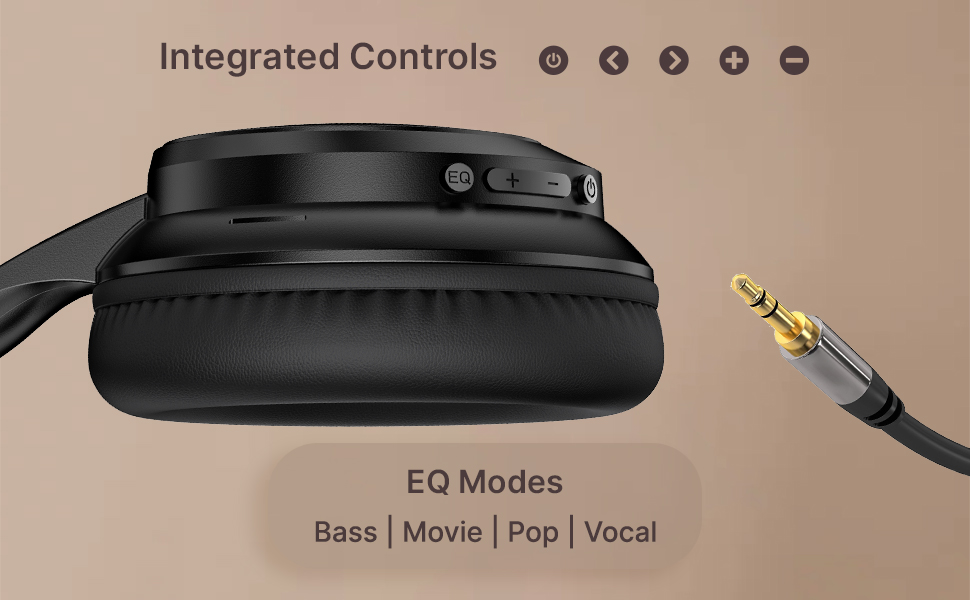
Image: User engaging in gaming with headphones, demonstrating low-latency sync for game mode.
3. Ṣiṣe ati Gbigba awọn ipe
The headphones include a built-in HD microphone for hands-free calls.
- Idahun/Ipe Ipari: Kukuru tẹ bọtini agbara.
- Kọ Ipe: Tẹ mọlẹ bọtini agbara fun iṣẹju 2.
4. Oluranlọwọ ohun
Access your device's voice assistant (e.g., Siri, Google Assistant) by double-pressing the Power button.
5. Wọ awọn Agbekọri
The pTron Studio Evo headphones feature an ergonomic design with soft earcups and an adjustable head beam for comfortable all-day listening. Adjust the head beam to position the earcups exactly over your ears for the best fit and sound isolation.
Itoju
1. Ninu
Regularly clean your headphones to maintain hygiene and performance.
- Lo aṣọ rirọ ati gbigbẹ lati nu awọn ago eti ati aṣọ ori.
- Ma ṣe lo abrasive ose tabi epo.
- Avoid getting moisture into the charging port or audio jack.
2. Omi Resistance
The headphones are IPX5 water-resistant, meaning they can withstand splashes and sweat. Do not submerge them in water or expose them to heavy rain.
3. Ibi ipamọ
The foldable design allows for easy storage. Fold the headphones when not in use to protect them from damage and save space. Store them in a cool, dry place away from direct sunlight and extreme temperatures.
Laasigbotitusita
- Ko si Agbara: Rii daju pe awọn agbekọri ti gba agbara ni kikun. Sopọ si orisun agbara ati gbiyanju lẹẹkansi.
- Ko le So pọ: Make sure Bluetooth is enabled on your device and the headphones are in pairing mode (flashing red and blue LED). Try restarting both devices.
- Ko si Ohun: Check the volume levels on both the headphones and your connected device. Ensure the correct audio output is selected on your device. If using a wired connection, ensure the 3.5mm cable is fully inserted.
- Didara Ohun Ko dara: Ensure the headphones are within the Bluetooth range (up to 10 meters) of your device. Avoid obstacles that may interfere with the signal. Try switching EQ modes.
- Gbohungbohun Ko Ṣiṣẹ: Ensure the headphones are properly connected and selected as the input device on your call application.
Awọn pato
| Ẹya ara ẹrọ | Sipesifikesonu |
|---|---|
| Orukọ awoṣe | Studio |
| Asopọmọra Technology | Ailokun (Bluetooth) |
| Imọ-ẹrọ Ibaraẹnisọrọ Alailowaya | Bluetooth 5.3 |
| Bluetooth Ibiti | 10 Mita |
| Audio Driver Iwon | 40 Milimita |
| Igbesi aye batiri | Awọn wakati 70 |
| Akoko gbigba agbara | Awọn wakati 2 |
| Awọn agbekọri Jack | 3.5 mm Jack |
| Omi Resistance Ipele | IPX5 Omi sooro |
| Ọna Iṣakoso | Titari Bọtini, Voice |
| Ariwo Iṣakoso | Iyasọtọ ohun |
| Ohun elo | Acrylonitrile Butadiene Styrene (ABS) |
| Iwọn Nkan | 157 giramu |
| Ọja Mefa | 19.2 x 15.8 x 7.9 cm |
Atilẹyin ọja ati Support
1. Atilẹyin ọja olupese
The pTron Studio Evo headphones come with a 1-Odun olupese atilẹyin ọja from the date of purchase. This warranty covers manufacturing defects only. Please retain your proof of purchase for warranty claims.
2. Onibara Support
For any queries, technical assistance, or warranty claims, please contact pTron customer support:
- Imeeli: support@ptron.in
- Foonu: 040-67138888