
1. Ifihan
The OhO sunshine Smart Bluetooth Glasses AI68 combine advanced technology with a sleek design, offering 4K video recording, real-time AI translation, and Bluetooth audio capabilities. These glasses are designed for hands-free operation, making them ideal for capturing moments, communication, and daily use. They feature 128GB of internal memory and UV protection lenses, with options for blue light blocking and transition lenses.

Image: The OhO sunshine Smart Bluetooth Glasses AI68, showcasing their sleek design and integrated camera.
2. Ohun ti o wa ninu Apoti
- OhO sunshine Smart Bluetooth Glasses AI68
- Okun Data USB (Iru-C)
- OTG Connector (for direct phone connection)
- Ninu Asọ
- Ọran Gbigbe Idaabobo
- Additional Lenses (e.g., polarized sunglasses, blue light blocking, transition lenses, depending on variant)
- Itọsọna olumulo
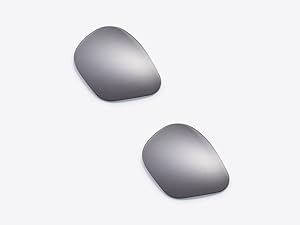
Image: A pair of additional sunglass lenses, which can be interchanged with the default lenses.
3. Awọn ẹya Ọja
- All-in-One Smart Glasses: Combines Bluetooth audio, real-time AI translation, and 4K ultra HD video recording in one design.
- Crystal-Clear 4K Video Recording: Capture hands-free video in stunning 4K resolution.
- Built-in 128GB Memory: Internal storage for videos and photos, with easy playback via USB data cable or OTG connector to your phone.
- Open Ear Speaker Design: Enjoy high-quality sound while remaining aware of your surroundings.
- Aṣẹ Ohùn Olùrànlọ́wọ́ Ọlọ́gbọ́n: Bluetooth 5.3 for hands-free phone calls, answering, and voice commands for Siri, Cortana, and Google Now.
- Itumọ AI akoko gidi: Supports two-way translation in 164 languages for seamless global communication.
- UV Protection Lenses: Provides protection for outdoor and indoor use.
- Awọn lẹnsi Iyipada: Lenses can be swapped between tinted and corrective lenses.

Image: An icon representing 4K video recording capability, highlighting the high-resolution camera feature.

Image: An icon indicating 128GB of maximum storage capacity, emphasizing the ample internal memory.
4. Eto
4.1. Gbigbe awọn gilaasi
Before first use, fully charge your OhO sunshine Smart Bluetooth Glasses. Connect the provided USB Type-C cable to the charging port located on the temple of the glasses and plug the other end into a USB power source. An indicator light will show charging status.
4.2. Sisopọ Bluetooth
- Rí i dájú pé àwọn gilaasi náà ti gba agbára tí wọ́n sì ti ń ṣiṣẹ́.
- Lori foonuiyara rẹ, lilö kiri si awọn eto Bluetooth.
- Wa fun available devices and select "oho sunshine" to connect.
- Once connected, you can use the glasses for audio playback and calls.
Video: An official product video demonstrating the features and setup of the OhO Smart Bluetooth Glasses, including 4K camera recording and translation capabilities.
4.3. App sori
To utilize the real-time AI translation and smart assistant features, download the dedicated OhO sunshine app from your smartphone's app store. Follow the in-app instructions to link your glasses and access all smart functionalities.

Image: The smart glasses interacting with a smartphone application, illustrating app integration for advanced features.
5. Awọn ilana Iṣiṣẹ
5.1. Gbigbasilẹ fidio
To start 4K video recording, locate the camera button on the temple of the glasses (refer to the diagram in the Quick Start Guide). Press the button once to begin recording. Press it again to stop. Videos are saved directly to the internal 128GB memory.

Image: A close-up of the smart glasses showing the clearly labeled Bluetooth and Camera buttons on the temple.
5.2. Bluetooth Audio & Calls
Once paired with your phone, the open-ear speakers allow you to listen to music and take calls. Use the integrated buttons on the glasses to control playback (play/pause, skip tracks) and manage calls (answer/end). The open-ear design ensures you can hear your surroundings.

Image: A man driving while wearing the smart glasses, illustrating the open-ear audio feature that allows him to hear both audio from the glasses and ambient sounds.
5.3. AI Translation
Activate the real-time AI translation feature through the OhO sunshine app. The glasses support two-way translation across 164 languages, facilitating communication in diverse environments. Speak naturally, and the glasses will translate and relay the conversation.

Image: A woman wearing the smart glasses, with speech bubbles indicating real-time language translation, demonstrating the AI translation feature.
5.4. Smart Assistant Voice Commands
With Bluetooth 5.3, you can use voice commands to interact with smart assistants like Siri, Cortana, and Google Now. Simply speak your commands to control music, get directions, check weather, and more, all hands-free.
6. Data Transfer & Playback
The glasses come with 128GB of internal storage. To access your recorded videos and photos, connect the glasses to your computer using the provided USB data cable. Alternatively, use the OTG connector to view files directly on your smartphone.

Image: A smartphone connected to the smart glasses via an OTG cable, displaying video playback from the glasses' internal storage.
7. Rirọpo lẹnsi
The OhO sunshine Smart Bluetooth Glasses feature interchangeable lenses. You can easily swap between the included non-prescription tinted lenses (e.g., sunglasses, blue light blocking, transition) and your own corrective lenses. Consult the Quick Start Guide for detailed instructions on safely replacing the lenses.

Image: A diagram illustrating the process of interchanging lenses on the smart glasses, highlighting their versatility.
8. Itọju
- Clean lenses with the provided microfiber cloth.
- The smart glasses are water-resistant for light rain and sweat. They are not suitable for swimming or heavy water exposure.
- Avoid exposing the glasses to extreme temperatures.
- Store in the protective carrying case when not in use.
9. Laasigbotitusita
- Ko le sopọ nipasẹ Bluetooth: Ensure the glasses are charged, powered on, and within range of your device. Restart both devices and try pairing again.
- Awọn iṣoro igbasilẹ: Check if the internal 128GB memory is full. Transfer files to free up space. Ensure the camera lens is clean and unobstructed.
- Didara ohun: Ensure the glasses are positioned correctly on your face for optimal open-ear audio. Check the volume settings on both the glasses and your connected device.
- Itumọ ko ṣiṣẹ: Verify that the OhO sunshine app is installed, updated, and properly connected to the glasses. Ensure a stable internet connection for AI translation features.
10. Awọn pato
| Ẹya ara ẹrọ | Ẹ̀kúnrẹ́rẹ́ |
|---|---|
| Nọmba awoṣe | AI68 |
| Iwọn Nkan | 39 Giramu (1.38 iwon) |
| Agbara Ibi ipamọ Iranti | 128 GB |
| Eto isesise | Android Wear 2.9 |
| Pataki Ẹya | AI smart camera bluetooth |
| Agbara Batiri | 500 Milionuamp Awọn wakati |
| Asopọmọra Technology | Bluetooth |
| Alailowaya Ibaraẹnisọrọ Alailowaya | Bluetooth |
| Batiri Cell Tiwqn | Litiumu polima |
| GPS | Ko si GPS |
| Apẹrẹ | onigun merin |
11. Alaye Aabo
- Ma ṣe fi han si ooru ti o pọju tabi imọlẹ orun taara fun awọn akoko pipẹ.
- Yẹra fún yíyọ tàbí àtúnṣe ẹ̀rọ náà, nítorí èyí lè sọ àtìlẹ́yìn náà di òfo kí ó sì fa ìbàjẹ́.
- Jeki kuro ni arọwọto awọn ọmọde.
- Lo okun gbigba agbara ti a pese nikan ati ohun ti nmu badọgba.
- Do not use while swimming or in heavy rain.
12. Atilẹyin ọja ati Support
This product is typically covered by a standard return policy allowing returns or replacements within 30 days of purchase. Extended protection plans are available for 2-year or 3-year durations, offering additional coverage. For detailed warranty information, technical support, or service inquiries, please refer to the official OhO sunshine webojula tabi kan si wọn onibara iṣẹ taara.
Fun iranlọwọ siwaju sii, ṣabẹwo si Ile Itaja Oorun OhO.