
1. Ifihan
The TONGOU Mini WiFi Smart Circuit Breaker (MCB) is designed to provide comprehensive electrical protection and smart control for your home or commercial installations. This device offers protection against short circuits, overcurrents, and overloads, ensuring the safety and reliability of your electrical system. With its integrated WiFi connectivity, you can monitor energy consumption and control the circuit breaker remotely via the Tuya/Smart Life application, or through voice commands with compatible smart assistants.
This manual provides essential information for the safe installation, operation, and maintenance of your TONGOU Mini WiFi Smart Circuit Breaker. Please read it thoroughly before installation and keep it for future reference.
2. Alaye Aabo
IKILO: Electrical installation and maintenance should only be performed by qualified electricians or personnel with appropriate electrical knowledge. Failure to follow these instructions can result in electric shock, fire, or serious injury.
- Always disconnect the main power supply before installing or performing any maintenance on the circuit breaker.
- Ensure that the wiring capacity matches the device specifications (maximum 16 mm²).
- Ma ṣe ṣiṣẹ ẹrọ ti o ba bajẹ tabi fihan awọn ami aiṣedeede.
- Install the circuit breaker in a dry, well-ventilated area, away from direct sunlight and extreme temperatures.
- Rii daju pe gbogbo awọn asopọ wa ni aabo ati ni idayatọ daradara lati ṣe idiwọ awọn iyika kukuru.
- This device is designed for AC systems (50/60 Hz) with a rated voltage up to 400V AC (for multi-pole versions) and an operating voltage of approximately 230V AC for this 1P model.
3. Ọja Ipariview
The TONGOU Mini WiFi Smart Circuit Breaker (1P) combines traditional circuit protection with modern smart home capabilities. Its compact design and robust flame-retardant casing ensure durability and reliable performance.
Awọn ẹya pataki:
- Aabo pupọ: Safeguards against short circuits, overcurrents, and overloads.
- Iṣakoso Smart: Remote management via Tuya/Smart Life app (iOS/Android) and voice control with Alexa/Google Assistant.
- Abojuto Agbara: Real-time display of current, voltage, and power consumption within the app.
- Oniga nla: Constructed with heat-resistant, flame-retardant materials and high-quality copper components for stable, long-term operation.
- Fifi sori Rọrun: Designed for 35mm DIN rail mounting with secure screw terminals.
Idanimọ eroja:

Nọmba 1: Iwaju view of the TONGOU Mini WiFi Smart Circuit Breaker. This image displays the main toggle switch, LED indicators for WiFi and pairing status, and the TONGOU branding with model number TOQCB2-80 C63.
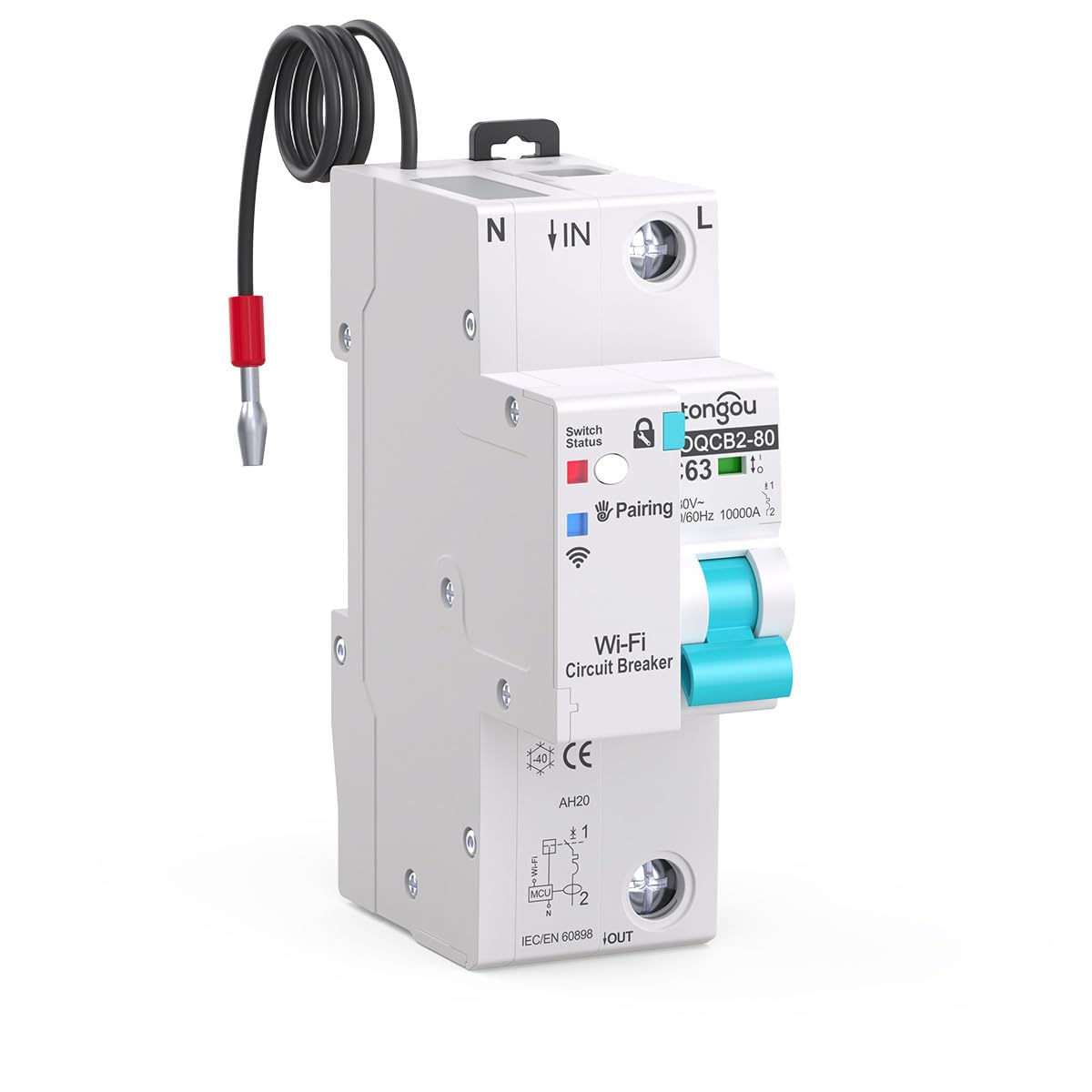
Nọmba 2: Angled iwaju view of the circuit breaker, showing the input (IN) and output (OUT) terminals, along with a pre-wired neutral connection for the smart module.
4. Eto ati fifi sori
The TONGOU Mini WiFi Smart Circuit Breaker is designed for simple installation on standard 35mm DIN rails. Ensure all safety precautions are followed before proceeding.
4.1 Fifi sori ti ara
- Ge asopọ agbara: Turn off the main power supply to the electrical panel where the circuit breaker will be installed. Verify with a voltage tester that no power is present.
- Iṣagbesori: Clip the circuit breaker onto a 35mm DIN rail in your electrical distribution box. Ensure it is securely fastened.
- Asopọmọra: Connect the input (IN) and output (OUT) wires to the respective screw terminals. The maximum wiring capacity is 16 mm² for both sides. Ensure the neutral (N) and live (L) connections are correct as indicated on the device. Tighten all screw terminals firmly to prevent loose connections and overheating.

Nọmba 3: Apa view illustrating the screw terminals for wiring connections and the mechanism for DIN rail mounting.

Nọmba 4: Oke view showing the clear labeling for input (IN) and output (OUT) wiring, facilitating correct installation.
4.2 App Pairing (Tuya/Smart Life)
- Ṣe igbasilẹ Ohun elo: Download the Tuya Smart or Smart Life app from the App Store (iOS) or Google Play Store (Android).
- Forukọsilẹ/Wọle: Ṣí àpù náà kí o sì forúkọ sílẹ̀ fún àkọọ́lẹ̀ tuntun tàbí kí o wọlé pẹ̀lú èyí tó wà tẹ́lẹ̀.
- Agbara Tan: Restore power to the circuit breaker. The WiFi indicator on the device should start blinking rapidly, indicating it's in pairing mode. If not, press and hold the pairing button (if available, refer to device markings) for 5-10 seconds until it blinks rapidly.
- Fi ẹrọ kun: In the app, tap the "+" icon in the top right corner to add a device. Select "Electrical Engineering" > "Circuit Breaker (Wi-Fi)" or allow the app to auto-discover the device.
- Sopọ si WiFi: Follow the on-screen instructions to connect the device to your 2.4 GHz WiFi network. Enter your WiFi password when prompted.
- Ipari: Once connected, the WiFi indicator on the circuit breaker will become solid. You can now rename the device and access its features within the app.

Nọmba 5: The Tuya/Smart Life app interface demonstrating remote control and monitoring capabilities for the circuit breaker.
5. Awọn ilana Iṣiṣẹ
Once installed and paired, you can operate your TONGOU Mini WiFi Smart Circuit Breaker both manually and remotely.
5.1 Afowoyi isẹ
- Yipada / PA: Use the physical toggle switch on the front of the circuit breaker to manually turn the connected circuit ON or OFF.
5.2 Iṣakoso latọna jijin nipasẹ App
- TAN/PA Iṣakoso: Open the Tuya/Smart Life app, select your circuit breaker, and tap the power icon to remotely switch the circuit ON or OFF.
- Abojuto Agbara: View lọwọlọwọ akoko gidi, voltage, and power consumption data for the connected circuit within the app interface. Historical data may also be available.
- Iṣeto: Set schedules or timers for the circuit breaker to automatically turn ON or OFF at specific times.
- Automation/Scenes: Create smart scenes to automate the circuit breaker's operation based on other smart devices, environmental conditions, or custom triggers.
5.3 Iṣakoso ohun
Integrate your TONGOU Smart Circuit Breaker with Amazon Alexa or Google Assistant for convenient voice control.
- Awọn akọọlẹ ọna asopọ: In the Alexa or Google Home app, link your Tuya Smart or Smart Life account.
- Ṣawari Awọn ẹrọ: Ask Alexa or Google Assistant to discover new devices.
- Awọn pipaṣẹ ohun: Use commands such as "Alexa, turn on [Device Name]" or "Hey Google, turn off [Device Name]".

Nọmba 6: Illustration of the TONGOU smart ecosystem, highlighting the integration of the smart circuit breaker with other devices for a comprehensive smart home experience.
6. Itọju
The TONGOU Mini WiFi Smart Circuit Breaker requires minimal maintenance. Regular checks can help ensure its longevity and safe operation.
- Ayewo wiwo: Máa ṣe àyẹ̀wò ẹ̀rọ náà lẹ́ẹ̀kọ̀ọ̀kan fún àwọn àmì ìbàjẹ́ ara, àwọ̀ ara tí ó yí padà, tàbí àwọn ìsopọ̀ tí ó bàjẹ́.
- Ninu: Tí ó bá pọndandan, fi aṣọ gbígbẹ tí ó rọra fọ ìta ẹ̀rọ náà pẹ̀lú pẹ̀lẹ́pẹ̀lẹ́. Má ṣe lo àwọn ohun ìfọṣọ omi tàbí àwọn ohun èlò ìfọṣọ.
- Ṣayẹwo Asopọmọra: Rii daju pe gbogbo awọn asopọ onirin wa ṣinṣin ati aabo.
- Awọn imudojuiwọn famuwia: Check the Tuya/Smart Life app for any available firmware updates for the device to ensure optimal performance and security.
IKIRA: Má ṣe gbìyànjú láti ṣí tàbí tún ẹ̀rọ ìdènà ẹ̀rọ náà ṣe fúnra rẹ. Tọ́ka gbogbo iṣẹ́ ìtọ́jú náà sí àwọn òṣìṣẹ́ tó péye.
7. Laasigbotitusita
If you encounter issues with your TONGOU Mini WiFi Smart Circuit Breaker, refer to the following common troubleshooting steps:
| Isoro | Owun to le Fa | Ojutu |
|---|---|---|
| Ẹrọ naa ko ṣiṣẹ | No main power; Incorrect wiring; Device fault | Check main power supply; Verify wiring connections; Contact support if device is faulty. |
| WiFi indicator not blinking (pairing mode) | Ko si ni ipo sisopọ | Press and hold the pairing button for 5-10 seconds until the indicator blinks rapidly. |
| Unable to connect to app | Incorrect WiFi password; 5GHz WiFi network; Weak WiFi signal | Ensure correct 2.4 GHz WiFi password; Connect to a 2.4 GHz network; Move router closer or use a WiFi extender. |
| Olupin Circuit n rin irin-ajo nigbagbogbo | Overload; Short circuit; Device fault | Reduce load on the circuit; Check for short circuits in wiring/appliances; Contact support. |
| Isakoṣo latọna jijin ko dahun | No internet connection; App issue; Device offline | Check internet connection; Restart app; Verify device WiFi connection. |
8. Awọn pato
| Paramita | Iye |
|---|---|
| Brand | Ọ́ŃGÙ |
| Nọmba awoṣe | 1P |
| Ọja Iru | Fifọ Circuit Kere (MCB) |
| Ohun elo | Ṣiṣu |
| Ti won won Lọwọlọwọ | 63 A (Adjustable 1-63 A) |
| Awọn ọna Voltage | Approx. 230 V AC |
| Oṣuwọn Voltage (Product Line) | Up to 400 V AC (for multi-pole versions) |
| Igbohunsafẹfẹ | 50/60 Hz |
| Ipo Iṣiṣẹ | TAN, PAA |
| Ebute Iru | dabaru TTY |
| Max. Wiring Capacity | 16 mm² (IN/OUT) |
| Awọn iwọn (L x W x H) | 47 x 35 x 104 mm |
| Iwọn | 250 giramu |
| WiFi Standard | 2.4 GHz |
| To wa Awọn ẹya | Ilana itọnisọna |
9. Atilẹyin ọja ati Support
TONGOU is committed to providing high-quality products and excellent customer service.
- Atilẹyin ọja: This product comes with a 2-year warranty, ensuring compliance with EU standards.
- Atilẹyin Onibara: For any questions, technical assistance, or issues, please contact TONGOU customer support. We aim to provide a solution within 24 hours.
- Ibi iwifunni: Fun iranlọwọ siwaju, jọwọ ṣabẹwo support@tongou.