
MOZOTER SP9i
Ìwé Ìtọ́sọ́nà Olùlò Àwọn Agbọ́rọ̀ Aláìlókùn MOZOTER SP9i
Model: SP9i
Ọrọ Iṣaaju
Thank you for choosing the MOZOTER SP9i Wireless Earbuds. These earbuds are designed to provide a comfortable and stable audio experience with advanced Bluetooth 5.3 technology, deep bass sound, and extended playtime. This manual will guide you through the setup, operation, and maintenance of your new earbuds to ensure optimal performance.
Ohun ti o wa ninu Apoti
- MOZOTER SP9i Wireless Earbuds (Left and Right)
- Ngba agbara Case
- USB-C Ngba agbara Cable
- Àwọn etí etí (àwọn ìwọ̀n S, M, L)
- Itọsọna olumulo
Ọja Pariview
The MOZOTER SP9i earbuds feature an over-ear hook design for secure fit and comfort. Each earbud is equipped with intuitive touch controls for easy management of audio and calls. The compact charging case provides additional battery life and convenient storage.

Image: The MOZOTER SP9i Wireless Earbuds resting in their open charging case, showcasing the over-ear hook design and the charging contacts.
Aworan: A alaye view of an earbud highlighting the integrated Bluetooth 5.3 technology for stable and efficient wireless connectivity.
Ṣeto
1. Ngba agbara si Earbuds ati Ọran
Ṣaaju lilo akọkọ, gba agbara ni kikun awọn agbekọri ati apoti gbigba agbara. So okun USB-C ti a pese si ibudo gbigba agbara lori ọran ati orisun agbara kan. Awọn ina Atọka lori ọran naa yoo fi ipo gbigba agbara han.
- Akoko gbigba agbara: O fẹrẹ to awọn wakati 1.5 fun idiyele ni kikun.
- Àkókò eré Agbọ́tísí: Titi di wakati 12 lori idiyele kan.
- Lapapọ akoko ere pẹlu Ọran: Titi di wakati 60.

Image: The charging case with earbuds inside, illustrating the 60-hour total playtime, 12-hour single charge, and 48-hour case capacity, along with the USB-C charging port.
2. Sisopọ pẹlu Ẹrọ Rẹ
- Ensure the charging case has power and the earbuds are inside.
- Ṣii apoti gbigba agbara. Awọn agbekọri yoo tan ina laifọwọyi ati tẹ ipo sisopọ pọ sii.
- Lori ẹrọ rẹ (foonuiyara, tabulẹti, kọǹpútà alágbèéká), mu Bluetooth ṣiṣẹ.
- Wa fun Awọn ẹrọ Bluetooth ti o wa ki o yan"SP9i"lati akojọ.
- Once connected, you will hear a confirmation tone, and the earbuds' indicator lights will turn off or flash slowly.
Awọn agbekọri naa yoo tun sopọ laifọwọyi si ẹrọ ti o so pọ to kẹhin nigbati o ba yọ kuro ninu ọran naa, ti o ba mu Bluetooth ṣiṣẹ lori ẹrọ naa.

Image: An illustration showing the MOZOTER SP9i earbuds in their open case, with a smartphone screen displaying a successful Bluetooth connection to "SP9i".
Awọn itọnisọna wiwọ
For optimal sound quality and comfort, it is important to wear the earbuds correctly and choose the appropriate eartip size.
1. Yiyan Eartips
The earbuds come with small (S), medium (M), and large (L) eartips. Experiment with different sizes to find the pair that provides the best seal and comfort for your ears. A good seal enhances bass response and passive noise cancellation.
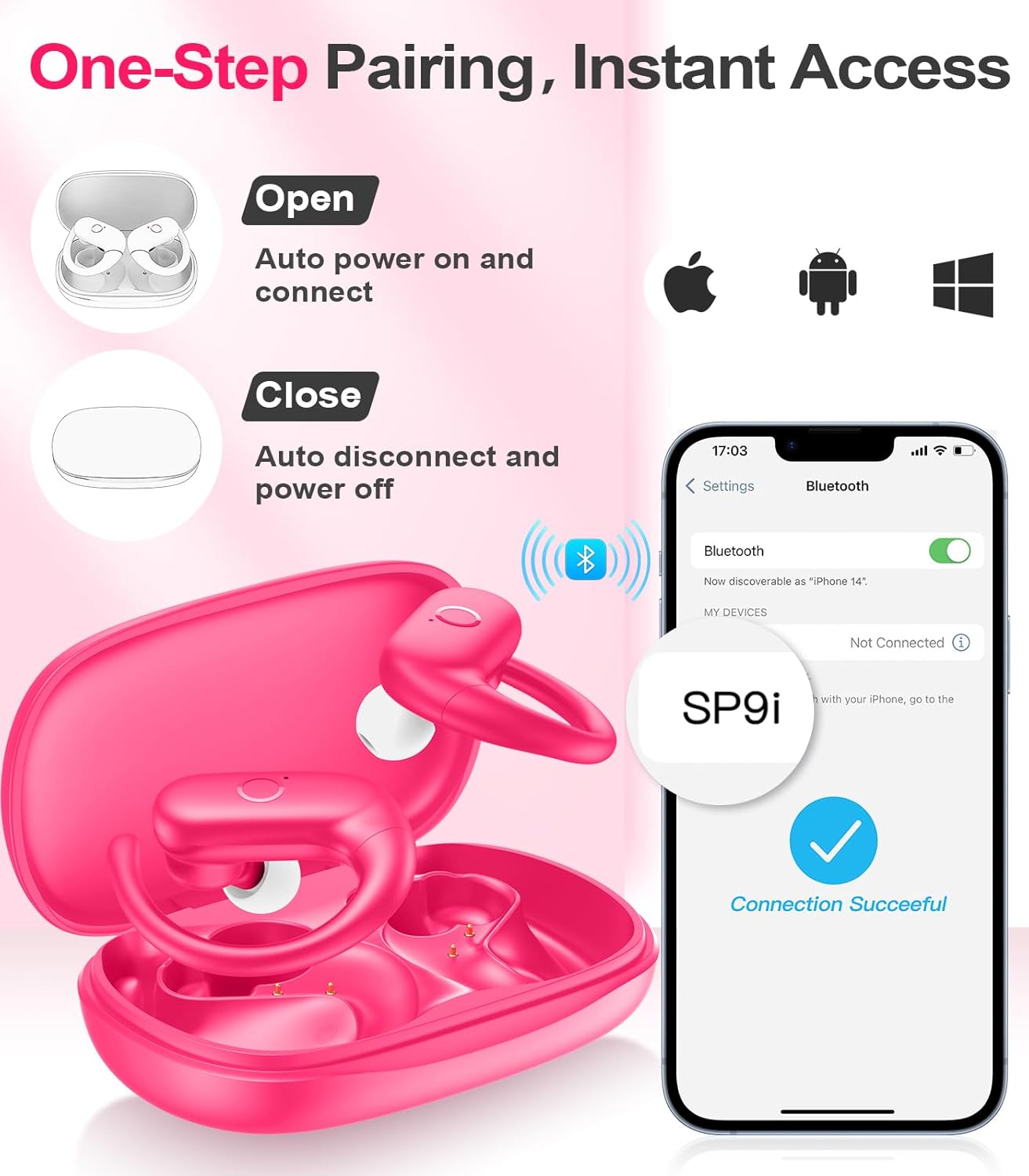
Image: A woman wearing an earbud, with an inset showing the three available eartip sizes (S, M, L) for a customized and comfortable fit.
2. Aṣeyọri a Secure Fit
- Igbesẹ 1: Place the ear hook over your ear.
- Igbesẹ 2: Fi rọra fi agbekọri sinu odo eti rẹ.
- Igbesẹ 3: Rotate the earbud slightly to find a comfortable and secure angle. The flexible ear hooks ensure a stable fit, ideal for sports and active use.

Image: A three-step diagram illustrating the correct method to wear the MOZOTER SP9i earbuds, ensuring a secure and comfortable fit with the ear hook.

Image: A woman wearing the MOZOTER SP9i earbuds, demonstrating the ergonomic design that rests comfortably and securely on the ear.
Awọn ilana Iṣiṣẹ
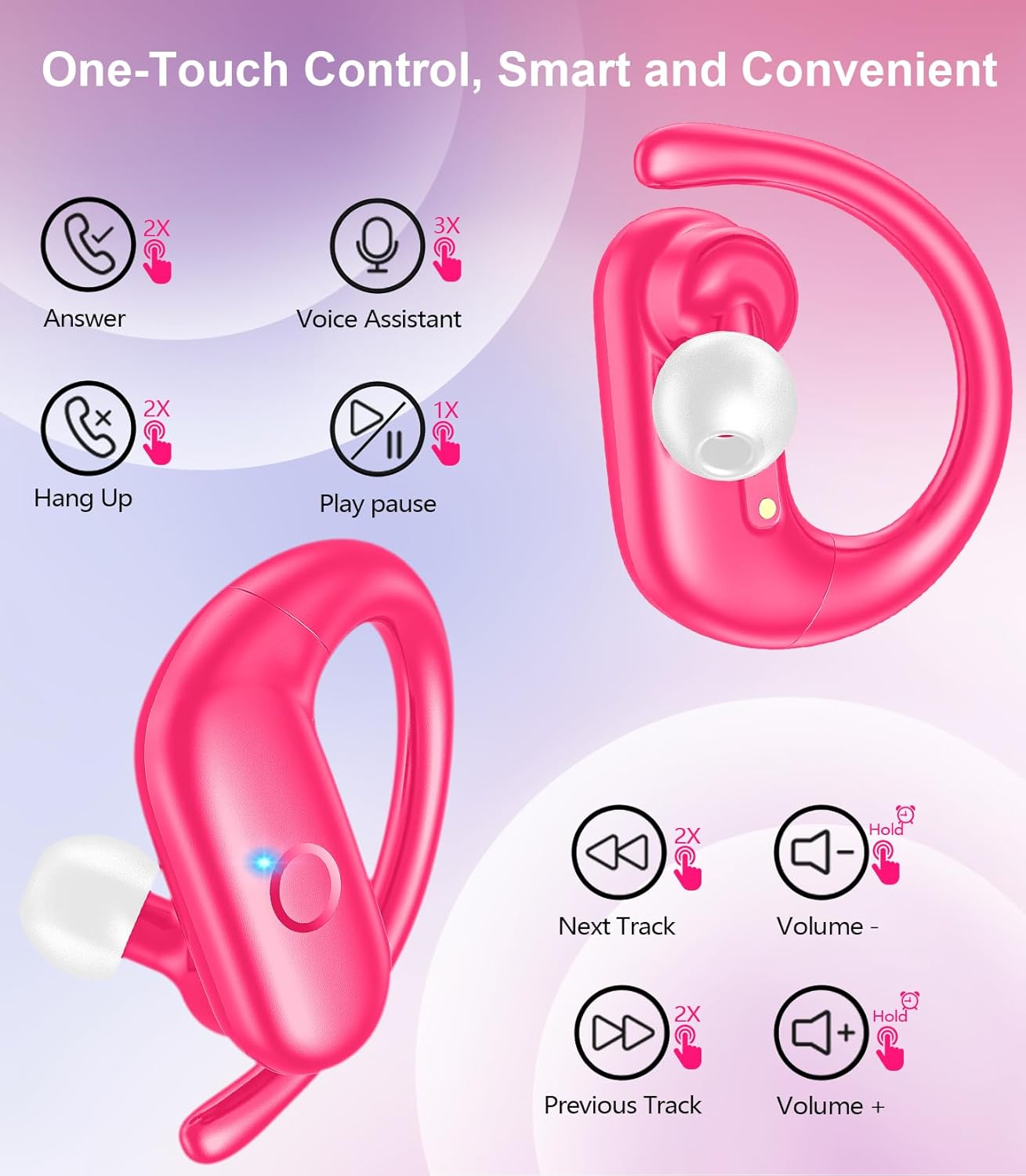
The MOZOTER SP9i earbuds feature intuitive touch controls on each earbud. The following table outlines the functions:
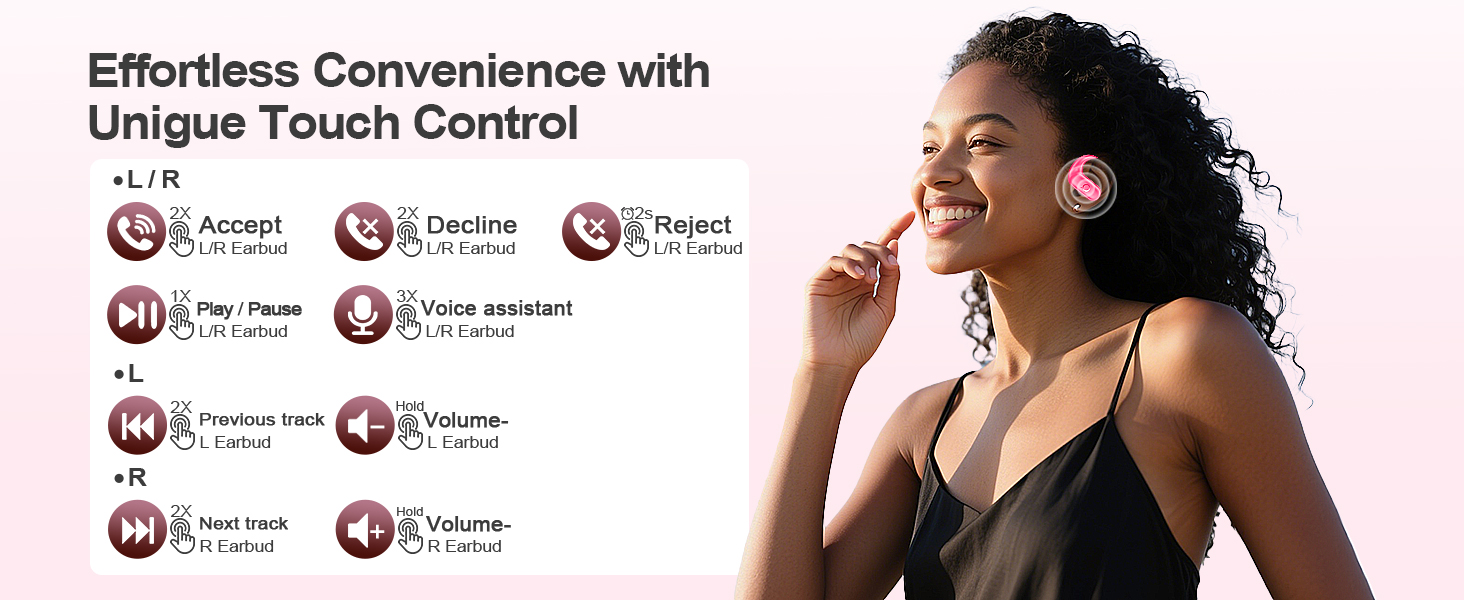
Image: A visual guide detailing the various touch control gestures for the MOZOTER SP9i earbuds, including call management, music playback, and volume adjustments.
| Iṣe | Afarajuwe (L/R Agbekọti) |
|---|---|
| Idahun Ipe | Double-tap (2X) |
| Idorikodo Ipe | Double-tap (2X) |
| Kọ Ipe | Triple-tap (3X) |
| Mu ṣiṣẹ/Danu Orin duro | Single-tap (1X) |
| Mu Oluranlọwọ Ohun ṣiṣẹ | Triple-tap (3X) |
| Next Track | Double-tap (2X) on Ọtun agbeti |
| Ti tẹlẹ Track | Double-tap (2X) on Osi agbeti |
| Iwọn didun soke | Da duro Ọtun agbeti |
| Iwọn didun isalẹ | Da duro Osi agbeti |
Itoju
Itọju to dara ṣe idaniloju gigun ati iṣẹ ti awọn agbekọri rẹ.
- Ninu: Regularly clean the eartips and the charging contacts on both the earbuds and the case with a soft, dry, lint-free cloth. Avoid using harsh chemicals or abrasive materials.
- Ibi ipamọ: Nigbati ko ba si ni lilo, tọju awọn afikọti sinu apoti gbigba agbara wọn lati daabobo wọn lati eruku ati ibajẹ.
- Ifihan omi: Bó tilẹ̀ jẹ́ pé a ṣe é fún eré ìdárayá, má ṣe jẹ́ kí o fi omi bò àwọn ètí ìgbọ́rọ̀ náà. Nu òógùn tàbí ọ̀rinrin kúrò lẹ́sẹ̀kẹsẹ̀ lẹ́yìn lílò.
Laasigbotitusita
If you encounter any issues with your MOZOTER SP9i earbuds, please refer to the following common solutions:
- Awọn agbekọri ti ko so pọ: Ensure both earbuds are charged and removed from the case. Turn off and on your device's Bluetooth. If issues persist, try resetting the earbuds (refer to manufacturer's webAaye fun awọn ilana atunṣe pato ti ko ba si ni itọnisọna).
- Agbekọri agbekọri kan ṣoṣo ti n ṣiṣẹ: Place both earbuds back into the charging case, close the lid, wait a few seconds, then open the lid and remove them. This often resynchronizes them.
- Didara ohun ti ko dara: Ensure the eartips provide a good seal in your ear. Clean any debris from the earbud speakers. Check your device's volume and audio settings.
- Awọn iṣoro gbigba agbara: Ensure the charging cable is securely connected to both the case and the power source. Clean the charging contacts on the earbuds and inside the case.
- Awọn agbekọri ti n ṣubu jade: Experiment with different eartip sizes and adjust the ear hooks for a more secure fit as described in the Wearing Instructions section.
Awọn pato
| Ẹya ara ẹrọ | Ẹ̀kúnrẹ́rẹ́ |
|---|---|
| Orukọ awoṣe | SP9i |
| Asopọmọra Technology | Ailokun (Bluetooth 5.3) |
| Ariwo Iṣakoso | Fifagile Ariwo |
| Ipalara | 4 ohm |
| Iwuwo Earbud | Nǹkan bí 8g fún etí kọ̀ọ̀kan |
| Earbud Playtime | Titi di wakati 12 |
| Lapapọ akoko ere (pẹlu ọran) | Titi di wakati 60 |
| Gbigba agbara Port | USB-C |
| Awọn irinše to wa | Earbuds, Charging Case, Eartips, User Manual |
Atilẹyin ọja ati Support
MOZOTER products are designed and manufactured to the highest quality standards. For warranty information and customer support, please refer to the documentation included with your purchase or visit the official MOZOTER website. If you require further assistance, please contact our customer service team.
Ask a question about this manual
Ask about setup, troubleshooting, compatibility, parts, safety, or missing instructions. Manuals+ will review the question and use this page’s manual context to help answer it.