
1. Ifihan
This manual provides detailed instructions for the installation, operation, and maintenance of your COUGAR OmnyX Mid Tower PC Case. Please read this manual thoroughly before beginning assembly to ensure correct setup and optimal performance. Keep this manual for future reference.
2. Alaye Aabo
- Always disconnect the power supply from the wall outlet before installing or servicing any components inside the PC case.
- Handle all components with care to prevent damage from static electricity. Consider using an anti-static wrist strap.
- Avoid placing the PC case in direct sunlight, near heat sources, or in areas with high humidity.
- Rí i dájú pé afẹ́fẹ́ tó yẹ wà ní àyíká àpótí náà kí ó má baà gbóná jù.
- Pa awọn ẹya kekere ati awọn irinṣẹ kuro lọdọ awọn ọmọde.
3. Package Awọn akoonu
Daju pe gbogbo awọn nkan wa ninu apo rẹ:
- COUGAR OmnyX Mid Tower PC Case
- Àpótí Ẹ̀rọ (tí ó ní àwọn skru, àwọn ìdádúró, àwọn okùn okùn, àti bẹ́ẹ̀ bẹ́ẹ̀ lọ)
- Afowoyi Olumulo (iwe-ipamọ yii)
- Pre-installed 160mm fans (quantity as specified in product details)
4. Ọja Ipariview
The COUGAR OmnyX case is designed for high expandability and efficient cooling, suitable for various computing needs. Its symmetrical design allows for flexible placement, showcasing internal components from multiple angles. Key features include:
- Symmetrical Design: Allows for versatile orientation on your desk.
- Omnidirectional Dynamic Flow System (ODF): Optimized airflow for superior cooling performance.
- Quad 160mm Fans: Equipped with four large 160mm fans for powerful cooling.
- Ambidextrous I/O Module: Features 4x USB 3.0 Type-A and 2x USB 3.2 Gen 2 Type-C ports for convenient connectivity.
- Ilana Tu silẹ ni iyara: Tool-less panel removal for easy access and installation.
- Streamlined Cable Management: Dedicated channels and tie-down points for a clean build.
- Bracketless Vertical GPU Mount: Supports vertical GPU installation without additional brackets.
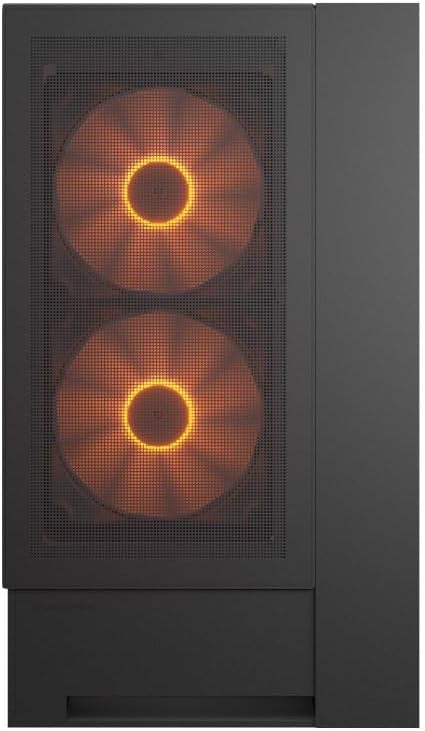
Iwaju view of the COUGAR OmnyX PC case, highlighting the pre-installed 160mm fans.

Illustration of the symmetrical design, allowing flexible case orientation.

Close-up of the large 160mm fans providing powerful cooling.
Ifihan fidio ọja osiseasing the COUGAR OmnyX PC case features, including its symmetrical design, quad 160mm fans, ambidextrous I/O module, cable management, and quick release mechanism for easy installation.
5. Eto & Fifi sori
5.1. Igbaradi
Before starting, ensure you have a clean, well-lit workspace and the necessary tools, including a Phillips head screwdriver.
5.2. Panel Yiyọ
The OmnyX case features a quick-release mechanism for easy panel removal. Gently pull the panels to detach them from the chassis. Refer to the exploded view for component identification.

Tutuka view of the COUGAR OmnyX case, showing removable panels and components.
5.3. Modaboudu fifi sori
The OmnyX supports Mini ITX, Micro ATX, and ATX motherboards. Install the necessary standoffs for your motherboard size, then carefully place the motherboard and secure it with screws.

Ti abẹnu view showing the motherboard tray and mounting points.
5.4. Kaadi eya aworan (GPU) fifi sori
Install your graphics card into the appropriate PCIe slot. The case supports GPUs up to 380mm in length. For vertical GPU mounting, utilize the integrated bracketless vertical GPU mount.

Illustration of the bracketless vertical GPU mounting option.
5.5. wakọ sori
The case provides bays for 2x 3.5-inch drives and 2x 2.5-inch drives. Secure your storage devices in the designated locations using the provided screws.
5.6. Agbara Ipese Unit (PSU) fifi sori
Install your power supply unit in the rear-mount location. The case accommodates PSUs up to 200mm in length.
5.7. Iṣakoso USB
Utilize the dedicated cable management channels and tie-down points behind the motherboard tray to route and secure cables. This ensures optimal airflow and a clean internal appearance.

View illustrating the efficient cable management system within the case.
5.8. Iwaju Mo / O Awọn isopọ
Connect the front panel I/O cables (USB 3.0, USB 3.2 Gen 2 Type-C, audio, power, reset) to their corresponding headers on your motherboard. The ambidextrous I/O module offers flexible placement.

Close-up of the front I/O panel with USB ports and controls.
6. Awọn ilana Iṣiṣẹ
6.1. Agbara Tan / Paa
After all components are installed and cables connected, plug the power supply into a wall outlet. Press the power button on the front I/O panel to turn on your PC.
6.2. RGB Lighting Iṣakoso
The pre-installed fans feature RGB lighting. Control of the RGB effects and fan speed is typically managed through your motherboard's software or a dedicated controller if included. Refer to your motherboard manual for specific instructions on RGB synchronization.

Illustration depicting RGB LED and fan speed control capabilities.
7. Itọju
Regular maintenance helps ensure the longevity and performance of your PC case:
- Pipa eruku: Periodically clean dust filters and internal components using compressed air or a soft brush. Dust accumulation can impede airflow and lead to overheating.
- Ode Ninu: Mu ese ita gbangba pẹlu asọ, damp asọ. Yago fun abrasive ose.
- Ṣayẹwo USB: Ensure all internal cables remain securely connected and neatly routed.
8. Laasigbotitusita
Ti o ba pade awọn ọran, tọka si awọn igbesẹ laasigbotitusita ti o wọpọ wọnyi:
- Ko si Agbara: Check if the power supply is properly connected to the wall outlet and the motherboard. Ensure the power button cable is correctly connected to the motherboard header.
- Awọn onijakidijagan Ko Yiyi: Verify that the fan cables are securely connected to the motherboard fan headers or a fan controller. Check BIOS settings for fan speed control.
- RGB Not Working: Confirm RGB cables are connected to the correct motherboard headers or controller. Check your motherboard's RGB software for settings.
- Igbóná púpọ̀: Ensure all fans are functioning correctly and oriented for optimal airflow. Clean any dust buildup from filters and components. Verify CPU cooler and GPU cooler installations.
For more complex issues, consult your component manuals or contact COUGAR support.
9. Awọn pato
| Ẹya ara ẹrọ | Sipesifikesonu |
|---|---|
| Orukọ awoṣe | OmnyX |
| Nọmba awoṣe | CGR-2WA3B-RGB |
| Iru Irú | Ile-iṣọ Mid |
| Modaboudu Support | Mini ITX / Micro ATX / ATX |
| Iwọn (D x W x H) | 300 x 470 x 520 mm |
| 3.5 "Wakọ Bays | 2 |
| 2.5 "Wakọ Bays | 2 |
| Sipiyu kula Giga iye to | 170mm |
| GPU Ipari Ifilelẹ | 380mm |
| PSU Length Limit | 200mm |
| Awọn onijakidijagan ti a ti fi sii tẹlẹ | 4 x 160mm |
| Iwaju Awọn Ibudo I / O | 4x USB 3.0 Type-A, 2x USB 3.2 Gen 2 Type-C |
| Iwọn | 12.6 kg |
10. Atilẹyin ọja ati Support
The COUGAR OmnyX PC Case comes with a 1-odun atilẹyin ọja from the date of purchase. This warranty covers manufacturing defects and faulty components under normal use. It does not cover damage caused by misuse, accidents, unauthorized modifications, or improper installation.
Fun atilẹyin imọ-ẹrọ, awọn ẹtọ atilẹyin ọja, tabi iranlọwọ siwaju sii, jọwọ ṣabẹwo si COUGAR osise webaaye ayelujara tabi kan si alagbata agbegbe rẹ.
Òṣìṣẹ́ COUGAR Webojula: www.cougar-gaming.com