
1. Ifihan
The NZXT H2 Flow (CI-H21FB-01) is a compact vertical Mini-ITX PC case designed to maximize airflow and save space while accommodating high-performance components. It features smart cable management, tool-less access, and includes dual top fans and a premium PCIe 5.0 riser cable for a streamlined building experience.
Awọn ẹya pataki:
- Hybrid Glass-and-Mesh Side Panel: Showcases your build while supporting up to a 280 mm radiator for efficient cooling.
- Apẹrẹ Iwapọ: A 20.7 L volume fits most GPUs up to 331 mm, offering high-end power in a small footprint.
- High Airflow Panels: Ultra-fine mesh panels on multiple sides maximize fresh air intake and filter dust, keeping components cooler and cleaner.
- Effortless Building: Tool-less panels, integrated cable routing Velcro straps, and intuitive wire management channels simplify installation.
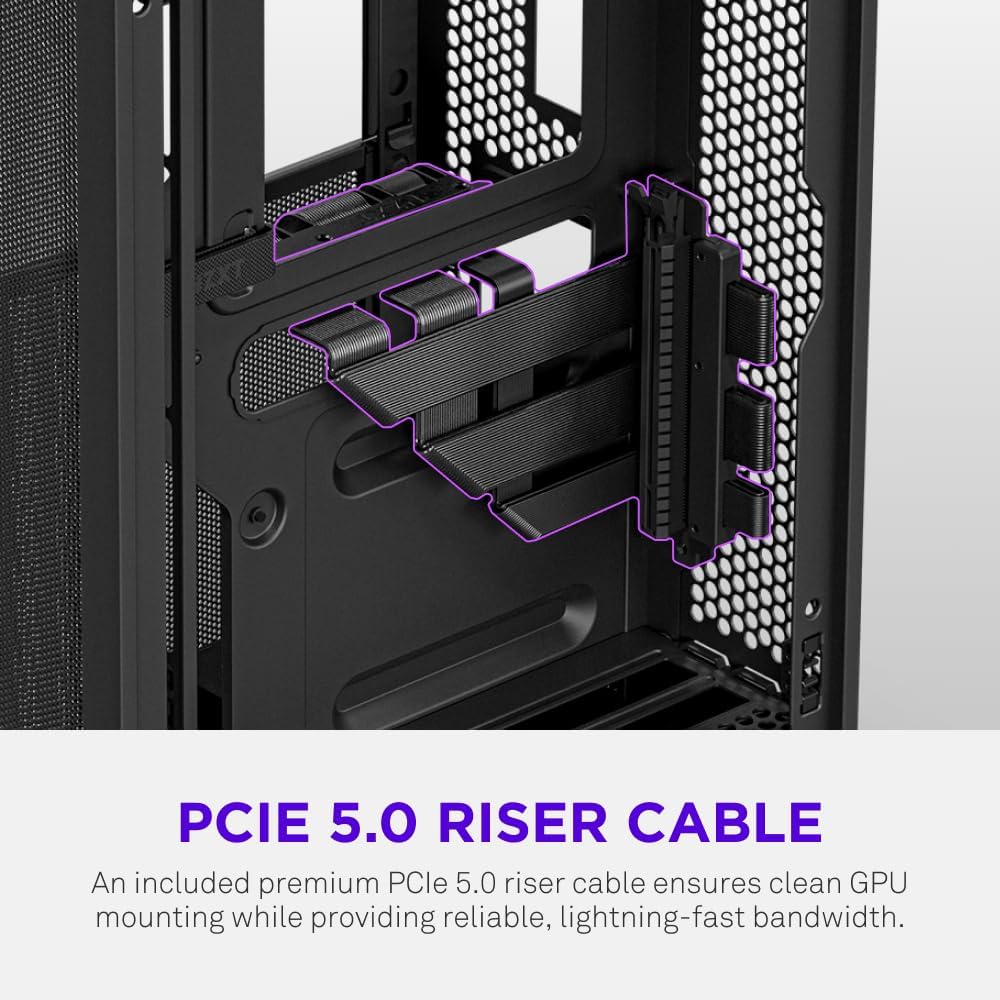
- Pre-Installed Performance: Includes a premium PCIe 5.0 riser cable for vertical GPU mounting and dual F120Q CV fans for immediate exhaust cooling.
2. Alaye Aabo
WARNING: Always disconnect power from your PC before performing any installation, maintenance, or troubleshooting. Failure to do so may result in personal injury or damage to components.
- Ka gbogbo awọn ilana ni pẹkipẹki ṣaaju fifi sori ẹrọ.
- Wear an anti-static wrist strap or frequently touch a grounded metal object to prevent electrostatic discharge (ESD) damage to components.
- Handle components with care. Avoid touching pins or exposed circuitry.
- Pa awọn ẹya kekere ati awọn ohun elo apoti kuro lọdọ awọn ọmọde.
- Rii daju pe fentilesonu to dara ni ayika ọran PC lati ṣe idiwọ igbona.
3. Package Awọn akoonu
Verify that all items are present in your NZXT H2 Flow package:
- NZXT H2 Flow Mini-ITX PC Case
- 2 x 120mm F120Q CV Top Fans (pre-installed)
- Premium PCIe 5.0 Riser Cable (pre-installed)
- Apoti ẹya ẹrọ (ti o ni awọn skru, awọn asopọ okun, ati awọn ẹya kekere miiran)
4. Ibamu paati
The NZXT H2 Flow case is designed to accommodate specific component sizes for optimal performance and fit:
- Modaboudu: Mini ITX
- Kaadi eya aworan (GPU): Up to 331 mm in length
- Radiator: Up to 280 mm (for liquid cooling solutions)
- Ipese Agbara (PSU): SFX/SFXL form factor is recommended for best compatibility and cable management.
- Awọn ololufẹ: Includes 2 x 120mm top fans. Additional fan mounting options may be available depending on other component choices.
5. Eto & Fifi sori
Follow these steps to assemble your PC within the NZXT H2 Flow case. Refer to your individual component manuals for specific installation details.
5.1. Àkókò tí a ti parí ọ̀ràn náàview ati Awọn iwọn
The NZXT H2 Flow is a compact vertical Mini-ITX case. Understanding its dimensions is crucial for planning your build.

5.2. Accessing the Case Interior
The H2 Flow features tool-less panels for easy access to the interior.

5.3. Motherboard and CPU Installation
Install your Mini-ITX motherboard and CPU (with cooler) before placing it into the chassis.
5.4. Agbara Ipese Unit (PSU) fifi sori
The case supports SFX/SFXL power supplies. Mount the PSU in its designated area, typically at the bottom of the case.

5.5. Iṣakoso USB
Utilize the integrated cable routing channels and Velcro straps for a clean and organized interior.
5.6. Kaadi eya aworan (GPU) fifi sori
The H2 Flow supports GPUs up to 331 mm in length and includes a premium PCIe 5.0 riser cable for vertical mounting.

5.7. itutu System
The case comes with two pre-installed 120mm F120Q CV fans at the top for exhaust. It also supports up to a 280mm radiator for liquid cooling.


5.8. Ọja Ipariview Fidio
Wo fidio osise yii fun wiwo lori oju opo wẹẹbu kanview of the NZXT H2 Flow Mini-ITX PC Gaming Case.
6. Awọn ilana Iṣiṣẹ
6.1. Agbara Tan / Paa
Press the power button located on the front I/O panel to turn your PC on or off.
6.2. Àwọn Ibudo I/O Iwaju
The front I/O panel provides convenient access to:
- Awọn ibudo USB 3.0
- Ibudo USB-C
- Audio Jack (if applicable)
Connect your peripherals such as keyboards, mice, and headsets to these ports.
7. Itọju
7.1. Fífọ Àwọn Àlẹ̀mọ́ Eruku
The NZXT H2 Flow features ultra-fine mesh panels that act as dust filters. Regularly clean these panels to maintain optimal airflow and prevent dust buildup inside your PC.
- Gently remove the mesh panels from the case.
- Use compressed air or a soft brush to remove accumulated dust.
- Reattach the panels securely.
7.2. Gbogbogbo Cleaning
Lo asọ, damp cloth to wipe down the exterior of the case. Avoid abrasive cleaners or solvents.
8. Laasigbotitusita
Tí o bá ní ìṣòro pẹ̀lú ìkọ́lé PC rẹ, ronú nípa àwọn ìgbésẹ̀ tí ó wọ́pọ̀ láti yanjú ìṣòro wọ̀nyí:
- Ko si Agbara: Rí i dájú pé gbogbo àwọn okùn agbára (PSU sí ògiri, PSU sí motherboard, CPU, GPU) ni a so pọ̀ dáadáa. Ṣàyẹ̀wò switch agbára lórí PSU.
- Ko si Ifihan: Verify that your monitor is connected to the graphics card (not the motherboard I/O unless using integrated graphics) and that the GPU has proper power connections. Reseat the GPU and RAM.
- Igbóná púpọ̀: Check fan connections and orientation. Ensure mesh panels are clean and not obstructed. Verify CPU cooler installation and thermal paste application.
- Ko ṣe awari ohun elo: Reseat the component (GPU, RAM, storage drives). Check power and data connections.
For more complex issues, consult your individual component manuals or NZXT customer support.
9. Awọn pato
| Ẹya ara ẹrọ | Ẹ̀kúnrẹ́rẹ́ |
|---|---|
| Brand | NZXT |
| Orukọ awoṣe | NZXT H2 Flow |
| Iru Irú | Ile-iṣọ kekere |
| Modaboudu Ibamu | Mini ITX |
| Àtìlẹ́yìn Gígùn GPU | Titi di 331 mm |
| Radiator Support | Titi di 280 mm |
| Awọn onijakidijagan to wa | 2 x 120mm F120Q CV Top Fans |
| Included Riser Cable | Premium PCIe 5.0 |
| Agbara Ipese Iṣagbesori Iru | Bottom Mount (SFX/SFXL recommended) |
| Ọna Itutu | Air, Liquid |
| Àwọ̀ | Dudu |
| Ohun elo | Gilasi, Irin |
| Iwọn Nkan | 4.55 kilo |
| Total USB 3.0 Ports | 1 |
| Other Special Features | Tool-less Installation, Integrated Cable Management |
10. Atilẹyin ọja & Atilẹyin
10.1. atilẹyin ọja Information
The NZXT H2 Flow Mini-ITX PC Case comes with a 2-Odun olupese atilẹyin ọja. Jọwọ ṣe idaduro ẹri rira rẹ fun awọn iṣeduro atilẹyin ọja.
10.2. Onibara Support
For technical assistance, troubleshooting, or warranty inquiries, please visit the official NZXT support webojula tabi kan si wọn onibara iṣẹ egbe.
NZXT Store: Visit the NZXT Store on Amazon