
1. Ọja Ipariview
The Moultrie Edge 3 Cellular Trail Camera with 3.4W Solar Kit is designed for remote wildlife monitoring and scouting. This system features advanced cellular connectivity, high-resolution imaging, and integrated solar power for extended field deployment. It is built to capture detailed photos and videos of wildlife activity, providing insights directly to your mobile device.

Aworan 1.1: The Moultrie Edge 3 Cellular Trail Camera with its integrated solar panel, shown alongside a smartphone displaying the Moultrie app interface. The app shows gallery views, activity charts, and device settings, highlighting the camera's remote monitoring capabilities.
2. Eto Itọsọna
2.1 Unboxing ati Ibẹrẹ ayewo
Ni ifarabalẹ yọ gbogbo awọn paati kuro ninu apoti. Jẹrisi pe awọn nkan wọnyi wa:
- Moultrie Edge 3 Cellular Trail Camera
- 3.4W Solar Panel (integrated or separate, depending on kit)
- Iṣagbesori Okun
- Itọsọna Ibẹrẹ kiakia (ti o ba wa)
Inspect all components for any signs of damage. If any items are missing or damaged, contact customer support.
2.2 Agbara kamẹra
The Edge 3 camera with the solar kit is designed for continuous power. The integrated 3.4W solar panel charges a built-in power bank, eliminating the need for AA batteries under typical conditions. Ensure the solar panel is exposed to direct sunlight for optimal charging.
2.3 Cellular Activation and App Setup
- Download the Moultrie App from your device's app store.
- Create an account or log in to your existing Moultrie account.
- Follow the in-app instructions to add your Edge 3 camera. The camera features nationwide 4-carrier auto-connect, simplifying the cellular setup process.
- Ensure the camera has a strong cellular signal for reliable data transmission.
2.4 Camera Placement and Aiming
Mount the camera to a tree or post using the provided strap. Utilize the Live Aim feature within the Moultrie App to preview aaye kamẹra ti view in real-time. This allows for precise positioning without needing to take test photos. The camera's GPS functionality will automatically update its location on your map within the app.

Aworan 2.1: A person is shown attaching the Moultrie Edge 3 Cellular Trail Camera to a tree in a wooded environment using the included strap. This demonstrates the typical setup process for deploying the camera in the field.
3. Awọn ilana Iṣiṣẹ
3.1 Yiya Awọn aworan ati Awọn fidio
The Edge 3 camera captures 40MP high-resolution still images and 1080p Full HD video. The low-glow infrared flash ensures discreet night-time capture, minimizing disturbance to wildlife. The camera features a 0.5-second trigger speed to capture fast-moving subjects.
3.2 Moultrie App Features
The Moultrie App serves as the central control hub for your camera. Key functionalities include:
- Abojuto latọna jijin: View captured images and videos from anywhere.
- On-Demand Access: Request new photos or videos in real-time.
- Atunṣe Eto: Modify camera settings remotely.
- Moultrie AI: This feature identifies bucks and uploads high-resolution images of them to the app, providing immediate alerts. It also helps reduce false triggers, optimizing the quality and relevance of captured media.
- Offline Settings: Even without cellular service, you can adjust camera settings directly in the field.

Aworan 3.1: A composite image displaying the Moultrie App interface across multiple smartphone screens. The app shows various features such as device management, feed levels, feed on-demand, clog alerts, species recognition, and interactive maps, illustrating the comprehensive control offered by the app.
3.3 Moultrie Connect for Feeder Integration
The Edge 3 camera can pair with compatible Moultrie feeders via Moultrie Connect. This integration allows you to control and monitor your feeders remotely through the same Moultrie App. Features include:
- Adjusting feed schedules
- Checking feed levels
- Monitoring feeder activity
- Enabling feed on demand
- Viewing battery statistics for connected feeders
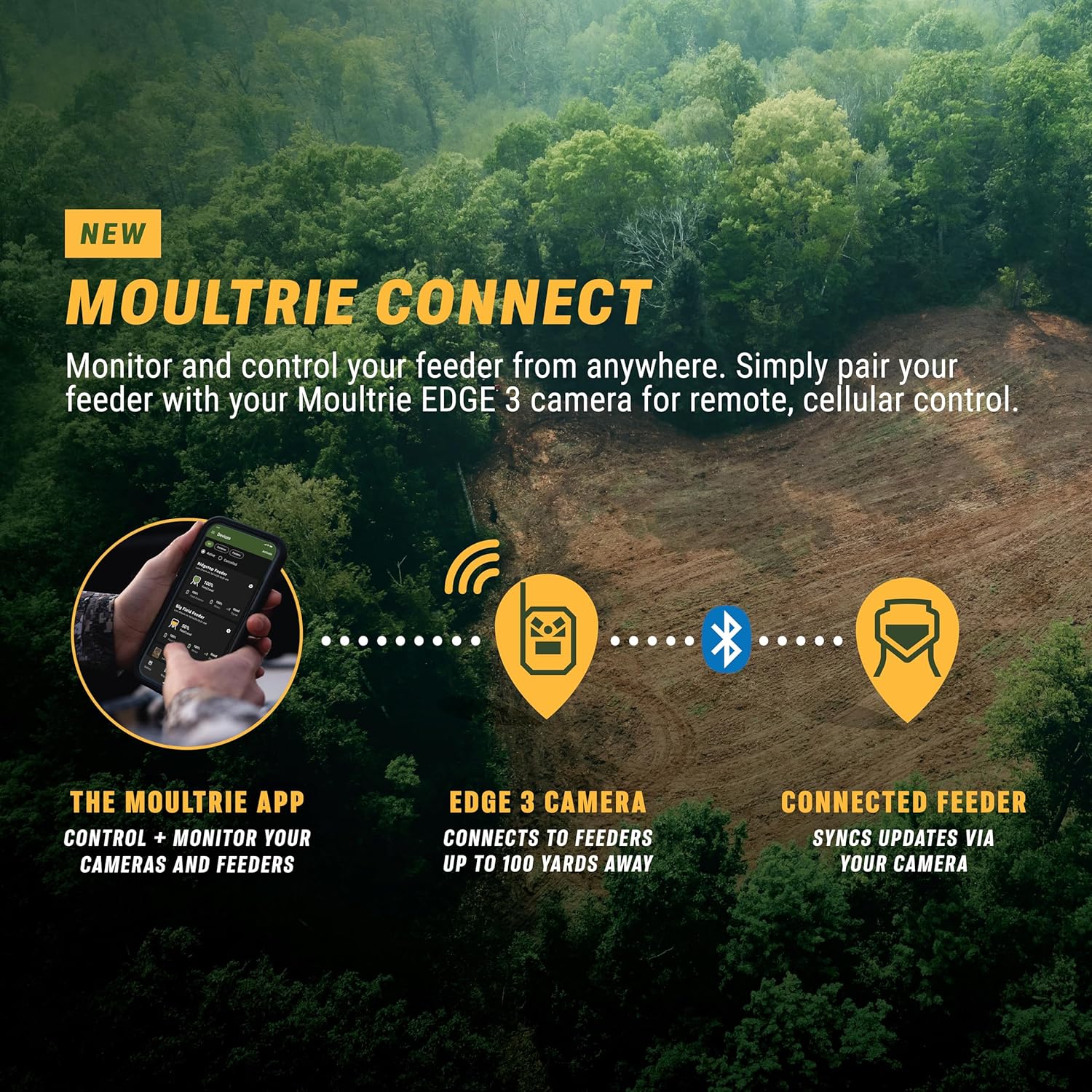
Aworan 3.2: A diagram illustrating the Moultrie Connect system. It shows the Moultrie App controlling cameras and feeders, with the Edge 3 camera connecting to feeders up to 100 yards away, and the connected feeder syncing updates via the camera. This highlights the integrated ecosystem for remote management.
4. Itọju
4.1 Iṣakoso agbara
The integrated 3.4W solar panel and built-in power bank are designed to provide continuous power. With approximately one hour of daily full sun exposure, the camera can maintain charge for typical use. The power bank stores energy for periods of low light or cloudy days. Monitor power metrics through the Moultrie App.
4.2 Itọju ati Itọju
The camera features an IP65 water-resistant housing, built to withstand various outdoor conditions. To ensure optimal performance:
- Lẹ́ẹ̀kọ̀ọ̀kan, nu lẹ́ńsì kámẹ́rà àti pánẹ́ẹ̀lì oòrùn pẹ̀lú ìrọ̀rùn, damp asọ lati yọ idoti, eruku, tabi idoti kuro.
- Ensure the solar panel is free from obstructions (leaves, snow, etc.) to maximize charging efficiency.
- Yago fun lilo awọn kẹmika lile tabi awọn ohun elo abrasive fun mimọ.
5. Laasigbotitusita
This section addresses common issues you might encounter with your Moultrie Edge 3 camera.
5.1 No Images/Videos Captured
- Ṣayẹwo Agbara: Ensure the camera has sufficient power. Verify the solar panel is receiving adequate sunlight and the internal power bank is charged.
- Idilọwọ sensọ: Confirm the motion sensor is not blocked by vegetation or debris.
- Eto: Review camera settings in the Moultrie App to ensure it is configured to capture images/videos (e.g., trigger delay, photo/video mode).
5.2 Asopọmọra Oran
- Agbara ifihan agbara: Check the cellular signal strength indicator in the Moultrie App. Relocate the camera to an area with better coverage if the signal is weak. The camera's 4-carrier auto-connect feature should automatically select the strongest network.
- Ohun elo amuṣiṣẹpọ: Ensure your Moultrie App is up to date and properly synced with the camera.
5.3 Poor Image/Video Quality
- Imototo lẹnsi: Mọ lẹnsi kamẹra bi a ti ṣe apejuwe rẹ ni apakan Itọju.
- Awọn ipo itanna: While the camera has low-glow IR for night, extreme low light or harsh backlighting can affect quality.
- Moultrie AI: The AI feature is designed to optimize images and reduce false triggers, leading to better footage. Ensure it is enabled if desired.
6. Awọn pato
Detailed technical specifications for the Moultrie Edge 3 Cellular Trail Camera with 3.4W Solar Kit.

Aworan 6.1: A sunmọ-soke view of the Moultrie Edge 3 Cellular Trail Camera with its key specifications overlaid: 40MP Image Resolution, 1080p FHD Video, 0.5s Trigger Speed, 100ft Detection Range, and Low-Glow Flash. This visually summarizes the camera's core capabilities.
| Ẹya ara ẹrọ | Ẹ̀kúnrẹ́rẹ́ |
|---|---|
| Orukọ awoṣe | EDGE 3 + 3.4W Solar Kit |
| Ipinnu Iduro ti o munadoko | 40 MP |
| Fidio fifi koodu | MPEG-4 |
| Ibiti Iran Night | 100 Ẹsẹ |
| Iyara Nfa | 0.5 aaya |
| Ilana Asopọmọra | Cellular (Nationwide 4-Carrier Auto-Connect) |
| Orisun agbara | Integrated 3.4W Solar Panel, Built-in Power Bank (Lithium Ion) |
| Agbara Batiri | 3450 (mAh, assumed) |
| Ohun elo | Ṣiṣu |
| Àwọ̀ | Pine Bark |
| Awọn iwọn Ọja (L x W x H) | 3.63 x 4.25 x 5.5 inches |
| Iwọn Nkan | 3.9 iwon |
| Omi Resistance | IP65 Water-Resistant Housing |
| Awọn irinše to wa | 3.4W Solar Panel, Strap, Trail Camera |
| UPC | 053695142081 |
7. Atilẹyin ọja ati Support
7.1 Atilẹyin ọja
The Moultrie Edge 3 Cellular Trail Camera with 3.4W Solar Kit comes with a 2-Odun olupese atilẹyin ọja. For specific terms and conditions, please refer to the warranty documentation included with your product or visit the official Moultrie webojula.
7.2 Onibara Support
For technical assistance, troubleshooting, or warranty claims, please contact Moultrie customer support. Contact information can typically be found on the official Moultrie webaaye tabi ni apoti ọja.
7.3 onX Hunt Elite Membership
This product includes 3 free months of onX Hunt Elite membership. Details for activation will be provided in a post-activation email. This membership delivers imagery into the onX app, enhancing your scouting and hunting experience.

Aworan 7.1: The Moultrie Edge 3 Cellular Trail Camera is displayed with a graphic indicating its integration with onX Hunt and a 3-month onX Hunt Elite membership. This highlights an additional benefit for users.


