
1. Ifihan
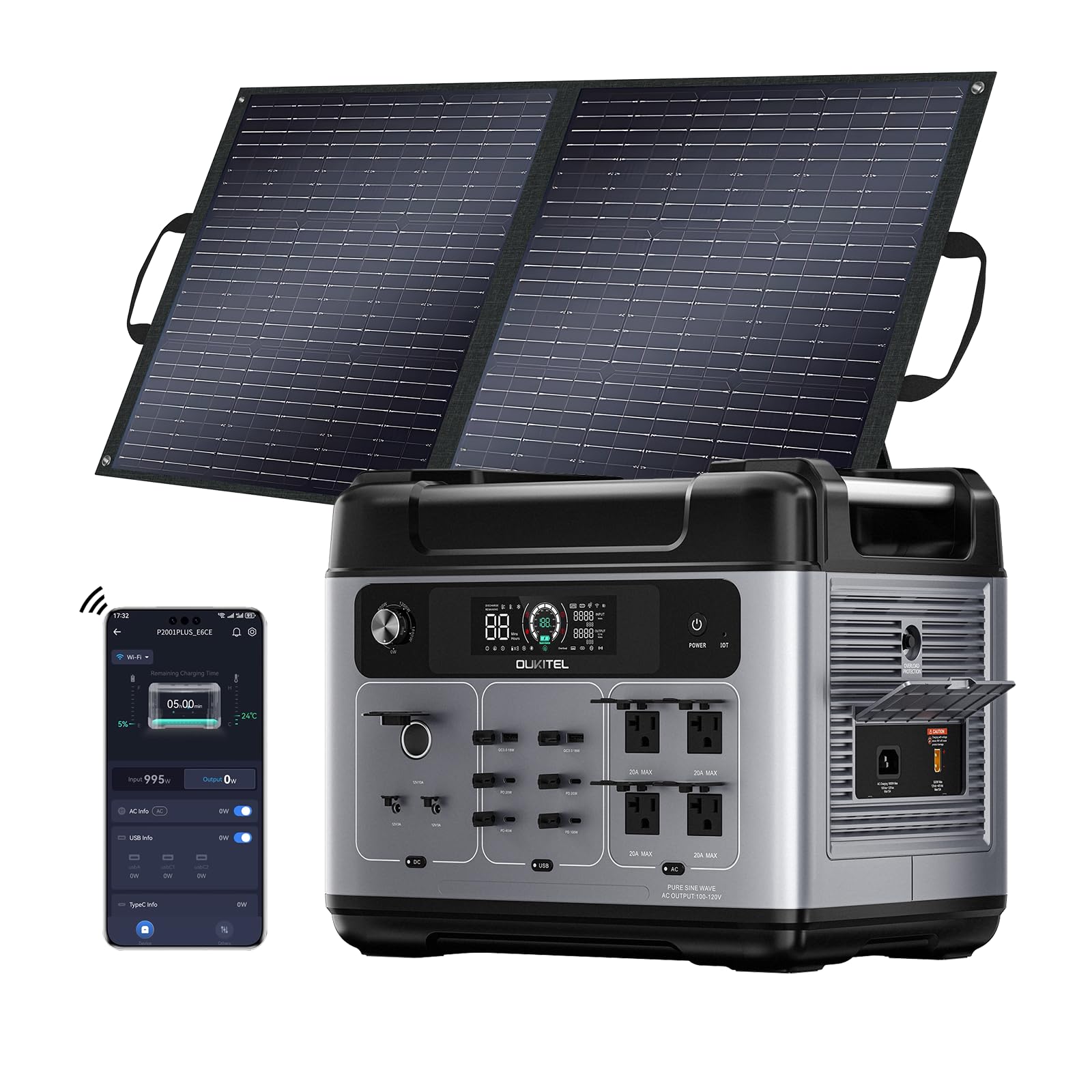
Thank you for choosing the OUKITEL P2001 Plus Solar Generator. This portable power station is designed to provide reliable power for various applications, from home backup to outdoor adventures. Featuring a robust 2048Wh capacity and 2400W AC output, it is equipped with a durable LiFePO4 battery and supports multiple charging methods, including solar and AC. Please read this manual thoroughly before operating the device to ensure safe and optimal performance.
Kini o wa ninu apoti:
- OUKITEL P2001 Plus Ibusọ Agbara To šee gbe
- 100W oorun nronu
- Okun gbigba agbara AC
- Okun Ngba agbara ọkọ ayọkẹlẹ
- Okun Gbigba agbara Oorun
- Itọsọna olumulo
Akiyesi: Due to the product's weight, the power station and solar panels may be delivered in separate packages.
2. Awọn ilana aabo
To ensure safe operation and prolong the lifespan of your OUKITEL P2001 Plus, please adhere to the following safety guidelines:
- Ka gbogbo awọn ilana ṣaaju lilo.
- Má ṣe tú nǹkan náà ká, tún un ṣe, tàbí ṣe àtúnṣe rẹ̀. Àtúnṣe tí kò tọ́ lè fa iná tàbí ìkọlù iná mànàmáná.
- Keep the unit away from water, moisture, and high temperatures.
- Use and store the unit in a well-ventilated area. Do not block the ventilation openings.
- Yẹra fún jíjá sílẹ̀, kí ó ní ipa lórí, tàbí kí ó mú kí ohun èlò náà gbọ̀n rìrì gidigidi.
- Jeki kuro ni arọwọto awọn ọmọde ati awọn ohun ọsin.
- Ma ṣe fi awọn nkan ajeji sii sinu awọn ibudo tabi awọn ṣiṣi.
- Ensure proper grounding when connecting to external devices.
- Do not overload the power station beyond its rated output.
3. Ọja Ipariview
The OUKITEL P2001 Plus is a high-capacity portable power station designed for versatility and durability. It features a 2048Wh LiFePO4 battery and delivers a continuous 2400W AC output (5000W peak).
Awọn ẹya pataki:
- Agbara nla: 2048Wh battery for extended power supply.
- Ijade giga: 2400W AC output (5000W peak) to power most appliances.
- Batiri ti o tọ: LiFePO4 battery with over 3500 charge/discharge cycles, lasting up to 15 years.
- Gbigba agbara yiyara: 0-100% in 1.5 hours via 1800W AC input.
- Awọn ile-iṣẹ ti o wapọ: 13 output ports including 4 AC, 2 USB-A QC 3.0, 4 USB-C PD (20W, 45W, 100W), 2 DC, and 1 cigar lighter.
- Iṣakoso APP: Monitor and control the power station via Bluetooth or Wi-Fi.
- EPS Function: Emergency Power Supply (less than 0.01s) for uninterrupted power during outages.
Ports and Display:
The front panel of the P2001 Plus features a clear LCD display showing battery status, input/output wattage, and remaining runtime. Various output ports are conveniently located for easy access.


4. Eto
4.1 Unpacking ati Ni ibẹrẹ idiyele
- Carefully unpack all components and verify against the 'What's in the Box' list.
- Ayewo kuro fun eyikeyi han bibajẹ.
- Before first use, fully charge the power station using the AC charging cable until the display shows 100%.
4.2 APP Installation and Connection
The OUKITEL P2001 Plus can be controlled and monitored via a mobile application. Follow these steps to set up the app:
- Ṣe igbasilẹ APP naa:
- For users in the US/Canada, search for "Landbook" on the App Store (iOS) or Google Play Store (Android).
- For users in other countries/regions, search for "Wonderfree" on the App Store (iOS) or Google Play Store (Android).
- Iforukọsilẹ: Open the app, click "Register" in the upper right corner. Choose your country/region, enter your email, fill in the verification code sent to your email, set a password, and complete registration.
- Wo ile: After successful registration, log in using your email and password. Ensure the selected country during login matches your registration country.
- Mu Bluetooth ṣiṣẹ: Ensure your phone's Bluetooth is enabled and the app has location access permissions.
- Enter Network Configuration Mode: Turn on the power station. Use a pin to press and hold the "IOT" hole on the power panel until you hear a "beep" sound. The network configuration icon on the LCD screen will start blinking.
- So ẹrọ pọ: In the app, click the "+" button in the top right corner and select "Detect Nearby Devices." The app will display a list of configurable devices. Click the "+" button next to your device (e.g., P2001 Plus).
- Eto Wi-Fi: Enter the Wi-Fi account and password your portable station is connected to, then click "Next." Wait for the progress bar to complete loading.
- Pari: Once configured, the interface will display the product device. Select "Finish." You can also edit the device name and click "Save."

Video 4.1: OUKITEL Solar Generator APP Setup Guide. This video demonstrates the step-by-step process of installing, registering, and connecting the OUKITEL solar generator to its mobile application for remote control and monitoring.
5. Awọn ilana Iṣiṣẹ
5.1 Titan / Pa a
- Láti tan ẹ̀rọ náà, tẹ bọ́tìnnì agbára àkọ́kọ́ kí o sì di mú títí tí ìbòjú LCD yóò fi tàn.
- Láti pa iná, tẹ kí o sì di bọtini agbára àkọ́kọ́ mú títí tí iboju LCD yóò fi pa.
5.2 Lilo o wu Ports
The P2001 Plus offers a variety of output ports to power different devices:
- Awọn iṣan AC: Press the AC power button to activate the 4 AC outlets. Connect your AC-powered devices.
- Awọn ibudo USB: The unit features 2 USB-A Quick Charge 3.0 ports and 4 USB-C PD ports (20W, 45W, 100W). These are typically active when the unit is on.
- Awọn Ile Itaja DC: Press the DC power button to activate the 2 DC outlets and the 1 cigar lighter port.

5.3 Ipese Agbara pajawiri (EPS)
The P2001 Plus includes an EPS function, providing uninterrupted power to connected devices in the event of a power outage. When connected to an AC power source, the unit will pass through power to connected devices. If the grid power fails, the unit automatically switches to battery power within 0.01 seconds, ensuring continuity for critical devices.

6. Awọn ọna gbigba agbara
The OUKITEL P2001 Plus supports multiple charging methods to ensure you always have power when you need it.
6.1 AC Wall Outlet Charging
- So okùn gbigba agbara AC pọ mọ ibudo titẹ sii AC lori ibudo agbara ati lẹhinna si ibudo ogiri boṣewa.
- The unit supports up to 1800W AC input, allowing for a full charge in approximately 1.5 hours.
- Intelligent input current adjustment (400W-1800W) prevents damage from unstable voltage.
6.2 Solar Panel Charging
- Connect the included 100W solar panel (or other compatible solar panels) to the solar charging input port using the solar charging cable.
- Fi awọn panẹli oorun si aaye oorun taara fun agbara gbigba agbara to dara julọ.
- Combine solar and AC input for ultra-fast charging, achieving 80% battery capacity in just 50 minutes and a full charge in 80 minutes (up to 2300W combined input).
6.3 Car Ngba agbara
- Connect the car charging cable to the car charging input port on the power station and then to your vehicle's 12V cigarette lighter socket.
- Ọ̀nà yìí dára fún gbígbà agbára nígbà tí o bá ń lọ.


7. Itọju
Proper maintenance ensures the longevity and optimal performance of your OUKITEL P2001 Plus.
7.1 batiri Itọju
- The built-in LiFePO4 battery is designed for over 3500 charge/discharge cycles, offering a lifespan of up to 15 years.
- For long-term storage, charge the unit to approximately 50-80% every 3-6 months.
- Yẹra fún gbígbá agbára batiri náà nígbà gbogbo láti mú kí ó pẹ́ sí i.
- The Battery Management System (BMS) and Control Unit (MCU) manage cell voltage and temperature for safety and efficiency.

7.2 Storage and Cleaning
- Store the unit in a cool, dry place, away from direct sunlight and corrosive materials.
- Ensure the unit is turned off during storage.
- Clean the exterior with a dry, soft cloth. Do not use harsh chemicals or abrasive materials.
- Jeki awọn ṣiṣi afẹfẹ kuro ninu eruku ati idoti.
8. Laasigbotitusita
If you encounter issues with your OUKITEL P2001 Plus, refer to the following common troubleshooting steps:
| Isoro | Owun to le Fa | Ojutu |
|---|---|---|
| Unit ko ni agbara lori | Batiri ti yọ gbogbo ara rẹ kuro patapata; Bọtini agbara ko ti tẹ fun igba pipẹ. | Connect to AC power for charging; Press and hold the power button for 3-5 seconds. |
| Ko si AC jade | AC output not activated; Overload protection triggered; Device power exceeds unit's capacity. | Press the AC power button; Reduce connected load; Check device power requirements. |
| Gbigba agbara lọra nipasẹ oorun | Insufficient sunlight; Solar panel not properly angled; Dirty solar panels. | Adjust panel angle towards direct sun; Clean solar panel surface; Check cable connections. |
| APP asopọ oran | Bluetooth/Wi-Fi off; Incorrect app/region selected; Device not in configuration mode. | Ensure Bluetooth/Wi-Fi is on; Verify app version and region; Re-enter network configuration mode. |
Ti iṣoro naa ba wa lẹhin igbiyanju awọn solusan wọnyi, jọwọ kan si atilẹyin alabara.
9. Awọn pato
| Ẹya ara ẹrọ | Ẹ̀kúnrẹ́rẹ́ |
|---|---|
| Brand | YOYOSCX (OUKITEL) |
| Orukọ awoṣe | P2001 Plus |
| Batiri Iru | LiFePO4 |
| Agbara | 2048Wh |
| Ijade AC (Ti won won) | 2400W |
| Ìjáde AC (Òkè) | 5000W |
| Lapapọ AC iÿë | 4 |
| Awọn ibudo USB-A | 2 (Quick Charge 3.0) |
| USB-C PD Ports | 4 (20W, 45W, 100W) |
| DC iÿë | 2 |
| Cigar Lighter Port | 1 |
| Iṣagbewọle AC | 1800W Max (1.5H full charge) |
| Input ti oorun | Up to 500W (with 100W panel included) |
| Combined AC+Solar Input | Up to 2300W (80% in 50min) |
| Àkókò Ìyípadà EPS | < 0.01-orundun |
| Iwọn Nkan | 102 Poun (iwọn 46.27 kg) |
| Awọn Iwọn Nkan (L x W x H) | 15.7" x 12.6" x 11.3" (isunmọ 39.9cm x 32cm x 28.7cm) |
10. Atilẹyin ọja & Atilẹyin
10.1 atilẹyin ọja Alaye
The OUKITEL P2001 Plus Solar Generator comes with a 5-odun olupese atilẹyin ọja. Atilẹyin ọja yi ni wiwa awọn abawọn ninu awọn ohun elo ati iṣẹ ṣiṣe labẹ lilo deede. Jọwọ ṣe idaduro ẹri rira rẹ fun awọn iṣeduro atilẹyin ọja.
10.2 Onibara Support
For any questions, technical assistance, or warranty inquiries, please contact our customer support team:
- Imeeli: support@oukitel.com
- Webojula: www.oukitel.com
Please provide your model number and purchase date when contacting support.