
Ọrọ Iṣaaju
Thank you for choosing the Bigben Karaoke Microphone. This all-in-one portable karaoke system combines a stereo microphone with a powerful 15W Bluetooth speaker and dynamic light effects, designed to enhance your singing and music listening experience. This manual provides essential information for safe and optimal use of your device.
Alaye Aabo
- Ka gbogbo awọn ilana ṣaaju lilo ẹrọ naa.
- Pa ẹrọ naa kuro ninu omi ati ọrinrin.
- Ma ṣe ṣipaya si awọn iwọn otutu to gaju tabi oorun taara.
- Ma ṣe gbiyanju lati tunto tabi tun ẹrọ naa funrararẹ. Tọkasi awọn oṣiṣẹ iṣẹ ti o peye.
- Lo awọn ẹya ẹrọ gbigba agbara pàtó kan.
- Jeki kuro ni arọwọto awọn ọmọde.
Package Awọn akoonu
Jọwọ ṣayẹwo pe gbogbo awọn nkan wa ninu package:
- Bigben Karaoke Microphone (Model PARTYBTMIC2WH)
- Okun gbigba agbara (USB)
- Afowoyi Olumulo (iwe-ipamọ yii)
- Front Glass (as an included component, likely pre-installed or a protective cover)

Aworan 1: The Bigben Karaoke Microphone shown in its retail packaging. The packaging highlights features such as Bluetooth connectivity, 4 vocal effects, and wireless speaker functionality.
Ọja Pariview
The Bigben Karaoke Microphone features an integrated speaker and various controls for an interactive experience.
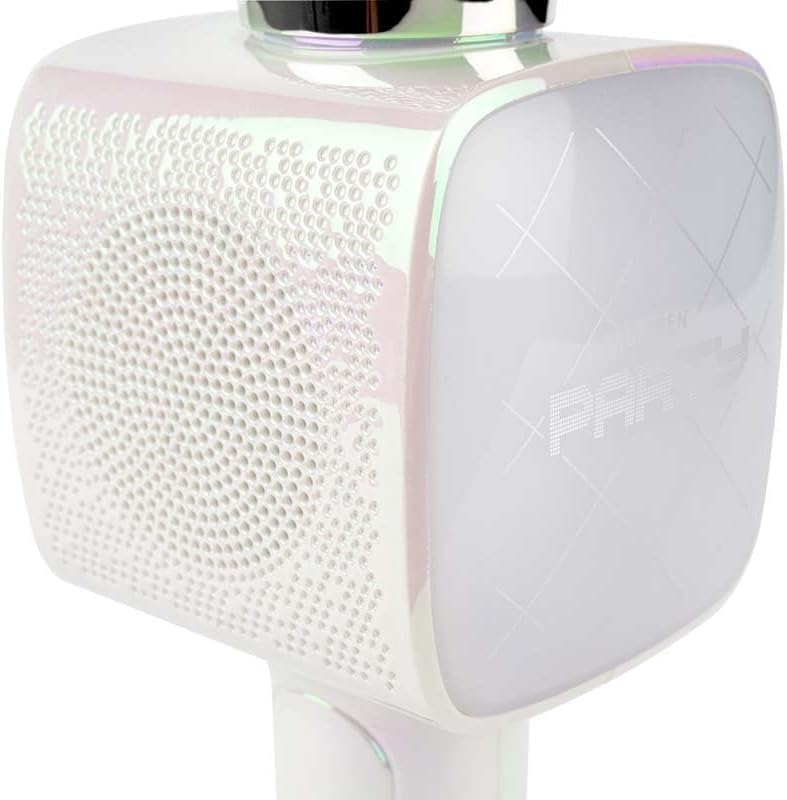
Aworan 2: A sunmọ-soke view of the Bigben Karaoke Microphone, focusing on the speaker grille and the light-up panel. The panel displays "PARTY" and shows dynamic light effects.
Awọn ẹya pataki:
- Bluetooth 5.0: For stable wireless connection to your devices.
- Agbọrọsọ Iṣọkan: 15W output for clear and powerful sound.
- Awọn ipa Imọlẹ: Dynamic lighting to enhance the karaoke experience.
- Awọn ipa ohun: 4 different vocal effects and an echo effect.
- Awọn igbewọle pupọ: USB, Micro SD, and 3.5mm headphone jack.
Ṣeto
1. Gbigba agbara si Gbohungbohun
- Connect the provided USB charging cable to the microphone's charging port.
- So opin keji okun USB pọ si ohun ti nmu badọgba agbara USB ibaramu (kii ṣe pẹlu) tabi ibudo USB ti kọnputa kan.
- Ina Atọka gbigba agbara yoo tan imọlẹ. Ni kete ti o ti gba agbara ni kikun, ina le yipada awọ tabi paa.
2. Agbara lori / Paa
- To power on, press and hold the Power button for a few seconds until the indicator light illuminates and you hear an audible prompt.
- Lati pa agbara, tẹ mọlẹ Bọtini Agbara lẹẹkansii titi ti ina Atọka yoo fi wa ni pipa.
3. Sisopọ Bluetooth
- Ensure the microphone is powered on and in Bluetooth pairing mode (usually indicated by a flashing light).
- Lori foonuiyara rẹ, tabulẹti, tabi ẹrọ miiran ti o ni Bluetooth, lọ si awọn eto Bluetooth.
- Wa fun available devices and select "Bigben Karaoke Mic" (or similar name) from the list.
- Once paired, you will hear a confirmation sound, and the indicator light will stop flashing.
Awọn ilana Iṣiṣẹ
1. Ti ndun Orin
- Nipasẹ Bluetooth: After successful pairing, play music from your connected device. The sound will output through the microphone's speaker.
- Via USB/Micro SD: Insert a USB drive or Micro SD card (with music files) into the respective port. The microphone will automatically detect and play music.
- Via 3.5mm Audio Cable: Connect an external audio source using a 3.5mm audio cable (not included) to the headphone input.
2. Lilo Gbohungbohun
- Speak or sing directly into the microphone grille.
- Adjust the microphone volume using the dedicated controls on the device.
3. Ohun ti yóogba
- Awọn ipa didun ohun: The microphone offers 4 different vocal effects. Press the "Effect" button (or similar labeled button) to cycle through these effects.
- Ipa Echo: Activate or adjust the echo effect using its dedicated control.
4. Awọn ipa Imọlẹ
The microphone features dynamic light effects. These lights typically activate automatically when the device is on and can often be toggled or changed using a dedicated light button, if available.
Itoju
- Ninu: Wipe the microphone with a soft, dry cloth. Do not use abrasive cleaners or solvents.
- Ibi ipamọ: Tọju ẹrọ naa ni itura, aye gbigbẹ kuro lati orun taara nigbati ko si ni lilo.
- Itọju Batiri: For optimal battery life, charge the device regularly, even if not used frequently.
Laasigbotitusita
| Isoro | Owun to le Fa | Ojutu |
|---|---|---|
| Ko si agbara | Batiri ti dinku. | Charge the microphone fully. |
| Ko si ohun lati agbọrọsọ | Volume is too low; device not connected; incorrect input mode. | Increase volume; ensure Bluetooth is paired or cable is connected; check USB/Micro SD insertion. |
| Gbohungbohun ko ṣiṣẹ | Microphone volume is too low; microphone function is off. | Increase microphone volume; ensure microphone is active. |
| Asopọ Bluetooth ko duro | Device is too far from the microphone; interference. | Move devices closer; avoid obstacles; disconnect and re-pair. |
Awọn pato
| Ẹya ara ẹrọ | Ẹ̀kúnrẹ́rẹ́ |
|---|---|
| Brand | Bigben |
| Nọmba awoṣe | PARTYBTMIC2WH |
| Asopọmọra | Bluetooth 5.0, USB, Micro SD, 3.5mm Headphone Jack |
| Ijade Agbọrọsọ | 15W |
| Awọn ipa didun ohun | 4 Vocal Effects, Echo Effect |
| Awọn iwọn Ọja (LxWxH) | 20 x 15 x 10 cm |
| Iwọn Nkan | 300 giramu |
| Àwọ̀ | Funfun |
| Nọmba ti awọn ikanni | 2 |
| Awọn batiri ti a beere | Yes (type unknown, likely integrated rechargeable) |
Atilẹyin ọja ati Support
For warranty information and customer support, please refer to the documentation provided with your purchase or visit the official Bigben webojula. Jeki ẹri rira rẹ fun awọn iṣeduro atilẹyin ọja.
For technical assistance or further inquiries, please contact Bigben customer service through their official channels.