
1. Awọn Ilana Aabo pataki
Please read all instructions carefully before using the Defy DBF300 Bladeless Fan. Retain this manual for future reference.
- Nigbagbogbo rii daju pe afẹfẹ gbe sori iduro, ipele ipele lati ṣe idiwọ tipping.
- Ma ṣe ṣiṣẹ afẹfẹ pẹlu okun tabi plug ti o bajẹ. Ti okun ba bajẹ, o gbọdọ rọpo nipasẹ olupese, aṣoju iṣẹ rẹ, tabi awọn eniyan ti o ni oye kanna lati yago fun ewu kan.
- Keep hands, fingers, hair, and loose clothing away from the fan's air inlet and outlet openings.
- Má ṣe tẹ afẹ́fẹ́, okùn, tàbí kí o so omi tàbí omi míràn mọ́ ọn.
- Unplug the fan from the power outlet when not in use, before cleaning, or before moving it.
- Ohun elo yii kii ṣe ipinnu fun lilo nipasẹ awọn eniyan (pẹlu awọn ọmọde) pẹlu idinku ti ara, imọlara tabi awọn agbara ọpọlọ, tabi aini iriri ati imọ, ayafi ti wọn ba ti fun wọn ni abojuto tabi itọnisọna nipa lilo ohun elo nipasẹ eniyan ti o ni iduro fun aabo wọn.
- Awọn ọmọde yẹ ki o wa ni abojuto lati rii daju pe wọn ko ṣere pẹlu ohun elo naa.
- Do not use the fan outdoors or in wet conditions.
- Do not block air openings or operate near curtains or other objects that could block airflow.
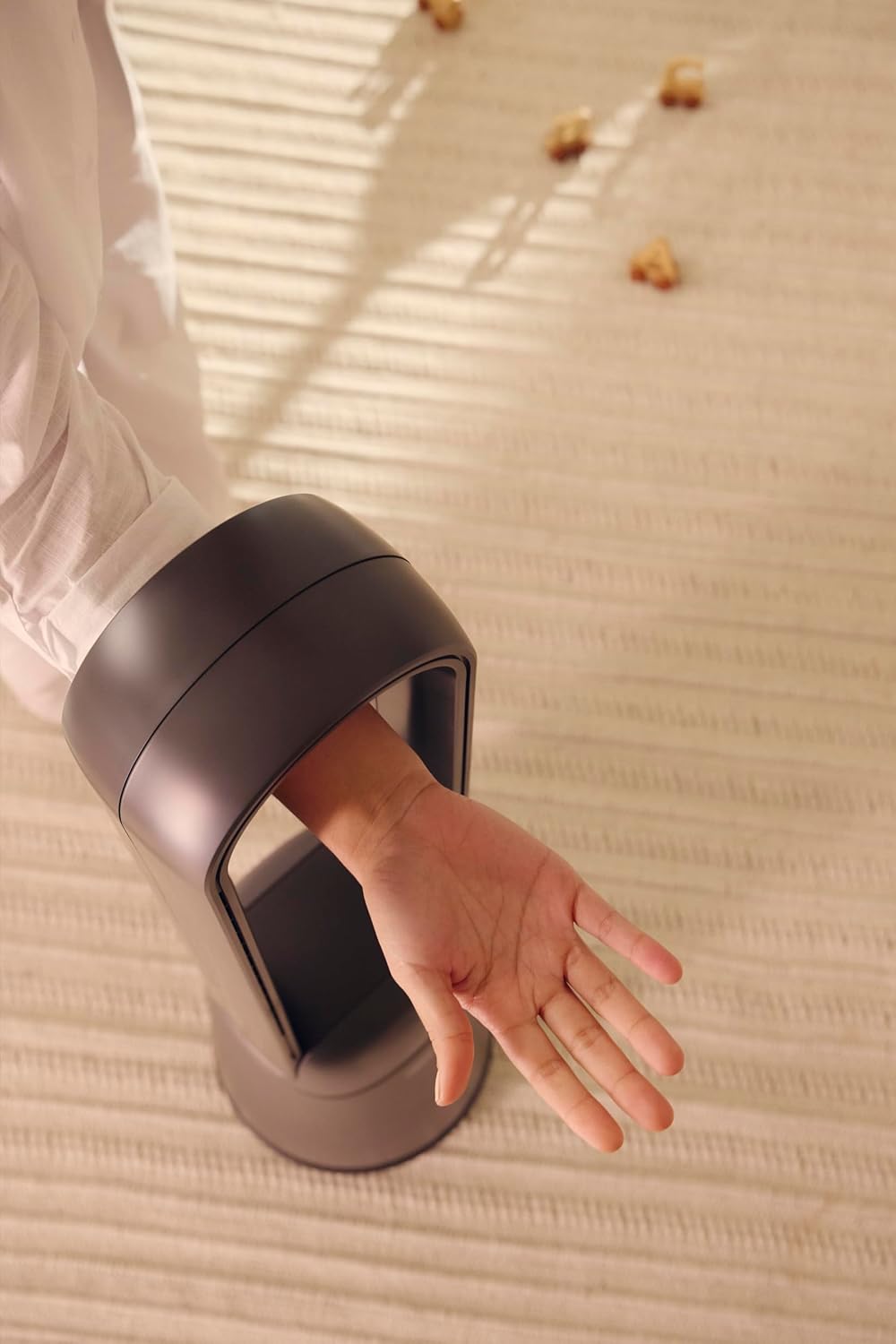
Figure 1: The bladeless design ensures safety, allowing a hand to pass through the air loop without obstruction.
2. Ọja Ipariview
The Defy DBF300 is a bladeless fan designed for efficient and quiet air circulation. It features multiple speed settings, various wind modes, and convenient remote control operation.

olusin 2: Iwaju view of the Defy DBF300 Bladeless Fan.
Awọn ẹya pataki:
- Bladeless design for enhanced safety and easy cleaning.
- Up to 20 wind speed settings for precise airflow control.
- Multiple wind modes: Strong, Natural, Sleep, and Smart adaptive wind.
- Oscillation function with 4 modes for wide area coverage.
- Wireless remote control for convenient operation.
- Integrated touch-sensitive control panel on the unit.
- Timer function for automatic shut-off, adjustable up to 8 hours.
- Iṣẹ́ ìkọ̀kọ̀-ìdákẹ́jẹ́ẹ́.
3. Eto
3.1 Ṣiṣii silẹ
- Fi ìṣọ́ra yọ afẹ́fẹ́ kúrò nínú àpò rẹ̀.
- Ṣàyẹ̀wò bóyá àwọn àmì ìbàjẹ́ kan wáyé nígbà ìrìnàjò. Tí ó bá bàjẹ́, má ṣe ṣiṣẹ́ kí o sì kan sí ìrànlọ́wọ́ àwọn oníbàárà.
- Ensure all components are present: the main fan unit and the remote control.
3.2 Ibi
- Place the fan on a firm, level, and stable surface.
- Ensure there is adequate space around the fan for optimal airflow, avoiding obstructions like walls, furniture, or curtains.
- Do not place the fan in direct sunlight or near heat sources.
- Keep the fan away from areas where it might be exposed to water or high humidity.
3.3 Asopọ agbara
- Before plugging in, ensure the power supply voltage matches the rating label on the fan.
- Insert the power plug firmly into a suitable electrical outlet.
4. Awọn ilana Iṣiṣẹ
The Defy DBF300 Bladeless Fan can be operated using the touch control panel on the unit or the provided remote control.
4.1 Iṣakoso igbimo Loriview

Figure 3: The fan's touch control panel and digital display.
- Bọtini agbara (①): Turns the fan On or Off.
- Speed Adjustment (②): Increases or decreases wind speed.
- Mode Selection (③): Cycles through Strong, Natural, Sleep, and Smart adaptive wind modes.
- Oscillation (④): Activates or deactivates the oscillation function.
- Timer (⑤): Sets the auto shut-off timer.
- Digital Ifihan: Shows current speed, mode, or timer setting.
4.2 Iṣakoso latọna jijin

Figure 4: The remote control for the Defy DBF300 Bladeless Fan.
The remote control duplicates all functions available on the fan's control panel. Ensure the remote has working batteries (typically 2x AAA, not included) and is pointed towards the fan's receiver for optimal operation.
- Bọtini agbara: Turns the fan On or Off.
- Iyara +/- Awọn bọtini: Adjusts the wind speed (1-20).
- Bọtini Ipo: Cycles through Strong, Natural, Sleep, and Smart modes.
- Bọtini oscillation: Toggles oscillation On/Off.
- Bọtini Aago: Sets the auto shut-off timer (1-8 hours).
4.3 Gbogbogbo isẹ
- Titan / Paa: Press the Power button on the control panel or remote. The digital display will illuminate.
- Titunṣe Iyara Afẹfẹ: Use the Speed adjustment buttons on the control panel or the +/- buttons on the remote. The display will show the current speed level (1-20).
- Selecting Wind Mode: Press the Mode button to cycle through the available modes:
- Ipo Alagbara: Provides a consistent, powerful airflow.
- Ipo Adayeba: Simulates natural breezes by varying wind speed.
- Ipo orun: Operates at a lower, quieter speed, gradually decreasing over time for comfortable sleep.
- Smart Adaptive Wind: Adjusts airflow based on ambient conditions (if sensor equipped, otherwise maintains a gentle flow).
- Activating Oscillation: Press the Oscillation button. The fan will begin to rotate horizontally. Press again to stop oscillation. There are 4 oscillation modes, which can be cycled through by repeatedly pressing the oscillation button.
- Ṣiṣeto Aago: Press the Timer button. Each press will increase the timer setting by 1 hour, up to a maximum of 8 hours. The fan will automatically turn off after the set time. To cancel the timer, cycle through until '00' or 'OFF' is displayed, or turn the fan off.
5. Itọju
Regular cleaning and proper storage will ensure the longevity and optimal performance of your Defy DBF300 Bladeless Fan.
5.1 Ninu
- Máa yọ afẹ́fẹ́ náà kúrò nígbà gbogbo láti ibi tí agbára ń jáde kí a tó fi mọ́.
- Mu ese ita ti afẹfẹ afẹfẹ pẹlu asọ, damp asọ. Ma ṣe lo abrasive ose tabi epo.
- For the air inlet and outlet, use a soft brush or a vacuum cleaner with a brush attachment to remove dust and debris. The bladeless design makes these areas easily accessible for cleaning.
- Ensure no water or liquid enters the internal components of the fan.
- Jẹ́ kí afẹ́fẹ́ náà gbẹ pátápátá kí o tó fi mọ́ ọn padà kí o sì ṣiṣẹ́.
5.2 Ibi ipamọ
- If storing the fan for an extended period, clean it thoroughly as per the instructions above.
- Fi afẹfẹ pamọ sinu apoti atilẹba rẹ tabi bo lati daabobo rẹ lati eruku.
- Keep the fan in a cool, dry place, away from direct sunlight and extreme temperatures.
6. Laasigbotitusita
Ṣaaju ki o to kan si atilẹyin alabara, jọwọ tọka si itọsọna laasigbotitusita atẹle fun awọn ọran ti o wọpọ.
| Isoro | Owun to le Fa | Ojutu |
|---|---|---|
| Fan ko ni tan-an. | Ko si ipese agbara. Okun agbara ko ṣafọ sinu daradara. | Ensure the fan is plugged into a live electrical outlet. Ṣayẹwo asopọ okun agbara. |
| Alailagbara tabi ko si ṣiṣan afẹfẹ. | Ti dina mọ ẹnu-ọna afẹfẹ. Fan iyara ṣeto ju kekere. | Check for obstructions and clear them. Mu eto iyara àìpẹ pọ si. |
| Isakoṣo latọna jijin ko ṣiṣẹ. | Awọn batiri ti ku tabi fi sii lọna ti ko tọ. Idilọwọ laarin latọna jijin ati àìpẹ. | Rọpo awọn batiri (2x AAA). Rii daju pe o pe polarity. Remove any objects blocking the signal path. Point remote directly at the fan. |
| Fan ki asopọ dani ariwo. | Afẹ́fẹ́ kò sí lórí ilẹ̀ tí ó tẹ́jú. Internal obstruction or damage. | Gbe awọn àìpẹ lori kan idurosinsin, ipele dada. Ti ariwo ba wa, da lilo duro ko si kan si atilẹyin alabara. |
7. Awọn pato
| Awoṣe | DBF300 |
| Brand | Kọja |
| Àwọ̀ | Grẹy Metallic |
| Agbara / Wattage | 36 watt |
| Awọn iwọn Ọja (D x W x H) | 28D x 25W x 97H sẹntimita |
| Iwọn Nkan | 6.7 kg |
| Pataki Ẹya | Bladeless, Oscillation, Remote Control, Timer |
| Orisun agbara | Okun Itanna |
8. Atilẹyin ọja ati Support
For detailed warranty information, please refer to the warranty card included with your product or visit the official Defy webojula. Jeki ẹri rira rẹ fun eyikeyi awọn ibeere atilẹyin ọja.
If you encounter any issues not covered in this manual or require further assistance, please contact Defy customer support. Contact details can typically be found on the Defy webaaye tabi apoti ọja rẹ.
You can visit the Defy Store for more information: Defy Store on Amazon.