
1. Ifihan
The PEICHENG Q2SPRO is a 7-inch tablet designed for a smooth and responsive user experience, powered by the Android 15.0 operating system. It features an IPS display, ample memory and storage, and dual cameras, making it suitable for various daily tasks from browsing to media consumption. This manual provides essential information for setting up, operating, maintaining, and troubleshooting your device.
2. Package Awọn akoonu
Jọwọ ṣayẹwo awọn akoonu package lori unboxing. Ti awọn ohun kan ba nsọnu tabi bajẹ, kan si atilẹyin alabara.
- PEICHENG Q2SPRO 7-inch Android 15.0 Tablet
- Protective Case with Foldable Stand
- USB-C Ngba agbara Cable
- Adapter agbara (le yatọ nipasẹ agbegbe)
- Afowoyi Olumulo (iwe-ipamọ yii)
3. Device Ìfilélẹ
Familiarize yourself with the physical components of your PEICHENG Q2SPRO tablet.
This image shows the PEICHENG Q2SPRO tablet from both the front, displaying its screen, and the rear, highlighting the camera and overall design.

Apa kan view of the PEICHENG Q2SPRO tablet, illustrating the placement of its various ports and buttons, such as the USB-C port, power button, and volume controls.
- Kamẹra iwaju: Ti o wa loke iboju naa.
- Kamẹra Tẹhin: Ti o wa lori nronu ẹhin.
- Bọtini agbara: Lọ́pọ̀ ìgbà, a máa ń lò ó láti tan/pa ẹ̀rọ náà tàbí láti jí/sùn.
- Awọn bọtini iwọn didun: Ṣatunṣe awọn ipele ohun.
- Ibudo USB-C: Fun gbigba agbara ati gbigbe data.
- Agbọrọsọ: Fun igbejade ohun.
- Iho kaadi MicroSD: Fun ibi ipamọ expandable.
4. Eto
4.1 Gbigba agbara akọkọ
Before first use, fully charge your tablet. Connect the USB-C cable to the tablet's charging port and the other end to the power adapter. Plug the adapter into a wall outlet. The charging indicator will show the charging status.
4.2 Agbara Tan / Pa
- Lati Fi agbara: Press and hold the Power button until the PEICHENG logo appears on the screen.
- Lati Paarẹ: Press and hold the Power button until the power options appear, then select "Power Off."
- Lati Sun/Ji: Ni kukuru tẹ bọtini agbara.
4.3 Oṣo oluṣeto akọkọ
Upon first power-on, the Android 15.0 setup wizard will guide you through essential configurations:
- Aṣayan ede: Yan ede ti o fẹ julọ.
- Asopọ Wi-Fi: Connect to a wireless network to access the internet. The tablet supports WiFi6 (2.4G+5G).
- Akọọlẹ Google: Sign in with your Google account or create a new one to access Google services like the Play Store, Gmail, and Google Drive.
- Ọjọ & Akoko: Ṣeto ọjọ ati akoko ti o pe.
- Aabo: Set up a screen lock (PIN, pattern, or password) for device security.

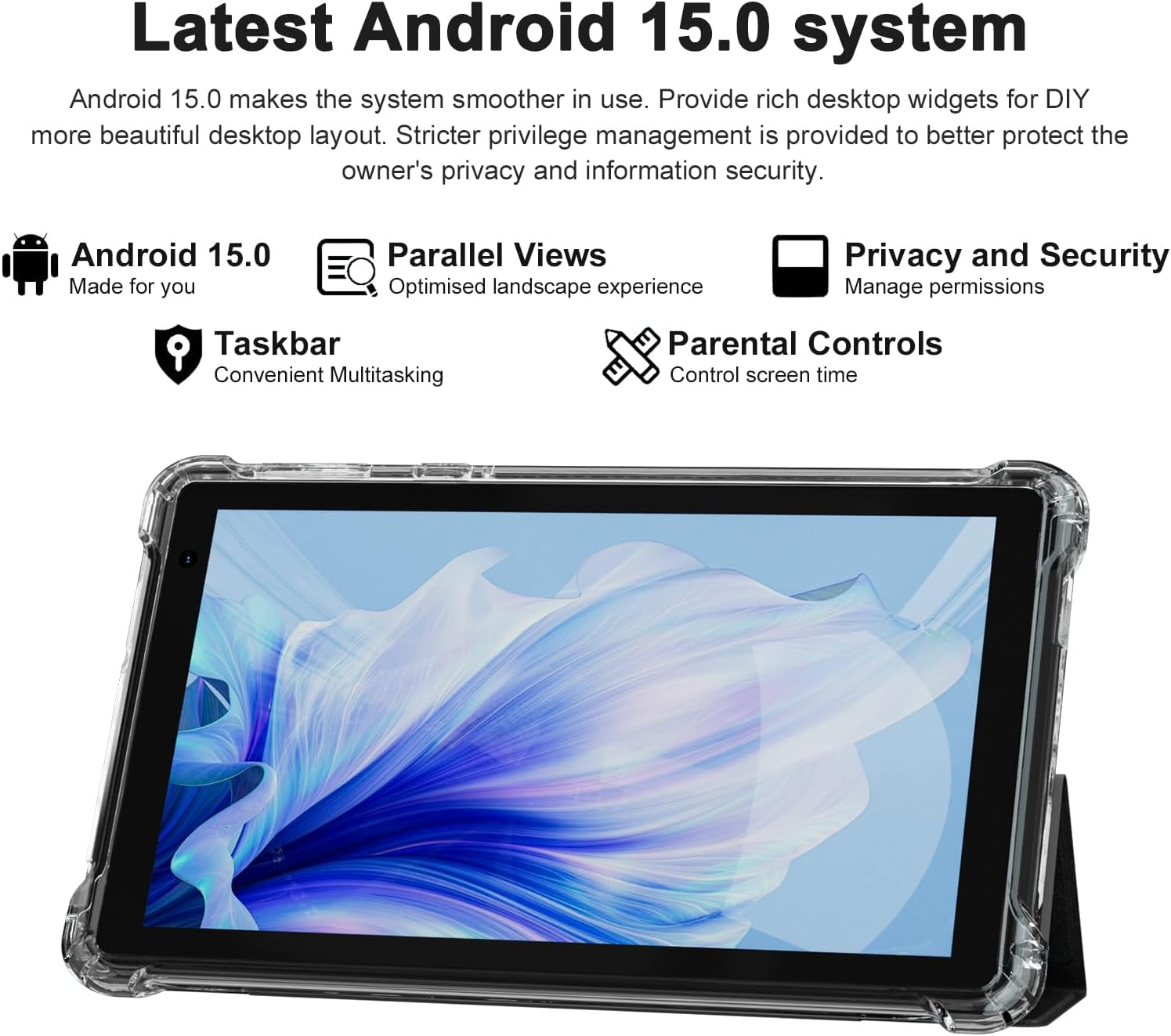
The PEICHENG Q2SPRO tablet screen displaying the Android 15.0 operating system interface, highlighting features like desktop widgets and privacy controls.
5. Awọn ilana Iṣiṣẹ
5.1 Ipilẹ Lilọ kiri
- Afi ika te: Tap, swipe, pinch-to-zoom for interaction.
- Iboju ile: Access apps, widgets, and notifications. Android 15.0 offers rich desktop widgets for customization.
- Igbimọ Iwifunni: Ra isalẹ lati oke iboju si view awọn iwifunni ati awọn eto iyara.
- Pẹpẹ iṣẹ-ṣiṣe: Android 15.0 includes a taskbar for convenient multitasking and optimized landscape mode.
5.2 Wi-Fi Asopọ
- Lọ si Eto > Nẹtiwọọki & Intanẹẹti > Ayelujara.
- Tan Wi-Fi.
- Yan nẹtiwọki Wi-Fi ti o fẹ lati inu atokọ naa.
- Tẹ ọrọ igbaniwọle sii ti o ba ṣetan, lẹhinna tẹ ni kia kia Sopọ.
5.3 Sisopọ Bluetooth
- Lọ si Eto > Awọn ẹrọ ti a ti sopọ > Awọn ayanfẹ asopọ > Bluetooth.
- Tan Bluetooth.
- Ensure the device you want to pair is in pairing mode.
- Select the device from the list of available devices and follow on-screen instructions to complete pairing.
5.4 kamẹra Lilo
The tablet features a 2.0MP front camera and a 5.0MP rear camera.
- Ṣii awọn Kamẹra ohun elo.
- Tẹ aami kamẹra lati yipada laarin awọn kamẹra iwaju ati ẹhin.
- Fọwọ ba bọtini titiipa lati ya fọto tabi bẹrẹ/da gbigbasilẹ fidio duro.

This image illustrates the 5MP rear camera and 2MP front camera specifications of the PEICHENG Q2SPRO tablet, alongside example photos taken with the device.
5.5 Fifi sori ẹrọ Ohun elo
Access millions of applications through the Google Play Store.
- Ṣii awọn Play itaja app.
- Wa fun ohun elo ti o fẹ.
- Fọwọ ba Fi sori ẹrọ ki o si tẹle awọn ilana loju iboju.
5.6 Protective Case and Stand
The included transparent, shock-absorbing protective case helps protect your tablet. It features a built-in foldable stand, allowing you to prop the tablet at a comfortable viewing angle for hands-free use.

The PEICHENG Q2SPRO tablet enclosed in its transparent protective case, demonstrating the integrated foldable stand propping the device at a comfortable viewigun igun.
6. Itọju
6.1 Ninu tabulẹti
- Lo asọ ti ko ni lint lati nu iboju ati ara.
- Do not use liquid cleaners or aerosols directly on the tablet.
- Fun awọn ami alagidi, die-die dampen awọn asọ pẹlu omi tabi a iboju-ailewu regede.
6.2 Software imudojuiwọn
Ṣayẹwo nigbagbogbo fun ati fi awọn imudojuiwọn sọfitiwia sori ẹrọ lati rii daju iṣẹ ṣiṣe to dara julọ, aabo, ati iraye si awọn ẹya tuntun. Lọ si Eto > Eto > Imudojuiwọn eto.
6.3 batiri Itọju
- Yago fun awọn iwọn otutu to gaju, eyiti o le ba igbesi aye batiri jẹ.
- Ma ṣe jẹ ki batiri naa ṣan patapata nigbagbogbo.
- Use the provided charger for optimal charging.
- The tablet emphasizes low power consumption for better battery efficiency.
7. Laasigbotitusita
Abala yii n ṣalaye awọn ọran ti o wọpọ ti o le ba pade pẹlu tabulẹti rẹ.
| Isoro | Owun to le Fa / Solusan |
|---|---|
| Tabulẹti ko ni agbara lori | Rí i dájú pé batiri náà ti gba agbára. So mọ́ ẹ̀rọ amúṣẹ́ náà kí o sì dúró díẹ̀ kí o tó gbìyànjú láti tún un ṣiṣẹ́. |
| Táblẹ́ẹ̀tì dì tàbí kò dáhùn | Press and hold the Power button for about 10-15 seconds to force a restart. Close unnecessary background applications. |
| Awọn oran asopọ Wi-Fi | Ensure Wi-Fi is enabled. Restart your router and the tablet. Check if the Wi-Fi password is correct. Try connecting to a different network if available. |
| Batiri n ṣan ni kiakia | Reduce screen brightness. Close unused apps. Disable Wi-Fi/Bluetooth when not in use. Check for power-intensive apps in battery settings. |
| Tabulẹti overheats | Avoid using the tablet in direct sunlight or hot environments. Close demanding applications. Allow the tablet to cool down before continued use. |
| O lọra išẹ | Clear cache and data of frequently used apps. Uninstall unused apps. Ensure sufficient free storage space. Restart the tablet regularly. |
8. Awọn pato
Technical specifications for the PEICHENG Q2SPRO tablet.
| Ẹya ara ẹrọ | Ẹ̀kúnrẹ́rẹ́ |
|---|---|
| Brand | PEICHENG |
| Orukọ awoṣe | Q2SPRO |
| Eto isesise | Android 15.0 |
| Iwon iboju | 7 inches |
| Ifihan Iru | IPS LED Touchscreen |
| Ipinnu Ifihan | 1024 x 600 awọn piksẹli |
| Ramu Memory | 8GB (3GB installed + 5GB expandable) |
| Agbara Ibi ipamọ Iranti | 32 GB (ti o gbooro si 1TB nipasẹ MicroSD) |
| isise Brand | Rockchip |
| Kamẹra ẹhin | 5.0MP |
| Kamẹra iwaju | 2.0MP |
| Ipinnu Yaworan fidio | HD 720p |
| Alailowaya Technology | Wi-Fi (802.11ax, 802.11g, 2.4G+5G) |
| Bluetooth | Bluetooth 5.0 |
| Asopọmọra Technology | USB 3.0 Iru C |
| Batiri Cell Type | Litiumu polima |
| Akoonu Agbara Batiri | 3000 Milionuampwakati ere (mAh) |
| Iwọn Nkan | 0.49 kilo |
| Awọn iwọn Nkan (L x W x Sisanra) | 8"L x 5"W x 0.4"Th |
9. atilẹyin ọja Information
The PEICHENG Q2SPRO tablet comes with a 1-odun lopin atilẹyin ọja from the date of purchase. This warranty covers manufacturing defects and malfunctions under normal use. It does not cover damage caused by misuse, accidents, unauthorized repairs, or normal wear and tear. Please retain your proof of purchase for warranty claims.
10. Onibara Support
For further assistance, technical support, or warranty inquiries, please refer to the contact information provided with your product packaging or visit the official PEICHENG website. When contacting support, please have your model number (Q2SPRO) and proof of purchase readily available.