
Ọrọ Iṣaaju
Welcome to the world of robotics with your new Xtrem Bots Bionic Robot! This interactive robot is designed to provide an engaging and educational experience, allowing users to explore basic programming concepts and remote control operation. With its versatile movement modes, LED lights, and robotic sounds, the Bionic Robot offers hours of interactive fun.

Image: The Xtrem Bots Bionic Robot in white and green, standing next to its white remote control.
Package Awọn akoonu
- 1 x Xtrem Bots Bionic Robot (Model XT3803418)
- 1 x Isakoṣo latọna jijin
- Ilana Afowoyi (iwe yii)
Ṣeto
1. Fifi sori batiri
The Xtrem Bots Bionic Robot requires 2 AA batteries (included) for operation.
- Locate the battery compartment on the back of the robot.
- Lilo screwdriver kekere kan (ko si ninu rẹ), ṣii ideri apo batiri naa.
- Fi awọn batiri AA 2 sii, ni idaniloju polarity ti o pe (+/-).
- Rọpo ideri kompaktimenti batiri ki o ni aabo pẹlu dabaru.
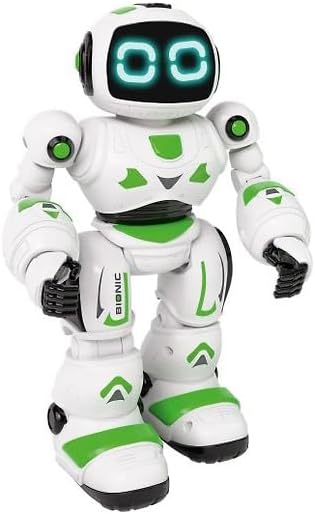
Aworan: Iwaju view of the Xtrem Bots Bionic Robot, showing its design.
2. Agbara Tan / Paa
- To power on the robot, locate the power switch on its back and slide it to the "ON" position.
- To power off the robot, slide the power switch to the "OFF" position.
- Ensure the remote control also has batteries installed and is powered on to establish a connection.
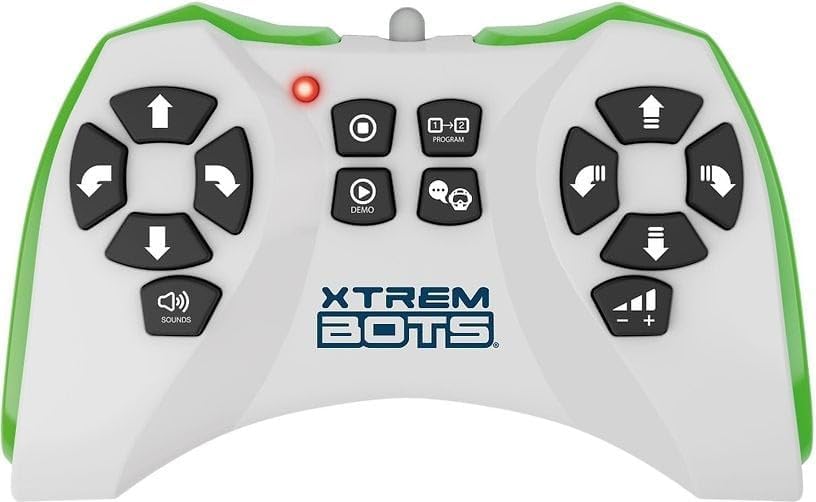
Image: The remote control for the Xtrem Bots Bionic Robot, showing various buttons for movement and functions.
Awọn ilana Iṣiṣẹ
Awọn iṣẹ iṣakoso latọna jijin
The remote control allows you to command your Bionic Robot with various actions. Familiarize yourself with the buttons and their corresponding functions:
- Awọn iṣakoso gbigbe: Use the directional buttons to make the robot move forward, backward, turn left, and turn right.
- Ipo ifaworanhan: The robot can perform sliding movements.
- Ipo Ririn: The robot can perform walking movements.
- Eto: Utilize the programming function to create sequences of up to 20 different actions.
- Awọn imọlẹ LED: The robot's eyes feature LED lights that illuminate during operation.
- Robotic Sound: The robot produces various robotic sounds.
Awọn iṣẹ siseto
To program a sequence of actions:
- Press the "Program" button on the remote control.
- Input your desired sequence of movements and actions (up to 20 steps).
- Press the "Program" button again to execute the programmed sequence.
Video: Demonstration of a remote control robot's programmable functions, including movement, sounds, and gesture sensing.
Itoju
- Ninu: Wipe the robot and remote control with a dry, soft cloth. Do not use water or cleaning solutions.
- Ibi ipamọ: Store the robot and remote control in a cool, dry place away from direct sunlight when not in use. Remove batteries if storing for extended periods.
- Itọju Batiri: Nigbagbogbo lo awọn batiri titun ti iru iṣeduro. Maṣe dapọ atijọ ati awọn batiri titun tabi awọn oriṣiriṣi awọn batiri.
Laasigbotitusita
| Isoro | Owun to le Fa | Ojutu |
|---|---|---|
| Robot does not respond. | Batteries are low or incorrectly installed. Remote control is off or out of range. | Check and replace batteries in both robot and remote. Ensure remote is within operating range. Power cycle both devices. |
| Robot n gbe lainidi. | Interference from other electronic devices. Low battery power. | Move to an area with less electronic interference. Replace batteries. |
| Programming sequence is incorrect. | Incorrect button presses during programming. | Clear the current program and re-enter the sequence carefully. |
Awọn pato
| Ẹya ara ẹrọ | Ẹ̀kúnrẹ́rẹ́ |
|---|---|
| Nọmba awoṣe | XT3803418 |
| Brand | Xtrem Bots |
| Awọn iwọn | 30 x 20 x 15 cm |
| Iwọn | 500 g |
| Ohun elo | Ṣiṣu |
| Àwọ̀ | Alawọ ewe |
| Batiri Iru | Awọn batiri 2 x AA (pẹlu) |
| Apejọ ti a beere | Rara |
| Pataki Awọn ẹya ara ẹrọ | LED Lights, Robotic Sound, Programmable (up to 20 functions), Walk and Slide Movement Modes |
| Ifojusi Ẹkọ | Introduce children to programming concepts and provide an educational, fun experience. |
Alaye Aabo
- Ko dara fun awọn ọmọde labẹ ọdun 3 nitori awọn ẹya kekere.
- A ṣe iṣeduro abojuto agbalagba lakoko ere.
- Do not operate near stairs, water, or other hazards.
- Do not attempt to modify or disassemble the robot or remote control.
- Sọ awọn batiri sọnu ni ifojusọna ni ibamu si awọn ilana agbegbe.
Atilẹyin ọja ati Support
For warranty information or technical support, please refer to the contact details provided on the product packaging or visit the official Xtrem Bots webojula.