
Ọrọ Iṣaaju
This manual provides essential instructions for the setup, operation, and maintenance of your Subsonic Superdrive 270 GT-5 Racing Wheel. Designed for a realistic racing experience, this wheel is compatible with PlayStation 5 (PS5) and PC. Please read this manual thoroughly before use to ensure optimal performance and longevity of your device.
Package Awọn akoonu
Daju pe gbogbo awọn nkan wa ninu apo rẹ:
- Superdrive 270 GT-5 Racing Wheel
- Pedal Set (Brake and Accelerator)
- Iṣagbesori adijositabulu Clamp
- Removable Suction Cups (5 units)
- Okun Asopọ USB
Awọn ilana iṣeto
Follow these steps to connect your racing wheel to your console or PC.
Fifi sori ti ara
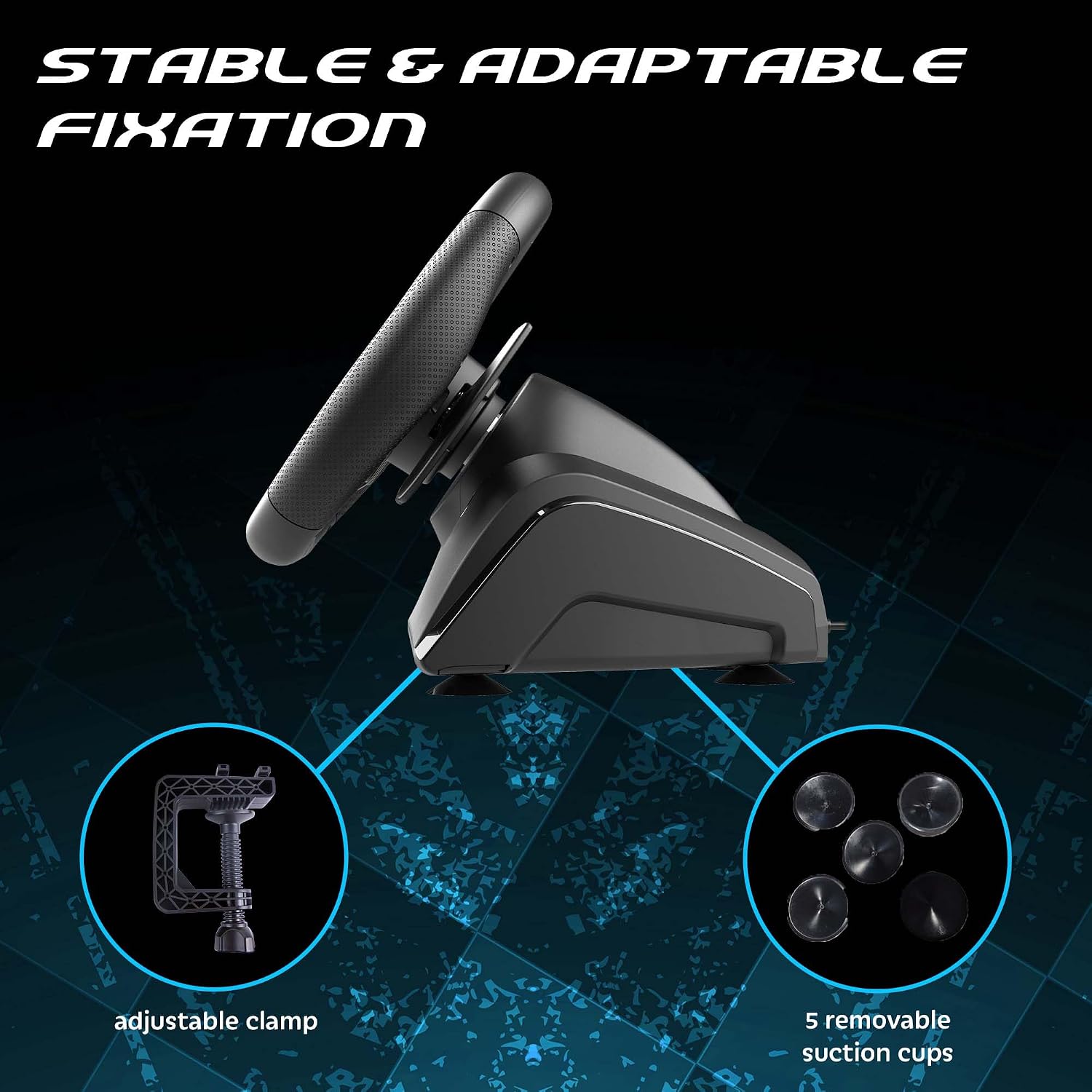
1. Fifi Kẹ̀kẹ́ Sílẹ̀: Place the racing wheel on a stable surface such as a desk or table. Use the adjustable clamp to secure it firmly. Alternatively, attach the five removable suction cups to the bottom of the wheel for additional stability on smooth surfaces.

Awọn adijositabulu clamp and suction cups provide stable fixation for the racing wheel.
2. Nsopọ awọn Pedals: Connect the pedal set cable to the designated port on the rear of the racing wheel base.
3. Connecting to Console/PC: Plug the USB connection cable from the racing wheel into an available USB port on your PlayStation 5 or PC.

The Superdrive 270 GT-5 Racing Wheel is designed for use with PS5 and PC.
PS5 Specific Setup
For optimal performance on PlayStation 5, ensure your console settings are configured correctly:
- Awọn Eto Iwọle: From the PS5 home screen, navigate to the Eto aami (aami jia).
- Navigate to Accessories: In the Settings menu, select Awọn ẹya ẹrọ.
- Select Controller (General): Under Accessories, choose Controller (General).
- Choose Communication Method: Yan Ọna Ibaraẹnisọrọ.
- Select Use USB Cable: From the Communication Method options, select Lo okun USB.
- Activate Wheel: After connecting the USB cable, press the ILE button on the racing wheel to activate it.

Navigate to the Settings menu on your PS5 console.

Follow the menu path to 'Communication Method'.

Ensure 'Use USB Cable' is selected for controller communication.

Connect the USB cable and press the HOME button on the wheel.
Awọn ilana Iṣiṣẹ
The Superdrive 270 GT-5 Racing Wheel offers various features for an immersive gaming experience.
Steering and Pedals
- Yiyi-Iwọn 270: The steering wheel provides a 270-degree rotation for precise control in racing games.
- Analog Pedals: The included pedal set features analog brake and accelerator pedals for responsive input.
- Àwọn Olùyípadà Paddle: Use the integrated paddle shifters on the wheel for quick and intuitive gear changes.

The racing wheel offers a 270-degree rotation for enhanced control.
Dual Joysticks and Programmable LEDs
The racing wheel includes dual joysticks, replicating full controller functionality, and programmable RGB LEDs.
- Dual Joysticks: The right and left joysticks provide access to all standard controller functions, conveniently located on the wheel.
- Programmable RGB LEDs: The LEDs around the joysticks can be customized to fix colors, display a rainbow effect, or show breathing colors. Refer to the programming section for detailed instructions on customization.

The dual joysticks feature programmable RGB LEDs with various display options.
Progressive LEDs
LEDs located on the top of the steering wheel provide visual feedback for acceleration and braking, enhancing immersion.

Progressive LEDs on the wheel indicate acceleration and braking.
Programmable Keys and Sensitivity Levels
The wheel features programmable buttons and adjustable sensitivity to suit different racing styles and game types.
- Awọn bọtini eto: Specific buttons on the wheel can be programmed for custom functions. Refer to the dedicated programming section in the full manual for detailed instructions.
- Awọn ipele ifamọ: Choose from three sensitivity levels:
- Ifamọ Kekere: Suitable for most racing games, offering stable control.
- Ifamọ Alabọde: Ideal for games with many curves, providing a balance of responsiveness and control.
- Ifamọ giga: Best for linking tight turns, offering maximum responsiveness.
Adjustable sensitivity levels allow customization for various racing scenarios.
Itoju
To ensure the longevity and proper functioning of your racing wheel:
- Ninu: Use a soft, dry cloth to clean the surfaces of the wheel and pedals. Avoid abrasive cleaners or solvents.
- Ibi ipamọ: Tọju ẹrọ naa ni itura, aye gbigbẹ kuro lati orun taara ati awọn iwọn otutu to gaju.
- Itọju USB: Avoid bending or twisting cables excessively. Disconnect cables by pulling the plug, not the cable itself.
Laasigbotitusita
If you encounter issues with your Superdrive 270 GT-5 Racing Wheel, refer to the following common solutions:
- Wheel Not Responding:
- Ensure all cables are securely connected to the wheel, pedals, and console/PC.
- For PS5, verify that the console's communication method is set to 'Use USB Cable' as described in the setup section.
- Try connecting the wheel to a different USB port on your console or PC.
- Tun console rẹ tabi PC bẹrẹ.
- Disconnections During Gameplay (PS5):
- This issue may occur if the PS5 perceives the wheel as a DualShock 4 controller and disconnects it. Ensure the 'Use USB Cable' setting is correctly applied and remains active.
- Ensure your PS5 system software is up to date.
- Avoid using USB hubs; connect the wheel directly to the console.
- Pedals Not Responding:
- Check the connection cable between the pedals and the wheel base.
- Test the wheel and pedals with a different game or on a different platform (if available) to isolate the issue.
- LEDs Not Functioning:
- Ensure the wheel is powered on and properly connected.
- Refer to the programming section (in the full manual) for LED customization and ensure settings are correct.
If problems persist after attempting these solutions, please contact Subsonic customer support.
Awọn pato
| Ẹya ara ẹrọ | Ẹ̀kúnrẹ́rẹ́ |
|---|---|
| Nọmba awoṣe | SA5721-2 |
| Ibamu | PLAYSTATION 5, PC |
| Steering Rotation | 270 iwọn |
| Kẹkẹ opin | 270 mm |
| Ohun elo mimu | Micro-perforated synthetic leather |
| Idahun gbigbọn | Awọn mọto gbigbọn meji |
| Awọn iṣakoso | Dual joysticks, paddle shifters, programmable buttons |
| Awọn LED | Programmable RGB LEDs (joysticks), progressive LEDs (acceleration/braking) |
| Awọn ipele ifamọ | 3 (Kekere, Alabọde, Giga) |
| Iṣagbesori | adijositabulu clamp, removable suction cups |
| Pedals | Analog brake and accelerator with footrest |
| Awọn iwọn (Apapọ) | 32 x 29.21 x 27.94 cm |
| Ìwúwo (Apapọ) | 2.5 kilo |
| Ipilẹṣẹ | China |
Atilẹyin ọja ati Support
The Subsonic Superdrive 270 GT-5 Racing Wheel comes with a 2-odun olupese ká atilẹyin ọja. Atilẹyin ọja yi ni wiwa awọn abawọn ninu awọn ohun elo ati iṣẹ ṣiṣe labẹ lilo deede.
For technical support, warranty claims, or further assistance, please visit the official Subsonic webojula tabi kan si wọn onibara iṣẹ Eka. Jeki ẹri rira rẹ fun ijẹrisi atilẹyin ọja.