
Ọrọ Iṣaaju
The CAS S2000 Jr is an NTEP certified electronic price computing scale designed for commercial use. This manual provides detailed instructions for the proper setup, operation, maintenance, and troubleshooting of your scale to ensure accurate and efficient performance. Please read this manual thoroughly before operating the device.
Alaye Aabo
- Always operate the scale on a stable, level surface to ensure accurate readings.
- Do not expose the scale to extreme temperatures, humidity, or direct sunlight.
- Yẹra fún dídín ìwọ̀n náà kù tàbí fífi sí àwọn ipa líle.
- Use only the provided AC adapter for power.
- Keep the scale clean and free from debris. Do not use abrasive cleaners.
- Do not attempt to disassemble or repair the scale yourself. Contact qualified service personnel.
Package Awọn akoonu
Jẹrisi pe gbogbo awọn ohun kan wa ninu package:
- CAS S2000 Jr Electronic Price Computing Scale Unit
- Stainless Steel Platter
- Adaparọ Agbara AC
- Afowoyi Olumulo (iwe-ipamọ yii)
Ṣeto
1. Unpacking ati Placement
Carefully remove the scale from its packaging. Place the scale on a firm, level surface, away from vibrations, drafts, and direct heat sources. Ensure adequate space for operation and display visibility.
2. Installing the Platter
Gently place the stainless steel platter onto the scale's weighing platform. Ensure it sits securely and does not wobble.
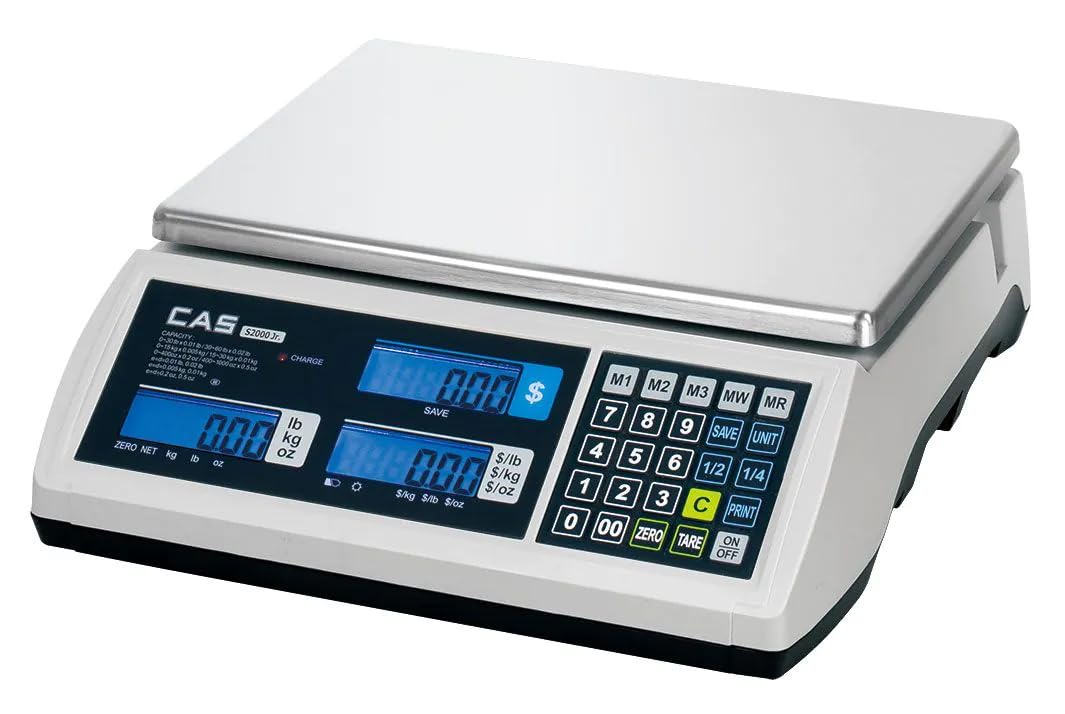
Image: The CAS S2000 Jr Electronic Price Computing Scale with its stainless steel platter correctly installed on the weighing platform. The scale features three blue backlit LCD displays on the front panel.
3. Asopọ agbara
Connect the AC power adapter to the scale's power input port and then plug it into a standard electrical outlet. The scale also features a rechargeable battery, providing up to 200 hours of operation, allowing for portability and use in areas without immediate AC power. Ensure the battery is sufficiently charged before portable use.
4. Leveling the Scale
The scale must be perfectly level for accurate measurements. Adjust the leveling feet located at the bottom of the scale until the bubble in the level indicator (if present) is centered. If no bubble level is present, ensure the scale is stable and does not rock.
Awọn ilana Iṣiṣẹ
1. Agbara Tan / Paa
Tẹ awọn [TAN/PA] button to turn the scale on. The display will perform a self-test and then show '0.00' or '0.000'. Press and hold the [TAN/PA] bọtini lati pa asekale.
2. Ipilẹ Iwon
Place the item to be weighed on the center of the stainless steel platter. The weight will be displayed on the left LCD screen. The scale supports measurements in pounds (lb), kilograms (kg), and ounces (oz). Use the [UNIT] button to cycle through the desired unit of measurement.
3. Iṣẹ́ Tare
To subtract the weight of a container, place the empty container on the platter and press the [TARE] button. The display will reset to zero. You can then add the product to the container, and only the net weight of the product will be displayed.
4. Price Computing
The S2000 Jr features dual displays, allowing both the operator and customer to view the total price, weight, and unit price simultaneously. To compute the price:
- Place the item on the platter to get its weight.
- Enter the unit price using the numeric keypad. The unit price will appear on the middle display.
- The total price will be calculated and shown on the right display.
5. Price Look-Up (PLU) Options
The scale includes Price Look-Up (PLU) options to store and recall frequently used item prices. Refer to the detailed PLU programming section in the full manual for specific instructions on how to program and recall PLU items. This feature streamlines the retail experience by quickly recalling piece weight and cost.
Itoju
1. Ninu
Wipe the scale's surface and stainless steel platter with a soft, damp cloth. Use a mild detergent if necessary. Do not use abrasive cleaners, solvents, or immerse the scale in water. Ensure the scale is dry before use.
2. Itọju batiri
To maximize battery life, fully charge the scale before its first use and after extended periods of storage. Avoid completely draining the battery frequently. If the scale will not be used for a long time, charge it periodically to maintain battery health.
3. Ibi ipamọ
When not in use, store the scale in a clean, dry environment, away from extreme temperatures and direct sunlight. Protect it from dust and potential physical damage.
Laasigbotitusita
| Isoro | Owun to le Fa | Ojutu |
|---|---|---|
| Iwọn ko ni tan-an | Ko si agbara, batiri ti o jade, ohun ti nmu badọgba ti ko tọ | Check AC adapter connection. Charge the battery. Ensure power outlet is functional. |
| Awọn kika ti ko pe | Not level, unstable surface, drafts, overload, dirty platter | Level the scale. Place on a stable surface. Avoid drafts. Do not exceed weight limit. Clean platter. |
| Display shows 'OVERLOAD' | Weight exceeds maximum capacity | Yọ iwuwo ti o pọ ju kuro lẹsẹkẹsẹ lati yago fun ibajẹ. |
| Ifihan ti wa ni baibai tabi flicker | Batiri kekere | Connect the scale to AC power and charge the battery. |
Awọn pato
| Ẹya ara ẹrọ | Apejuwe |
|---|---|
| Brand | CAS |
| Awoṣe | S2000 Jr |
| Iwọn Idiwọn | 60 iwon (27.2 kg) |
| Readout Yiye | 0.005 lbs (2g) |
| Ifihan Iru | LCD pẹlu Backlight |
| Pataki Awọn ẹya ara ẹrọ | Dual Displays, Price Look-Up Options, Rechargeable Battery, NTEP Certification |
| Orisun agbara | AC Adapter, Rechargeable Battery (up to 200 hours operation) |
| Àwọ̀ | Funfun |
| Fọọmù ifosiwewe | Iwọn counter |
| UPC | 850072510187 |
Alaye atilẹyin ọja
CAS products are manufactured under strict quality control standards. This product is covered by a limited warranty against defects in materials and workmanship. The specific terms and duration of the warranty may vary by region. Please retain your proof of purchase for warranty claims. For detailed warranty information, refer to the warranty card included with your product or visit the official CAS webojula.
Onibara Support
If you encounter any issues or have questions regarding your CAS S2000 Jr scale that are not addressed in this manual, please contact CAS customer support. You can typically find contact information (phone number, email, or support portal) on the official CAS webaaye tabi lori apoti ọja.