
1. Ifihan
Thank you for choosing the Long Run Technologies LRT-ANC1 Active Noise Cancelling Bluetooth Headphones. These headphones are designed to provide a superior audio experience with advanced noise cancellation, extended battery life, and comfortable wear. This manual will guide you through the setup, operation, and maintenance of your new headphones.
Awọn ẹya pataki pẹlu:
- Advanced Active Noise Cancellation (ANC) technology.
- Bluetooth 5.4 for stable wireless connectivity.
- Up to 100 hours of music playtime on a single charge.
- Hi-Res Audio support with precision-tuned 40mm drivers.
- Comfortable memory foam ear cups and a foldable design for portability.
- Wired audio option via 3.5mm jack.
2. Alaye Aabo
Please read the following safety guidelines before using your headphones:
- Avoid listening to audio at loud volumes for extended periods to prevent hearing damage.
- Do not use the headphones while operating a motor vehicle or in situations where awareness of surroundings is critical.
- Keep the headphones away from water and moisture. While water-resistant, they are not waterproof.
- Má ṣe gbìyànjú láti tú tàbí yí àwọn agbekọri náà padà. Èyí lè sọ àtìlẹ́yìn náà di òfo kí ó sì fa ìbàjẹ́.
3. Package Awọn akoonu
Rii daju pe gbogbo awọn nkan wa ninu apo rẹ:
- Long Run Technologies LRT-ANC1 Headphones
- Okun Ngba agbara USB
- 3.5mm Audio USB
- Afowoyi Olumulo (iwe-ipamọ yii)
4. Ọja Ipariview
Familiarize yourself with the headphone components and controls.
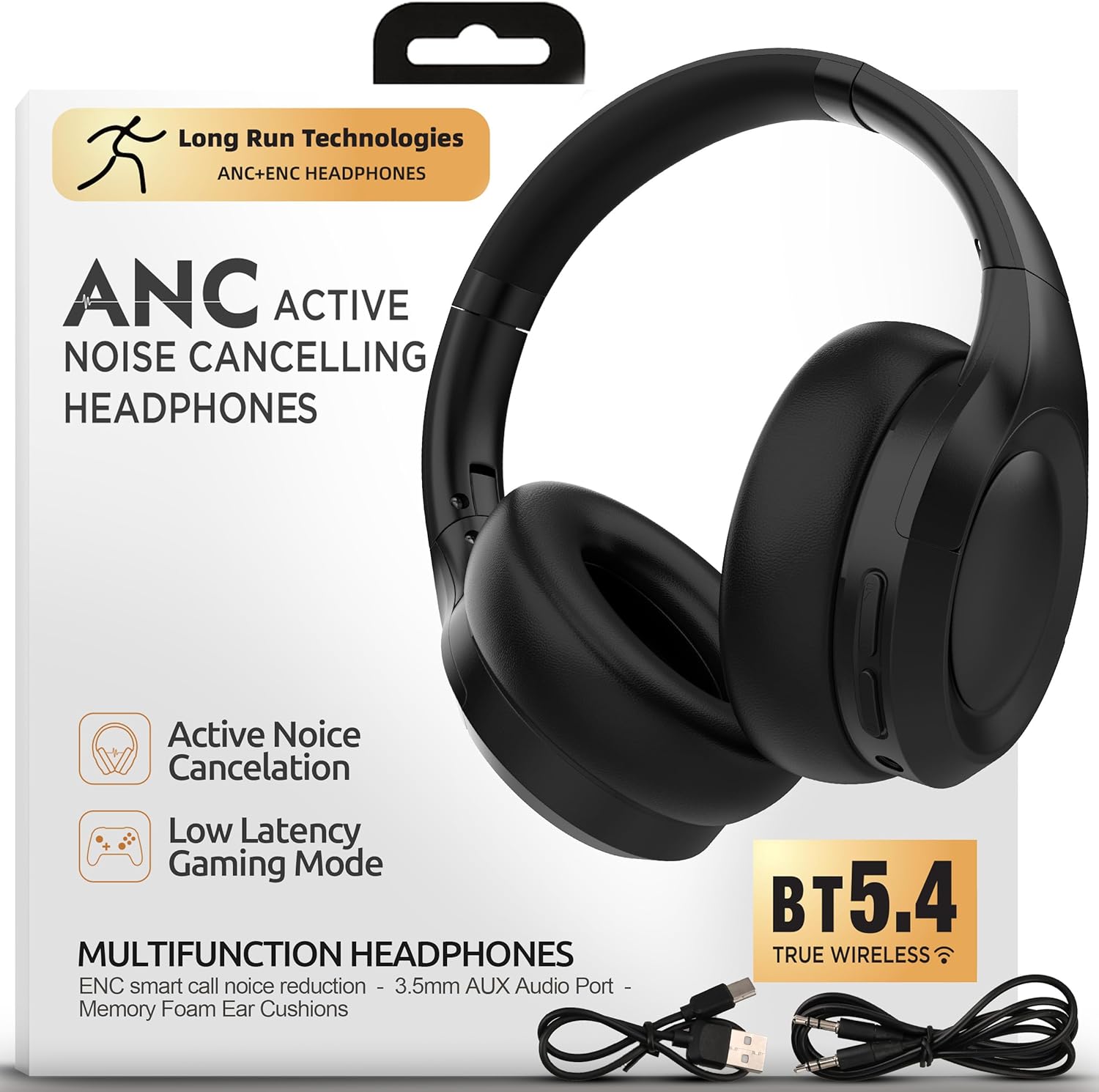
Aworan: Iwaju view of the Long Run Technologies LRT-ANC1 headphones.
Awọn idari ati Awọn itọkasi:
- Bọtini agbara: Tẹ mọlẹ lati fi agbara tan/pa a.
- Iwọn didun Soke/Bọtini orin atẹle: Tẹ kukuru fun iwọn didun soke, tẹ gun fun orin atẹle.
- Iwọn didun isalẹ/Bọtini orin ti iṣaaju: Tẹ kukuru fun iwọn didun isalẹ, gun tẹ fun orin iṣaaju.
- Bọtini iṣẹ-ọpọlọpọ (MFB): Mu ṣiṣẹ/duro, dahun/pari awọn ipe.
- Bọtini ANC: Yipada Ifagile Ariwo Ti nṣiṣe lọwọ tan/pa.
- Jack Audio 3.5mm: Fun asopọ onirin.
- Ibudo Ngba agbara USB-C: Fun gbigba agbara awọn agbekọri.
- Atọka LED: Ṣe afihan agbara, sisopọ, ati ipo gbigba agbara.
5. Eto
5.1 Ngba agbara si awọn Agbekọri
Before first use, fully charge your headphones. A full charge takes approximately 2 hours and provides up to 100 hours of playtime.
- So okun gbigba agbara USB pọ si ibudo USB-C lori awọn agbekọri.
- So opin okun miiran pọ si ohun ti nmu badọgba agbara USB (kii ṣe pẹlu) tabi ibudo USB ti kọnputa kan.
- Atọka LED yoo ṣe afihan ipo gbigba agbara (fun apẹẹrẹ, pupa nigba gbigba agbara, pipa nigbati o ba gba agbara ni kikun).

Image: The headphones next to a battery icon, illustrating the 100-hour playtime per charge.
5.2 Titan / Pa a
- Lati Fi agbara: Press and hold the Power button for 3 seconds. The LED indicator will flash blue.
- Lati Paarẹ: Tẹ mọlẹ bọtini agbara fun iṣẹju-aaya 3. Atọka LED yoo wa ni pipa.
5.3 Sisopọ Bluetooth
Pair your headphones with a Bluetooth-enabled device for wireless audio.
- Rii daju pe awọn agbekọri ti wa ni pipa.
- Tẹ bọtini agbara ki o si di mu fun awọn aaya 5-7 titi ti ifihan LED yoo fi tan pupa ati buluu ni ọna miiran, ti o fihan ipo isopọmọ.
- Lórí ẹ̀rọ rẹ (fóònù alágbéka, kọ̀ǹpútà alágbèéká, àti bẹ́ẹ̀ bẹ́ẹ̀ lọ), mu Bluetooth ṣiṣẹ́ kí o sì wá àwọn ẹ̀rọ tó wà.
- Select "LRT-ANC1" from the list of devices.
- Ni kete ti o sopọ, Atọka LED yoo tan buluu laiyara.
5.4 Asopọ Onirin
Use the included 3.5mm audio cable for a wired connection, which is useful when the battery is low or for non-Bluetooth devices.
- Pulọọgi opin ọkan ti okun ohun 3.5mm sinu jaketi ohun afetigbọ 3.5mm agbekọri.
- Plug the other end into your audio source's 3.5mm audio output.
- The headphones will automatically switch to wired mode. Bluetooth functionality will be disabled.

Image: The LRT-ANC1 headphones highlighting the flexibility of both wireless Bluetooth and wired 3.5mm jack connectivity.
6. Awọn ilana Iṣiṣẹ
6.1 Ifagile Ariwo Nṣiṣẹ (ANC)
The LRT-ANC1 headphones feature advanced ANC technology to reduce ambient noise.
- Lati Mu ANC ṣiṣẹ: Press the ANC button once. The ANC indicator light will turn on.
- Lati mu ANC ṣiṣẹ: Press the ANC button once again. The ANC indicator light will turn off.

Image: Two individuals wearing the headphones, one on a plane and one working, demonstrating the ability to cancel chaos and focus in any environment.
6.2 Sisisẹsẹhin Orin
- Ṣiṣẹ/Daduro: Tẹ MFB lẹẹkan.
- Orin t’okan: Gun tẹ bọtini didun Up.
- Tẹlẹ Orin: Gun tẹ bọtini Iwọn didun isalẹ.
6.3 ipe Management
- Idahun/Ipe Ipari: Tẹ MFB lẹẹkan.
- Kọ Ipe: Tẹ mọlẹ MFB fun iṣẹju-aaya 2.
- Mu Oluranlọwọ Ohun ṣiṣẹ: Tẹ MFB lẹẹmeji.
6.4 Iṣakoso iwọn didun
- Mu iwọn didun pọ si: Kukuru tẹ bọtini Iwọn didun Up.
- Din iwọn didun silẹ: Kukuru tẹ bọtini Iwọn didun isalẹ.
7. Itọju
Ìtọ́jú tó tọ́ ń jẹ́ kí àwọn agbekọri rẹ pẹ́ títí.
- Clean the ear cups and headband with a soft, dry cloth. Do not use harsh chemicals or abrasive materials.
- Tọju awọn agbekọri naa ni itura, aye gbigbẹ nigbati ko si ni lilo. Apẹrẹ ti a ṣe pọ gba laaye fun ibi ipamọ iwapọ.
- Yẹra fún fífi àwọn agbekọri sí ooru líle tàbí oòrùn tààrà fún ìgbà pípẹ́.

Image: Close-up of the headphones highlighting pressure-free foam, perfect fit, and travel-ready foldable form.
8. Laasigbotitusita
| Isoro | Ojutu |
|---|---|
| Awọn agbekọri ko ni ṣiṣẹ. | Ensure the headphones are charged. Connect to a power source using the USB charging cable. |
| Ko le so pọ nipasẹ Bluetooth. |
|
| Kò sí ohùn nígbà tí a bá so pọ̀ mọ́ ara wọn. |
|
| ANC is not effective. |
|
9. Awọn pato
| Ẹya ara ẹrọ | Ẹ̀kúnrẹ́rẹ́ |
|---|---|
| Nọmba awoṣe | LRT-ANC1 |
| Ẹya Bluetooth | 5.4 |
| Igbesi aye batiri | Titi di awọn wakati 100 |
| Igba agbara Batiri | O fẹrẹ to awọn wakati 2 |
| Ariwo Iṣakoso | Fagilee Ariwo Ti nṣiṣe lọwọ (ANC) |
| Audio Driver Type | Yiyi Awakọ |
| Iwọn Igbohunsafẹfẹ | 20 Hz - 20,000 Hz |
| Asopọmọra | Ailokun (Bluetooth), Ti firanṣẹ (Jack3.5mm) |
| Gbigbe Eti | Lori Eti |
| Ohun elo | Foam, Leather (ear cups) |
| Omi Resistance Ipele | Omi sooro |
| Ọja Mefa | 19.05 x 5.08 x 19.05 cm |
| Iwọn Nkan | 375 g |
10. Official ọja Video
Fidio: Ipariview of the Long Run Technologies LRT-ANC1 headphones, showcasing their design, features like long battery life, noise cancellation, and comfort.
11. Atilẹyin ọja ati Support
Your Long Run Technologies LRT-ANC1 headphones come with a 1-odun atilẹyin ọja lati ọjọ rira, ibora awọn abawọn iṣelọpọ.
For technical support, warranty claims, or any questions regarding your product, please contact Long Run Technologies customer service. Refer to the contact information provided with your purchase or visit the official Long Run Technologies webojula fun support awọn alaye.
Olupese: Long Run Technologies