
1. Ifihan
This manual provides detailed instructions for the installation, operation, and maintenance of your Antec GSK750 V2 ATX3.1 750W Full Modular Power Supply. This power supply unit (PSU) is designed to deliver stable and efficient power to your computer system, featuring ATX3.1 and PCIe 5.1 compatibility, 80 PLUS Gold certification, and a full modular cable design for optimized cable management.

Image: The Antec GSK750 V2 750W Full Modular Power Supply, showcasing its compact design and modular connectors.
2. Alaye Aabo
Please read and follow all safety instructions carefully before installing or operating the power supply. Failure to do so may result in personal injury or damage to your equipment.
- Rii daju pe ipese agbara ti ge asopọ lati inu iṣan agbara AC ṣaaju fifi sori ẹrọ tabi itọju.
- Maṣe ṣii ipese agbara casing. Iwọn gigatages are present inside, and there are no user-serviceable parts.
- Fi sori ẹrọ ipese agbara ni agbegbe ti o ni afẹfẹ daradara, kuro lati awọn orisun ooru, oorun taara, ati ọrinrin.
- Lo awọn kebulu modulu nikan ti a pese pẹlu ipese agbara yii. Lilo awọn kebulu ti ko ni ibamu le ba PSU jẹ tabi awọn paati ti a ti sopọ.
- Rii daju pe gbogbo awọn kebulu ti sopọ ni aabo ṣaaju ṣiṣe agbara lori eto naa.
3. Package Awọn akoonu
Jẹrisi pe gbogbo awọn ohun kan wa ninu package:
- Antec GSK750 V2 ATX3.1 750W Full Modular Power Supply Unit
- Modular Cable Set (including 12V-2x6 PCIe 5.1 cable)
- AC Agbara okun
- Iṣagbesori skru
- Afowoyi Olumulo (iwe-ipamọ yii)
4. Eto & Fifi sori
Follow these steps to install your Antec GSK750 V2 power supply:
4.1 Fifi sori ti ara
- Rii daju pe kọmputa rẹ ti wa ni pipa ati yọọ kuro lati inu iṣan ogiri.
- Ṣii apoti kọnputa rẹ.
- Mount the Antec GSK750 V2 PSU into the designated power supply bay in your PC case using the provided mounting screws. Ensure the fan is oriented correctly for optimal airflow (typically facing down if there's a bottom vent, or up if not).

Image: The compact size of the Antec GSK750 V2 power supply, illustrating its smaller dimensions compared to larger PSUs, allowing for easier installation in various PC cases.
4.2 USB Awọn isopọ
The GSK750 V2 is a full modular PSU, meaning you only connect the cables you need, which helps improve airflow and cable management within your case.
- So awọn kebulu apọjuwọn pataki si ẹyọ ipese agbara. Tọkasi awọn akole lori PSU ati awọn kebulu lati rii daju awọn asopọ ti o tọ.
- So okùn ATX 24-pin pọ mọ modaboudu rẹ.
- Connect the 8-pin (4+4) EPS/CPU cables to your motherboard's CPU power connectors.
- For graphics cards, use the appropriate PCIe cables. The GSK750 V2 supports PCIe 5.1 with a dedicated 12V-2x6 (450W) cable for modern GPUs. Connect these securely to your graphics card(s).
- So awọn okun agbara SATA pọ mọ awọn awakọ ibi ipamọ rẹ (SSDs, HDDs) ati awọn ẹrọ miiran ti agbara SATA.
- Connect Molex cables for any peripherals that require them.
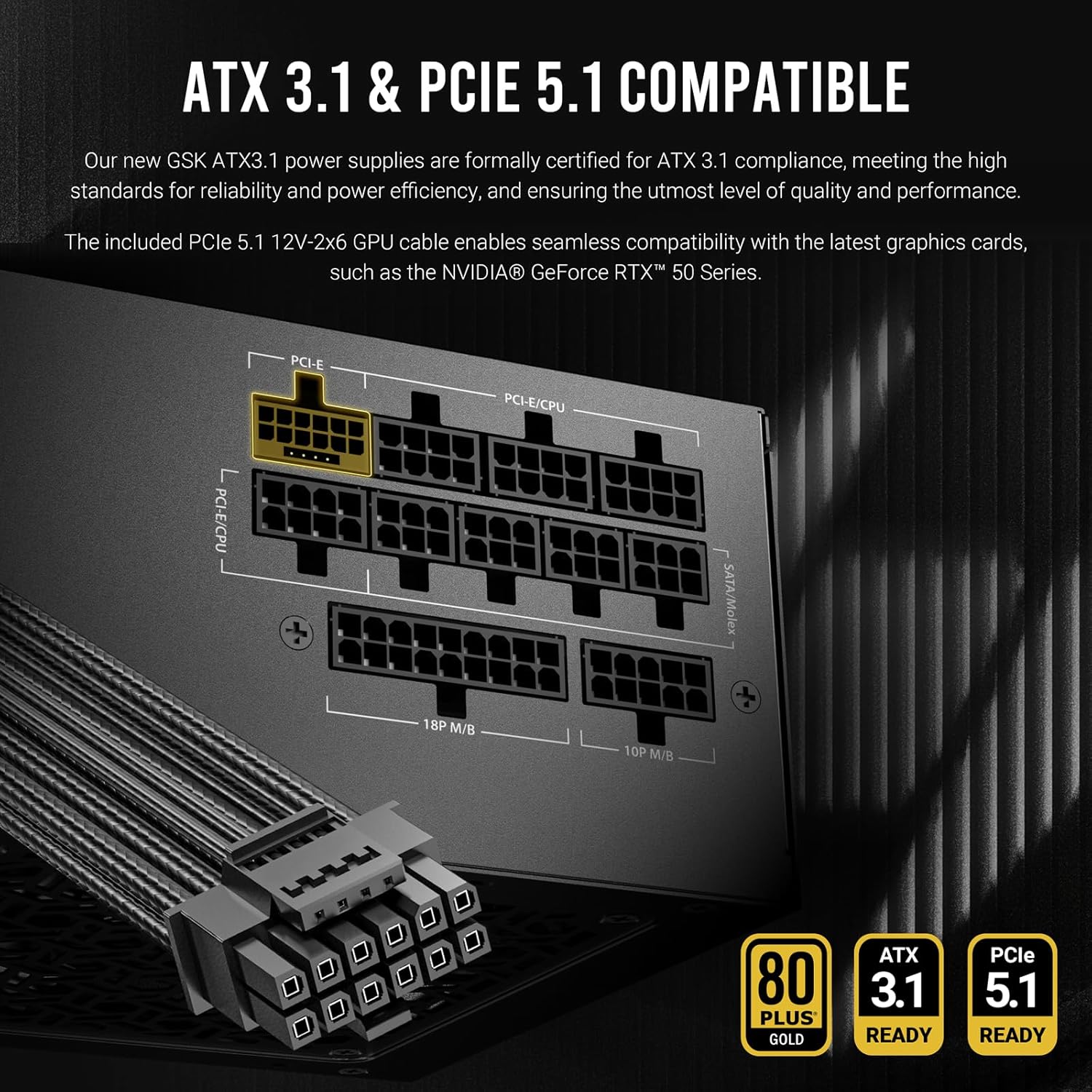
Aworan: A alaye view of the Antec GSK750 V2's modular cable ports, highlighting the ATX3.1 and PCIe 5.1 compatibility and the various connection types available for system components.

Image: Illustration of the full modular cable design, demonstrating how only necessary cables are connected to the PSU, reducing clutter and improving airflow within the PC case.
4.3 Initial Power Up
- Nígbà tí gbogbo àwọn ìsopọ̀ inú bá ti wà, ti àpótí kọ̀ǹpútà rẹ pa.
- Connect the AC power cord to the PSU and then to a wall outlet.
- Yipada agbara lori ẹhin PSU si ipo 'ON'.
- Agbara lori kọmputa rẹ.
5. Awọn ilana Iṣiṣẹ
The Antec GSK750 V2 PSU is designed for reliable and efficient operation with minimal user intervention.
5.1 Zero RPM Manager
This power supply features a Zero RPM Manager mode. In this mode, the 120mm silent fan remains off under low to moderate loads to provide silent operation. The fan will automatically activate when the power load increases, ensuring optimal cooling while minimizing noise levels.

Image: Diagram illustrating the Zero RPM Manager's fan speed curve relative to power load, alongside a visual of the 120mm silent fan designed for quiet and efficient cooling.
5.2 PhaseWave Design
The PSU incorporates Antec's PhaseWave Design, which utilizes an LLC + DC-DC topology for server-class power delivery. This design ensures high efficiency, stable voltage regulation, and reliable performance for your system.

Image: Explanation of PhaseWave Design for power delivery efficiency and CircuitShield, a suite of industrial-grade protections including OCP, OVP, UVP, SCP, OPP, OTP, SIP, and NLO.
6. Itọju
To ensure the longevity and optimal performance of your Antec GSK750 V2 power supply, follow these simple maintenance guidelines:
- Jeki awọn atẹgun kuro: Ensure that the intake and exhaust vents of the power supply are not obstructed by dust or other objects. Proper airflow is crucial for cooling.
- Ninu igbagbogbo: Periodically clean the exterior of the power supply and its fan grille using compressed air to remove dust buildup. Always disconnect the PSU from the AC power before cleaning.
- Iṣakoso USB: Maintain tidy cable management within your PC case to prevent cables from obstructing airflow to the PSU and other components.
7. Laasigbotitusita
If you encounter issues with your Antec GSK750 V2 power supply, refer to the following common problems and solutions:
7.1 No Power to System
- Ṣayẹwo agbara AC: Ensure the AC power cord is securely connected to both the PSU and the wall outlet. Verify the wall outlet is functional.
- Yipada PSU: Confirm the power switch on the back of the PSU is in the 'ON' position.
- Internal Connections: Double-check all modular cable connections to the PSU and to your components (motherboard, CPU, GPU). Ensure the 24-pin and 8-pin CPU cables are fully seated.
- Motherboard Stand-offs: Ensure your motherboard is properly installed with stand-offs to prevent short circuits.
7.2 System Instability or Random Shutdowns
- Apọju: Rii daju pe awọn ibeere agbara eto rẹ ko kọja agbara 750W ti PSU.
- Igbóná púpọ̀: Check for proper airflow within your case and ensure the PSU fan is operating when under load. Clean any dust buildup.
- Idaabobo Circuit Shield: The Antec GSK750 V2 includes comprehensive industrial-grade protections (OCP, OVP, UVP, SCP, OPP, OTP, SIP, NLO). If the PSU detects an unsafe condition, it may shut down to protect your components. If this occurs repeatedly, consult a professional.
7.3 Fan Ko Yiyi
- Ipo RPM odo: Under low loads, the fan will not spin. This is normal operation. The fan will activate automatically as the system load increases.
- Idilọwọ: Ensure nothing is physically blocking the fan blades.
If problems persist after following these steps, please contact Antec customer support.
8. Awọn pato
Detailed technical specifications for the Antec GSK750 V2 ATX3.1 750W Full Modular Power Supply:
| Ẹya ara ẹrọ | Ẹ̀kúnrẹ́rẹ́ |
|---|---|
| Orukọ awoṣe | GSK750 V2 US |
| Wattage | 750 watt |
| Fọọmù ifosiwewe | ATX |
| Ijẹrisi ṣiṣe | 80 PLUS Gold ifọwọsi |
| Iye owo ti ATX | ATX3.1 |
| PCIe Support | PCIe 5.1 (pẹlu okun 12V-2x6) |
| Modularity | Modulu ni kikun |
| Ọna Itutu | Air (120mm Silent Fan with Zero RPM Manager) |
| Apẹrẹ | PhaseWave Design (LLC + DC-DC) |
| Awọn aabo | OCP, OVP, UVP, SCP, OPP, OTP, SIP, NLO (CircuitShield) |
| Ọja Mefa | 5.51 x 3.38 x 5.9 inches (140 x 86 x 150 mm) |
| Iwọn Nkan | 5.29 iwon |
| Awọn ẹrọ ibaramu | Kọmputa ti ara ẹni |
8.1 Input and Output Ratings

Image: Table detailing the input voltage ranges and the output voltage, lọwọlọwọ, ati wattage for each rail (+3.3V, +5V, +12V, -12V, +5VSB) of the Antec GSK750 V2 power supply.
| Iṣawọle | |||||
|---|---|---|---|---|---|
| 100-240V~, 50Hz-60Hz, 10A Max 200-240V~, 50Hz-60Hz, 10A Max / for China and Korea | |||||
| Abajade | |||||
| + 3.3V | + 5V | + 12V | -12V | +5VSB | |
| 20A | 20A | 62.5A | 0.3A | 3.0A | |
| 100W | 750W | 3.6W | 15W | ||
| 750W (Combined) | |||||
9. atilẹyin ọja Information
The Antec GSK750 V2 ATX3.1 750W Full Modular Power Supply comes with a 10-odun atilẹyin ọja from the date of purchase. This warranty covers defects in materials and workmanship under normal use. Please retain your proof of purchase for warranty claims. For full warranty terms and conditions, please visit the official Antec webojula tabi kan si atilẹyin alabara.
10. Onibara Support
For technical assistance, troubleshooting, or warranty inquiries, please contact Antec customer support through their official webojula:
You may also find helpful resources, FAQs, and driver downloads on their support page.