
Ọrọ Iṣaaju
O ṣeun fun riraasing the Anker Soundcore P31i True Wireless Earbuds. This manual provides detailed instructions on how to set up, operate, and maintain your earbuds to ensure optimal performance and longevity. Please read this manual carefully before use and retain it for future reference.
Kini To wa
Your Soundcore P31i package includes the following items:
- Soundcore P31i Earbuds (Left and Right)
- Ngba agbara Case
- Ear Tips (XS, S, M, L - M size pre-installed)
- USB-C si okun USB-A Ngba agbara
- Quick Bẹrẹ Itọsọna
- Aabo Afowoyi
Ọja Pariview
The Soundcore P31i earbuds are designed for comfort and high-quality audio. Each earbud features a touch control area and an indicator light. The charging case protects the earbuds and provides additional battery life.
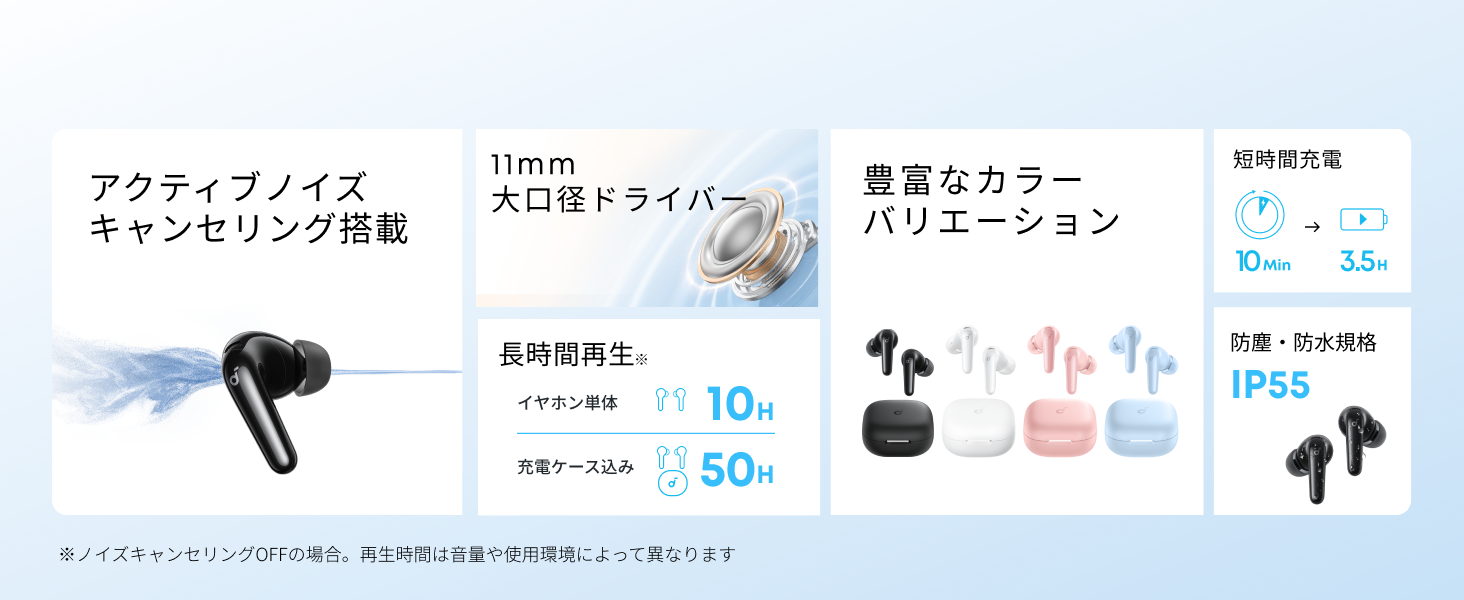
Diagram showing the Soundcore P31i earbuds and charging case with key components labeled.
Awọn afetigbọ: Each earbud is equipped with an 11mm dynamic driver for powerful bass and clear sound. They feature active noise cancellation and AI noise reduction for calls. The ergonomic design ensures a secure and comfortable fit.
Ngba agbara: The compact charging case not only stores and protects your earbuds but also recharges them on the go. It has a USB-C charging port and a strap hole for portability.
Ngba agbara si Earbuds rẹ ati Ọran
Ṣaaju lilo akọkọ, gba agbara ni kikun mejeeji awọn agbekọri ati apoti gbigba agbara.
- Ngba agbara si Earbuds: Place the earbuds into the charging case. The indicator lights on the earbuds will show charging status.
- Gbigba agbara si ọran naa: Connect the charging case to a power source using the provided USB-C to USB-A cable. A full charge for the case and earbuds takes approximately 3 hours.
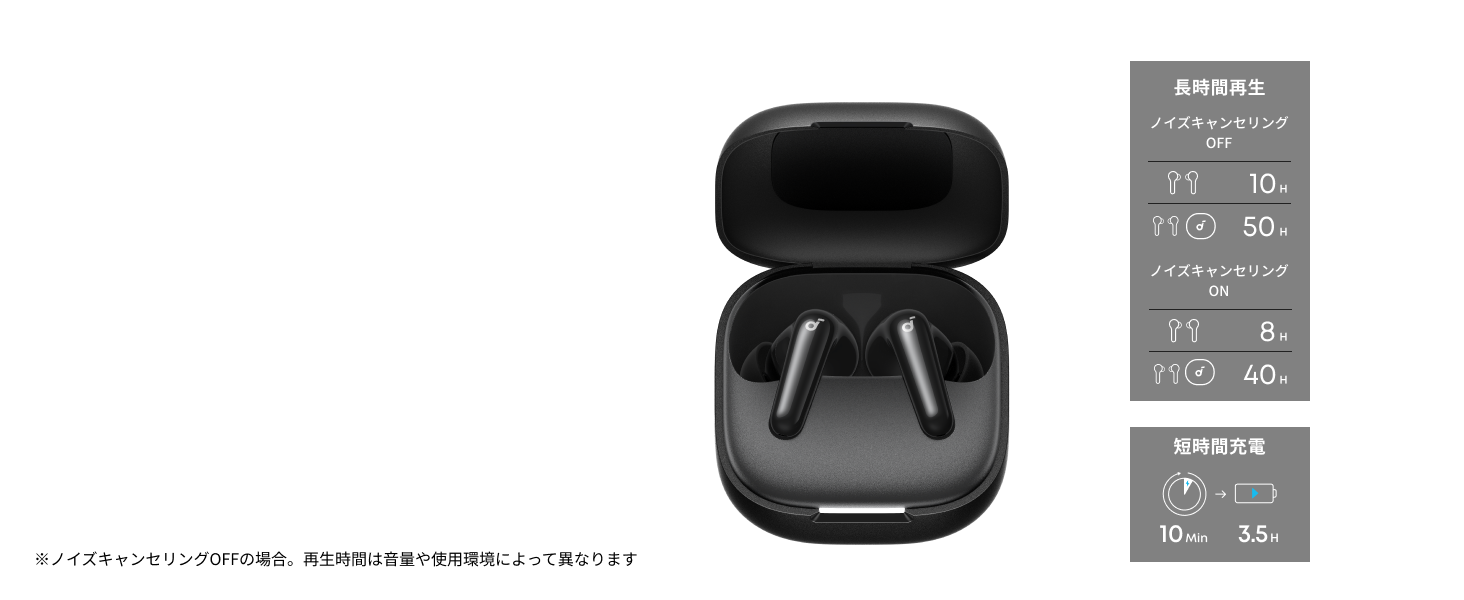
Diagram illustrating charging times and playback duration for Soundcore P31i earbuds.
Igbesi aye batiri:
- Up to 10 hours of playback on a single charge (earbuds only).
- Títí dé wákàtí mẹ́rìnlélógún ti gbogbo ìgbà tí a bá fi àpótí ìgbara ṣiṣẹ́.
- A quick 10-minute charge provides up to 3.5 hours of listening time.
Note: Playback time varies depending on volume level and audio content.
Wọ Awọn Akọti Rẹ
For optimal sound quality and comfort, it is important to wear your earbuds correctly.
- Yan Awọn imọran Eti Ọtun: Select the ear tips that provide the best seal and comfort for your ears. Experiment with different sizes (XS, S, M, L) to find the perfect fit.
- Fi Earbuds sii: Gently insert the earbuds into your ear canals.
- Yipada si Ni aabo: Twist the earbuds slightly until they fit snugly and securely in your ears.

Image showing a person wearing the Soundcore P31i earbuds correctly.
Asopọ Bluetooth
Follow these steps to pair your Soundcore P31i earbuds with your device:
- Pipọpọ-akoko:
- Open the charging case. The earbuds will automatically enter Bluetooth pairing mode. The indicator lights on the earbuds will flash white.
- Lori ẹrọ rẹ (foonuiyara, tabulẹti, ati bẹbẹ lọ), lọ si awọn eto Bluetooth.
- Select "Soundcore P31i" from the list of available devices.
- Once connected, the indicator lights on the earbuds will turn solid white for 1 second and then turn off.
- Pipọpọ pẹlu Ẹrọ miiran:
- Fi awọn afikọti sinu apoti gbigba agbara ki o fi ideri silẹ ni ṣiṣi.
- Press and hold the button on the charging case for 3 seconds until the earbud indicator lights flash white rapidly.
- Repeat steps 2 and 3 from "First-Time Pairing" on your new device.
Awọn iṣakoso
The Soundcore P31i earbuds feature touch controls for managing playback, calls, and other functions. Specific control configurations can often be customized via the Soundcore app.
General Touch Controls (Default):
- Ṣiṣẹ/Daduro: Fọwọ ba lẹẹkan lori boya agbọrọsọ.
- Orin t’okan: Fọwọ ba agbekọri ọtun lẹẹmeji.
- Tẹlẹ Orin: Fọwọ ba agbekọri osi lẹẹmeji.
- Idahun/Ipe Ipari: Fọwọ ba lẹẹkan lori boya agbọrọsọ.
- Kọ Ipe: Tẹ mọlẹ boya agbekọri fun iṣẹju 2.
- Mu Oluranlọwọ Ohun ṣiṣẹ: Triple-tap either earbud (may vary).
- Yipada Ipo ANC/Iyipada: Press and hold the right earbud for 2 seconds (may vary).
For detailed and customizable controls, please refer to the Soundcore app or the included Quick Start Guide.
Ifagile Ariwo Nṣiṣẹ (ANC)
The Soundcore P31i earbuds feature Active Noise Cancelling technology to minimize ambient noise, allowing for an immersive listening experience.

Illustration demonstrating the active noise cancelling feature of the Soundcore P31i earbuds.
ANC detects and reduces various types of noise, such as engine hum on trains or buses, and chatter in cafes. This allows you to enjoy your music or podcasts with greater clarity and fewer distractions.
To switch between ANC, Normal, and Transparency modes, use the touch controls on the earbuds or adjust settings within the Soundcore app.
Didara ohun
The Soundcore P31i earbuds are engineered to deliver a rich audio experience.

Diagram illustrating the 11mm dynamic driver responsible for the audio output.
- Awọn Awakọ Yiyi 11mm: Equipped with large 11mm drivers, these earbuds produce a wide frequency range and detailed sound.
- BassUp™ Technology: Anker's proprietary BassUp™ technology enhances low frequencies, delivering powerful and impactful bass.
You can further customize the sound profile using the equalizer settings within the Soundcore app.
Didara ipe
The Soundcore P31i earbuds ensure clear voice calls and web awọn apejọ.

Illustration depicting AI noise reduction technology for clear voice calls.
Idinku Ariwo AI: Integrated AI noise reduction technology effectively filters out background noise, ensuring your voice is transmitted clearly to the person on the other end of the call, even in noisy environments.
Olona-ojuami Asopọ
The Soundcore P31i supports multi-point connection, allowing you to connect to two Bluetooth devices simultaneously.

Illustration showing the Soundcore P31i connected to multiple devices simultaneously.
This feature enables seamless switching between devices. For example, you can listen to music on your laptop and instantly switch to answer a call on your phone without manually re-pairing.
To enable multi-point connection, ensure both devices are paired with your earbuds. The earbuds will automatically connect to the last two paired devices when powered on.
Ohun elo Soundcore
Download the Soundcore app to enhance your experience with the P31i earbuds. The app offers various features and customization options.

Screenshots of the Soundcore app interface, highlighting customization features.
Awọn ẹya ara ẹrọ ti ohun elo pẹlu:
- Awọn iṣakoso isọdi: Personalize touch controls for playback, calls, and voice assistant.
- Eto oludogba: Ṣatunṣe profiles to your preference or choose from preset EQs.
- ANC/Transparency Mode Switching: Easily toggle between noise cancelling and transparency modes.
- Awọn imudojuiwọn famuwia: Jeki awọn agbekọri rẹ ni imudojuiwọn pẹlu awọn ẹya tuntun ati awọn ilọsiwaju.
- AI Translation Function: (Available from Spring 2026, requires Soundcore app ver 4.0.0 or higher).
The Soundcore app is available for download on both iOS and Android devices.
Ọja Pariview Fidio
Ifihan fidio ọja osiseasing the key features and design of the Soundcore P31i True Wireless Earbuds, including active noise cancellation, powerful bass, long battery life, and multi-point connectivity.
Itọju ati Itọju
Proper maintenance ensures the longevity and performance of your Soundcore P31i earbuds.
- Ninu: Mọ awọn afikọti nigbagbogbo ati apoti gbigba agbara pẹlu asọ ti o gbẹ, asọ ti ko ni lint. Maṣe lo awọn kẹmika lile tabi awọn ohun elo abrasive.
- Italolobo Eti: Remove the ear tips and clean them with water and mild soap if necessary. Ensure they are completely dry before reattaching.
- Awọn olubasọrọ gbigba agbara: Jẹ́ kí àwọn olùbáṣepọ̀ gbigba agbára lórí àwọn ètí àti àpótí náà mọ́ tónítóní kí ó sì gbẹ kí ó lè rí i dájú pé ó gba agbára dáadáa.
- Ibi ipamọ: Nigbati ko ba si ni lilo, tọju awọn afikọti sinu apoti gbigba agbara wọn lati daabobo wọn lati eruku ati ibajẹ.
- Omi Resistance: The earbuds are rated IP55 for dust and water resistance. This means they can withstand sweat and light rain, but are not designed for submersion in water. Ensure the earbuds are dry before placing them back in the charging case.

Image showing Soundcore P31i earbuds with water droplets, highlighting their IP55 water resistance.
Laasigbotitusita
If you encounter any issues with your Soundcore P31i earbuds, refer to the following common solutions:
- Agbohun-eti Ko Sopọ:
- Rii daju pe awọn agbekọri mejeeji ti gba agbara ni kikun.
- Place earbuds in the case, close the lid, then open it again to re-enter pairing mode.
- Forget "Soundcore P31i" from your device's Bluetooth list and try pairing again.
- Reset the earbuds (refer to the Quick Start Guide for specific reset instructions).
- Only One Earbud Playing Audio:
- Place both earbuds back into the charging case and close the lid for 5 seconds, then open it again.
- Ensure both earbuds have sufficient battery.
- Tun awọn agbekọri pada.
- Didara Ohun Ko dara:
- Rii daju pe awọn imọran eti pese edidi to dara ninu odo eti rẹ. Gbiyanju awọn titobi oriṣiriṣi.
- Nu idoti eyikeyi kuro lati awọn nozzles earbud.
- Sunmọ ẹrọ ti o sopọ lati yago fun kikọlu.
- Awọn ọran gbigba agbara:
- Ṣàyẹ̀wò okùn gbigba agbara ati adapter fun ibajẹ.
- Rí i dájú pé àwọn ohun tí a fi ń gba agbára lórí àwọn ètí àti àpótí náà mọ́ tónítóní.
- Gbiyanju okun gbigba agbara ti o yatọ tabi orisun agbara.
Awọn pato
| Ẹya ara ẹrọ | Ẹ̀kúnrẹ́rẹ́ |
|---|---|
| Brand | Soundcore |
| Orukọ awoṣe | P31i |
| Nọmba awoṣe | D1202 |
| Àwọ̀ | Dúdú (Irúfẹ́ pàtó yìí) |
| Fọọmù ifosiwewe | Ninu Eti |
| Asopọmọra Technology | Ailokun (Bluetooth 6.1) |
| Ariwo Iṣakoso | Ti nṣiṣe lọwọ Noise Ifagile |
| Awakọ Iwon | 11mm Yiyi Awakọ |
| Akoko Sisisẹsẹhin (Earbuds) | Titi di wakati 10 |
| Lapapọ Akoko Sisisẹsẹhin (pẹlu Ọran) | Titi di wakati 50 |
| Gbigba agbara yara | 10 iseju gba agbara fun 3.5 wakati šišẹsẹhin |
| Àkókò gbígbà agbára (Kíkún) | O fẹrẹ to awọn wakati 3 |
| Omi Resistance | IP55 |
| Olona-ojuami Asopọ | Atilẹyin |
| UPC | 194644251543 |
| Ilu isenbale | China |
Atilẹyin ọja ati Onibara Support
Soundcore provides a comprehensive warranty for your P31i earbuds.

Image detailing the warranty period and extension for Soundcore P31i.
- Atilẹyin ọja boṣewa: An 18-month warranty is provided for products purchased from authorized retailer AnkerDirect.
- Atilẹyin ọja ti o gbooro sii: Anker members can extend their warranty up to a maximum of 24 months.
- Akiyesi pataki: Purchases from unauthorized sellers may not be covered under warranty.
For product inquiries, delivery questions, or technical support, please contact Soundcore customer support. Contact details can typically be found on the official Soundcore webojula tabi ninu rẹ Quick Bẹrẹ Itọsọna.
Alaye Aabo
Jọwọ ka ki o si tẹle awọn itọsona aabo lati yago fun ibaje si ẹrọ rẹ tabi ipalara si ara rẹ:
- Ma ṣe tu tabi ṣatunkọ awọn agbekọri tabi apoti gbigba agbara.
- Jeki ẹrọ naa kuro ni awọn iwọn otutu to gaju, oorun taara, ati ina.
- Avoid exposing the device to excessive moisture or liquids, beyond its IP55 rating.
- Do not use the device at high volume levels for extended periods to prevent hearing damage.
- Jeki kuro ni arọwọto awọn ọmọde ati awọn ohun ọsin.
- Sọ ọja naa ni ifojusọna ni ibamu si awọn ilana agbegbe.