
1. Ifihan
This manual provides essential information for the safe and efficient operation of your Thomson 43UF4S35 43-inch 4K UHD Smart LED TV with Fire TV. Please read this manual thoroughly before using your television and retain it for future reference. This television combines a stunning 4K UHD display with the intuitive Fire TV operating system, offering integrated Alexa voice control, Apple AirPlay support, and comprehensive connectivity options for a complete entertainment experience.
2. Alaye Aabo
Ṣe akiyesi awọn iṣọra ailewu wọnyi lati ṣe idiwọ ina, mọnamọna, tabi ipalara:
- Ma ṣe fi TV han si ojo tabi ọrinrin.
- Rii daju pe fentilesonu to dara; maṣe dina awọn ṣiṣi atẹgun.
- Ma ṣe gbe TV sori kẹkẹ ti ko duro, iduro, mẹta, akọmọ, tabi tabili.
- Dabobo okun agbara lati rin lori tabi pinched.
- Yọ TV kuro lakoko iji manamana tabi nigbati a ko lo fun igba pipẹ.
- Tọkasi gbogbo iṣẹ si awọn oṣiṣẹ iṣẹ ti o peye.
3. Package Awọn akoonu
Daju pe gbogbo awọn nkan wa ninu apoti:
- Thomson 43UF4S35 43-inch 4K UHD Smart LED TV
- Adapter agbara
- Okun agbara
- Iṣakoso latọna jijin (pẹlu awọn batiri)
- Iduro TV (awọn ege 2)
- Afowoyi Olumulo (iwe-ipamọ yii)
4. Ti ara Loriview
4.1. Awọn iwọn

Aworan: Iwaju view of the Thomson 43UF4S35 TV with key dimensions labeled in centimeters. The TV measures 97 cm in width, 60 cm in total height with the stand, and has a screen height of 56 cm. The TV's depth is 9 cm, and the stand's depth is 27 cm.

Aworan: Pro ẹgbẹfile of the Thomson 43UF4S35 TV, illustrating its slim design and the attached stand.
4.2. Ru Panel Awọn isopọ

Aworan: Alaye view of the rear connection panel of the Thomson 43UF4S35 TV. Ports are clearly labeled for Audio Out, CI+ slot, Headphone jack, three HDMI 2.1 inputs, LAN (Ethernet) port, Satellite input, Antenna input, and two USB 2.0 ports.
- AUDIO JADE: Fun pọ ita iwe awọn ọna šiše.
- CI+: Common Interface Plus slot for conditional access modules (CAM) to decrypt pay-TV channels.
- Awọn akọle: Jack 3.5mm fun sisopọ awọn agbekọri.
- 3x HDMI 2.1: High-Definition Multimedia Interface inputs for connecting devices like Blu-ray players, game consoles, or set-top boxes.
- Lan: Àjọlò ibudo fun ti firanṣẹ nẹtiwọki asopọ.
- Satẹlaiti: Input for satellite dish connection (DVB-S2).
- ANNA: Input for terrestrial antenna connection (DVB-T2) or cable TV (DVB-C).
- 2x USB 2.0: Universal Serial Bus ports for connecting USB storage devices for media playback or software updates.
5. Eto
5.1. Iduro Apejọ
- Farabalẹ gbe oju TV si isalẹ lori rirọ, dada alapin lati ṣe idiwọ ibajẹ iboju.
- Attach the two stand pieces to the designated slots on the bottom of the TV using the provided screws. Ensure they are securely fastened.
- Gbe TV soke ni pipe ki o gbe sori iduro, ipele ipele.
5.2. Nsopọ Agbara
Connect the power adapter to the TV's power input, then plug the power cable into a wall outlet. The TV will enter standby mode.
5.3. Initial Setup (Fire TV)
- Tẹ bọtini agbara lori isakoṣo latọna jijin lati tan TV.
- Follow the on-screen instructions to select your language, connect to a Wi-Fi network, and sign in to your Amazon account.
- The Fire TV interface will guide you through setting up live TV channels (via the Triple Tuner) and installing your favorite streaming applications.
- Ṣẹda olumulo profiles for personalized recommendations and settings.
6. Ṣiṣẹ TV
6.1. Isakoṣo latọna jijin

Aworan: The Bluetooth remote control for the Thomson 43UF4S35 TV, featuring a central navigation pad, number buttons, and dedicated quick access buttons for popular streaming services like Netflix, Prime Video, Amazon Music, and an Alexa voice control button.
The included Bluetooth remote control allows for easy navigation. It features dedicated buttons for quick access to popular streaming services such as Netflix, Prime Video, and Amazon Music. The central navigation pad is used for menu selection and browsing.
6.2. Fire TV Interface

Aworan: A visual representation of the Fire TV home screen, displaying a selection of streaming applications and options for multiple user profiles, indicating the personalized nature of the interface.
The Fire TV operating system provides a user-friendly interface for accessing streaming services, live TV, and apps. Navigate using the remote control to browse content, launch applications, and manage settings. User profiles can be created to tailor recommendations and settings for different household members.
6.3. Alexa Voice Control
Press the Alexa button on your remote control and speak your commands. You can ask Alexa to:
- Wa fun àwọn fíìmù tàbí àwọn ètò tẹlifíṣọ̀n.
- Lọlẹ awọn ohun elo.
- Ṣakoso awọn ẹrọ ile ọlọgbọn.
- Check the weather or get information.
6.4. Apple airplay
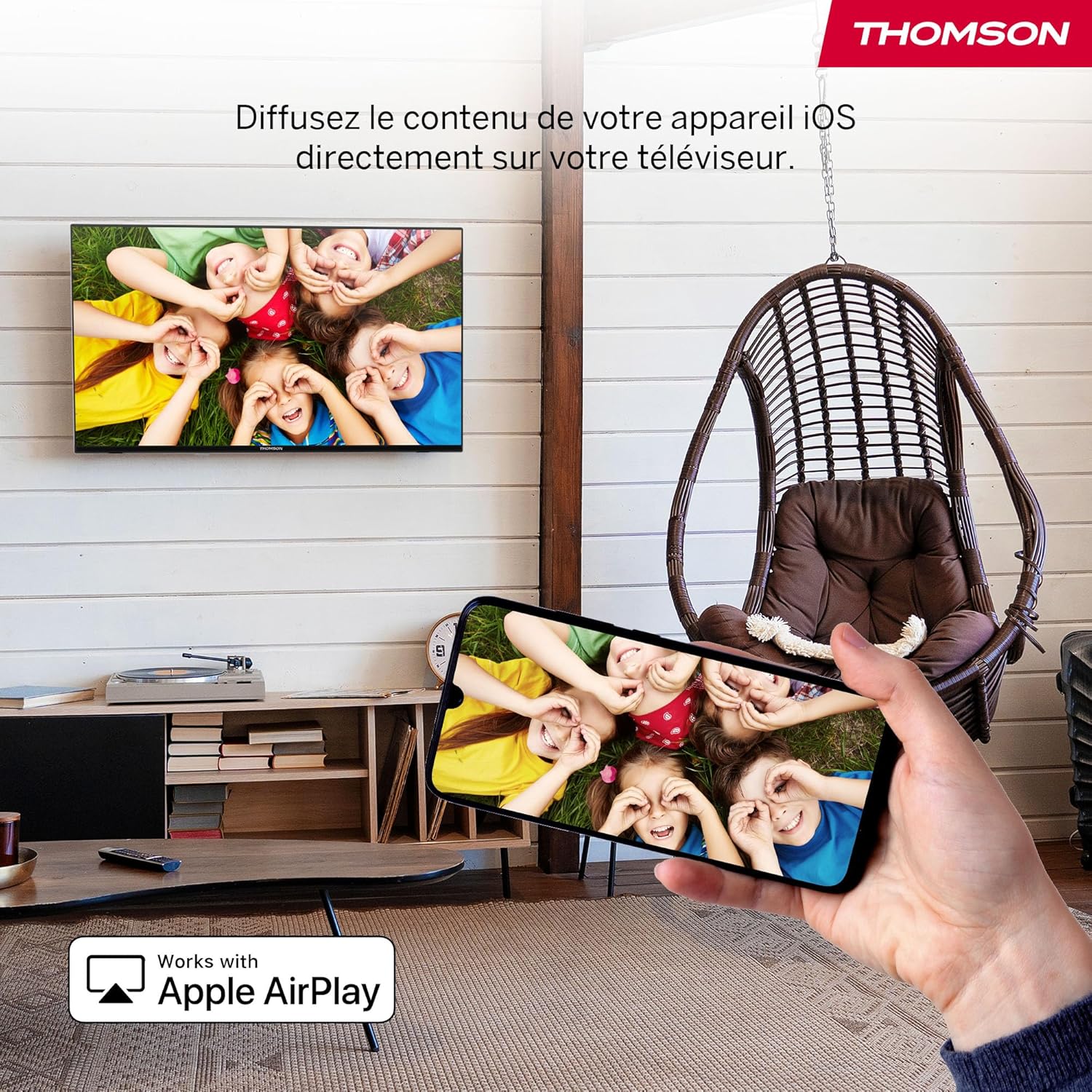
Aworan: An illustration of Apple AirPlay in use, showing content from an iPhone being wirelessly streamed or mirrored to the Thomson TV, enabling seamless content sharing from iOS devices.
The TV supports Apple AirPlay, allowing you to stream content directly from your iPhone, iPad, or Mac. Ensure your Apple device and the TV are connected to the same Wi-Fi network. Select the AirPlay icon on your Apple device and choose your Thomson TV from the list of available devices.
6.5. Atunṣe Mẹ́ta
The integrated Triple Tuner supports DVB-C (cable), DVB-S2 (satellite), and DVB-T2 (terrestrial antenna) signals. Connect your preferred signal source to the corresponding input on the rear panel. During initial setup or via the TV settings, you can scan for available channels.
6.6. Smart Home Dashboard

Aworan: A view of the Smart Home Dashboard accessible on the Thomson TV, presenting an organized interface for managing and controlling various smart home devices, including cameras and lighting, directly from the television screen.
Access the integrated Smart Home Dashboard to control compatible connected devices in your home. This feature allows you to manage smart lights, cameras, and other smart appliances directly from your TV screen.
7. Àwòrán àti Ohùn
7.1. 4K UHD with Dolby Vision

Aworan: A side-by-side comparison illustrating the visual difference between Standard Dynamic Range (SDR) and Dolby Vision. The Dolby Vision image on the right displays significantly improved contrast, brighter highlights, and more vibrant colors in a landscape scene.
Experience exceptional clarity with 4K UHD resolution, offering four times the detail of Full HD. Dolby Vision further enhances the visual experience by providing superior brightness, contrast, and color accuracy, bringing scenes to life with stunning realism.
7.2. Ohun Dolby Atmos
Aworan: A visual representation of the Dolby Atmos audio experience, showing sound waves expanding from the television screen to envelop viewers, suggesting a multi-dimensional and immersive sound environment.
Dolby Atmos delivers rich, multi-dimensional sound that flows around you, creating an immersive audio experience. For the full effect, connect your TV to a compatible Dolby Atmos sound system.
8. Asopọmọra
Your Thomson TV offers a variety of connection options:
- HDMI: Connect up to three HDMI devices for high-definition audio and video.
- USB: Use the two USB 2.0 ports to play media from USB drives or for service updates.
- LAN (ayelujara): Fun asopọ intanẹẹti onirin iduroṣinṣin.
- Wi-Fi: Connect wirelessly to your home network for streaming and online features.
- Bluetooth: Pair Bluetooth-enabled devices such as headphones or soundbars.
- CI+: Insert a Conditional Access Module for encrypted digital TV services.
9. Itọju
Lati rii daju igbesi aye gigun ati iṣẹ to dara julọ ti TV rẹ:
- Ninu: Gently wipe the screen with a soft, dry, lint-free cloth. For stubborn marks, use a screen-specific cleaner applied to the cloth, not directly to the screen. Clean the TV body with a soft, dry cloth.
- Afẹfẹ: Rí i dájú pé àwọn ihò afẹ́fẹ́ tí ó wà lẹ́yìn TV kò dí.
- Awọn imudojuiwọn sọfitiwia: The Fire TV system will periodically check for and install software updates automatically when connected to the internet.
10. Laasigbotitusita
Ti o ba pade awọn iṣoro, tọka si awọn solusan ti o wọpọ wọnyi:
| Isoro | Owun to le Solusan |
|---|---|
| Ko si agbara | Check if the power cable is securely connected to the TV and the wall outlet. Ensure the outlet is functioning. |
| Ko si aworan, ṣugbọn ohun wa | Daju pe orisun titẹ sii to pe ti yan. Ṣayẹwo awọn isopọ ẹrọ ita. |
| Ko si ohun, ṣugbọn aworan wa | Check volume levels and mute settings. Ensure external audio devices are correctly connected and powered on. |
| Isakoṣo latọna jijin ko ṣiṣẹ | Replace batteries. Ensure there are no obstructions between the remote and the TV. Re-pair the Bluetooth remote if necessary (refer to Fire TV settings). |
| Ko le sopọ si Wi-Fi | Rii daju pe olulana rẹ wa ni titan ati ṣiṣe. Tun-tẹ ọrọ igbaniwọle Wi-Fi sii. Gbiyanju tun bẹrẹ mejeeji TV ati olulana naa. |
| Didara aworan ti ko dara | Check antenna/cable/satellite connections. Adjust picture settings (brightness, contrast, sharpness). Ensure the content source is high quality. |
11. Awọn pato
| Ẹya ara ẹrọ | Ẹ̀kúnrẹ́rẹ́ |
|---|---|
| Brand | Thomson |
| Nọmba awoṣe | 43UF4S35 |
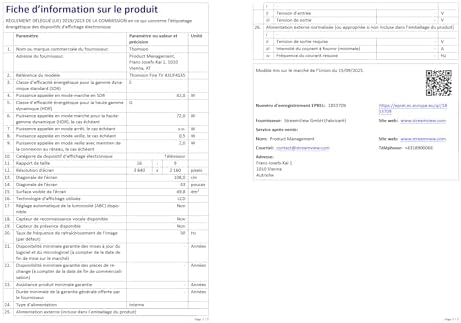
| Iwon iboju | 43 inches (109 cm) |
| Ipinnu | 4K UHD (3840 x 2160) |
| Ifihan ọna ẹrọ | LCD |
| Oṣuwọn sọtun | 50 Hz |
| Eto isesise | TV ina |
| Pataki Awọn ẹya ara ẹrọ | Dolby Vision, Dolby Atmos, Alexa Voice Control, Apple AirPlay, Smart Home Dashboard |
| Asopọmọra | Wi-Fi, Bluetooth, Ethernet (LAN), 3x HDMI 2.1, 2x USB 2.0, CI+, Audio Out, Headphones, Satellite, Antenna |
| Triple Tuner | DVB-C, DVB-S2, DVB-T2 |
| Àwọ̀ | Dudu |
| Apakan Ipin | 16:9 |
| Awọn iwọn Ọja (D x W x H) | 9 cm x 97 cm x 60 cm |
| Awọn irinše to wa | Power Adapter, Power Cable, Remote Control, Stand, User Manual |
| Olupese | OSANVIEW GMBH |
| Ilu isenbale | Tọki |
12. Atilẹyin ọja ati Support
Your Thomson 43UF4S35 TV comes with a 3-odun olupese ká atilẹyin ọja. Atilẹyin ọja yi ni wiwa awọn abawọn ninu awọn ohun elo ati iṣẹ ṣiṣe labẹ lilo deede. Jọwọ ṣe idaduro ẹri rira rẹ fun awọn iṣeduro atilẹyin ọja.
For technical support, troubleshooting assistance, or warranty service, please contact your retailer or the manufacturer, STREAMVIEW GMBH. Refer to your purchase documentation for specific contact details.