
1. Ifihan
Welcome to the VARUN M26-2 Pro E-Bike user manual. This guide provides essential information for the safe operation, assembly, maintenance, and troubleshooting of your new electric bicycle. Please read this manual thoroughly before your first ride to ensure optimal performance and safety. Retain this manual for future reference.
For additional support and product information, please visit the official VARUN Store.
2. Alaye Aabo
Ààbò rẹ ṣe pàtàkì jùlọ. Máa tẹ̀lé àwọn ìlànà wọ̀nyí nígbà gbogbo:
- Wọ Àṣíborí: Nigbagbogbo wọ àṣíborí keke ti a fọwọsi nigba gigun.
- Awọn Ilana Agbegbe: Familiarize yourself with and obey all local traffic laws and regulations regarding electric bicycles.
- Ṣayẹwo Ride-ṣaaju: Before each ride, inspect the brakes, tires, battery, and all fasteners to ensure they are in proper working order.
- Awọn ipo oju ojo: Exercise caution when riding in wet conditions, as braking distance may increase. Avoid riding in severe weather.
- Opin iwuwo: Maṣe kọja agbara fifuye ti o pọju ti 330 lbs (150 kg).
- Ibiti ọjọ ori: This e-bike is designed for adult riders.
3. Package Awọn akoonu
Lẹhin ṣiṣi silẹ, rii daju pe gbogbo awọn paati wa:
- 1 x VARUN M26-2 Pro Electric Bike
- 1 x Itọsọna olumulo
- 1 x Ṣaja
- 1 x Apo Irinṣẹ
- 1 x dimu foonu
- 1 x Bike Lock Cable
- 1 x Bicycle Pump
- 1 x USB Charging Taillight

Image: The VARUN M26-2 Pro E-Bike shown with a red gift box indicating included accessories such as a bike lock, phone holder, pump, and taillight.
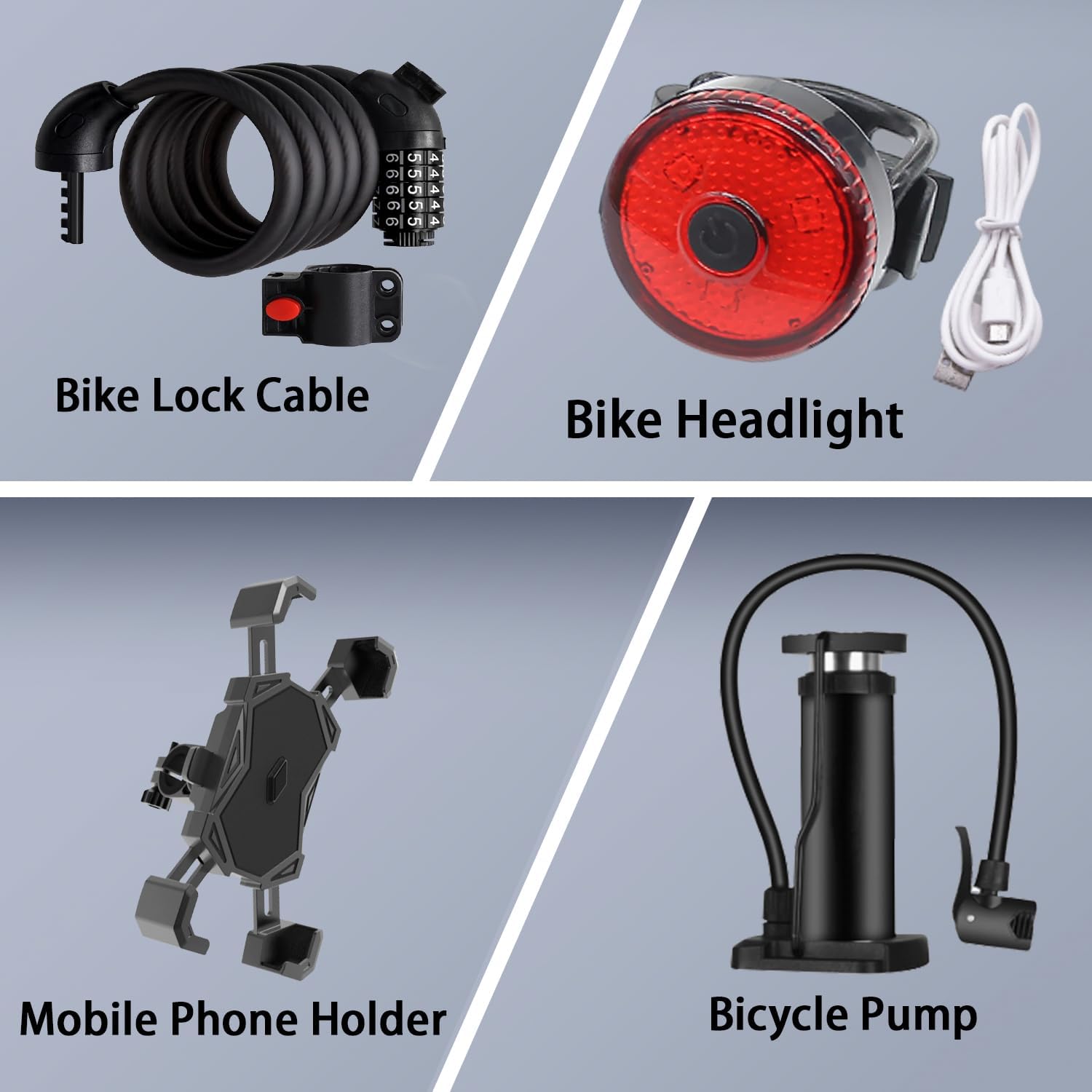
Aworan: A alaye view of the included accessories: a coiled bike lock cable, a red USB-chargeable taillight, a mobile phone holder, and a bicycle pump.
4. Eto Itọsọna
4.1 Apejọ
Your VARUN M26-2 Pro E-Bike arrives approximately 90% pre-assembled. The remaining assembly typically involves attaching the front wheel, handlebars, pedals, seat post, and any included accessories. Refer to the detailed instructions in the included user manual for step-by-step guidance.
4.2 Fi sori ẹrọ batiri ati gbigba agbara ibẹrẹ
- Locate the battery compartment on the bike frame.
- Insert the 48V 13AH removable lithium battery securely into the frame. Ensure it clicks into place.
- Before your first ride, fully charge the battery using the provided charger. Connect the charger to the battery port and then to a power outlet. The charging indicator on the charger will change when fully charged (typically 4-6 hours).
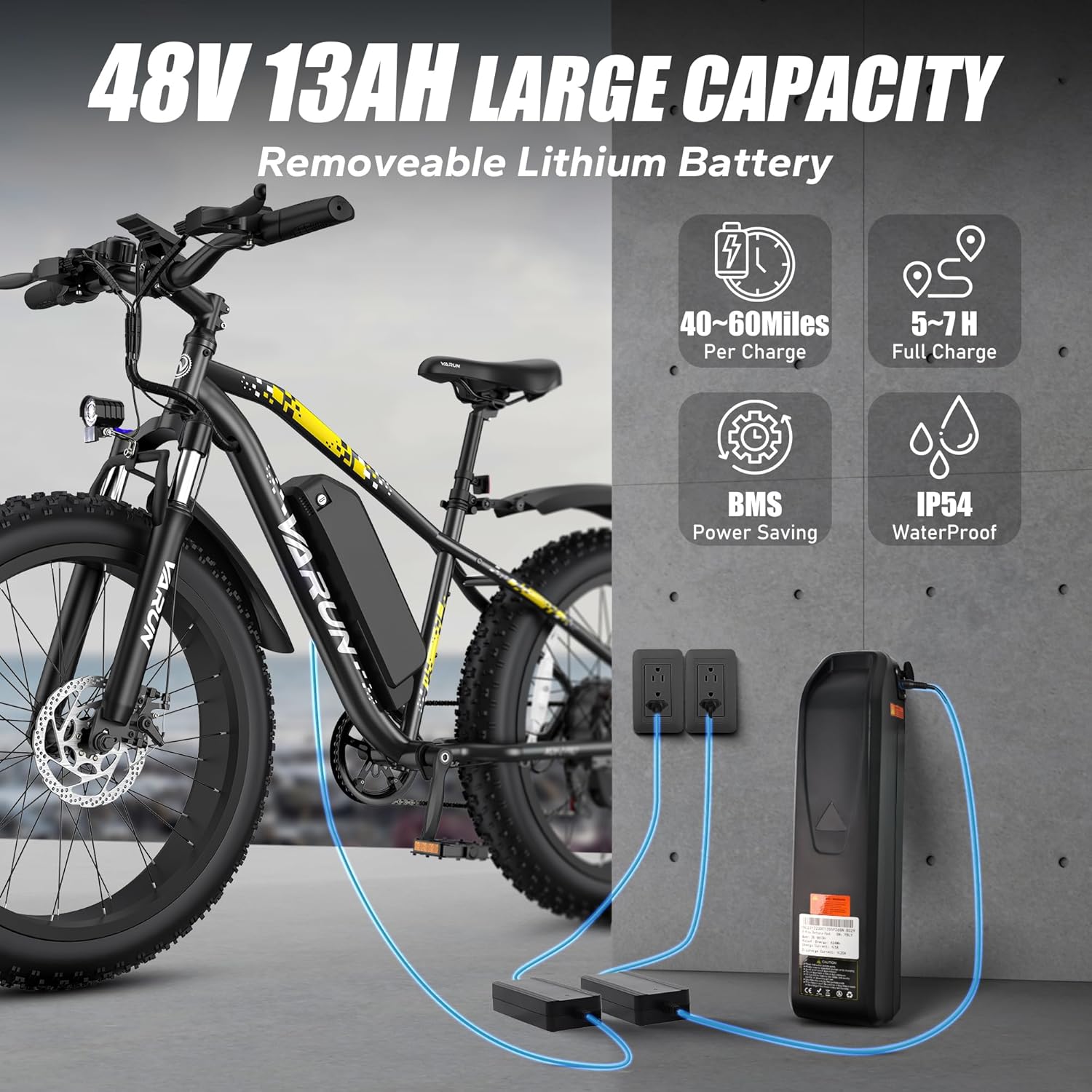
Image: The VARUN M26-2 Pro E-Bike with its removable 48V 13AH battery, illustrating the charging process with two chargers connected to power outlets.
4.3 Tire Inflation
The 26" x 4.0" fat tires require specific pressure for optimal performance and comfort. Use the included bicycle pump to inflate the tires to the recommended PSI, which can typically be found on the tire sidewall. Proper inflation is crucial for grip and stability across various terrains.
4.4 Atunse Brake
Ensure both front and rear dual disc brakes are properly aligned and adjusted for responsive stopping power. Test the brakes at a low speed before riding.
4.5 Handlebar ati Ijoko tolesese
Adjust the handlebar height and seat post to a comfortable riding position that allows for proper leg extension and control. Ensure all quick-release levers are securely tightened after adjustment.
5. Awọn ilana Iṣiṣẹ
5.1 Agbara Tan / Pa
To power on the e-bike, press and hold the power button on the LCD display. To power off, repeat the action. Always ensure the bike is powered off when not in use or during transport.
5.2 LCD Ifihan Awọn iṣẹ
The IPX4 waterproof LCD display provides real-time riding data:
- Atọka Batiri: Ṣe afihan ipele batiri lọwọlọwọ.
- Riding Speed: Ṣe afihan iyara lọwọlọwọ.
- Ipele Iyara: Indicates the current pedal assist level.
- Odometer: Àwọn ipa ọ̀nà ìrìnàjò gbogbogbò.
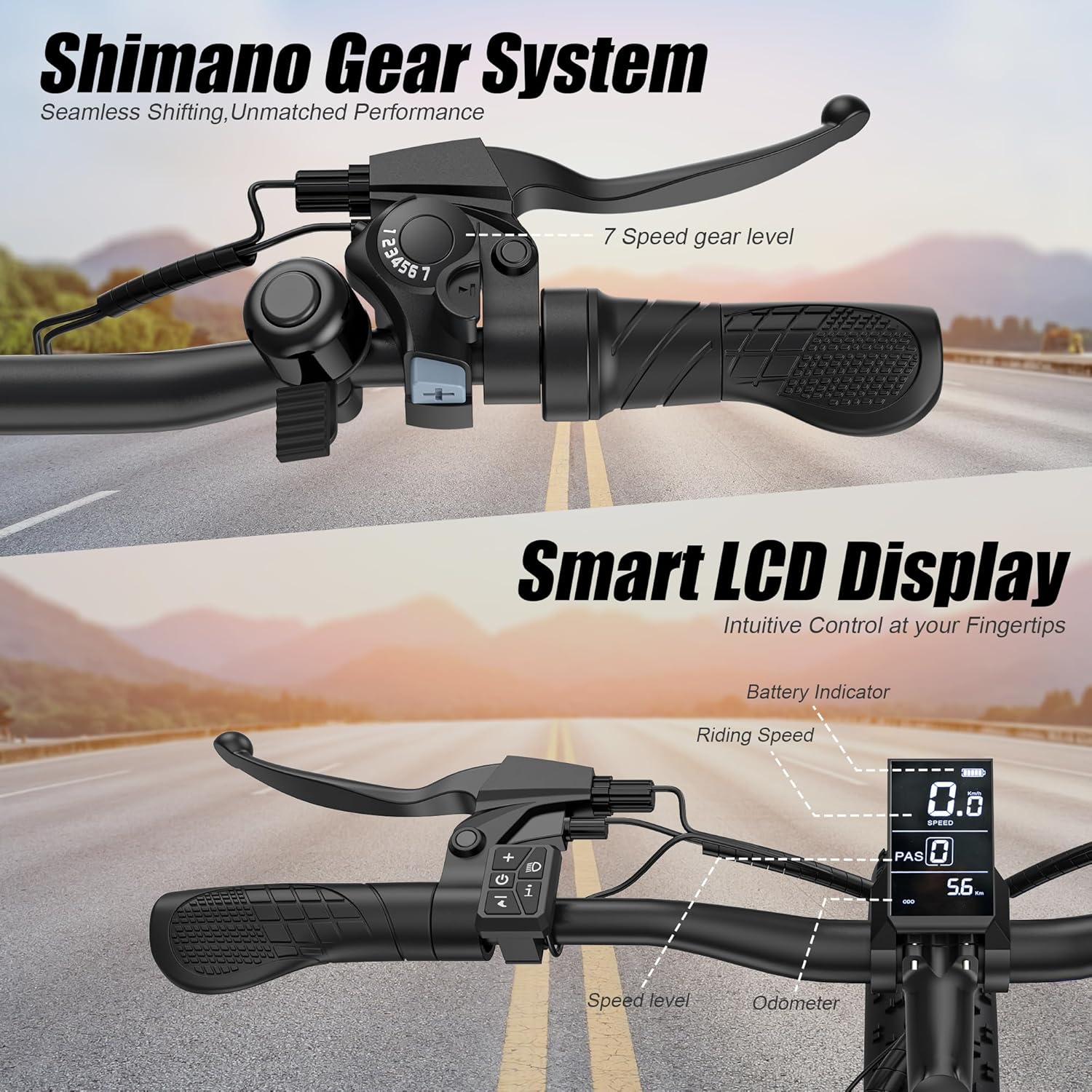
Aworan: A sunmọ-soke view of the e-bike's handlebars, highlighting the Shimano 7-speed gear shifter on the left and the smart LCD display on the right, showing battery indicator, riding speed, speed level, and odometer.
5.3 Riding Awọn ọna
The VARUN M26-2 Pro offers four multifunctional riding modes:
- Ipo Itanna Mimo: Provides full motor power without pedaling, ideal for effortless cruising up to 25 MPH.
- Ipo Iranlọwọ Efatelese (PAS): The motor assists your pedaling effort, offering a balanced exercise experience and extending range up to 60 miles. Speed can reach up to 28 MPH in this mode.
- Walking Assist Mode: Provides low-speed motor assistance for easy manipulation when walking alongside the bike.
- Classic Cycling Mode: The motor is off, and the bike operates like a traditional bicycle, relying solely on pedal power.

Image: A rider on the VARUN E-Bike, with an overlay illustrating the three main speed modes: 25 MPH Pure Electric, 28 MPH Pedal-Assist, and Manual Pedal Class Mode.
5.4 Gbigbe jia
The Shimano 7-speed gear system allows for seamless transitions and efficient riding across varied terrain. Use the shifter on the handlebars to select the appropriate gear for your speed and incline.
5.5 Braking System
The dual disc brakes provide reliable and strong stopping power. Always apply both brakes simultaneously for controlled deceleration. Regularly check brake pads for wear and ensure cables are properly tensioned.
5.6 Lockable Front Suspension
The adjustable front fork suspension enhances comfort by absorbing impacts. It features a lockout function:
- Open (Unlocked): Provides cushioning for rugged paths and bumpy roads, offering a more comfortable ride.
- Titiipa: Stiffens the fork for higher energy transfer efficiency on smooth surfaces, improving pedaling performance.

Image: A rider on the VARUN E-Bike navigating rocky terrain, highlighting the 'PRO-LEVEL LOCKABLE FRONT FORK SUSPENSION' with illustrations of 'Lockout Fork' for comfort and 'Locked Fork' for high energy efficiency.
6. Itọju batiri
Proper battery care extends its lifespan and ensures safe operation:
- Gbigba agbara: Always use the original charger. Avoid overcharging or completely draining the battery.
- Ibi ipamọ: Store the battery in a cool, dry place, away from direct sunlight and extreme temperatures. If storing for extended periods, charge it to 50-70% every 2-3 months.
- Eto Isakoso Batiri (BMS): The integrated BMS protects the battery from overcharge, over-discharge, and overheating, ensuring safety and longevity.
7. Itọju
Regular maintenance is crucial for the longevity and safe operation of your e-bike:
- Taya: Check tire pressure before each ride. Inspect for wear, cuts, or punctures.
- Awọn idaduro: Regularly check brake lever tension and pad wear. Replace worn pads promptly.
- Ẹwọn: Jeki pq naa di mimọ ati lubricated lati rii daju awọn iyipada jia dan ati ṣe idiwọ ipata.
- Awọn ohun mimu: Periodically check all bolts and nuts for tightness, especially on critical components like wheels, handlebars, and seat post.
- Ninu: Mọ keke pẹlu damp asọ ati ìwọnba ọṣẹ. Yago fun fifọ titẹ-giga taara lori awọn paati itanna.
- Iṣẹ Iṣẹ Ọjọgbọn: Consider professional inspection and servicing at least once a year, or more frequently with heavy use.
8. Laasigbotitusita
Abala yii n ṣalaye awọn ọran ti o wọpọ ti o le ba pade:
| Isoro | Owun to le Fa | Ojutu |
|---|---|---|
| Ẹ̀rọ itanna kì í ṣiṣẹ́ | Battery not charged or not properly installed; loose connections. | Ensure battery is fully charged and securely seated. Check all cable connections. |
| Motor ko ṣe iranlọwọ | Pedal Assist System (PAS) level set to 0; brake levers engaged; motor connection issue. | Increase PAS level on display. Ensure brake levers are fully released. Check motor cable connections. |
| Bírékì máa ń nímọ̀lára àìlera tàbí ariwo | Worn brake pads; misaligned calipers; loose cables. | Inspect and replace brake pads if worn. Adjust caliper alignment. Tighten brake cables. |
| Àwọn ohun èlò ìdìpọ̀ kò yí padà dáadáa | Dirty or unlubricated chain; misaligned derailleur; stretched gear cable. | Clean and lubricate the chain. Adjust derailleur. If issues persist, seek professional help. |
If you encounter issues not listed here or cannot resolve a problem, please contact VARUN customer support.
9. Awọn pato
Key technical specifications for the VARUN M26-2 Pro E-Bike:
| Ẹya ara ẹrọ | Ẹ̀kúnrẹ́rẹ́ |
|---|---|
| Keke Iru | Electric Bike |
| Ibiti ọjọ ori | Agbalagba |
| Mọto | 500W (Ti o ga julọ 750W) |
| Batiri | Batiri Litiumu Yiyọkuro 48V 13AH |
| Iyara ti o pọju | Up to 28 MPH (Pedal Assist) |
| Ibiti o | Up to 60+ Miles (Auxiliary Mode) |
| Akoko gbigba agbara | Awọn wakati 4-6 |
| Nọmba ti Awọn iyara | 7 (Shimano Gear System) |
| Kẹkẹ Iwon | 26 inches |
| Iwọn Kẹkẹ | 4 Inches (Fat Tires) |
| Ohun elo fireemu | Aluminiomu |
| Idaduro Iru | Dual (Lockable Front Fork) |
| Brake Style | Disc (Dual Disc Brakes) |
| Mabomire Rating | IPX4 (LCD Display) |
| O pọju fifuye | 330 lbs (150 kg) |
| Iwọn keke | 62.8 lbs (28.5 kg) |
| Niyanju Giga | 5.7 ft - 6.7 ft |
10. Atilẹyin ọja ati Support
VARUN provides a 1-odun olupese ká atilẹyin ọja for your M26-2 Pro E-Bike, ensuring peace of mind. This warranty covers manufacturing defects under normal use conditions.
For any questions, technical assistance, or warranty claims, please contact VARUN customer service. Our team is available to provide support and ensure your VARUN electric bike experience is satisfactory.
You can find contact information and further details on the official VARUN Store or through your purchase platform.