
1. Ifihan
This manual provides essential information for the safe operation and maintenance of your FINOTI XIL 017 4K Camera Drone. Please read this manual thoroughly before operating the drone to ensure proper usage and to prevent damage or injury. The XIL 017 is a lightweight, foldable quadcopter equipped with a 4K camera and a 3-axis gimbal, designed for high-quality aerial photography and videography.
2. Awọn Itọsọna Aabo
Lílo drone nílò ẹrù iṣẹ́. Tẹ̀lé àwọn ìlànà ààbò wọ̀nyí:
- Ka iwe afọwọkọ naa: Understand all instructions and warnings before flight.
- Ṣiṣayẹwo Ọkọ ofurufu-ṣaaju: Ensure the drone, remote control, and batteries are in good condition and fully charged.
- Imọye Ayika: Fly in open areas, away from people, animals, buildings, and obstacles. Avoid flying over private property without permission.
- Awọn ipo oju ojo: Do not fly in strong winds (above Level 5), rain, snow, or fog.
- Ṣetọju Laini Oju: Máa pa drone náà mọ́ láàárín ojú ìwòran rẹ nígbà gbogbo.
- Ibowo Asiri: Má ṣe lo drone láti ya àwòrán tàbí láti gba àwọn ènìyàn sílẹ̀ láì gbà láyè.
- Aabo Batiri: Use only approved chargers and batteries. Do not overcharge or puncture batteries. Store batteries in a cool, dry place.
- Awọn ilana pajawiri: Familiarize yourself with emergency landing procedures.
3. Package Awọn akoonu
Daju pe gbogbo awọn nkan wa ninu apo rẹ:
- FINOTI XIL 017 Drone
- Remote Control with Built-in Screen
- Intelligent Flight Batteries (Quantity may vary based on purchase, e.g., Triple Battery)
- Okun Ngba agbara USB
- apoju Propellers
- Screwdriver
- Itọsọna olumulo
4. Ọja Ipariview
4.1 Àwọn Ẹ̀yà Drone
The FINOTI XIL 017 drone features a compact, foldable design for portability and ease of use. It weighs under 249g, which may exempt it from certain registration requirements in some regions.

Image: The FINOTI XIL 017 drone in both its folded, compact state and its unfolded, flight-ready configuration. The image highlights its portability and its weight being under 249g, indicating no registration is required in some jurisdictions.
- Awọn apa ti o le ṣe pọ: Fun ibi ipamọ kekere ati gbigbe.
- Awọn oniroyin: Efficient flight.
- 4K Camera with 3-Axis Gimbal: Provides stable, high-resolution video and photos.
- Abala Batiri: Houses the intelligent flight battery.
- TOF Sensors: For precise positioning and stable hovering.
4.2 Iṣakoso latọna jijin
The remote control features a built-in screen for direct live view, eliminating the need for a separate smartphone. It offers a stable 10KM HD image transmission range.

Image: The remote control for the FINOTI XIL 017 drone, featuring a large built-in screen that displays live footage. The image emphasizes the 10KM HD image transmission range and the convenience of not needing a separate phone.

Image: A detailed diagram illustrating the various buttons and functions of the remote control, including roller camera adjustment, record button, speed key, throttle, steering, one-touch takeoff/landing, return button, forward/backward/left/right flying keys, obstacle avoidance switch, GPS switch, and On/Off key.
- Awọn ọpá Iṣakoso: Fun itọsọna ofurufu ati giga.
- Ifihan ti a ṣe sinu: For real-time video feed and flight data.
- Awọn bọtini iṣẹ: Dedicated buttons for takeoff/landing, return to home, photo/video, gimbal control, and flight modes.
- Eriali: For stable signal transmission.
5. Eto
5.1 gbigba agbara Batiri
- Connect the USB charging cable to the intelligent flight battery.
- So opin keji okun USB sinu ohun ti nmu badọgba agbara USB ti o baamu (ko si ninu rẹ).
- Charge until the battery indicator lights show a full charge.
- Gba agbara si isakoṣo latọna jijin nipa lilo ibudo gbigba agbara igbẹhin ati okun.
5.2 Ṣiṣii Drone
- Gently unfold the front arms of the drone until they lock into place.
- Lẹhinna, ṣii awọn apa ẹhin.
- Ensure all propellers are free to rotate.
5.3 Fifi Batiri naa sii
- Slide the fully charged intelligent flight battery into the battery compartment on the drone until it clicks securely into place.
- Ensure the battery is firmly seated to prevent dislodgement during flight.
5.4 Titan / Pa a
- Drone: Press the power button once briefly, then press and hold for 2 seconds until the indicator lights illuminate.
- Isakoṣo latọna jijin: Press the power button once briefly, then press and hold for 2 seconds.
- To power off, repeat the same sequence.
5.5 Sísopọ̀ mọ́ Drone àti Remote Control
The drone and remote control are typically pre-paired. If re-pairing is necessary, refer to the specific instructions in the full manual or the drone's companion app for the pairing procedure.
6. Ṣiṣẹ Drone
6.1 Pre-Flight Akojọ ayẹwo
- Rii daju pe drone ati awọn batiri isakoṣo latọna jijin ti gba agbara ni kikun.
- Ṣàyẹ̀wò àwọn propeller fún ìbàjẹ́ kí o sì rí i dájú pé wọ́n so mọ́ ara wọn dáadáa.
- Verify the camera gimbal is free to move.
- Choose an open, clear flying area.
- Wait for sufficient GPS signal acquisition before takeoff.
6.2 Ìgbésẹ̀ àti Ìbalẹ̀
- One-Touch Takeoff: Press the dedicated takeoff button on the remote control. The drone will ascend to a safe altitude and hover.
- Gbigbe afọwọṣe: Tẹ̀ àwọn ọ̀pá ìṣàkóso méjèèjì sí ìsàlẹ̀ àti síta láti bẹ̀rẹ̀ sí í gbé àwọn mọ́tò náà, lẹ́yìn náà, tẹ̀ ọ̀pá òsì náà sókè díẹ̀díẹ̀ láti gòkè.
- Ibalẹ Ifọwọkan Kan: Press the dedicated landing button. The drone will descend and land automatically.
- Ibalẹ pẹlu ọwọ: Slowly pull the left control stick down to descend. Once landed, push both sticks down and inwards to stop the motors.
6.3 Ipilẹ ofurufu idari
Refer to the remote control diagram for button locations.
- Ọpá Osi (Ifun/Yaw): Gòkè/Sàlẹ̀ fún gíga, Òsì/Ọ̀tún fún yíyípo (yaw).
- Ọpá Ọtun (Pitch/Roll): Up/Down for forward/backward movement (pitch), Left/Right for left/right movement (roll).
- Speed Key: Adjusts flight speed (e.g., beginner, normal, sport modes).
6.4 kamẹra isẹ
The drone is equipped with a 4K camera and a 3-axis brushless gimbal for stable, clear shots.

Aworan: A alaye view of the drone's 3-axis brushless gimbal, showing its range of motion for stabilization. It also highlights the 4K HD video capability and electronic image stabilization (EIS).
- Bọtini Fọto/Fidio: Press once to take a photo, press and hold to start/stop video recording.
- Iṣakoso Gimbal: Use the roller on the remote control to adjust the camera's vertical angle (90° adjustable).
- AI Night Scene: The camera automatically enhances low-light scenes for clearer images.
6.5 Oye ofurufu igbe
Utilize smart features for cinematic results.

Image: A composite image detailing the drone's intelligent flight capabilities. This includes 360° Smart Tracking, which follows a subject, Smart Flight Path Planning, allowing users to draw a route, and TOF Visual & Optical Flow Positioning for stable hovering.
- 360° Smart Tracking: The drone can lock onto and follow a designated subject from any direction.
- Smart Flight Path Planning: Draw a desired flight route in the companion app, and the drone will follow it automatically.
- TOF Visual & Optical Flow Positioning: Achieves precise and stable hovering, especially useful in indoor environments or when GPS is weak.
6.6 HD Image Transmission
The drone provides up to 10KM HD digital transmission, allowing for smooth, real-time viewohun footage directly on the remote control's screen.
7. Itọju
7.1 Ninu
- Fi aṣọ rírọrùn tí ó gbẹ nu ara drone náà.
- Clean the camera lens with a microfiber cloth designed for optics.
- Remove any debris from propellers and motors.
7.2 batiri Itọju
- Store batteries in a cool, dry place, away from direct sunlight.
- Má ṣe tọ́jú àwọn bátírì tí ó ti gba agbára tàbí tí ó ti bàjẹ́ pátápátá fún ìgbà pípẹ́. Gba agbára wọn sí nǹkan bí 50-60% fún ìtọ́jú ìgbà pípẹ́.
- Tí bá hàn pé bátírì kan wú, tàbí ó bàjẹ́, tàbí ó ń jó, dáwọ́ lílò rẹ̀ dúró lẹ́sẹ̀kẹsẹ̀ kí o sì sọ ọ́ nù dáadáa.
7.3 Propeller Rirọpo
If a propeller is damaged, replace it with a new one from the spare parts kit. Use the provided screwdriver to remove and install propellers, ensuring they are correctly oriented (e.g., 'A' with 'A', 'B' with 'B').
8. Laasigbotitusita
| Isoro | Owun to le Fa | Ojutu |
|---|---|---|
| Drone ko ni agbara lori | Battery depleted or not installed correctly. | Charge battery fully. Reinstall battery securely. |
| No image on remote control screen | Drone and remote not paired. Signal interference. | Ensure drone and remote are paired. Move to an area with less interference. |
| Drone drifts nigba flight | Insufficient GPS signal. Calibration needed. Wind interference. | Wait for strong GPS signal. Perform IMU/compass calibration. Avoid flying in strong winds. |
| Dídára fídíò/fọ́tò tí kò dára | Dirty camera lens. Gimbal obstruction. Low light conditions. | Clean lens. Check gimbal for obstructions. Utilize AI Night Scene feature. |
| Kukuru flight akoko | Battery not fully charged. Old/damaged battery. Aggressive flying. | Ensure full charge. Replace old batteries. Fly more conservatively. |
9. Awọn pato
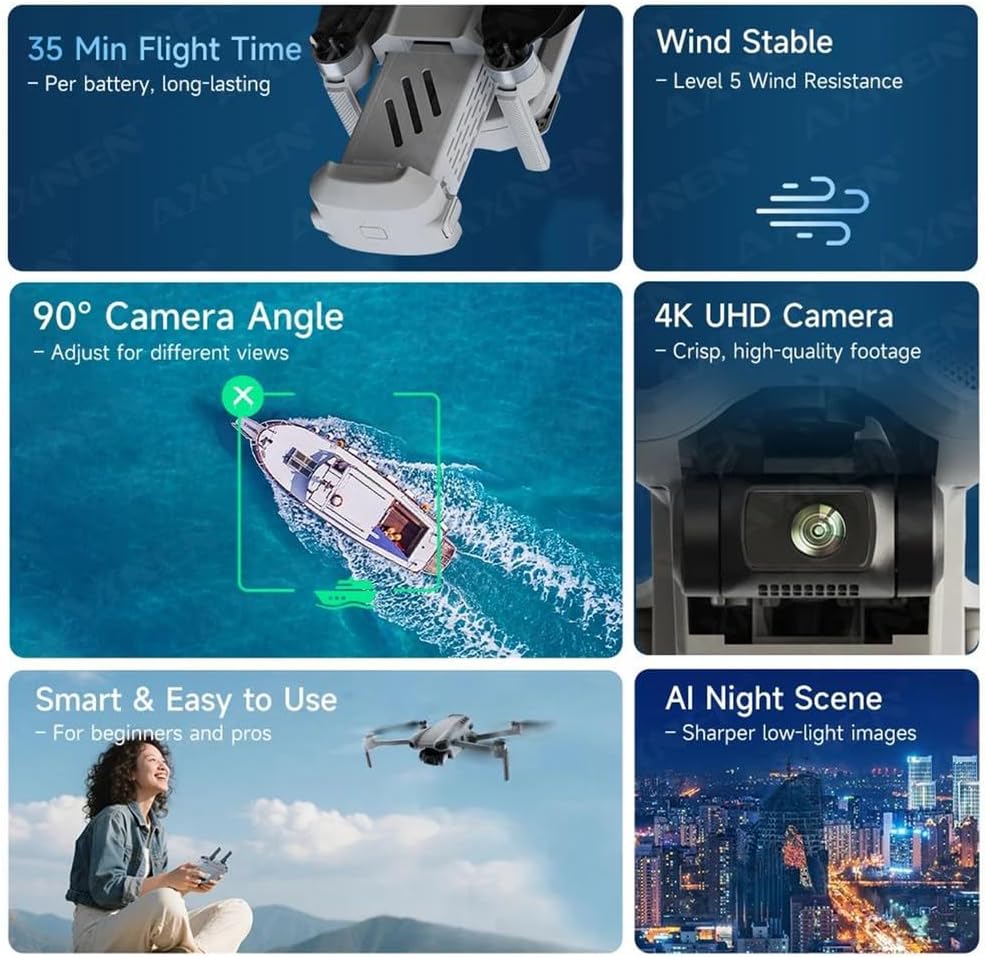
Image: An infographic summarizing key performance features of the drone, including 35 minutes of flight time per battery, Level 5 wind resistance, a 90° adjustable camera angle, 4K UHD camera capabilities, ease of use, and AI Night Scene enhancement.

Image: A diagram illustrating the physical dimensions of the FINOTI XIL 017 drone, both in its folded state (e.g., 11cm x 20cm x 8.5cm) and unfolded state, providing clear measurements for portability and operational size.
- Awoṣe: XIL 017
- Ìwúwo: Labẹ 249g
- Kamẹra: 4K UHD
- Gimbal: 3-Axis Brushless
- Akoko ofurufu: Titi di iṣẹju 35 fun batiri kan
- Gbigbe Aworan: 10KM HD
- Atako Afẹfẹ: Ipele 5
- Ipo: GPS, TOF Visual, Optical Flow
- Igun Kamẹra ti o le ṣatunṣe: 90°
10. Atilẹyin ọja ati Support
For warranty information and technical support, please refer to the warranty card included with your product or visit the official FINOTI website. Keep your proof of purchase for warranty claims. If you encounter issues not covered in this manual, contact FINOTI customer service for assistance.