
1. Ọja Ipariview
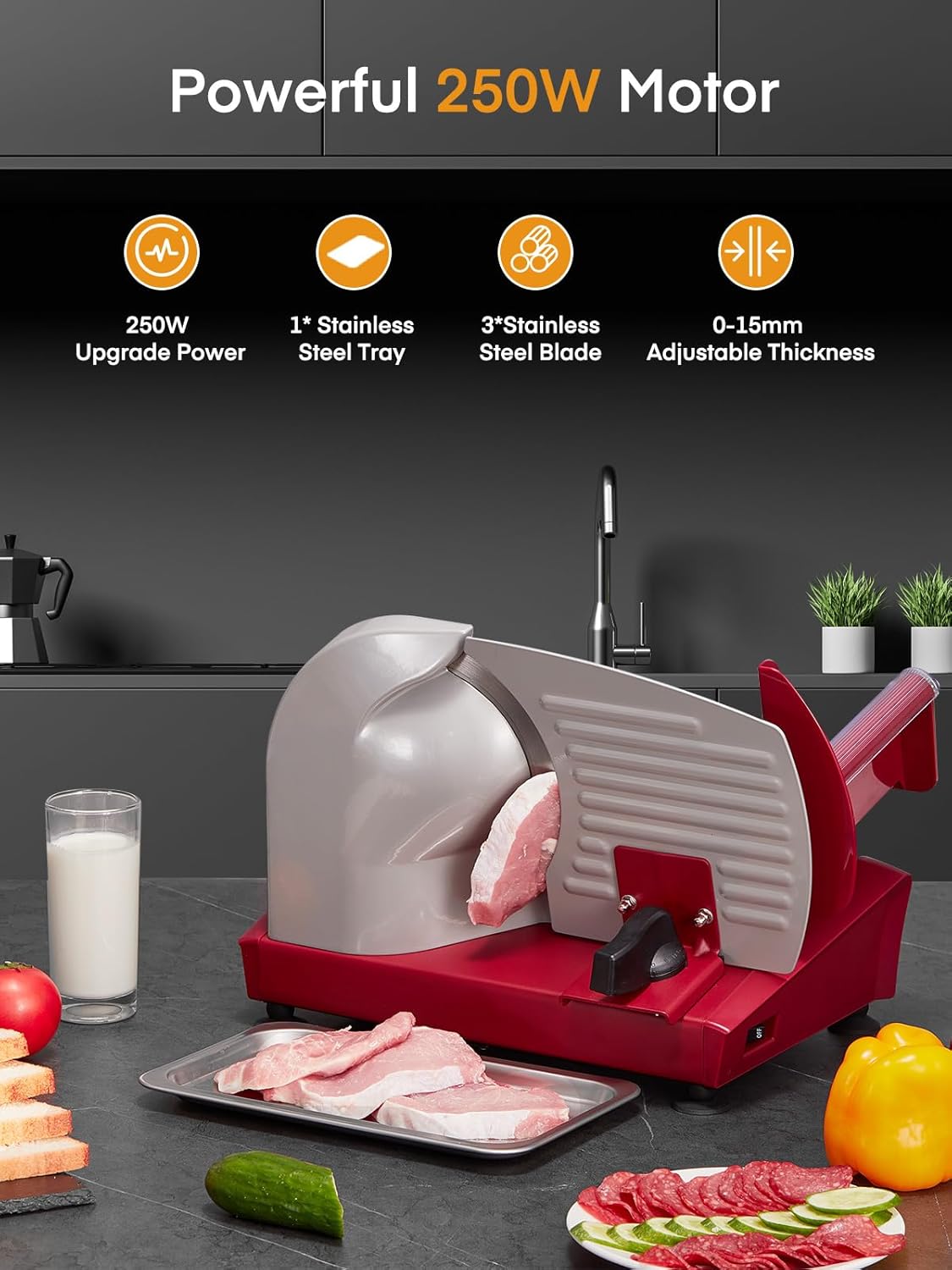
The FOHERE 250W Electric Meat Slicer Machine (Model 5191M12D) is designed for home use, offering efficient and precise slicing of various foods. It features a powerful 250W motor and comes with three 7.5-inch stainless steel blades (two serrated, one smooth) to handle different food types. The adjustable thickness knob allows for slices from 0 to 15mm, suitable for meat, cheese, bread, fruits, and vegetables. Its compact design and safety features ensure convenient and secure operation.

Image: The FOHERE 250W Electric Meat Slicer, showcasing its main unit, three interchangeable 7.5-inch stainless steel blades (two serrated, one smooth), and a stainless steel food tray. The slicer is red and silver, positioned on a kitchen counter.
2. Awọn Ilana Aabo pataki
Jọwọ ka gbogbo awọn ilana ni pẹkipẹki ṣaaju lilo ohun elo naa. Ikuna lati tẹle awọn ilana wọnyi le ja si mọnamọna, ina, tabi ipalara nla.
- Aabo Itanna: Ensure the appliance is connected to a grounded outlet. Do not immerse the motor unit in water or other liquids. Keep the power cord away from hot surfaces.
- Aabo abẹfẹlẹ: The blades are extremely sharp. Always handle them with extreme care. Use the food pusher to guide food and protect your fingers from the blade. Never touch the blade while the machine is operating or plugged in.
- Ibi Iduroṣinṣin: Always operate the slicer on a clean, dry, and stable surface. The non-slip suction feet must be securely attached to prevent movement during use.
- Abojuto: This appliance is not intended for use by persons with reduced physical, sensory, or mental capabilities, or lack of experience and knowledge, unless they have been given supervision or instruction concerning use of the appliance by a person responsible for their safety. Children should be supervised to ensure they do not play with the appliance.
- Lilo daradara: Use the appliance only for its intended purpose of slicing food. Do not attempt to slice frozen food with bones or excessively hard items, as this can damage the blade and motor.
- Ninu: Always unplug the slicer before cleaning. Follow the detailed cleaning instructions to safely remove and clean blades and other components.
- Itọju: Má ṣe gbìyànjú láti tún ẹ̀rọ náà ṣe fúnra rẹ. Kan si àwọn òṣìṣẹ́ iṣẹ́ tó mọ̀ nípa rẹ̀ fún àtúnṣe èyíkéyìí.
3. Ọja irinše
Familiarize yourself with the main parts of your FOHERE Electric Meat Slicer:
- Ẹka akọkọ: Houses the motor and blade assembly.
- Food Carriage/Slide Rod: Platform for holding food to be sliced.
- Titari Ounjẹ: Secures food on the carriage and protects hands.
- Bọtini Iṣatunṣe Sisanra: Controls slice thickness from 0-15mm.
- Abẹfẹ: The cutting disc (interchangeable serrated and smooth blades).
- ON/PA Yipada: Power control for the slicer.
- Non-Slip Suction Feet: Stabilize the unit during operation.
- Atẹ ounjẹ: Collects sliced food.

Aworan: A alaye view of the FOHERE meat slicer highlighting its safety and design features: the BPA-free food pusher, the ON/OFF switch, anti-slip suction feet, and the removable slide-rod for easy cleaning.
4. Awọn ilana iṣeto
- Yọọ kuro: Ni ifarabalẹ yọ gbogbo awọn paati kuro ninu apoti. Ṣe idaduro apoti fun ibi ipamọ iwaju tabi gbigbe.
- Ibi: Place the slicer on a flat, stable, and dry countertop. Ensure the non-slip suction feet are firmly pressed down to secure the unit.
- Fifi sori abẹfẹlẹ:
- Rii daju pe a ti yọ ọbẹ kuro.
- Select the desired blade (serrated for meat, smooth for bread/cheese).
- Align the blade with the motor shaft and gently push it into place until it clicks or is securely seated.
- Rotate the blade lock clockwise to secure the blade.
- Gbigbe Ounjẹ: Ensure the food carriage and food pusher are correctly assembled and slide smoothly along the guide rod.
- Asopọ agbara: So okùn agbára náà mọ́ inú ihò iná mànàmáná tí a fi ilẹ̀ ṣe déédéé.
Video: This video demonstrates the FOHERE meat slicer's features, including its 250W motor, the complete slicing set with two serrated and one smooth blade, secure suction feet for stability, and the ease of changing blades. It also shows the slicer in action, effortlessly slicing bread and meat, and highlights the simple cleaning process.
5. Awọn ilana Iṣiṣẹ
- Ṣetan Ounjẹ: For best results, chill meat for 1-3 hours before slicing for more even slices. Partially frozen meat is ideal for slicing. Do not attempt to slice fully frozen or bone-in meat.
- Ṣatunṣe Sisanra: Turn the thickness adjustment knob to select your desired slice thickness (0-15mm). Refer to the markings for guidance.
- Kojọpọ Ounjẹ: Place the food item onto the food carriage. Use the food pusher to secure the food against the guide plate and protect your fingers.
- Agbara Tan: Press the ON switch to start the motor. The blade will begin to rotate.
- Bibẹ: Gently push the food carriage forward and backward, guiding the food towards the rotating blade with the food pusher. Apply even pressure for consistent slices.
- Gba Àwọn Ègé Gígé: Use the provided food tray or a plate to collect the sliced food.
- Agbara Pa: Once slicing is complete, press the OFF switch and wait for the blade to come to a complete stop before handling.
Aworan: A sunmọ-soke view of the FOHERE meat slicer's thickness adjustment knob, showing the range from 0mm to 15mm. Below, examples of thinly sliced meat demonstrate the precision achievable.

Image: An instructional graphic detailing how to prepare meat for slicing. It advises chilling fresh meat for 1-3 hours for even slices and partially defrosting frozen meat for 20-30 minutes, explicitly stating not to slice whole, bone-in frozen meat.
6. Ninu ati Itọju
Regular cleaning and proper maintenance will extend the life of your slicer and ensure hygienic operation.
- Yọọ: Máa yọ ẹ̀rọ náà kúrò nínú ihò agbára kí o tó sọ ọ́ di mímọ́ tàbí kí o ṣe àtúnṣe èyíkéyìí.
- Yọ Blade kuro:
- Rotate the blade lock counter-clockwise to unlock the blade.
- Carefully remove the blade. Handle by the center hub to avoid touching the sharp edges.
- Blade mimọ: Wash the blade immediately after use with warm, soapy water. Rinse thoroughly and dry completely with a soft cloth.
- Clean Food Carriage and Pusher: The food carriage and pusher can be removed for thorough cleaning. Wash with warm, soapy water, rinse, and dry.
- Mọ Ẹka Akọkọ: Mu ese akọkọ kuro pẹlu ipolowoamp cloth. Do not use abrasive cleaners or immerse the unit in water. Ensure no food particles are left in crevices.
- Ṣe atunto: Once all parts are clean and dry, reassemble the slicer by installing the blade and securing it with the blade lock. Reattach the food carriage and pusher.
- Ibi ipamọ: Tọju awọn slicer ni mimọ, ibi gbigbẹ nigbati o ko ba wa ni lilo.

Image: A visual guide demonstrating the ease of cleaning the FOHERE meat slicer. It shows the removable slide-rod, the process of detaching the blade, and hand-washing the blade under running water in a sink.
7. Itọsọna Laasigbotitusita
If you encounter any issues with your FOHERE Electric Meat Slicer, please refer to the following common problems and solutions:
| Isoro | Owun to le Fa | Ojutu |
|---|---|---|
| Slicer ko ni tan. | Kò sí ìsopọ̀ mọ́; Agbára pa; Agbára outage. | Check power cord connection; Ensure ON/OFF switch is in ON position; Check household circuit breaker. |
| Blade rotates slowly or stalls. | Food is too hard or too large; Blade is dull or dirty; Motor overheating. | Ensure food is properly prepared (chilled/partially frozen); Clean blade thoroughly; Allow motor to cool down if used continuously for a long period. |
| Slices are uneven. | Food not properly secured; Incorrect thickness setting; Blade not sharp enough. | Use food pusher to secure food firmly; Adjust thickness knob for desired consistency; Ensure blade is clean and sharp. |
| Ariwo ti o pọju nigba iṣẹ. | Blade not properly installed; Loose components; Motor issue. | Ensure blade is securely locked; Check for any loose parts and tighten if possible; If noise persists, contact customer support. |
If the problem persists after attempting these solutions, please contact FOHERE customer support for assistance.
8. Awọn alaye ọja
| Ẹya ara ẹrọ | Ẹ̀kúnrẹ́rẹ́ |
|---|---|
| Brand | NIPA |
| Nọmba awoṣe | 5191M12D |
| Ọja Mefa | 16.33"L x 10.63"W x 9.84"H |
| Ohun elo | Stainless Steel (Blades, Tray), Die-cast Aluminum (Body) |
| Àwọ̀ | Pupa |
| Agbara mọto | 250W |
| Blade elo | Irin ti ko njepata |
| Blade Ipari | 7.5 inches (19cm) |
| Sisanra Adijositabulu | 0-15mm |
| Iwọn Nkan | 12.05 Poun (iwọn 5.47 kg) |
| Ipo Isẹ | Laifọwọyi |
| Niyanju Lilo | Bread, Meat, Vegetable, Cheese |
| Itọju Ọja | Hand wash recommended for blades and removable parts. Wipe main unit. |

Image: A graphic displaying the FOHERE meat slicer's dimensions (15.74 inches length, 9.84 inches width, 9.84 inches height) and a table summarizing key specifications such as product name, rated power (250W), blade diameter (7.5 inches), weight (4.5kg), rated voltage (120V), and adjustable thickness (0-15mm).
9. Atilẹyin ọja ati Onibara Support
FOHERE products are manufactured with quality and reliability in mind. For specific warranty information, please refer to the warranty card included with your purchase or visit the official FOHERE webojula.
If you have any questions, require technical assistance, or need to report an issue with your FOHERE 250W Electric Meat Slicer, please contact our customer support team:
- Webojula: Visit the FOHERE Store on Amazon
- Imeeli: Refer to your product packaging or warranty card for contact email.
- Foonu: Refer to your product packaging or warranty card for contact phone number.
Please have your model number (5191M12D) and purchase date ready when contacting support.