
1. Ifihan
This manual provides detailed instructions for the setup, operation, and maintenance of your WOOPKER AK50 Stereo Amplifier. Please read this manual thoroughly before using the product to ensure proper functionality and to extend its lifespan.
1.1 Ọja Loriview
The WOOPKER AK50 is a multi-function 2-channel stereo amplifier designed for home audio systems. It features Bluetooth 5.0 connectivity, FM radio, USB and SD card playback, and multiple input options for various audio sources. It is suitable for driving passive speakers in home theater, studio, or karaoke setups.

Image 1.1: WOOPKER AK50 Stereo Amplifier and Remote Control
This image displays the WOOPKER AK50 stereo amplifier, a compact black unit with blue illuminated knobs, alongside its black remote control. The amplifier features a central LED display, USB and SD card slots, microphone inputs, and controls for volume, bass, and treble.
1.2 Key Awọn ẹya ara ẹrọ
- Agbara Ijade: Provides a maximum output of 400W + 400W, compatible with 4-16 inch passive speakers.
- Awọn aṣayan Iṣawọle Wapọ: Supports Bluetooth, AUX, MIC, USB, and SD card inputs. Connects to external devices such as CD/DVD players, TVs, PCs, smartphones, and projectors.
- Bluetooth 5.0: Integrated Bluetooth 5.0 for stable wireless audio streaming. Optimal connection range is within 30 feet (10 meters) without obstructions.
- Awọn iṣakoso ohun orin: Independent knobs for adjusting Bass, Treble, Microphone Volume, and Echo effects.
- Isakoṣo latọna jijin: Includes a remote for convenient adjustment of input modes and volume from a distance.
2. Awọn Ilana Aabo pataki
Láti dín ewu ìkọlù iná mànàmáná kù, iná, tàbí ìpalára, jọ̀wọ́ tẹ̀lé àwọn ìlànà ààbò wọ̀nyí:
- Ma ṣe fi ohun elo yii han si ojo tabi ọrinrin.
- Maṣe ṣii casing. Tọkasi gbogbo iṣẹ si oṣiṣẹ oṣiṣẹ.
- Rii daju pe fentilesonu to dara. Ma ṣe dina eyikeyi awọn ṣiṣi atẹgun.
- Gbe ẹyọ naa sori iduro, dada alapin.
- Jeki ẹyọ kuro lati orun taara, awọn orisun ooru, ati eruku pupọ.
- Ge okun ina kuro ninu ibudo ogiri ti o ba jẹ pe a ko lo ẹrọ naa fun igba pipẹ.
- Maṣe ṣiṣẹ ẹrọ pẹlu ọwọ tutu.
3. Package Awọn akoonu
Daju pe gbogbo awọn nkan ti a ṣe akojọ rẹ si isalẹ wa ninu package rẹ:
- WOOPKER AK50 Stereo Ampitanna
- Isakoṣo latọna jijin
- Okun agbara
- Eriali FM
- Iwe afọwọkọ olumulo (iwe yii)
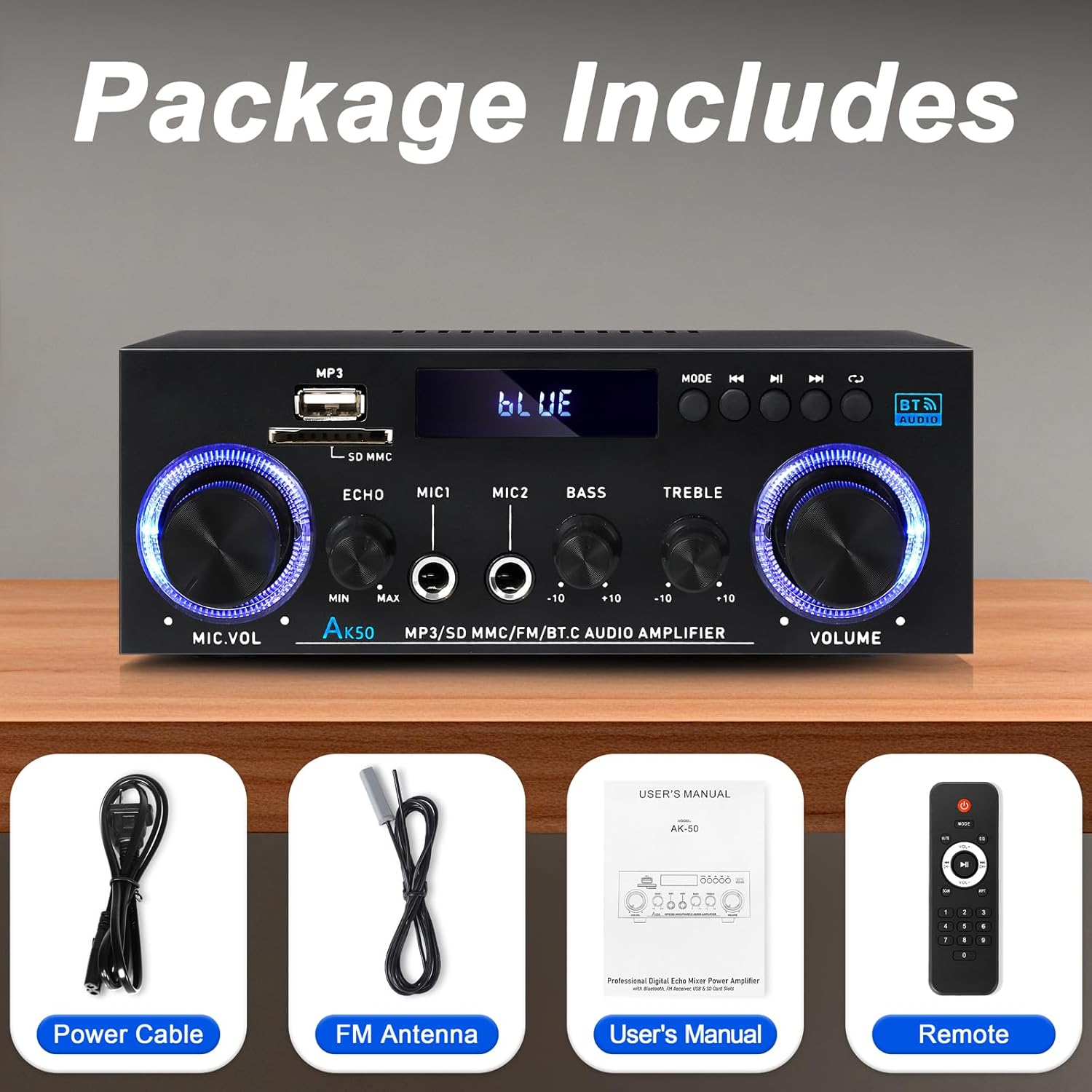
Àwòrán 3.1: Àwọn Ẹ̀rọ Tí A Fi Hàn
This image shows the items included in the WOOPKER AK50 package: the amplifier unit, a power cable, an FM antenna, a user's manual, and a remote control.
4. Ifilelẹ ọja
4.1 Igbimọ iwaju

Image 4.1: Front Panel Controls and Indicators
This diagram illustrates the front panel of the AK50 amplifier, highlighting its various controls and ports. Key features include the USB/SD port, LED display, mode selection buttons, microphone inputs, and rotary knobs for microphone volume, echo, bass, treble, and master volume.
- Ibudo USB/SD: Fun ohun afetigbọ files lati USB drives tabi SD kaadi.
- Ifihan LED: Ṣe afihan ipo lọwọlọwọ, alaye orin, ati awọn afihan ipo miiran.
- Bọtini Ipo: Switches between input modes (Bluetooth, AUX, USB, SD, FM).
- Bọtini ti tẹlẹ: Navigates to the previous track/station.
- Bọ́tìnnì Ṣíṣe/Sánu duro: Controls playback for USB/SD/Bluetooth.
- Bọtini atẹle: Navigates to the next track/station.
- Bọtini Yiyi: Repeats playback mode for USB/SD.
- Knob Iwọn didun Gbohungbo: Adjusts the volume of connected microphones.
- Echo Knob: Ó ń ṣe àtúnṣe ipa echo fún àwọn gbohùngbohùn.
- Mic Input Jacks (MIC1, MIC2): Awọn asopọ 6.35mm fun sisopọ awọn gbohungbohun.
- Knob Bass: Ṣe atunṣe iṣelọpọ ohun-igbohunsafẹfẹ kekere.
- Knob Treble: Ṣe atunṣe iṣẹjade ohun igbohunsafẹfẹ giga-giga.
- Knob Iwọn didun Titunto: Ṣe iṣakoso iwọn didun iṣelọpọ gbogbogbo.
4.2 ru Panel

Image 4.2: Rear Panel Connections
This diagram details the rear panel of the AK50 amplifier, showing the various input and output terminals. It includes the FM antenna jack, power switch, audio input/output jacks, speaker output terminals, and power input ports.
- FM Antenna Jack: Connects to the included FM antenna for radio reception.
- Agbara Yi pada: Yipada awọn amplifier ON tabi PA.
- Audio Input Jacks (AUX/LINE): RCA jacks for connecting external audio sources (e.g., CD player, TV).
- Awọn ebute Ijade Agbọrọsọ: Connects to passive speakers (4-16Ω impedance).
- Ìtẹ̀wọlé Agbára DC 12V/5A: For DC power supply (if applicable, check model specifications).
- AC 90-240V Power Input: Connects to the main power supply using the provided power cable.
5. Eto Itọsọna
Follow these steps to set up your AK50 Stereo Ampolutọpa:
5.1 Asopọ Agbọrọsọ
- Rii daju pe amplifier is turned OFF and unplugged from the power outlet.
- So rẹ palolo agbohunsoke si awọn Agbọrọsọ wu ebute on the rear panel. Ensure correct polarity (red to red, black to black) for each speaker.
- Awọn amplifier n ṣe atilẹyin fun awọn agbọrọsọ pẹlu impedance ti 4-16Ω.
5.2 Ìsopọ̀ Orísun Ohun
You can connect various audio sources to the AK50 ampolutọpa:
- AUX/LINE Input: Use RCA cables to connect devices like CD players, DVD players, TVs, or PCs to the Audio Input Jacks lori ru nronu.
- USB/SD Kaadi: Insert a USB flash drive or SD card (pre-loaded with audio files) into the respective port on the front panel.
- Bluetooth: Wo Abala 6.3 fun awọn ilana isopọ Bluetooth.
- Eriali FM: Connect the included FM antenna to the FM Eriali Jack on the rear panel for radio reception. Extend the antenna for better signal.
5.3 Asopọ agbara
- So okun agbara ti a pese si awọn AC 90-240V Power Input lori ru nronu.
- So opin keji okun ina sinu ibudo ogiri ti o yẹ.
- Rii daju pe Agbara Yipada on the rear panel is in the OFF position before plugging in.

Aworan 5.1: Example Asopọ aworan atọka
This image illustrates various connection possibilities for the AK50 amplifier, including connecting to speakers, a CD player, a DVD player, a PC/laptop, and a TV/Blu-ray player. It also shows the FM antenna and power connections.
6. Awọn ilana Iṣiṣẹ
6.1 Agbara Tan / Pa
After all connections are made, flip the Agbara Yipada on the rear panel to the ON position. The LED display on the front panel will illuminate.
6.2 Aṣayan ipo
Tẹ awọn Bọtini Ipo on the front panel or the remote control to cycle through the available input modes: Bluetooth, AUX, USB, SD, and FM.
6.3 Iwọn didun ati Iṣakoso ohun orin
- Iwọn Titunto: Yiyi awọn Titiipa Iwọn didun Titunto to adjust the overall sound level.
- Bass/Treble: Lo awọn Bọọlu Bass ati Tbleble Knob to fine-tune the low and high frequencies of the audio output.
- Ìwọ̀n/Ìró ohùn gbohùngbohùn: If microphones are connected, use the Bọtini Iwọn didun Mic to adjust their volume and the Echo Knob to add an echo effect.

Image 6.1: Bass and Treble Controls
This image highlights the Bass and Treble control knobs on the front panel of the AK50 amplifier, indicating their function in adjusting audio frequencies.
6.4 Sisopọ Bluetooth
- Yipada awọn amplifier to Bluetooth mode using the Bọtini Ipo. The LED display will show "BLUE" or a similar indicator, and the unit will enter pairing mode.
- Lori ẹrọ Bluetooth ti o ṣiṣẹ (fun apẹẹrẹ, foonuiyara, tabulẹti), mu Bluetooth ṣiṣẹ ki o wa awọn ẹrọ to wa.
- Select "AK50" (or similar device name) from the list to pair.
- Lọgan ti so pọ, awọn amplifier will indicate a successful connection, and you can play audio from your device.
- Maintain a distance of within 30 feet (10 meters) for optimal Bluetooth performance.

Image 6.2: Bluetooth Connection
This image demonstrates the Bluetooth pairing process, showing a smartphone displaying available Bluetooth devices and the AK50 amplifier in Bluetooth mode, indicating a successful connection.

Image 6.3: Bluetooth Range
This image illustrates the effective Bluetooth range of the AK50 amplifier, indicating a maximum distance of 32 feet (10 meters) for stable wireless connection between the amplifier and a paired device.
6.5 Sisisẹsẹhin USB/SD
Insert a USB drive or SD card into the corresponding slot. The amplifier will automatically switch to USB/SD mode and begin playing audio files. Lo awọn Ti tẹlẹ, Ṣiṣẹ / Sinmi, ati Itele awọn bọtini lati ṣakoso ṣiṣiṣẹsẹhin.
6.6 FM Radio isẹ
- Yipada awọn amplifier to FM mode using the Bọtini Ipo.
- Awọn amplifier will automatically scan and store available FM stations.
- Lo awọn Ti tẹlẹ ati Itele buttons to navigate between stored stations.
- Adjust the FM antenna position for optimal reception.
6.7 Latọna Iṣakoso Lilo
Iṣakoso latọna jijin ti a fi kun gba laaye lati ṣiṣẹ ni irọrun ti ẹrọ naa amplifier from a distance. Ensure the plastic isolation sheet is removed from the battery compartment before first use.

Image 6.4: Remote Control
This image displays the remote control for the AK50 amplifier, showing buttons for power, mode selection, EQ, volume adjustment, track navigation, and numerical input for direct track selection.
7. Itọju
Itọju to dara ṣe idaniloju gigun ati iṣẹ ṣiṣe ti o dara julọ ti rẹ ampolutọpa:
- Ninu: Lo aṣọ rírọrùn tí ó gbẹ láti nu ìta ẹ̀rọ náà. Má ṣe lo àwọn ohun ìfọmọ́ omi tàbí àwọn kẹ́míkà tí ó ń pa ara.
- Afẹfẹ: Rii daju pe awọn šiši fentilesonu ko kuro ninu eruku ati idoti lati ṣe idiwọ igbona.
- Ibi ipamọ: Ti o ba titoju awọn amplifier for an extended period, unplug it from the power outlet and store it in a cool, dry place.
- Okun Agbara: Regularly inspect the power cord for any damage. If damaged, discontinue use and replace it with an appropriate cord.
8. Laasigbotitusita
If you encounter issues with your AK50 amplifier, tọka si awọn iṣoro ti o wọpọ ati awọn ojutu wọnyi:
| Isoro | Owun to le Fa | Ojutu |
|---|---|---|
| Ko si agbara | Kò sí okùn agbára tí a so pọ̀; A ti pa iná; ibi tí a ti ń ta iná mànàmáná kò ní àbùkù. | Check power cable connection; Turn power switch ON; Test outlet with another device. |
| Ko si ohun jade | Speakers not connected; Incorrect input mode; Volume too low; Audio source issue. | Check speaker connections and polarity; Select correct input mode; Increase master volume; Verify audio source is playing. |
| Bluetooth ko sopọ | Amplifier not in Bluetooth mode; Device not in pairing mode; Too far from amplifier. | Yipada amplifier to Bluetooth mode; Ensure device Bluetooth is ON and searching; Move device closer to amplifier. |
| Isakoṣo latọna jijin ko ṣiṣẹ | Battery isolation sheet not removed; Batteries depleted; Obstruction between remote and amplifier. | Remove plastic sheet; Replace batteries; Ensure clear line of sight to ampolugba IR ti lifier. |
| Gbigba FM ti ko dara | FM antenna not connected or positioned incorrectly. | Connect FM antenna securely; Adjust antenna position for better signal. |
Ti iṣoro naa ba wa lẹhin igbiyanju awọn solusan wọnyi, jọwọ kan si atilẹyin alabara.
9. Awọn pato
| Ẹya ara ẹrọ | Sipesifikesonu |
|---|---|
| Nọmba awoṣe | AK50 |
| Brand | WOOPKER |
| Agbara Ijade | 400 Wattis (Ti o ga julọ) |
| Kakiri Ohun ikanni iṣeto ni | 2.0 ikanni |
| Asopọmọra Technology | Bluetooth 5.0, Auxiliary (RCA), USB, SD Card |
| Awọn ẹrọ ibaramu | Speakers, Smartphones, Tablets, PCs, CD/DVD Players |
| Ipo Ijade Ohun | Sitẹrio |
| Àwọ̀ | Dudu |
| Iwọn Nkan | 1.98 iwon |
| Package Mefa | 8.66 x 7.87 x 3.54 inches |
10. Atilẹyin ọja ati Support
For warranty information or technical support, please refer to the documentation provided at the time of purchase or contact WOOPKER customer service through their official channels. Keep your purchase receipt as proof of purchase.