
1. Ifihan
Thank you for choosing the MERCUSYS MC510 2K 3MP Outdoor WiFi Camera. This manual provides detailed instructions for the installation, operation, and maintenance of your security camera. Please read this manual carefully before use to ensure proper functionality and safety. The MC510 offers 2K 3MP resolution, 360-degree panoramic view, color night vision, two-way audio, smart motion detection, and IP65 weather resistance for reliable outdoor surveillance.

Image: MERCUSYS MC510 2K Pan/Tilt Wi-Fi Camera mounted on a wall, highlighting its 2K resolution and IP65 weather resistance.
2. Alaye Aabo
- Ensure the power adapter is suitable for your local power supply.
- Ma ṣe fi kamẹra han si awọn iwọn otutu to gaju, ọriniinitutu, tabi awọn agbegbe ibajẹ.
- Yẹra fún gbígbé kámẹ́rà sí ẹ̀gbẹ́ àwọn pápá oníná mànàmáná tó lágbára.
- Jeki kamẹra ati awọn ẹya ẹrọ rẹ kuro ni arọwọto awọn ọmọde.
- Lo awọn ẹya ẹrọ nikan nipasẹ olupese.
- Ge asopọ agbara ṣaaju ṣiṣe mimọ tabi ṣiṣe itọju.
- The camera is IP65 rated for outdoor use, but avoid submerging it in water.
3. Package Awọn akoonu
Daju pe gbogbo awọn nkan wa ninu apo rẹ:
- MC510 Camera × 1
- Adaparọ Agbara × 1
- Mounting Sticker × 1
- Akọmọ iṣagbesori × 1
- Mounting Screws × 4 + Bracket Screws × 2
- Àwọn ìdákọ̀ró gbígbéga × 4
- Waterproof Gasket × 1
- Quick Bẹrẹ Itọsọna
4. Ọja Ipariview
The MERCUSYS MC510 is a versatile outdoor security camera designed to provide comprehensive surveillance with advanced features.
Awọn ẹya pataki:
- 2K QHD with 360° View: Provides clear 2K 3MP video and full 360° horizontal coverage to see every corner and detail.
- Smart Motion Detection and Person Tracking: Automatically detects and tracks motion or people, ensuring key activities remain in focus.
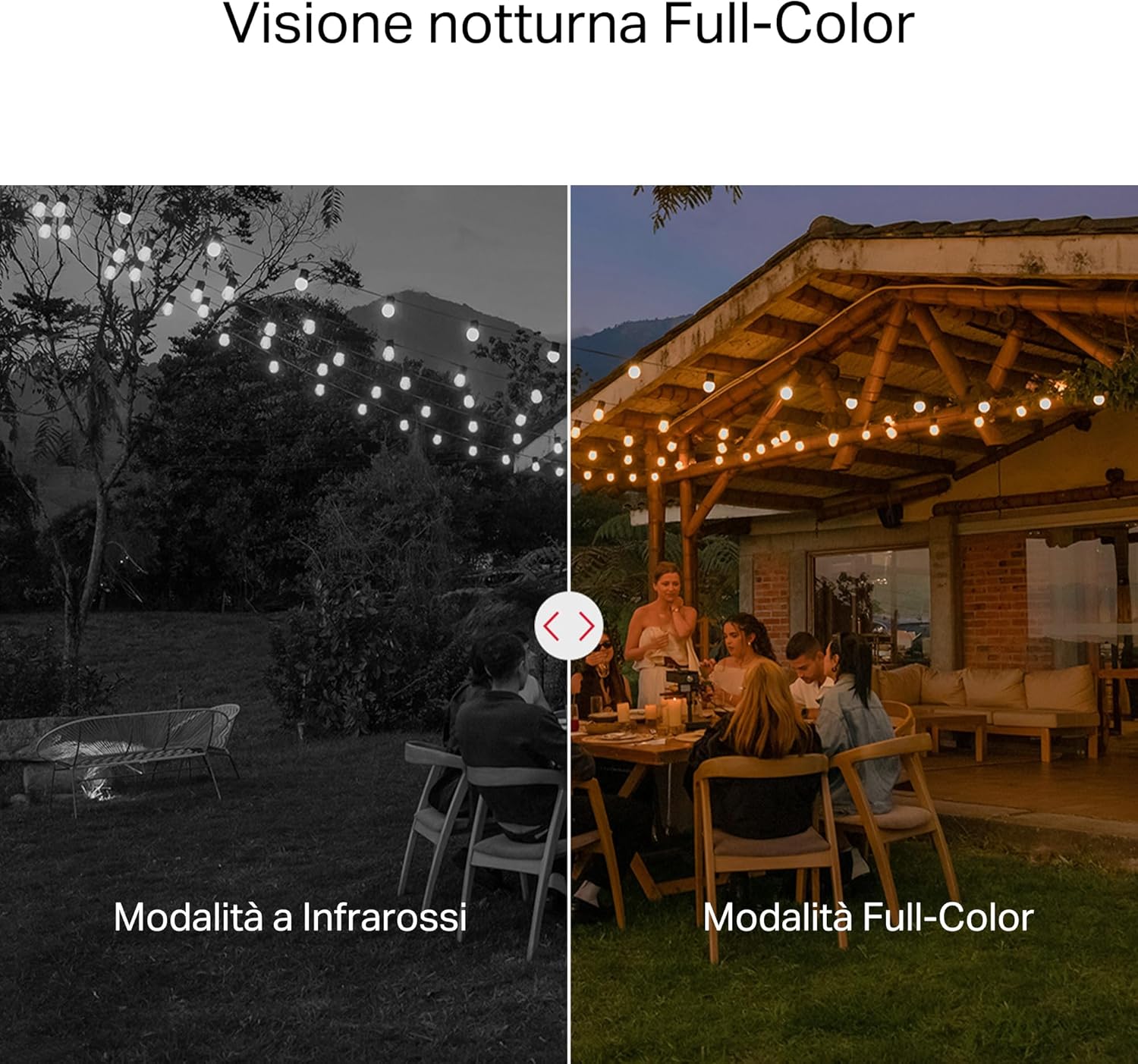
- Oju Alẹ Awọ: Provides vivid and detailed images even at night for 24/7 protection.
- Àwọn Agbègbè Ìgbòkègbodò Tí A Lè Ṣe Àtúnṣe: Helps filter out irrelevant events and sends alerts only when necessary.
- Ibi ipamọ agbegbe ati awọsanma: Supports microSD cards up to 512GB and cloud storage for secure and flexible video backup.
- Oju ojo fun Lilo ita gbangba: IP65 certified for reliable performance in rain, dust, or snow. Easily mounts on walls, ceilings, or poles.
- Privacy Protection with Lens Shield: Activate the physical lens cover when surveillance is not needed for greater peace of mind at home.
- Audio Ọna Meji: Ṣe ibaraẹnisọrọ taara nipasẹ kamẹra.
Awọn ẹya ara wiwo:

High-resolution 2K 3MP video capture.
360-degree panoramic rotation for full coverage.
Full-Color Night Vision for clear images in low light.

Physical lens shield for enhanced privacy.
5. Eto
5.1 Fifi sori ti ara
The MC510 camera is designed for outdoor use and can be mounted on walls, ceilings, or poles. Its IP65 rating ensures protection against dust and water jets.
- Yan Ibi kan: Yan ipo ita gbangba ti o yẹ ti o pese ohun ti o fẹ viewing igun ati ki o ni kan idurosinsin ifihan agbara Wi-Fi.
- Iṣagbesori: Use the provided mounting sticker to mark drill holes. Drill holes, insert anchors, and secure the mounting bracket with screws. Attach the camera to the bracket.
- Asopọ agbara: Connect the power adapter to the camera and plug it into a power outlet. Ensure the waterproof gasket is properly installed for outdoor power connections.

Image: The camera is shown mounted outdoors, demonstrating its weather-resistant design.
5.2 App sori & Asopọmọra
The MC510 connects exclusively via Wi-Fi. An Ethernet port is not available.
- Ṣe igbasilẹ ohun elo naa: Download the official MERCUSYS app from your smartphone's app store (iOS or Android).
- Se akanti fun ra re: Ṣii app naa ki o ṣẹda akọọlẹ tuntun tabi wọle ti o ba ti ni ọkan tẹlẹ.
- Fi Kamẹra kun: Follow the in-app instructions to add your MC510 camera. This typically involves scanning a QR code on the camera and connecting it to your home Wi-Fi network.
5.3 MicroSD Kaadi fifi sori
For local storage, install a microSD card (up to 512GB, not included).
- Agbara Pa: Disconnect the camera from power before inserting or removing the microSD card.
- Wa Iho: Refer to the camera's physical design to locate the microSD card slot, often protected by a cover.
- Fi Kaadi sii: Fi kaadi microSD sii sinu iho titi ti o fi tẹ sinu aaye.
- Ọna kika: After powering on the camera and connecting it to the app, navigate to the camera settings to format the microSD card.

Image: Close-up of the camera showing the microSD card slot, indicating flexible storage options.
6. Awọn ilana Iṣiṣẹ
6.1 Live View & Sisisẹsẹhin
- Gbe View: Open the MERCUSYS app and select your MC510 camera to view kikọ sii ifiwe.
- Iṣakoso Pan/Tit: Use the controls in the app to remotely rotate the camera horizontally (pan) and vertically (tilt) to adjust the viewigun igun.
- Sisisẹsẹhin: Wiwọle gba silẹ footage from the app's playback section. You can filter by date and event.

Image: Illustration of 360-degree rotation with motion tracking.
6.2 Ṣíṣàwárí Ìṣípo àti Ìtọ́pasẹ̀
- Mu Ṣíṣe Àwárí ṣiṣẹ́: In the app settings, enable motion detection and person tracking.
- Customize Activity Zones: Ṣetumo awọn agbegbe kan pato laarin kamẹra view where you want motion to be detected. This helps reduce false alarms.
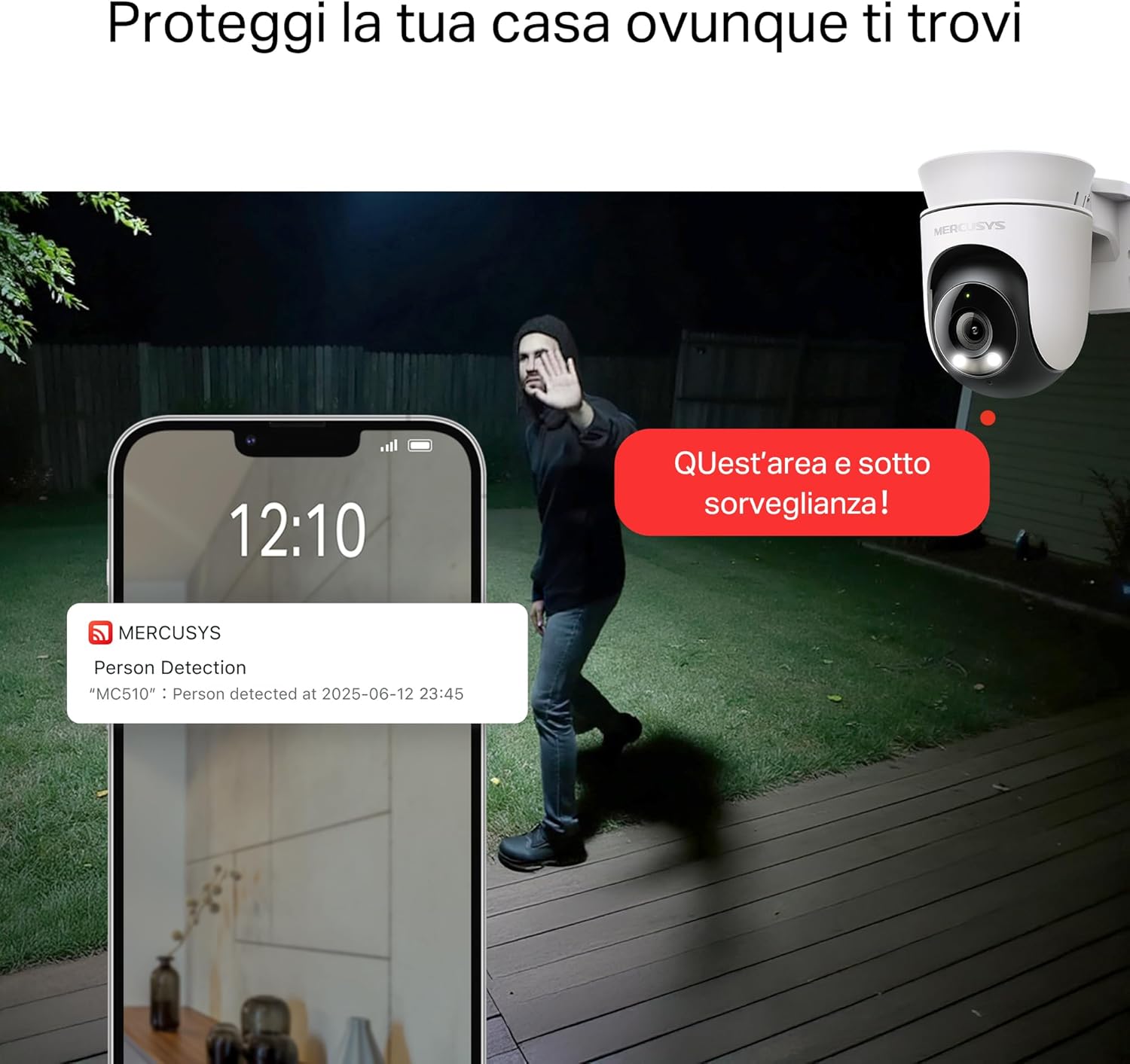
- Gba Awọn Itaniji: The camera will send notifications to your smartphone when motion or a person is detected in the monitored zones.

Image: A person running in a yard, with detection boxes, demonstrating motion detection and tracking.
6.3 Meji-Ona Audio
The built-in microphone and speaker allow for two-way communication.
- Activate Audio: Ninu aye view interface of the app, tap the microphone icon to speak through the camera.
- Gbọ: The speaker icon allows you to hear audio from the camera's vicinity.

Image: A person detected by the camera, with a phone notification and an on-screen alert, demonstrating customizable alarms and two-way audio.
6.4 Ìran Aláwọ̀ Alẹ́
The MC510 provides full-color night vision for enhanced clarity in low-light conditions.
- Ṣiṣẹ Aifọwọyi: Color night vision activates automatically in low-light conditions.
- Ipo infurarẹẹdi: The camera also supports traditional infrared night vision (black and white) if preferred or in extremely dark environments.

Image: Comparison of infrared (monochrome) and full-color night vision modes.
6.5 Privacy Zone & Lens Shield
Protect your privacy by defining privacy zones or activating the physical lens shield.
- Awọn agbegbe ikọkọ: In the app, you can set up specific areas within the camera's view to be excluded from recording.
- Lens Shield: For complete privacy, use the app to activate the physical lens shield, which covers the camera lens.
7. Itọju
7.1 Ninu
- Rí i dájú pé kámẹ́rà náà ti pa kí o tó sọ ọ́ di mímọ́.
- Lo asọ ti o rọ, ti o gbẹ lati nu ara kamẹra nu.
- For the lens, use a lens cleaning cloth to avoid scratches. Do not use harsh chemicals or abrasive cleaners.
7.2 famuwia imudojuiwọn
Regularly check for firmware updates through the MERCUSYS app. Updates provide new features, performance improvements, and security enhancements. Follow the in-app instructions to perform updates.
8. Laasigbotitusita
If you encounter issues with your MERCUSYS MC510 camera, refer to the following common problems and solutions:
| Isoro | Owun to le Solusan |
|---|---|
| Kamẹra ko sopọ mọ Wi-Fi | Ensure the camera is within range of your Wi-Fi router. Check Wi-Fi password. Restart the camera and router. The MC510 only supports Wi-Fi connection, no Ethernet. |
| Didara fidio ti ko dara | Check your Wi-Fi signal strength. Ensure the camera lens is clean. Adjust camera placement to avoid glare or obstructions. |
| Motion detection issues | Verify motion detection is enabled in the app. Adjust sensitivity settings. Ensure activity zones are correctly configured. |
| MicroSD card not working | Ensure the card is inserted correctly. Format the microSD card via the app. Try a different compatible microSD card. Power cycle the camera after inserting the card. |
| No two-way audio | Check microphone and speaker settings in the app. Ensure your phone's volume is up. |
9. Awọn pato
| Ẹya ara ẹrọ | Ẹ̀kúnrẹ́rẹ́ |
|---|---|
| Brand | IDANILE |
| Orukọ awoṣe | MC510 |
| inu ile / ita gbangba Lo | Ita gbangba |
| Ilana Asopọ | Wi-Fi |
| Iṣagbesori Iru | Aja, Ọpá, Odi |
| Iduro Aworan Ṣi | 3 MP |
| International Idaabobo Rating | IP65 |
| Alailowaya Technology | Wi-Fi |
| Awọn batiri ti a beere | Rara |
| Ipinnu Yaworan fidio | 2K 3MP |
| Fidio Yaworan kika | MPEG-4 |
| Nọmba ti Awọn nkan | 1 |
| Awọn irinše to wa | MC510 Camera, Power Adapter, Mounting Sticker, Mounting Bracket, Mounting Screws, Mounting Anchors, Waterproof Gasket, Quick Start Guide |
| Ilu isenbale | China |
| Olupese | TP-Link |
| Awọn iwọn Nkan | 14.1 x 9.3 x 12.2 cm |
10. Atilẹyin ọja ati Support
Fun alaye atilẹyin ọja ati atilẹyin imọ-ẹrọ, jọwọ tọka si MERCUSYS osise website or contact their customer service. Details can typically be found in the Quick Start Guide included with your product or on the manufacturer's webojula.
Atilẹyin Ayelujara: Ṣabẹwo www.mercusys.com for FAQs, user manuals, and support resources.