
1. Ifihan
O ṣeun fun riraasing the WOOPKER AK50 Home Audio Stereo Amplifier. Eyi amplifier is designed to provide high-quality audio for your home theater, garage, or other personal audio setups. It features Bluetooth 5.0 connectivity, USB and SD card inputs, RCA inputs, and two microphone inputs for versatile use. Please read this manual carefully before operating the device to ensure proper use and to maximize its performance.
2. Awọn ilana aabo
- Orisun Agbara: Rii daju pe ipese agbara voltage matches the requirements specified on the amplifier. Use only the provided power cable.
- Afẹfẹ: Do not block any ventilation openings. Place the amplifier ni a daradara-ventilated agbegbe lati se overheating.
- Omi ati Ọrinrin: Maṣe fi han awọn amplifier to rain, moisture, or dripping/splashing liquids. Do not place objects filled with liquids, such as vases, on the apparatus.
- Awọn orisun Ooru: Pa awọn ampohun èlò ìtújáde kúrò ní àwọn orísun ooru bí radiators, àwọn ìwé ìforúkọsílẹ̀ ooru, stovu, tàbí àwọn ẹ̀rọ mìíràn (pẹ̀lú ampliifiers) ti o gbe ooru jade.
- Ninu: Yọọ kuro amplifier from the power outlet before cleaning. Use a dry cloth for cleaning.
- Ṣiṣẹ: Maṣe gbiyanju lati ṣiṣẹ ọja yi funrararẹ. Tọkasi gbogbo iṣẹ si oṣiṣẹ oṣiṣẹ ti o peye.
- Idilọwọ Agbọrọsọ: Ensure connected speakers have an impedance between 4-16 ohms. Connecting speakers with incorrect impedance may damage the amplifier.
3. Package Awọn akoonu
Daju pe gbogbo awọn nkan ti a ṣe akojọ rẹ si isalẹ wa ninu package rẹ:
- 1x WOOPKER AK50 Audio Ampitanna
- 1x Okun Agbara
- 1x Itọsọna olumulo
- 1x Remote Control (Note: Battery for remote is not included. Please purchase 2x AAA batteries separately.)

Image: Package contents of the AK50 amplifier, showing the main unit, power cable, user manual, and remote control.
4. Ọja Ipariview
4.1 Igbimọ iwaju

Aworan: Alaye view of the AK50 amplifier's front panel, highlighting the USB/SD port, LED display, control buttons, microphone inputs, and various adjustment knobs.
- Ibudo USB/SD: For connecting USB flash drives or SD cards.
- Ifihan LED: Shows current mode, track number, or volume level.
- Bọtini Ipo: Switches between input modes (Bluetooth, USB/SD, RCA, FM).
- Bọtini ti tẹlẹ: Skips to the previous track/station.
- Bọ́tìnnì Ṣíṣe/Sánu duro: Ṣiṣẹ tabi daduro ṣiṣiṣẹsẹhin ohun.
- Bọtini atẹle: Skips to the next track/station.
- Bọtini Yiyi: Ó tún orin tàbí àkójọ orin lọ́wọ́lọ́wọ́ ṣe.
- Iwọn Gbohungbohun: Ó ń ṣe àtúnṣe iwọn didun àwọn gbohùngbohùn tí a so pọ̀.
- Bọtini Iwoyi: Activates/deactivates or adjusts microphone echo effect.
- Mic Input Jacks (MIC1, MIC2): Awọn asopọ 6.35mm fun sisopọ awọn gbohungbohun.
- Knob Bass: Ṣe atunṣe iṣelọpọ ohun-igbohunsafẹfẹ kekere.
- Knob Treble: Ṣe atunṣe iṣẹjade ohun igbohunsafẹfẹ giga-giga.
- Iwọn Titunto: Išakoso awọn ìwò o wu iwọn didun ti awọn amplifier.
4.2 Pada Panel

Aworan: Alaye view of the AK50 amplifier's back panel, showing all input and output connections, including power inputs and speaker terminals.
- FM Antenna Jack: So eriali FM ti o wa ninu rẹ pọ fun gbigba redio.
- Agbara Yi pada: Yipada awọn amplifier tan tabi pa.
- Audio Input Jacks (AUX, LINE): RCA inputs for connecting external audio sources (e.g., CD player, DVD player, TV).
- Speaker Output Jacks: Terminals for connecting passive speakers (4-16 ohms).
- DC 12V/5A Power: Alternative DC power input.
- AC 90-240V Power: Main AC power input.
5. Eto
5.1 Asopọ Agbọrọsọ
Follow these steps to connect your passive speakers to the ampolutọpa:
- Before connecting the speakers, identify the positive and negative terminals. The positive terminal is typically red, and the negative terminal is black.
- Press the clasp on the back of the AK50 amplifier's speaker output terminals and insert the bare speaker wires. Ensure the positive wire from the speaker connects to the positive terminal on the amplifier, and the negative wire to the negative terminal.
- Ensure a secure connection for both left and right channels.
- Iṣọra: Avoid plugging and unplugging USB drives, SD cards, RCA audio cables, or speaker cables while the amplifier ti wa ni titan.

Image: Speaker connection diagram, illustrating the proper wiring of passive speakers to the amplifier and RCA input connections for other devices.
5.2 Asopọ agbara
Connect the provided power cable to the AC 90-240V power input on the back panel of the amplifier, then plug the other end into a standard wall outlet.
6. Awọn ilana Iṣiṣẹ
6.1 Agbara Tan / Pa
Flip the Power Switch on the back panel to the 'ON' position to power on the amplifier. Flip it to 'OFF' to power off.
6.2 Àwọn Ìgbékalẹ̀ Ìtẹ̀síwájú
Tẹ awọn Ipo button on the front panel or the remote control to cycle through available input modes: Bluetooth, USB, SD, RCA (AUX/LINE), and FM Radio.
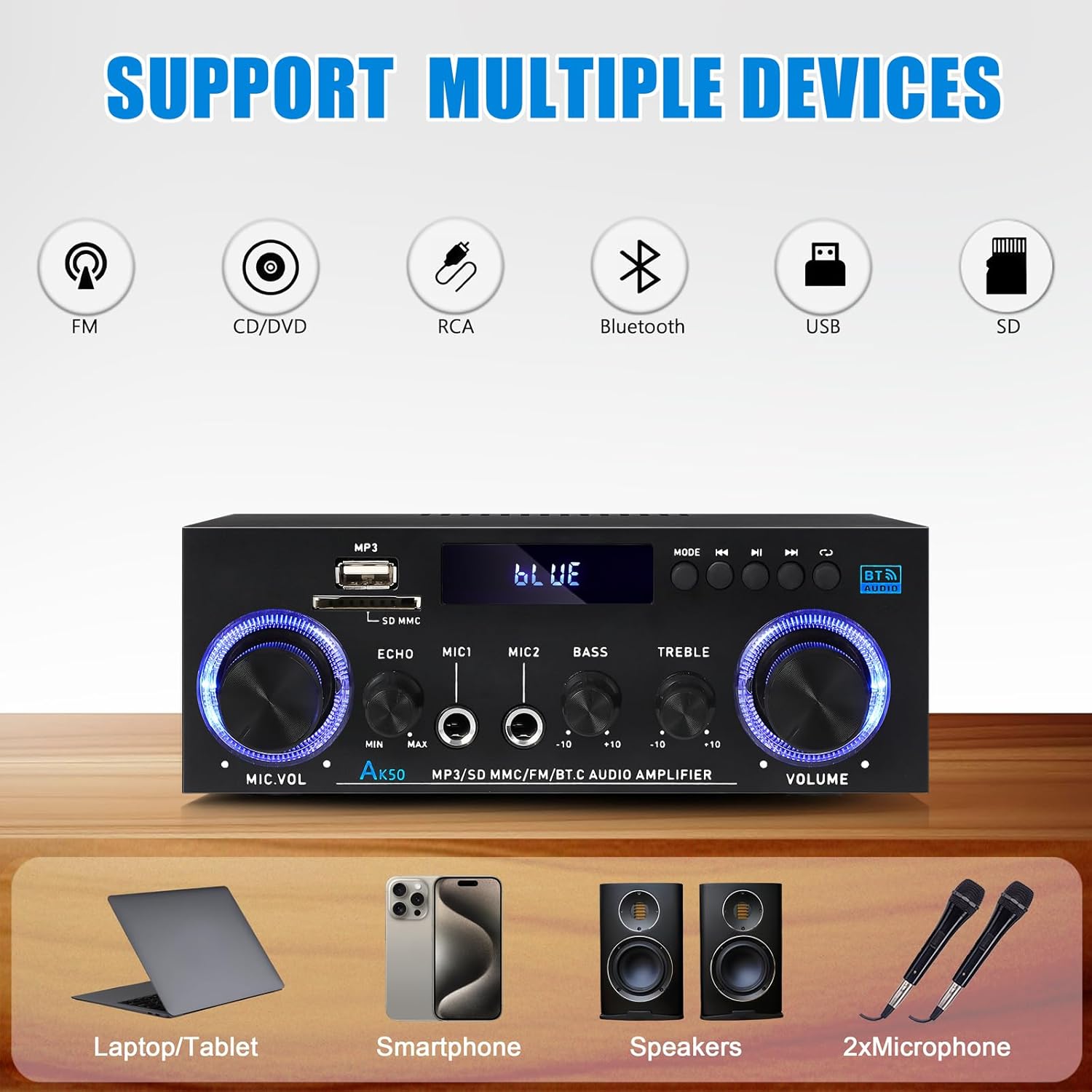
Image: Visual representation of the AK50 amplifier's compatibility with various input sources like FM, CD/DVD, RCA, Bluetooth, USB, and SD.
6.2.1 Ipo Bluetooth
- Yipada awọn amplifier to Bluetooth mode using the Ipo Bọ́tìnì náà. Ìfihàn LED náà yóò fi 'BÙLÙ' hàn.
- Lori ẹrọ alagbeka rẹ (foonuiyara, tabulẹti, kọǹpútà alágbèéká), mu Bluetooth ṣiṣẹ ki o wa awọn ẹrọ to wa.
- Select 'AK50' from the list of devices to pair. Once paired, you will hear a confirmation sound, and the LED display will indicate a successful connection.
- O le mu ohun orin lati ẹrọ rẹ ṣiṣẹ bayi nipasẹ amplifier.

Image: Demonstrates connecting a mobile device to the AK50 amplifier via Bluetooth for wireless music streaming.
6.2.2 USB/SD Card Mode
- Fi awakọ filasi USB tabi kaadi SD ti o ni ohun MP3 sinu files sinu ibudo ti o yẹ lori iwaju nronu.
- Yipada awọn amplifier to USB or SD mode using the Ipo bọtini. Awọn amplifier yoo ṣe awari laifọwọyi ati bẹrẹ si dun ohun files.
- Lo awọn Ti tẹlẹ, Itele, ati Ṣiṣẹ / Sinmi awọn bọtini lati ṣakoso ṣiṣiṣẹsẹhin.
6.2.3 RCA (AUX/LINE) Input Mode
- Connect external audio devices (e.g., CD player, DVD player, TV, computer) to the AUX or ILA RCA input jacks on the back panel using an RCA audio cable.
- Yipada awọn amplifier to the corresponding RCA input mode using the Ipo bọtini.
- Audio from the connected device will now play through the amplifier.
6.2.4 Gbigbe gbohungbohun
- So awọn gbohungbohun meji pọ mọ MIC1 ati MIC2 input jacks on the front panel.
- Ṣatunṣe iwọn gbohungbohun nipa lilo awọn Iwọn didun Mic koko.
- Lo awọn Eko button to add or remove an echo effect to the microphone audio.

Image: Two individuals using microphones connected to the AK50 amplifier, demonstrating its dual microphone support for karaoke or public speaking.
6.2.5 FM Redio Ipo
- Connect the included FM antenna to the FM ANT jack on the back panel.
- Yipada awọn amplifier to FM Radio mode using the Ipo bọtini.
- Lo awọn Ti tẹlẹ ati Itele buttons to scan for radio stations.
6.3 Iwọn didun ati Iṣakoso ohun orin
- Iwọn Titunto: Yiyi ti o tobi Iwọn didun knob on the front panel to adjust the overall output volume.
- Iṣakoso Bass: Lo awọn Bass knob to increase or decrease the low-frequency response of the audio.
- Iṣakoso Treble: Lo awọn TREK. knob to increase or decrease the high-frequency response of the audio.

Aworan: Isunmọ view of the Bass and Treble adjustment knobs, indicating their function in sound customization.
6.4 Latọna Iṣakoso Lilo
The included remote control allows for convenient operation from a distance. Insert 2x AAA batteries (not included) into the remote before use.
- Bọtini agbara: Yipada awọn amplifier on/off (standby).
- Bọtini Ipo: Ó ń yípo nípasẹ̀ àwọn ipò ìtẹ̀wọlé.
- Iwọn didun Soke/Isalẹ: Ṣatunṣe iwọn didun oluwa.
- Ti tẹlẹ/Itele: Skips tracks or tunes FM stations.
- Ṣiṣẹ/Daduro: Ó máa ń gbé ohùn sókè tàbí ó máa ń dá dúró.
- Awọn bọtini Nọmba: For direct track selection (USB/SD) or FM station input.

Image: A user operating the AK50 amplifier with its remote control, demonstrating ease of volume and input adjustment.
6.5 Video ifihan
Watch this video for a demonstration of the AK50 Stereo Audio Amplifier's sound and control features.
Video: A demonstration of the AK50 Stereo Audio Amplifier, showcasing its sound output and the functionality of its controls, including volume and tone adjustments.
7. Itọju
- Ninu: Lo asọ ti o gbẹ lati mu ese ita ti awọn amplifier. Do not use liquid cleaners or aerosol sprays.
- Afẹfẹ: Regularly check that the ventilation openings are clear of dust and debris to ensure proper airflow.
- Ibi ipamọ: Ti o ba titoju awọn amplifier for an extended period, disconnect it from the power supply and store it in a cool, dry place.
8. Laasigbotitusita
| Isoro | Owun to le Fa | Ojutu |
|---|---|---|
| Ko si agbara | Power cable not connected; Power switch off; Outlet malfunction. | Ensure power cable is securely connected; Turn power switch ON; Test outlet with another device. |
| Ko si ohun jade | Incorrect input mode; Speaker wires loose/incorrectly connected; Volume too low; Mute activated; Faulty audio source. | Select correct input mode; Check speaker connections (positive/negative); Increase Master Volume; Ensure not muted; Test with a different audio source. |
| Bluetooth ko sopọ | Amplifier not in Bluetooth mode; Device not in pairing mode; Amplifier already paired with another device; Out of range. | Yipada amplifier to Bluetooth mode; Ensure device's Bluetooth is on and discoverable; Disconnect from other devices; Move device closer to amplifier. |
| USB/SD kaadi ko dun | Ti ko tọ file ọna kika; Kaadi / wakọ ko fi sii daradara; Ti bajẹ files. | Rii daju files are MP3 format; Reinsert card/drive; Try a different USB/SD card. |
| Gbigba redio FM ti ko dara | Antenna not connected; Weak signal. | Connect FM antenna securely; Adjust antenna position for better reception. |
9. Awọn pato
| Ẹya ara ẹrọ | Sipesifikesonu |
|---|---|
| Awoṣe | AK50 |
| Ijade agbara ti o ga julọ | 500W + 500W |
| Iṣajade agbara ti a ṣe iwọn (RMS) | 60W x 2 |
| Awọn ikanni | 2.0 Sitẹrio ikanni |
| Ẹya Bluetooth | 5.0 |
| Input Interface | Bluetooth, USB, SD Card, RCA (AUX/LINE), 2x MIC |
| O wu Interface | Speaker Output (4-16 Ohm) |
| Iṣakoso ohun orin | Bass, tirẹbu |
| Gbohungbohun Awọn ẹya ara ẹrọ | Volume, Echo Control |
| Ibi ti ina elekitiriki ti nwa | AC 90-240V or DC 12V/5A |
| Awọn iwọn (L x W x H) | Isunmọ. 7.09 x 5.47 x 2.56 inches (180 x 139 x 65 mm) |
| Iwọn Nkan | 1.5 poun (isunmọ 680g) |
10. Atilẹyin ọja ati Support
WOOPKER products are designed and manufactured to the highest quality standards. For warranty information or technical support, please refer to the contact details provided with your purchase or visit the official WOOPKER webojula. Tọju iwe-ẹri rira rẹ bi ẹri rira.