
1. Ifihan
This manual provides essential instructions for the installation, operation, and maintenance of your Aninerel 3000W Hybrid Solar Inverter, model ANJ-3KW-LV-WIFI. This device is designed to convert 24V DC power to 110V AC pure sine wave power, suitable for various off-grid and backup power applications. Please read this manual thoroughly before installation and use to ensure safe and efficient operation.
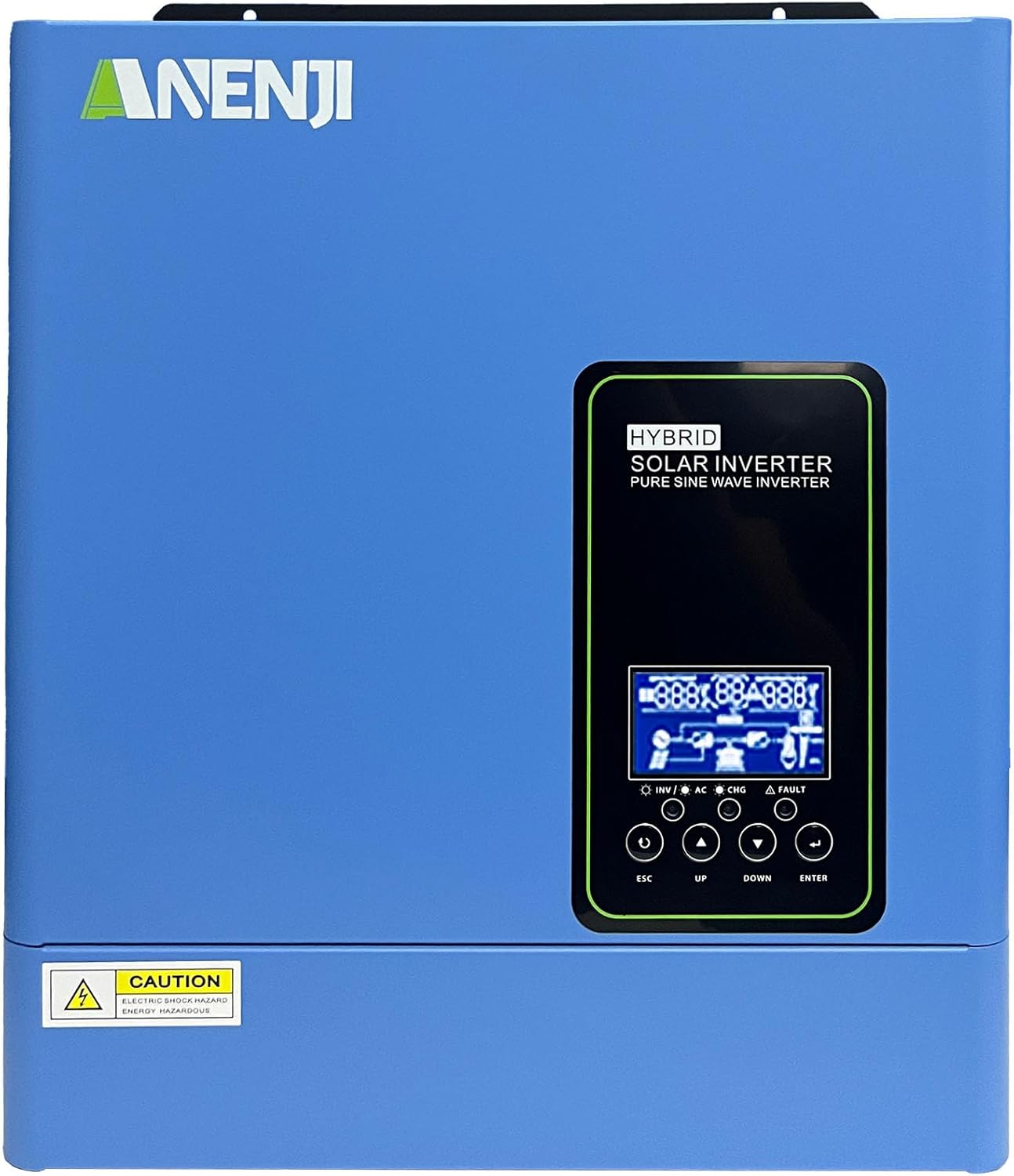
olusin 1.1: Iwaju view of the Aninerel 3000W Hybrid Solar Inverter. The inverter features a blue casing with the Aninerel logo and a central LCD display panel with control buttons.
2. Awọn ilana aabo
Máa tẹ̀lé àwọn ìlànà ààbò wọ̀nyí láti dín ewu ìkọlù iná mànàmáná, iná, tàbí ìpalára kù:
- Read all instructions and cautionary markings on the unit and in this manual before installation or operation.
- Do not disassemble the inverter. Refer servicing to qualified personnel. Incorrect reassembly may result in electric shock or fire.
- Lati dinku eewu ina mọnamọna, ge asopọ gbogbo awọn onirin ṣaaju ṣiṣe eyikeyi itọju tabi mimọ.
- This inverter is designed for indoor or semi-outdoor use with an IP65 rating. Avoid direct exposure to rain or snow.
- Rí i dájú pé afẹ́fẹ́ ń tàn káàkiri ẹ̀rọ inverter náà kí ó má baà gbóná jù. Má ṣe dí àwọn ihò afẹ́fẹ́.
- Lo awọn irinṣẹ ti o yẹ ati ohun elo aabo ti ara ẹni lakoko fifi sori ẹrọ.
- Ensure all wiring connections are tight and secure to prevent loose connections that can cause overheating.
- Maṣe so inverter pọ mọ akoj iṣẹ gbogbogbo laisi aṣẹ to dara ati awọn igbese aabo.
3. Ọja Ipariview
The Aninerel 3000W Hybrid Solar Inverter integrates a pure sine wave inverter, an MPPT solar charge controller, and a battery charger into one compact unit. It is designed to provide uninterrupted power support.
3.1 Key Awọn ẹya ara ẹrọ
- Ìjáde Ìgbì Sine Pure 3000W: Converts 24V DC to 110V AC, providing stable power for sensitive electronics.
- Integrated 100A MPPT Solar Charge Controller: Maximizes solar energy harvesting with up to 500VDC PV input.
- Flexible Charging and Output Modes: Offers multiple modes (Solar Only, AC Priority, Hybrid Charging; Mains Priority, PV Priority, Hybrid Output) for diverse power management.
- Ibamu Batiri gbooro: Supports AGM, GEL, Lead-acid, Li-ion, and LiFePO4 24V batteries.
- Ifihan LCD Smart: Provides real-time monitoring and allows for easy configuration of system settings.
- Wi-Fi ti a ṣe sinu: Enables remote monitoring of the inverter status (registration required).
- Apẹrẹ ti o lagbara: IP65-rated enclosure for durability in various environments, with intelligent cooling.
- Awọn aabo to peye: Pẹlu overvoltage, undervoltage, reverse polarity, and short circuit protection.

olusin 3.1: Iwaju ati Ru Panel Loriview. This diagram labels the LCD display, indicators, function buttons, RS485 communication port, grounding terminal, battery input, dry contact port, built-in Wi-Fi, AC input, AC output, PV input, and power on/off switch.
3.2 Pánẹ́lì iwájú àti àwọn àmì
- Ifihan LCD: Shows system status, operational data, and configuration settings.
- Atọka gbigba agbara: Illuminates to indicate battery charging status.
- Atọka ipo: Provides general operational status of the inverter.
- Atọka aṣiṣe: Lights up to signal system errors or warnings.
- Àwọn bọ́tìnì iṣẹ́ (ESC, Sókè, SÍSẸ́, TẸ̀LẸ̀): A lo fun lilọ kiri awọn akojọ aṣayan ati ṣatunṣe awọn eto lori LCD.
3.3 Ru Panel Awọn isopọ
- Ibudo Ibaraẹnisọrọ RS485: For external communication and monitoring.
- Ipari Ilẹ -ilẹ: Essential for safety grounding.
- Iṣawọle Batiri: O so pọ mọ banki batiri 24V.
- Ibudo Olubasọrọ Gbígbẹ: Fun iṣakoso ita tabi ifihan agbara.
- Built-in Wi-Fi Module: Fun ibojuwo alailowaya.
- Iṣawọle AC: Connects to grid utility or generator AC power.
- Ijade AC: O sopọ mọ awọn ẹru ile.
- Iṣawọle PV: Connects to solar panel arrays.
- Tan-an/Pa Yipada: O n ṣakoso agbara akọkọ si inverter.
4. Fifi sori & Oṣo
Proper installation is crucial for the safe and efficient operation of your hybrid solar inverter. Ensure all connections are made by a qualified electrician and adhere to local electrical codes.
4.1 Iṣagbesori ẹrọ oluyipada
- Yan ibi tó yẹ, tó gbẹ, tó ní afẹ́fẹ́ tó dára, tó sì ní ààbò láti inú oòrùn àti ọ̀rinrin.
- Ensure sufficient clearance around the inverter for proper airflow and cooling.
- Mount the inverter vertically on a sturdy surface using appropriate fasteners.
4.2 Awọn isopọ onirin
Follow the wiring diagram carefully. All wiring should be performed with the inverter and all power sources disconnected.
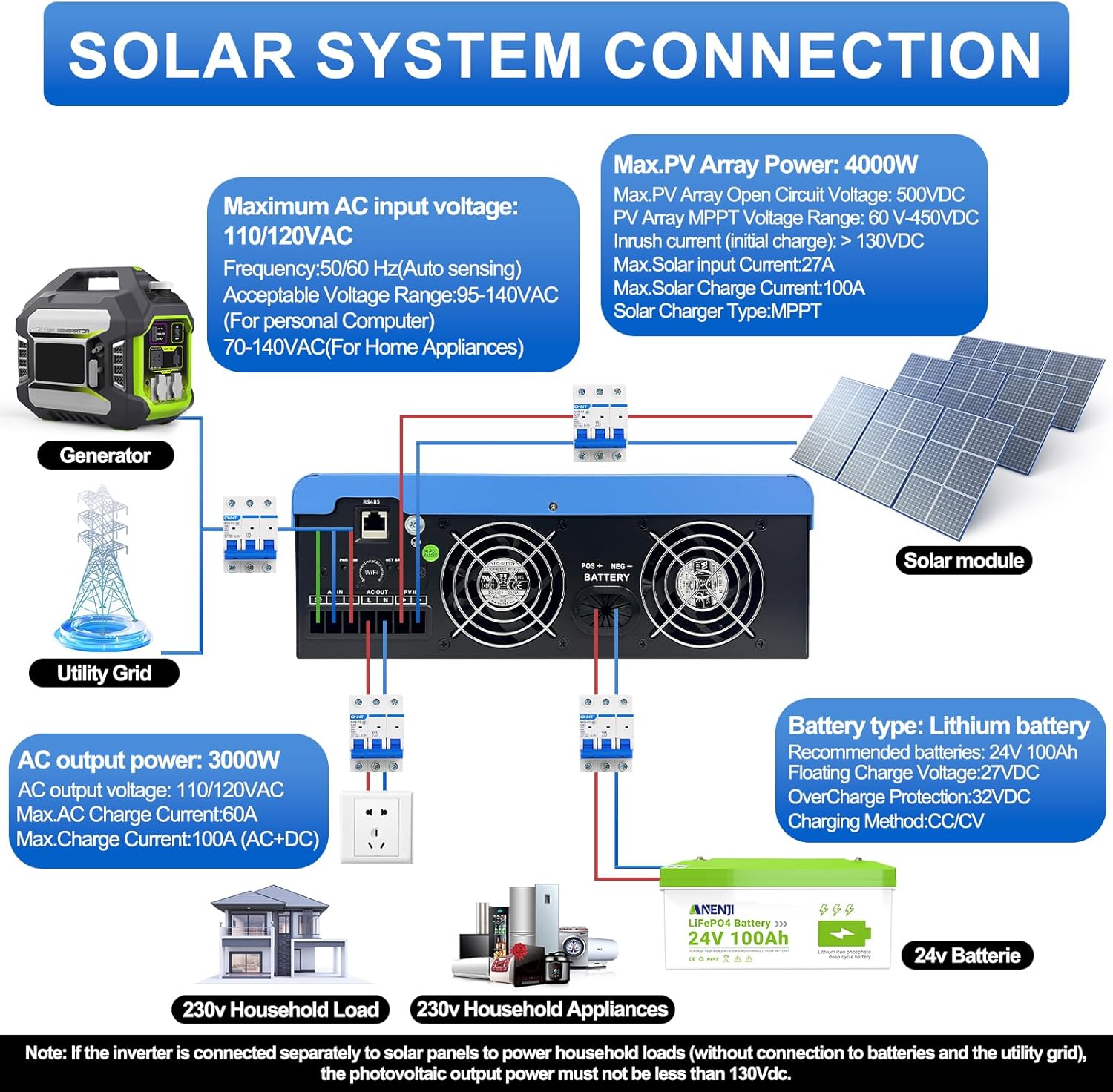
Figure 4.1: Solar System Connection Diagram. This diagram illustrates the connections for solar panels, generator, utility grid, 24V battery, and household loads to the inverter. It shows the PV input, battery input, AC input, and AC output terminals.
4.2.1 batiri Asopọ
- Connect the 24V battery bank to the battery input terminals on the inverter. Ensure correct polarity (+ to + and - to -).
- Use appropriate cable gauges for the battery connections to handle the expected current.
- The ANJ-3KW-LV-WIFI model supports a 24-volt DC system and is recommended for use with batteries of at least 100 ampere-hours capacity.

Figure 4.2: Inverter Battery Connection. This diagram shows wiring configurations for both 12-volt and 24-volt battery systems, emphasizing correct series/parallel connections for the desired voltage.
4.2.2 PV (Solar Panel) Connection
- Connect the solar panel array to the PV input terminals. Observe correct polarity.
- Ensure the total open circuit voltage of the PV array does not exceed 500VDC.
- The MPPT voltage range is 60-450VDC. Ensure your PV array voltage falls within this range for optimal charging.
4.2.3 AC Input Asopọ
- Connect the utility grid or generator AC power to the AC input terminals.
- The inverter supports 110/120VAC input with auto-sensing frequency (50/60Hz).
4.2.4 AC o wu Asopọ
- Connect your household loads or appliances to the AC output terminals.
- The inverter provides 3000W continuous AC output at 110/120VAC.
4.3 Ibẹrẹ Agbara-soke
- After all connections are secure, switch on the battery breaker first.
- Then, switch on the PV array breaker (if applicable).
- Finally, switch on the AC input breaker (if applicable) and the inverter's main power switch.
- Observe the LCD display for initial boot-up and status indicators.
5. Isẹ
The inverter offers various configurable settings to optimize power management based on your specific needs.
5.1 LCD Ifihan ati Eto
The LCD display provides real-time information and allows you to configure operational parameters using the function buttons.
- Lo awọn UP ati SILE awọn bọtini lati lọ kiri nipasẹ awọn aṣayan akojọ aṣayan.
- Tẹ WOLE láti yan àṣàyàn kan tàbí láti jẹ́rìí sí ètò kan.
- Tẹ ESC to exit a menu or cancel an action.
5.2 Gbigba agbara ayo Awọn ipo
These settings determine how the battery bank is charged from available power sources.

Figure 5.1: Charger Source Priority. This diagram illustrates three charging priority options: Solar First (solar panels charge first, AC input only if solar is unavailable), Solar and AC Input Simultaneously (both solar and utility charge at the same time), and Solar Only (solar energy is the exclusive charging source).
- Oòrùn Àkọ́kọ́: Prioritizes solar power for charging. AC input will only charge the battery when solar power is insufficient or unavailable.
- AC Priority (Utility Priority): Prioritizes AC input (utility or generator) for charging. Solar power will supplement or take over if AC input is unavailable.
- Oorun Nikan: The inverter will only charge the battery bank from solar power. AC input will not be used for charging.
5.3 Output Priority Modes
These settings determine the power source for your connected loads.

Figure 5.2: Output Source Priority. This diagram shows three output priority options: Solar First (power from solar first, AC input supplements if solar is insufficient), AC First (redirects AC input to power loads, uses solar/batteries when AC is unavailable), and DC Priority (prioritizes solar first, then battery, then AC input only when voltage drops to a programmable value).
- Solar First (PV Priority): Prioritizes solar power to supply loads. If solar power is insufficient, the battery bank will supplement, and then AC input will be used.
- AC First (Mains Priority): Prioritizes AC input (utility or generator) to power loads. If AC input is unavailable, the inverter will switch to battery power.
- DC Priority (Battery Priority): Prioritizes solar power first, then battery power. AC input will only engage when the battery voltage drops below a programmable threshold.
5.4 Wi-Fi Monitoring
The built-in Wi-Fi module allows for remote monitoring of your inverter's performance and status via a dedicated application. Registration may be required to access this feature.

Figure 5.3: Wi-Fi Monitoring. This image depicts a user monitoring the hybrid inverter's status wirelessly via a smartphone application, highlighting the convenience of the built-in Wi-Fi feature.
6. Itọju
Regular maintenance helps ensure the longevity and optimal performance of your Aninerel Hybrid Solar Inverter.
- Ninu: Máa fọ ìta inverter náà lẹ́ẹ̀kọ̀ọ̀kan pẹ̀lú aṣọ gbígbẹ. Rí i dájú pé àwọn ihò afẹ́fẹ́ kò ní eruku àti ìdọ̀tí.
- Awọn isopọ: Annually check all electrical connections (battery, PV, AC input/output) for tightness and corrosion. Tighten any loose connections.
- Ayika: Rii daju pe ayika fifi sori ẹrọ wa laarin iwọn otutu ti a sọ ati awọn sakani ọriniinitutu.
- Firmware: Ṣayẹwo awọn olupese ká website for any available firmware updates for improved performance or new features.
7. Laasigbotitusita
Apá yìí fún wa ní ìdáhùn sí àwọn ìṣòro tó wọ́pọ̀ tí o lè bá pàdé. Tí ìṣòro náà bá ń bá a lọ, kan si olùrànlọ́wọ́ oníbàárà.
| Isoro | Owun to le Fa | Ojutu |
|---|---|---|
| Oluyipada ko titan | Ko si asopọ batiri tabi vol batiri kekeretage; Power switch off; Loose wiring. | Ṣayẹwo awọn asopọ batiri ati voltage; Ensure power switch is ON; Verify all wiring is secure. |
| Ko si AC jade | Overload; Short circuit on output; Inverter in fault mode; Output priority setting. | Reduce load; Check for short circuits; Refer to LCD fault codes; Adjust output priority settings. |
| Batiri ko gba agbara lati oorun | Low PV voltage; Incorrect PV connection; Solar charging disabled; Faulty solar panels. | Ṣàyẹ̀wò ìpele ìpele PVtage (must be >60VDC); Verify PV polarity; Check charging priority settings; Inspect solar panels. |
| Ikilọ igbona pupọ | Insufficient ventilation; Excessive ambient temperature; Overload. | Ensure clear airflow around inverter; Relocate to cooler area; Reduce connected load. |
| Wi-Fi monitoring not working | No Wi-Fi signal; Incorrect app configuration; Registration issue. | Check Wi-Fi signal strength; Reconfigure app settings; Contact support for registration issues. |
8. Awọn pato
Technical specifications for the Aninerel 3000W Hybrid Solar Inverter ANJ-3KW-LV-WIFI:
| Ẹya ara ẹrọ | Sipesifikesonu |
|---|---|
| Nọmba awoṣe | ANJ-3KW-LV-WIFI |
| Tesiwaju Power wu | 3000W |
| Ijade agbara ti o ga julọ | 6000W |
| DC Input Voltage | 24V |
| AC wu Voltage | 110V AC |
| Iwajade Waveform | Wave Sine Sure |
| O pọju. PV Input Power | 4000W |
| Iṣẹ́ Àkóso MPPT Lọ́wọ́lọ́wọ́ | 100A |
| O pọju. PV Ṣii Circuit Voltage | 500VDC |
| PV orun MPPT Voltage Ibiti | 60-450VDC |
| O pọju. AC Input Lọwọlọwọ | 60A |
| Igbohunsafẹfẹ Ijade | 50/60Hz (Ṣawari aifọwọyi) |
| Ibamu batiri | AGM, GEL, Lead-acid, Li-ion, LiFePO4 (24V) |
| Idaabobo Rating | IP65 |
| Ọja Mefa | 15 x 6.98 x 18 inches |
| Iwọn Nkan | 16.5 iwon |
9. Atilẹyin ọja & Atilẹyin
For warranty information, please refer to the warranty card included with your product or visit the official Aninerel website. For technical support, troubleshooting assistance, or service inquiries, please contact Aninerel customer service through their official channels.
Manufacturer: Shenzhen Anenji Energy Technology Co.,Ltd