
Ọrọ Iṣaaju
This manual provides detailed instructions for the setup, operation, and maintenance of your LIGE EF19-A Smartwatch. This device features a 1.85-inch HD display, Bluetooth calling capabilities, extensive health monitoring, and over 100 sports modes. It is designed for durability with IP68 waterproofing and a robust build. Please read this manual thoroughly to ensure proper use and to maximize the functionality of your smartwatch.
1. Eto
1.1 Package Awọn akoonu
- 1 x LIGE EF19-A Smartwatch
- 2 x Watch Straps (1 steel, 1 silicone)
- 1 x Okun Ngba agbara USB
- 1 x Okun gbigba agbara Iru-C
- 1 x Strap Adjuster (Regulator)
- 1 x Itọsọna olumulo
1.2 Gbigba agbara Smartwatch
Ṣaaju lilo akọkọ, gba agbara ni kikun smartwatch rẹ.
- So okùn gbigba agbara oofa pọ mọ awọn olubasọrọ gbigba agbara ni ẹhin agogo smartwatch naa.
- Connect the other end of the charging cable (USB or Type-C) to a compatible power source (e.g., USB wall adapter, computer USB port, power bank, car charger).
- Ifihan aago yoo tọkasi ipo gbigba agbara. Gbigba agbara ni kikun maa n gba to awọn wakati 2.

Image: The smartwatch connected to a charging cable, illustrating its 1000 mAh battery capacity and charging process.
A fully charged battery provides up to 7-15 days of normal use and up to 50 days in standby mode.
1.3 App fifi sori ati so pọ
To access all features, download the companion app on your smartphone. The smartwatch is compatible with Android 5.1 and higher, and iOS 9.0 and higher.
- Scan the QR code provided in the manual or on the watch packaging, or search for the app name (usually specified in the quick start guide) in your phone's app store (Google Play Store for Android, Apple App Store for iOS).
- Fi sori ẹrọ ni app ki o si ṣẹda iroyin ti o ba ti ṣetan.
- Rii daju pe Bluetooth ti ṣiṣẹ lori foonuiyara rẹ.
- Open the app and follow the on-screen instructions to add your device. The app will search for your smartwatch.
- Select your smartwatch (e.g., "EF19-A" or similar Bluetooth name) from the list of available devices to pair.
- Confirm the pairing request on both your smartphone and smartwatch if a prompt appears.
1.4 Fifi sori ẹrọ/Ṣatunṣe okùn
The smartwatch comes with two interchangeable straps: a steel strap and a silicone strap.
- Lati so okun: Align the spring bar with the lug holes on the watch body and slide the pin into place.
- Lati yọ okun kuro: Locate the small lever on the spring bar, pull it inwards, and gently detach the strap from the watch body.
- For the steel strap: Use the provided strap adjuster (regulator) to remove or add links for a comfortable fit. Refer to the specific instructions for the strap adjuster if needed.
2. Awọn ilana Iṣiṣẹ
2.1 Ipilẹ Lilọ kiri
- Afi ika te: Rọ apa osi/ọtun, soke/isalẹ lati lọ kiri nipasẹ awọn akojọ aṣayan ati awọn ẹya ara ẹrọ. Tẹ lati yan.
- Bọtini ẹgbẹ: Typically, one button serves as a power on/off, back, or home button. Long press for power options, short press to return to the watch face or previous screen.
2.2 Bluetooth Awọn ipe ati awọn iwifunni
Once paired with your smartphone, the smartwatch allows you to manage calls and receive notifications.
- Ṣiṣe/Ngba Awọn ipe: When a call comes in, the watch will display the caller ID. You can answer or reject calls directly from the watch. You can also dial numbers or select contacts from the watch interface.
- Awọn iwifunni Ifiranṣẹ: Receive notifications for SMS, Facebook, WhatsApp, Twitter, TikTok, and other apps directly on your watch. Swipe down from the watch face to view to šẹšẹ iwifunni.

Image: The smartwatch showing an incoming call, message notifications, and the voice assistant interface.
2.3 Abojuto Ilera
Smartwatch nigbagbogbo n ṣe abojuto ọpọlọpọ awọn metiriki ilera.
- Oṣuwọn Ọkàn: Access the heart rate monitoring function to view ìlù ọkàn rẹ lọ́wọ́lọ́wọ́ àti ìwádìí ìtàn.
- Atẹgun ẹjẹ (SpO2): Ṣe iwọn awọn ipele atẹgun ẹjẹ rẹ.
- Didara orun: The watch automatically tracks your sleep patterns, including deep sleep, light sleep, and wake times. View Àwọn ìròyìn oorun tó ṣe kedere nínú àpù alábápín.
- Ipele Wahala: Ṣe àkíyèsí ipele wahala rẹ ní gbogbo ọjọ́.
- Ikẹkọ Mimi: Engage in guided breathing exercises to help manage stress.

Image: A user wearing the smartwatch, with the display showing real-time heart rate, blood oxygen saturation, and breathing exercise prompts.
Akiyesi: This device is not a medical device. Health monitoring data is for reference only and should not be used for medical diagnosis or treatment.
2.4 idaraya Awọn ipo
The smartwatch supports over 100 sports modes for tracking your physical activity.
- Navigate to the "Workout" or "Sports" menu on your watch.
- Select your desired activity (e.g., running, cycling, swimming, hiking, yoga, badminton, basketball, golf).
- The watch will begin tracking metrics such as steps, distance, calories burned, and heart rate.
- End the workout by following the on-screen prompts. Detailed summaries are available on the watch and in the companion app.

Image: A person cycling while wearing the smartwatch, with the display showing steps, distance, calories, and heart rate for different sports activities.
2.5 Torch Function
The smartwatch includes a built-in torch function for instant illumination.
- Access the torch function from the quick settings menu or app list.
- It offers different modes such as constant light, warning mode, and SOS mode.
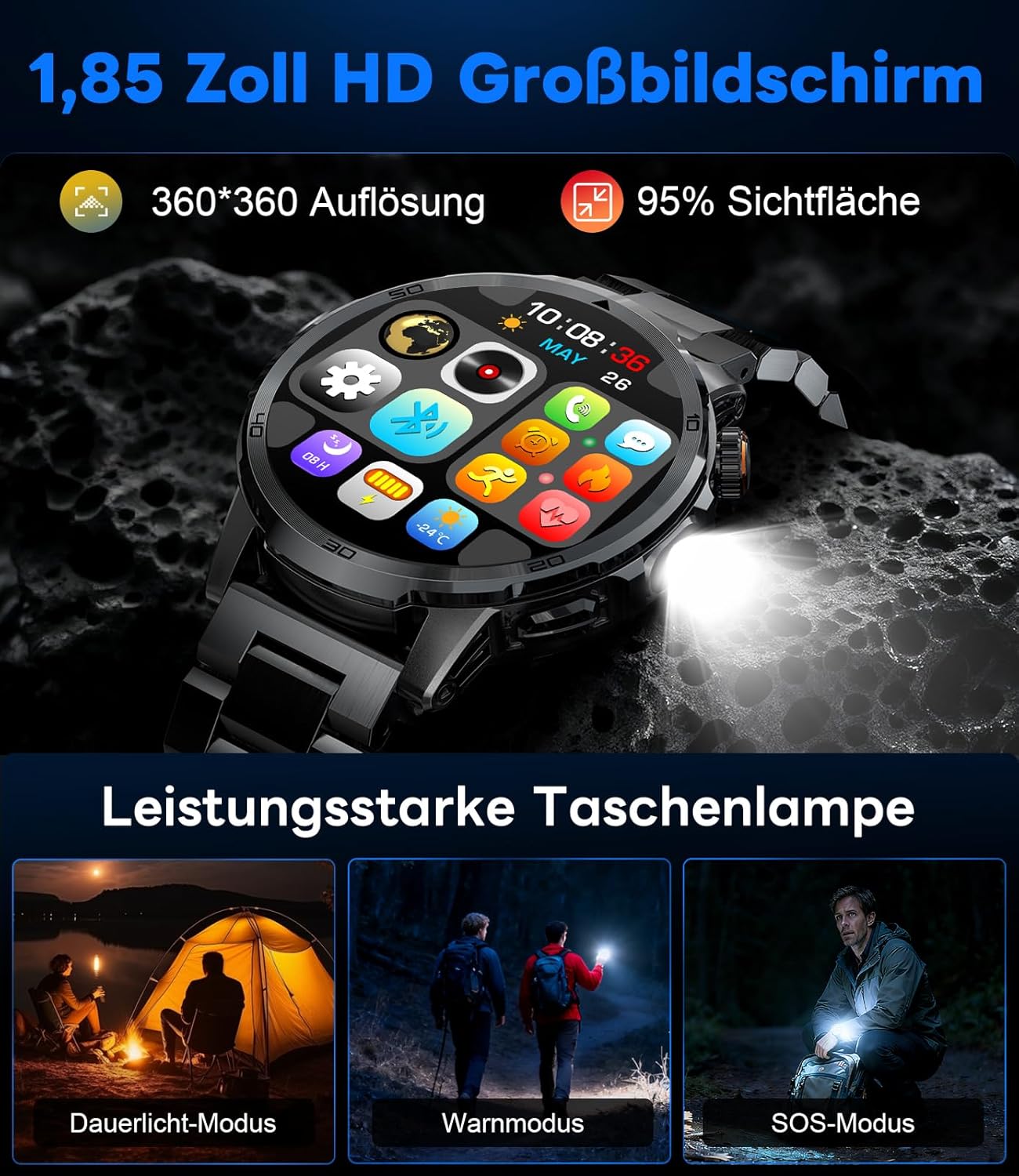
Image: The smartwatch displaying its 1.85-inch HD screen and demonstrating its powerful flashlight feature with different modes.
2.6 Miiran Awọn iṣẹ
- Oluranlọwọ ohun: Activate the voice assistant to control your phone or get information (e.g., "What's the weather?").
- Iṣakoso Orin: Control music playback on your smartphone (play, pause, skip tracks, adjust volume) directly from your watch.
- Iṣakoso kamẹra: Lo aago rẹ gẹ́gẹ́ bí ohun tí ó ń dènà àgbékalẹ̀ fún kámẹ́rà fóònù rẹ.
- Àfojúsùn ojú ọjọ: View awọn ipo oju ojo lọwọlọwọ ati awọn asọtẹlẹ.
- Awọn itaniji & Awọn aago: Set alarms and use stopwatch/timer functions.
- Iranti mimu: Ṣeto awọn olurannileti lati mu omi.
- Awọn oju iṣọ: Customize your watch face from over 100 options or upload your own photos via the app.

Image: The smartwatch interface displaying icons for music control, flashlight, camera control, weather, alarm, and drink reminders.

Image: A selection of diverse watch faces available for customization on the LIGE EF19-A Smartwatch.
3. Itọju
3.1 Ninu
- Regularly clean your smartwatch and straps with a soft, dry, lint-free cloth.
- Ti o ba jẹ dandan, lo die-die damp asọ pẹlu ìwọnba ọṣẹ, ki o si mu ese gbẹ.
- Yẹra fún lílo àwọn kẹ́míkà líle, àwọn ohun ìfọmọ́ra, tàbí àwọn ohun olómi, nítorí pé wọ́n lè ba ìparí àti èdìdì aago náà jẹ́.
- Rii daju pe awọn olubasọrọ gbigba agbara jẹ mimọ ati ki o gbẹ ṣaaju gbigba agbara.
3.2 Omi Resistance (IP68)
The LIGE EF19-A Smartwatch is IP68 waterproof, meaning it is resistant to dust and can withstand immersion in water up to 1.5 meters for up to 30 minutes.
- It is suitable for daily use, such as hand washing, rain, and shallow water swimming.
- Avoid using the watch in hot water, saunas, or steam rooms, as steam can penetrate the seals and cause damage.
- Ma ṣe tẹ awọn bọtini labẹ omi.
- After exposure to water, wipe the watch dry before charging or using.

Image: The smartwatch highlighting its robust military-grade design, including resistance to temperature extremes, shock, dust, and IP68 water resistance.
4. Laasigbotitusita
4.1 Wo Ko Titan
- Rii daju pe aago naa ti gba agbara ni kikun. Sopọ mọ ṣaja fun o kere 30 iṣẹju.
- Try long-pressing the side button for 10-15 seconds to force a restart.
4.2 Unable to Pair with Smartphone
- Rii daju pe Bluetooth ti ṣiṣẹ lori foonuiyara rẹ.
- Rí i dájú pé smartwatch náà wà láàrín ibi tí Bluetooth lè dé (nígbà gbogbo, àwọn mítà 10).
- Tun bẹrẹ mejeeji foonuiyara rẹ ati smartwatch.
- Check if the app has the necessary permissions (location, Bluetooth, etc.).
- If previously paired, try "forgetting" the device in your phone's Bluetooth settings and re-pairing through the app.
4.3 Alaye ilera ti ko pe
- Rii daju pe aago naa ti wọ daradara lori ọwọ ọwọ rẹ, nipa iwọn ika kan loke egungun ọwọ.
- Yago fun gbigbe pupọ lakoko awọn wiwọn.
- Nu sensọ lori ẹhin aago naa.
- Environmental factors and individual physiology can affect readings.
4.4 Awọn iwifunni Ko han
- Verify that the watch is successfully paired with your smartphone.
- Check notification settings within the companion app to ensure desired apps are enabled for notifications.
- Rii daju pe awọn eto ifitonileti foonu rẹ gba ohun elo ẹlẹgbẹ laaye lati ṣafihan awọn iwifunni.
- Make sure your phone is not in "Do Not Disturb" mode.
5. Awọn pato
| Ẹya ara ẹrọ | Sipesifikesonu |
|---|---|
| Nọmba awoṣe | EF19-A |
| Ifihan | 1.85-inch IPS HD Touch Screen, 360x360 pixels |
| Agbara Batiri | 1000 mAh litiumu polima |
| Igbesi aye batiri (Lilo deede) | 7-15 ọjọ |
| Igbesi aye batiri (Iduroṣinṣin) | Titi di ọjọ mẹwa 50 |
| Akoko gbigba agbara | Isunmọ. wakati meji 2 |
| Asopọmọra | Bluetooth 5.2 |
| Omi Resistance | IP68 (Mabomire) |
| Agbara Ibi ipamọ Iranti | 128 MB |
| Awọn ẹrọ ibaramu | Android 5.1+ / iOS 9.0+ Smartphones |
| Abojuto Ilera | Heart Rate, Blood Oxygen, Sleep Quality, Stress Level |
| Awọn ipo ere idaraya | 100+ (e.g., Running, Cycling, Swimming, Hiking, Yoga) |
| Afikun Awọn ẹya ara ẹrọ | Bluetooth Calls, Message Notifications, Torch, Voice Assistant, Music Control, Camera Control, Weather, Alarms, Timers, Drink Reminder, Customizable Watch Faces |
| GPS | Nipasẹ Foonuiyara |
| Awọn olugbo afojusun | Awọn ọkunrin |
6. atilẹyin ọja Information
The LIGE EF19-A Smartwatch comes with a 2-odun atilẹyin ọja lati ọjọ ti o ra. Atilẹyin ọja yi ni wiwa awọn abawọn iṣelọpọ ati ailagbara labẹ lilo deede.
Atilẹyin ọja naa ko ni aabo:
- Damage caused by improper use, accident, abuse, neglect, or unauthorized modification.
- Normal wear and tear, including scratches, dents, or cosmetic damage.
- Damage caused by exposure to extreme temperatures, liquids (beyond IP68 rating), or corrosive environments.
- Damage to accessories (straps, charging cables) unless defective upon receipt.
To claim warranty service, please retain your proof of purchase and contact customer support.
7. Onibara Support
If you encounter any issues or have questions regarding your LIGE EF19-A Smartwatch that are not covered in this manual, please contact our customer support team.
- Refer to the contact information provided on the product packaging or the official LIGE webojula.
- When contacting support, please provide your product model number (EF19-A) and a detailed description of the issue.