
1. Ifihan
Thank you for choosing the MECHEN M33 Hi-Res MP3 Player. This device is designed to provide a high-fidelity audio experience with support for various lossless formats, Bluetooth 5.3 connectivity, and a user-friendly touchscreen interface. This manual will guide you through the setup, operation, and maintenance of your new MP3 player.
2. Package Awọn akoonu
Jọwọ rii daju pe gbogbo awọn nkan ti a ṣe akojọ rẹ si isalẹ wa ninu package rẹ:
- MECHEN M33 Hi-Res MP3 Player
- USB-C Data Cable
- Protective Leather Case
- 128GB External Memory Card (pre-installed or separate)
- Afowoyi Olumulo (iwe-ipamọ yii)
3. Ọja Ipariview
The MECHEN M33 features a compact design with a durable zinc alloy body and a 2.8-inch HD touchscreen for intuitive navigation. It supports high-resolution audio formats and offers versatile connectivity options.
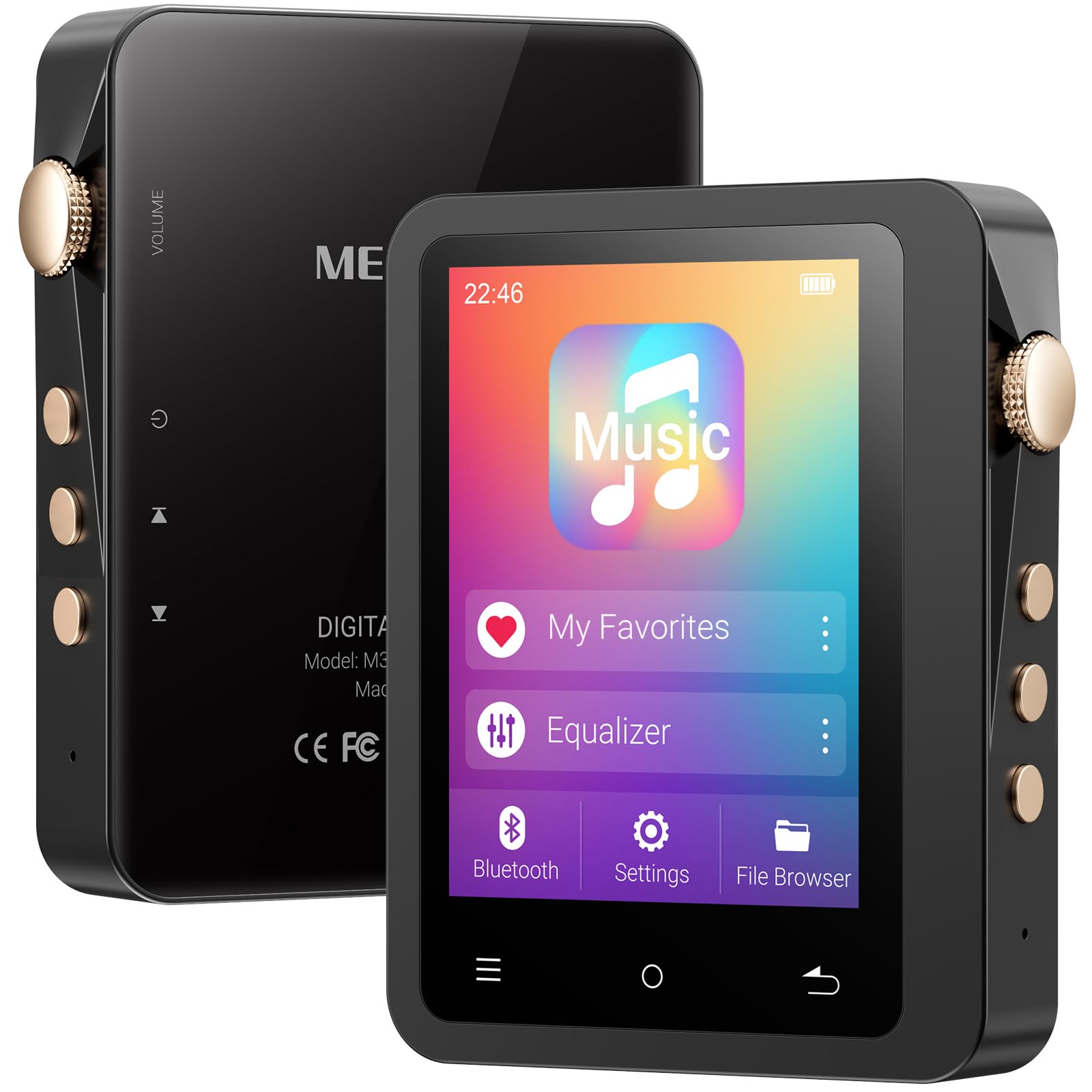
Image: The MECHEN M33 Hi-Res MP3 Player, showcasing its 2.8-inch touchscreen and compact form factor, often accompanied by its protective leather case.
Awọn ẹya pataki:
- Didara Ohun Hi-Fi: Built-in DAC decoding chip supports DSD (DSF/DFF), FLAC, APE, ALAC, MP3, AAC, and other formats.
- Bluetooth 5.3: Stable wireless connection for headphones and speakers.
- Igbesi aye batiri gigun: 2000mAh battery provides up to 60 hours of continuous playback.
- Ibi ipamọ ti o gbooro: Standard 128GB external memory card, expandable up to 512GB (TF card not included for expansion).
- Iboju ifọwọkan HD 2.8-inch: Simple UI design for easy navigation and song categorization.
- Kọ ti o tọ: Solid zinc alloy shell, scratch-resistant and wear-resistant.
4. Eto
4.1 Ngba agbara si Ẹrọ
Before first use, fully charge the MP3 player. Connect the provided USB-C data cable to the player's USB-C port and the other end to a USB power adapter (not included) or a computer's USB port. The charging indicator will show the charging status. A full charge typically takes a few hours.
4.2 Agbara Tan / Pa
- Lati Fi agbara: Press and hold the Power button (usually located on the side) for a few seconds until the screen lights up.
- Lati Paarẹ: Press and hold the Power button for a few seconds. A power-off prompt will appear on the screen. Select 'Power Off' to shut down the device.
4.3 Inserting/Removing MicroSD Card
The device comes with a 128GB external memory card. If you wish to use a different card or expand storage further (up to 512GB), follow these steps:
- Lati Fi sii: Locate the MicroSD card slot on the device. Gently push the MicroSD card into the slot until it clicks into place. Ensure the card is oriented correctly.
- Lati Yọ: Gently push the MicroSD card inward until it springs out slightly. Then, pull it out of the slot. Always ensure the device is powered off before removing the card to prevent data loss.
5. Ipilẹ isẹ
5.1 Lilọ kiri ni wiwo
The MECHEN M33 features a 2.8-inch touchscreen. Swipe left, right, up, or down to navigate through menus and options. Tap on icons to select them. The user interface is designed for simplicity and ease of use.
5.2 Sisisẹsẹhin Orin
- From the main menu, tap on 'Music' or 'Player'.
- Browse your music library by artist, album, genre, or folder.
- Tẹ orin kan lati bẹrẹ si iṣiṣẹ.
- During playback, you can control volume, skip tracks, pause/play, and access playback settings from the screen.
5.3 Sisopọ Bluetooth
To connect your MECHEN M33 to Bluetooth headphones or speakers:
- Rii daju pe ohun elo Bluetooth rẹ wa ni ipo sisopọ.
- On the MP3 player, go to 'Settings' and then 'Bluetooth'.
- Turn Bluetooth 'On'. The player will scan for available devices.
- Select your desired device from the list to pair. Once paired, audio will be routed wirelessly.
6. Awọn ẹya ara ẹrọ ti ilọsiwaju
6.1 Hi-Fi Audio Playback
The MECHEN M33 supports various high-resolution lossless audio formats including DSD (DSF/DFF), FLAC, APE, and ALAC, in addition to common formats like MP3 and AAC. For the best audio experience, use high-quality headphones and lossless audio files.
6.2 Oluṣeto ohun
The device includes an equalizer function to customize your audio output. Access the equalizer settings during music playback or through the 'Settings' menu to adjust sound profiles according to your preference.
6.3 OTG Iṣẹ
The MECHEN M33 supports OTG (On-The-Go) functionality, allowing it to act as a host to connect other USB devices, such as USB flash drives, for direct file transfer or playback. A compatible OTG adapter (not included) may be required.
7. File Isakoso
Lati gbe orin lọ files to your MECHEN M33:
- Connect the MP3 player to your computer using the provided USB-C data cable.
- Awọn ẹrọ orin yoo han bi a yiyọ kuro disk drive lori kọmputa rẹ.
- Fa ati ju ohun rẹ silẹ files into the appropriate folders on the player's internal storage or the MicroSD card.
- Ni ẹẹkan files ti gbe, yọ ẹrọ naa kuro ninu kọmputa rẹ lailewu ṣaaju ki o to ge asopọ okun USB naa.
8. Itọju
8.1 Ninu ẹrọ naa
Wipe the device with a soft, dry, lint-free cloth. Do not use abrasive cleaners, alcohol, or solvents, as these may damage the surface or internal components.
8.2 batiri Itọju
- Avoid exposing the device to extreme temperatures (hot or cold) as this can reduce battery life.
- Fun igbesi aye batiri to dara julọ, yago fun gbigbe batiri patapata nigbagbogbo.
- If storing the device for an extended period, charge it to about 50% before storage.
9. Laasigbotitusita
- Ẹrọ ti ko tan: Rii daju pe batiri ti gba agbara. Sopọ si orisun agbara ati gbiyanju lẹẹkansi.
- Ko si ohun: Check volume levels. Ensure headphones are properly connected or Bluetooth is paired correctly. Verify audio file ibamu kika.
- Awọn iṣoro asopọ Bluetooth: Ensure both devices are in pairing mode and within range. Try unpairing and re-pairing the device.
- Files not recognized: Ṣe idaniloju ohun afetigbọ files are in a supported format. Check if the MicroSD card is properly inserted and formatted.
- Device frozen: Tẹ mọlẹ bọtini agbara fun isunmọ awọn aaya 10-15 lati fi ipa mu tun bẹrẹ.
10. Awọn pato
| Ẹya ara ẹrọ | Sipesifikesonu |
|---|---|
| Brand | MECHEN |
| Orukọ awoṣe | M33 |
| Pataki Ẹya | Equalizer, Touch Screen |
| Asopọmọra Technology | Aux, Bluetooth 5.3, USB-C |
| Agbara Ibi ipamọ Iranti | 128 GB (external card included), expandable up to 512 GB |
| Àwọ̀ | DE-Black01 |
| Iwon iboju | 2.8 inches |
| Awọn ẹrọ ibaramu | Headphones, Speakers, Cars (via Aux/Bluetooth) |
| Awọn irinše to wa | 1*MP3 Player, Data Cable, Protective Case, 128GB Memory Card |
| Ifihan ọna ẹrọ | LCD |
| Iwọn Nkan | 167 giramu |
| Olupese | MECHEN |
| Nọmba awoṣe | M33 |
11. Atilẹyin ọja ati Support
This product includes a 30-day unconditional return policy and a 1-year exchange service. For any questions, technical support, or warranty claims, please contact MECHEN customer support. We aim to reply to all inquiries within 24 hours.