
Ọrọ Iṣaaju
Thank you for choosing the LEEMC TP03 Wireless Earbuds. These earbuds are designed to provide a high-quality audio experience with advanced features such as a touchscreen charging case, Active Noise Cancellation (ANC), and a secure, waterproof fit. This manual will guide you through the setup, operation, and maintenance of your new earbuds to ensure optimal performance.
Ohun ti o wa ninu Apoti
- TP03 Sport Earbuds (Left and Right)
- Wireless Touchscreen Charging Case
- Silicone Ear Tips (Sizes S, M, L - M-size pre-installed)
- USB-C Ngba agbara Cable
- Itọsọna olumulo
Ọja Pariview
The LEEMC TP03 Wireless Earbuds combine innovative technology with user-friendly design. Key features include:
- Revolutionary Touchscreen Charging Case: Control music, volume, noise modes, EQ presets, camera remote, and more directly from the case's intuitive interface.
- Secure, Waterproof Fit: Flexible over-ear hooks ensure stability during intense activities, complemented by IPX7 waterproof protection against sweat and rain.
- Premium Hi-Fi Sound: Enjoy rich audio with a 13mm dynamic driver and customizable sound profiles via 5 EQ modes.
- Smart Noise Control: Seamlessly switch between Active Noise Cancellation (ANC) for immersive listening and Transparency Mode for environmental awareness.
- Akoko Idaraya: Up to 9 hours of listening on a single charge, extended to 40 hours with the charging case.
- Ilọsiwaju Asopọmọra: Bluetooth 6.0 ensures a stable and rapid connection up to 15 meters.

Image: LEEMC TP03 Wireless Earbuds and their touchscreen charging case.
Ṣeto
1. Ikọju akọkọ
Ṣaaju lilo akọkọ, gba agbara ni kikun awọn agbekọri ati apoti gbigba agbara.
- So okùn gbigba agbara USB-C ti a pese mọ ibudo gbigba agbara lori apoti naa ati si orisun agbara USB ti o baamu.
- The touchscreen on the case will display the charging status. A full charge typically takes about 75 minutes.
2. Yíyan àti Ìbámu Títẹ́tí
Choosing the correct ear tip size is crucial for comfort, sound quality, and effective noise cancellation.
- Experiment with the included S, M, and L silicone ear tips to find the size that creates a snug seal in your ear canal.
- The earbuds feature flexible over-ear hooks for a secure fit. Gently place the earbud into your ear and adjust the hook over your ear until it feels stable and comfortable.

Image: A person wearing the LEEMC TP03 earbuds, demonstrating the secure and comfortable fit with the over-ear hook.
Image: The LEEMC TP03 earbuds shown with different sizes of silicone ear tips (S, M, L) for a customized fit.
3. Power On and Bluetooth Pairing
The earbuds will automatically power on and enter pairing mode when the charging case lid is opened.
- Open the lid of the charging case. The earbuds' indicator lights will flash, indicating they are ready to pair.
- Lori foonuiyara rẹ tabi ẹrọ Bluetooth miiran ti o ṣiṣẹ, lọ si awọn eto Bluetooth.
- Wa fun "LEEMC TP03" in the list of available devices and select it to connect.
- Nígbà tí a bá ti so pọ̀, ìpè ohùn kan yóò jẹ́rìí sí àṣeyọrí ìsopọ̀pọ̀, àwọn ìmọ́lẹ̀ àmì tí ó wà lórí àwọn agbekọrí yóò sì pa tàbí kí ó fi ìmọ́lẹ̀ tí ó dúró ṣinṣin hàn.
Awọn ilana Iṣiṣẹ
Touchscreen Charging Case Controls
The smart touchscreen on the charging case provides comprehensive control over your earbuds' functions without needing your phone.
- Sisisẹsẹhin orin: Swipe left/right to navigate to the music control screen. Tap to play/pause, or use the forward/backward arrows to skip tracks.
- Atunse iwọn didun: Swipe to the volume control screen and tap the '+' or '-' icons to adjust the volume.
- Noise Control (ANC/Transparency): Navigate to the noise reduction screen to toggle between Active Noise Cancellation (ANC), Transparency Mode, and Normal mode.
- Awọn tito tẹlẹ EQ: Access the equalizer screen to select from 5 preset sound modes: Normal, Rock, Classic, Pop, or Jazz.
- Latọna Kamẹra: Use the camera icon to remotely trigger your phone's camera for hands-free photos.
- Find My Earbud: If an earbud is misplaced, select 'Find My Earphone' and choose L or R to make the earbud emit a beeping sound.
- Oju-ọna Ede: Select your preferred language from the 16 available options.
- Ipele Imọlẹ: Adjust the brightness of the touchscreen display.
- Aago: Set a timer for workouts or other activities.
- Iṣẹṣọ ogiri: Customize the touchscreen with 5 preset wallpapers.
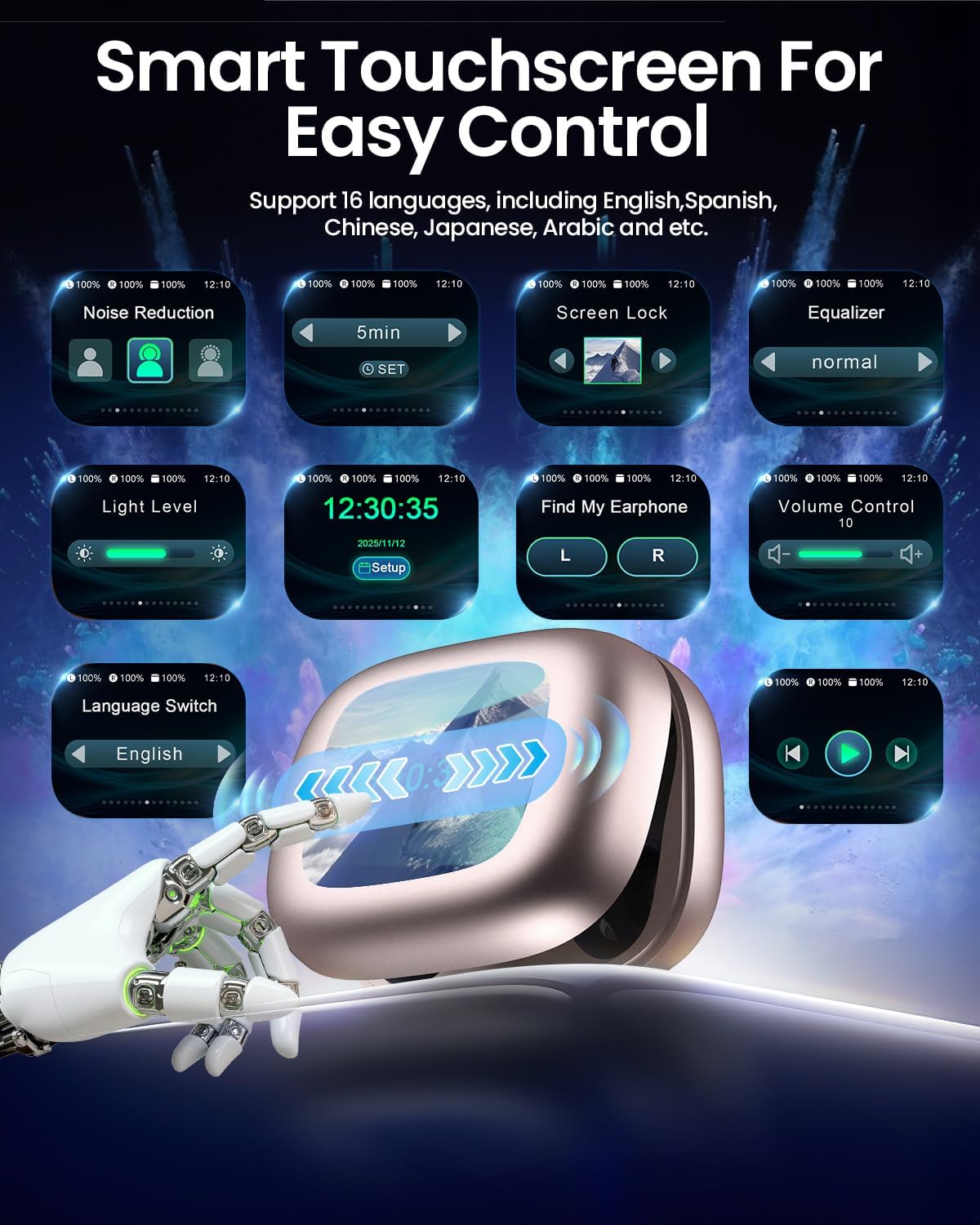
Image: The LEEMC TP03 touchscreen charging case showing various control options.

Image: A close-up of the LEEMC TP03 touchscreen interface, highlighting options like noise reduction, equalizer, and 'Find My Earphone'.

Image: The 'Find My Earphone' feature on the touchscreen case, indicating a lost earbud's location.

Image: The timer function displayed on the LEEMC TP03 touchscreen charging case.

Image: The camera remote control feature shown on the LEEMC TP03 touchscreen case, connected to a smartphone.
Awọn iṣakoso Ifọwọkan Earbud
The earbuds themselves feature touch-sensitive panels for quick control during activities.
- Ṣiṣẹ/Daduro: Single tap (Left or Right earbud).
- Iwọn didun Up: Press and hold (Right earbud).
- Iwọn didun isalẹ: Press and hold (Left earbud).
- Orin to nbọ: Double tap (Right earbud).
- Orin ti tẹlẹ: Double tap (Left earbud).
- Dahun/Pari Awọn ipe: Double tap (Left or Right earbud).
- Kọ awọn ipe: Press and hold for 3 seconds (Left or Right earbud).
- Oluranlọwọ ohun: Tap four times (Left or Right earbud).
- Yiyipada Ipo ANC/Alaye Itumọ: Triple tap (Left or Right earbud).

Image: A visual guide to the intuitive touch controls on the LEEMC TP03 earbuds.
Ariwo Iṣakoso
The TP03 earbuds offer versatile noise control options to suit your environment:
- Ifagile Ariwo Nṣiṣẹ (ANC): Reduces ambient noise, allowing for focused listening. Ideal for travel or noisy environments.
- Ipo akoyawo: Allows you to hear your surroundings while still enjoying your audio, enhancing situational awareness. Useful for urban environments or conversations.
- Ipo deede: Standard audio experience without active noise cancellation or transparency.
Switch between modes using the touchscreen charging case or by triple-tapping either earbud.

Image: Visual representation of Active Noise Cancellation (ANC) and Transparency Mode functionality.

Image: A cyclist wearing LEEMC TP03 earbuds, illustrating the use of Transparency Mode for safety.
Didara ohun
The TP03 earbuds are equipped with a large 13mm dynamic driver, delivering powerful bass and clear, crisp highs. Customize your listening experience with 5 preset equalizer (EQ) modes available through the touchscreen case:
- Deede
- Apata
- Alailẹgbẹ
- Agbejade
- Jazz

Image: A visual representation of the 13mm dynamic driver and the five available EQ modes.
Igbesi aye batiri
Enjoy extended listening sessions with the TP03 earbuds:
- Single Charge: Titi di awọn wakati 9 ti ṣiṣiṣẹsẹhin lemọlemọfún.
- Pẹlu Ẹru Gbigba agbara: Total playtime extends to approximately 40 hours.
- Gbigba agbara kiakia: A 10-minute charge provides up to 1 hour of playback.

Image: An illustration highlighting the 9-hour single charge and 40-hour total battery life with the charging case.
Asopọmọra
The TP03 earbuds utilize advanced Bluetooth 6.0 technology for a reliable and efficient wireless connection.
- Iduroṣinṣin Asopọ: Experience an unbreakable connection with enhanced signal stability.
- Pipọpọ Lẹsẹkẹsẹ: Earbuds pair quickly with your device upon opening the charging case.
- Ibiti: Maintain a stable connection up to 15 meters (approximately 49 feet).
- Irẹwẹsi Kekere: Enjoy synchronized audio and video with a low latency of 55 milliseconds.

Image: A diagram illustrating the advanced Bluetooth 6.0 technology within the LEEMC TP03 earbuds.

Image: An illustration demonstrating the low latency feature of the LEEMC TP03 earbuds, ideal for gaming.
Itoju
Proper care will extend the lifespan and performance of your earbuds.
- Ninu: Mu ese awọn afikọti nigbagbogbo ati ọran gbigba agbara pẹlu asọ ti o gbẹ, asọ ti ko ni lint. Yẹra fun lilo awọn ohun elo abrasive tabi awọn kẹmika lile.
- Italolobo Eti: Remove the silicone ear tips and clean them with mild soap and water. Ensure they are completely dry before reattaching them to the earbuds.
- Ibi ipamọ: Tọju awọn agbekọri nigbagbogbo sinu apoti gbigba agbara wọn nigbati ko si ni lilo lati daabobo wọn lati eruku, ibajẹ, ati lati jẹ ki wọn gba agbara.
- Omi Resistance: The earbuds are IPX7 waterproof, making them resistant to sweat and rain. However, they are not designed for swimming or submersion in water. Ensure the earbuds are dry before placing them back into the charging case to prevent damage.

Image: A person exercising, highlighting the sweat and water-resistant features of the LEEMC TP03 earbuds with an IPX7 rating.
Laasigbotitusita
If you encounter any issues with your LEEMC TP03 Wireless Earbuds, please refer to the following common solutions:
- Awọn agbekọri ti ko so pọ: Ensure both earbuds are charged and the charging case lid is open. Turn your device's Bluetooth off and on, then try re-pairing. If issues persist, forget the device from your Bluetooth list and attempt to pair again.
- Ko si ohun lati inu agbekọri agbekọri kan: Check if both earbuds are sufficiently charged. Place both earbuds back into the charging case, close the lid, wait a few seconds, then reopen to reset the connection.
- Apo gbigba agbara ko gba agbara: Verify that the USB-C cable is securely connected to both the case and the power source. Ensure the power source is active.
- Awọn idari ifọwọkan ko dahun: Make sure your fingers are clean and dry. Try restarting the earbuds by placing them in the case and closing the lid, then reopening.
- Didara ohun ti ko dara: Confirm that the ear tips provide a proper seal in your ear canal. Clean any debris from the earbud nozzles. Ensure your device is within the 15-meter Bluetooth range.
Fun alaye diẹ sii laasigbotitusita tabi awọn ọran itẹramọṣẹ, jọwọ kan si atilẹyin alabara.
Awọn pato
| Ẹya ara ẹrọ | Ẹ̀kúnrẹ́rẹ́ |
|---|---|
| Brand | LEEMC |
| Nọmba awoṣe | TP03 |
| Gbigbe Eti | Lori Eti |
| Fọọmù ifosiwewe | Ninu Eti |
| Ipalara | 32 ohms |
| Asopọmọra Technology | Ailokun (Bluetooth 6.0) |
| Bluetooth Ibiti | 15 Mita |
| Ariwo Iṣakoso | Fagilee Ariwo Ti nṣiṣe lọwọ (ANC) |
| Idahun Igbohunsafẹfẹ | 50 kHz |
| Ifamọ | 107 dB |
| Audio Driver Type | Yiyi Awakọ |
| Audio Driver Iwon | 13mm |
| Latency Ohun | 55 Milise-aaya |
| Igbesi aye batiri (Earbuds) | Titi di awọn wakati 9 (idiwọn ẹyọkan) |
| Igbesi aye batiri (pẹlu Ọran) | Titi di awọn wakati 40 |
| Igba agbara Batiri | 75 iṣẹju |
| Omi Resistance Ipele | IPX7 Omi sooro |
| Iṣakoso Iru | Touch Control (Earbuds and Case) |
| Iwọn Nkan | 72.8 Giramu (lapapọ) |
| Gbigbe Case Mefa | 8 cm (Ipari) x 6.08 cm (Iwọn) x 3.56 cm (Iga) |
| Ohun elo apade | Acrylonitrile Butadiene Styrene (ABS), Silikoni |
Atilẹyin ọja & Atilẹyin
Your LEEMC TP03 Wireless Earbuds come with a Atilẹyin ọja olupilẹṣẹ oṣu mejila lati ọjọ ti o ra, ibora awọn abawọn ninu awọn ohun elo ati iṣẹ-ṣiṣe.
For any questions, technical support, or warranty claims, please contact our dedicated online customer service team. We are committed to providing prompt assistance and ensuring your satisfaction.
Awọn fidio ọja
Fidio: Ipariview of the TP03 wireless earbuds, highlighting their design and suitability for workouts.
Video: Demonstrating the Active Noise Cancellation and touchscreen features of the wireless earbuds.