
1. Ọja Ipariview
The darkFlash DB330M MESH is a Micro-ATX PC case designed for high heat dissipation and optimal airflow. It features a full mesh front panel and comes with three pre-installed PWM ARGB fans to ensure efficient cooling and dynamic lighting effects. This case supports various components, offering a user-friendly experience for PC builders.
2. Key Awọn ẹya ara ẹrọ
- High Airflow Mesh Front Panel: Provides superior intake and lower temperatures compared to panoramic cases.
- Pre-installed 3x DR08 PWM ARGB Fans: Ensures powerful cooling and vibrant RGB effects right out of the box.
- Vertical Airflow Cooling: Two fan positions above the power supply direct airflow to the graphics card for improved cooling.
- Apẹrẹ ironu: Includes magnetic dust filters on the top and panel to keep components clean.
- Fifi sori Rọrun: User-friendly design facilitates hassle-free cable management and component access.
3. Awọn pato
| Ẹya ara ẹrọ | Ẹ̀kúnrẹ́rẹ́ |
|---|---|
| Brand | darkFlash |
| Orukọ awoṣe | DB330 MESH |
| Modaboudu Ibamu | Micro ATX |
| Iru Irú | Ile-iṣọ Midi |
| Àwọ̀ | Dudu |
| Ohun elo | Ṣiṣu, Gilasi Oníwọ̀n |
| Awọn iwọn Ọja (D x W x H) | 8.58" x 13.11" x 15.75" |
| Agbara Ipese Iṣagbesori Iru | Isalẹ Oke |
| Ọna Itutu | Afẹfẹ, omi |
| Total USB 3.0 Ports | 1 |
| Pataki Awọn ẹya ara ẹrọ | Fẹ́ẹ́fù tí a ṣe sínú rẹ̀, Àlẹ̀mọ́ eruku, Ìmọ́lẹ̀ RGB |
| Internal Bays Quantity | 3 |
| Max GPU Ipari | 305mm |
| Max Sipiyu kula Iga | 180mm |
| Radiator Support | Up to 240mm on top |
4. Eto ati fifi sori
This section provides a general guide for installing components into your darkFlash DB330M MESH PC case. Always refer to your component manuals for specific installation instructions.
4.1 Ngbaradi Ọran naa
Before installing components, ensure the case is placed on a stable, flat surface. Remove the side panels and any protective films.

Figure 4.1: The darkFlash DB330M MESH PC Case with side panels and front mesh removed, illustrating the ease of access for component installation.
4.2 Component Compatibility and Placement
- Modaboudu: Supports Micro ATX and ITX motherboards. Install the motherboard onto the standoffs provided.
- Kaadi eya aworan: Maximum length of 305mm. Ensure your GPU fits within this specification.
- Olutọju Sipiyu: Maximum height of 180mm for air coolers.
- Ipese Agbara (PSU): Supports standard size PSUs with a maximum length of 180mm, mounted at the bottom.
- Radiator: Up to 240mm AIO liquid cooling systems can be installed on the top panel.
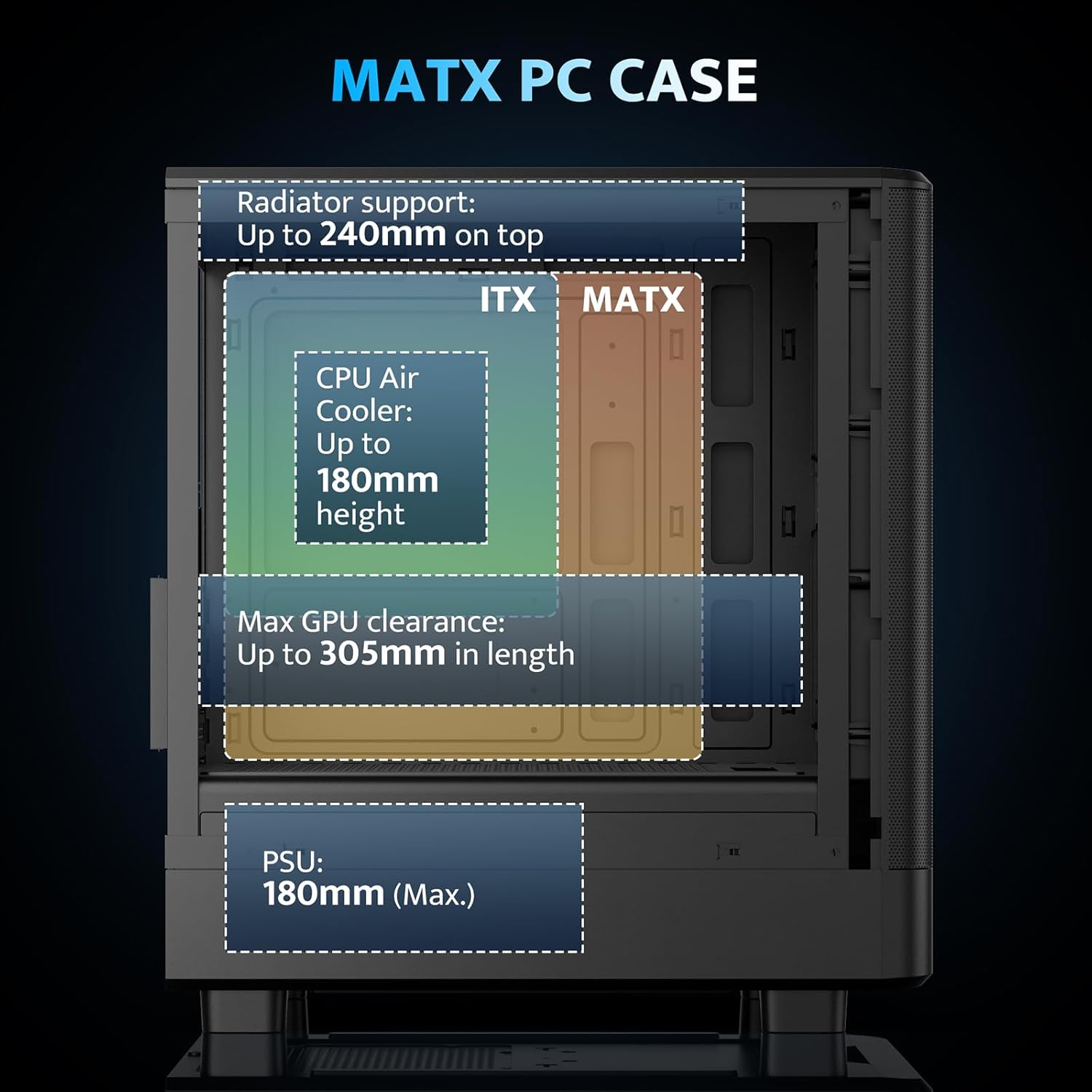
Figure 4.2: Internal layout and maximum dimensions for motherboard (ITX, MATX), CPU air cooler, GPU, and PSU.
4.3 Fan Configuration
The case comes with three pre-installed 120mm PWM ARGB fans. Two are located at the front for intake, and one at the rear for exhaust. Additional fan positions are available at the top (up to 2x 120mm/140mm) and bottom (up to 2x 120mm) for enhanced cooling.

Figure 4.3: Illustration of the pre-installed 120mm PWM ARGB fans and their placement within the case.

Figure 4.4: Optimized airflow channels demonstrating natural vertical air ducts for efficient heat dissipation.
5. Awọn ilana Iṣiṣẹ
5.1 Mo / Eyin Panel Awọn iṣẹ
Pẹpẹ I/O iwaju pese iwọle ti o rọrun si awọn ibudo ati awọn iṣakoso pataki:
- Bọtini agbara: To turn the system on or off.
- HD Audio Ports: Fún sísopọ̀ àwọn agbekọri àti makirofóònù.
- Awọn ibudo USB 2.0: Fun sisopọ awọn agbeegbe.
- Ibudo USB 3.0: Fun ga-iyara data gbigbe.
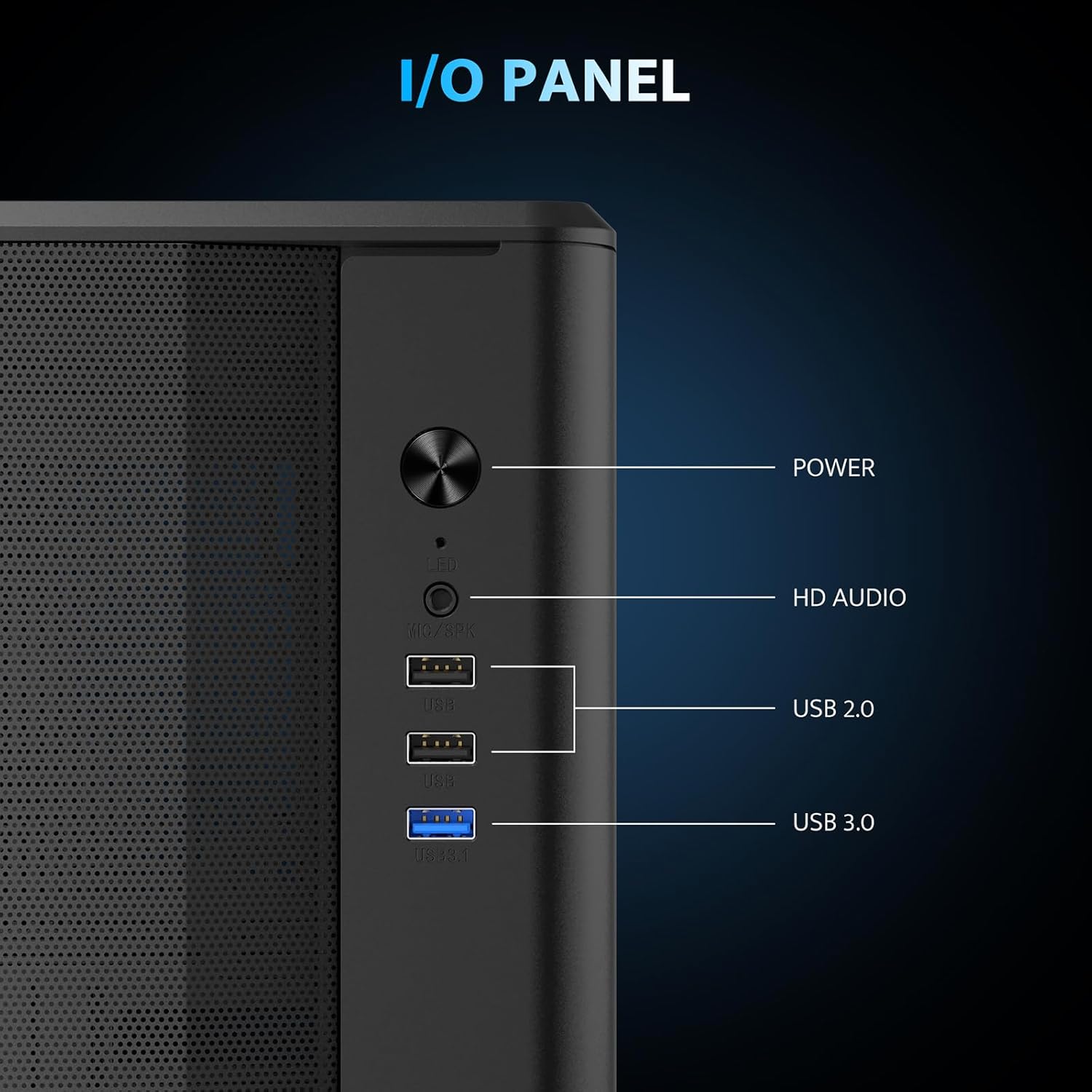
Nọmba 5.1: Alaye view of the I/O panel and its functionalities.
5.2 Iṣakoso Fẹ́ẹ́fù ARGB
The pre-installed fans are PWM ARGB fans. Their lighting effects can be controlled via your motherboard's ARGB software if your motherboard supports it. Please note that an ARGB Hub Controller is not included with the case.
6. Itọju
6.1 eruku Filter Cleaning
The darkFlash DB330M MESH PC case is equipped with magnetic dust filters on the top and a panel dust filter to prevent dust accumulation. Regularly clean these filters to maintain optimal airflow and cooling performance.
- To clean the top dust filter, gently lift and detach the magnetic filter.
- Use a soft brush or compressed air to remove accumulated dust.
- Reattach the filter once clean.

Figure 6.1: Top panel with magnetic dust filter and large cooling holes for AIO support.

Figure 6.2: High-airflow dustproof mesh front panel, which also acts as a dust filter.
6.2 Gbogbogbo Cleaning
Use a soft, dry cloth to wipe down the exterior of the case. Avoid using harsh chemicals or abrasive materials that could damage the finish.
7. Laasigbotitusita
If you encounter issues with your PC build, consider the following general troubleshooting steps:
- Ko si Agbara: Ensure all power cables (PSU to wall, PSU to motherboard, CPU, GPU) are securely connected. Check the power button connection to the motherboard.
- Àwọn Olùfẹ́ Kò Yí/Kò Rẹ́gbí: Verify fan power connections to the motherboard or fan controller. Check ARGB connections for lighting issues. Ensure your motherboard's BIOS/UEFI settings or software are configured correctly for fan control and RGB.
- Igbóná púpọ̀: Confirm all fans are spinning in the correct direction for optimal airflow. Ensure dust filters are clean and not obstructing airflow. Check CPU cooler and GPU cooler installations.
- Awọn ibudo USB Ko Ṣiṣẹ: Check the USB header connections from the front I/O panel to the motherboard.
For more specific issues, consult the manuals for your individual components (motherboard, GPU, PSU, etc.) or seek assistance from a qualified technician.
8. Atilẹyin ọja ati Support
The darkFlash DB330M MESH PC Case comes with a 1-odun atilẹyin ọja. For warranty claims or technical support, please contact darkFlash customer service through their official webaaye tabi alagbata ti o ti ra ọja naa. Jeki ẹri rira rẹ fun ijẹrisi atilẹyin ọja.