
Ọrọ Iṣaaju
This manual provides detailed instructions for the MECHEER JK-TM02-FR Digital Programmable Timer Outlet. This device allows you to automate the on/off cycles of electrical appliances, helping to save energy and enhance home security. Please read this manual carefully before use to ensure proper operation and safety.
Awọn Itọsọna Aabo
- Ma ṣe fi aago naa bọ inu omi tabi omi miiran.
- Do not connect any appliance that exceeds the maximum load rating (16A, 3680W).
- Rii daju pe aago ti wa ni edidi ni aabo sinu iṣanjade ti ilẹ.
- Do not disassemble or attempt to repair the unit. Contact qualified personnel for service.
- Jeki kuro ni arọwọto awọn ọmọde.
Ọja Pariview
The MECHEER JK-TM02-FR is a digital timer outlet designed for easy programming and control of your electrical devices. It features a clear LCD screen and intuitive buttons for setting various programs.
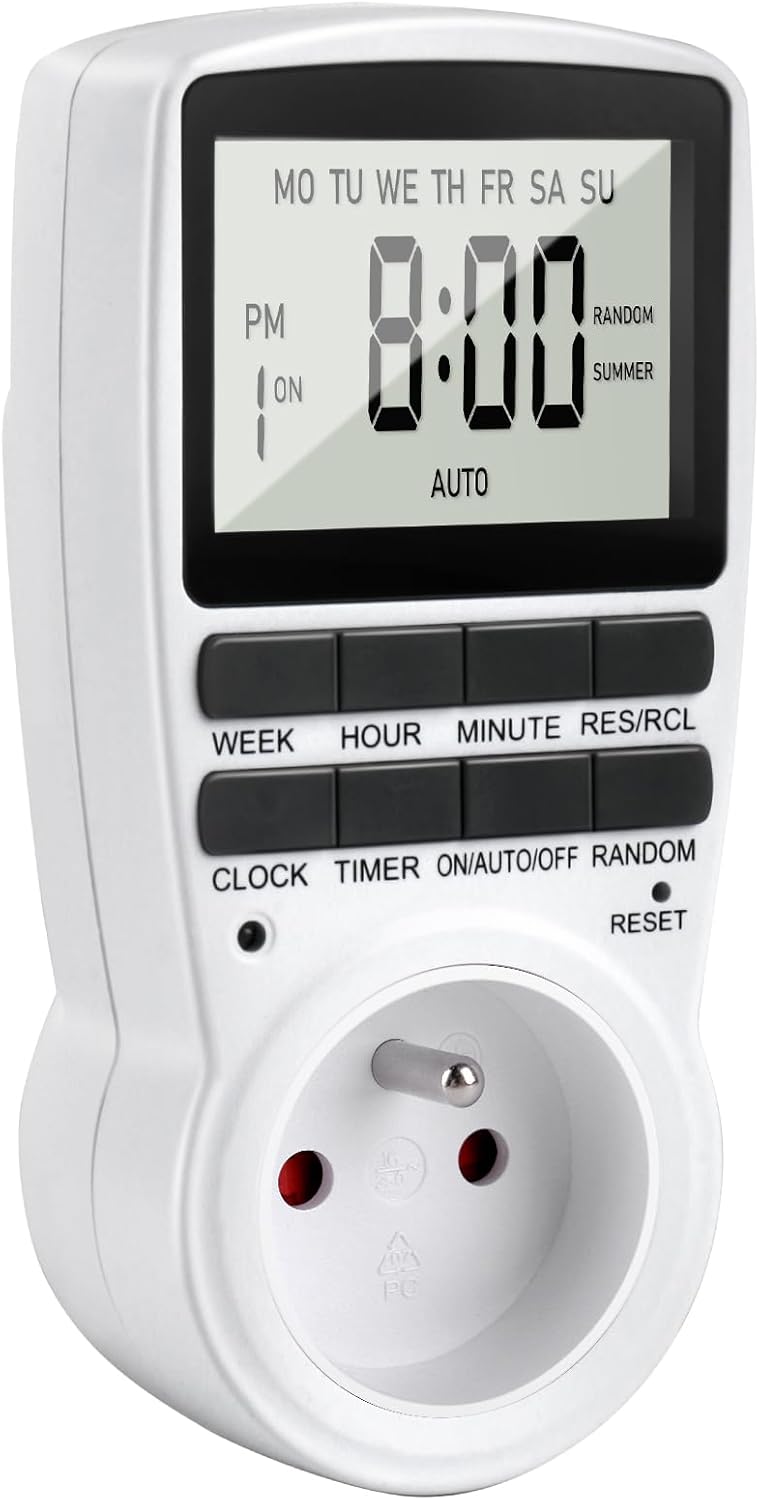
Nọmba 1: Iwaju view of the MECHEER JK-TM02-FR Digital Programmable Timer Outlet, showing the LCD display and control buttons.
Awọn ẹya pataki:
- Up to 16 On/Off programs.
- Multiple day combinations (daily, specific days, weekdays, weekends).
- Random mode for enhanced home security.
- Iṣẹ́ àtúnṣe ọwọ́.
- Ifihan LCD nla pẹlu ina ẹhin.
- Built-in backup battery to retain settings during power outages.
Awọn iṣẹ bọtini:
- OSE: Sets the day of the week.
- WAKATI: Sets the hour.
- ISEJU: Sets the minute.
- RES/RCL: Resets or recalls program settings.
- Aago: Enters or exits clock setting mode.
- Aago: Ó wọ ipo eto.
- Tan/Afọwọṣe/PA: Cycles through ON, AUTO, and OFF modes.
- ID: Activates/deactivates random mode.
- Tun: Resets the unit to factory defaults (requires a pointed object).
Ṣeto
1. Initial Charge and Reset:
Before first use, plug the timer into a live electrical outlet for at least 30 minutes to charge the internal backup battery. After charging, use a small pointed object (like a pen tip) to press the Tunto button to clear all memory and reset the unit to factory defaults. The display will show "0:00".
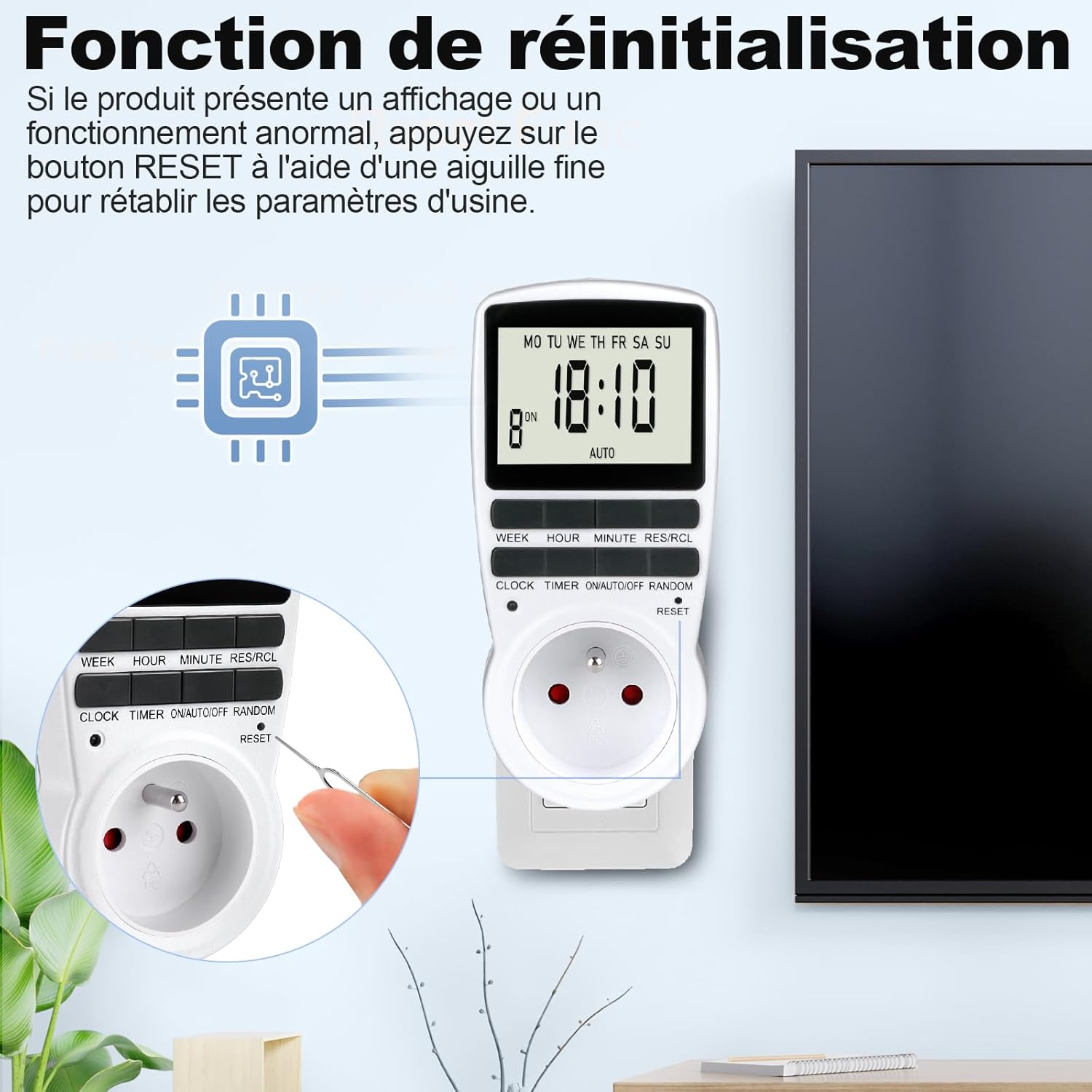
Nọmba 2: Locating and pressing the RESET button with a pointed object to clear settings.
2. Setting the Current Time:
- Tẹ awọn Aago bọtini.
- Nigba dani Aago, tẹ awọn OSE button repeatedly until the correct day of the week is displayed.
- Nigba dani Aago, tẹ awọn WAKATI button repeatedly until the correct hour is displayed.
- Nigba dani Aago, tẹ awọn ISEJU button repeatedly until the correct minute is displayed.
- Tu silẹ Aago Bọ́tìnì náà. Àkókò ìsinsìnyí ti ṣètò báyìí.

Nọmba 3: Visual guide for setting the current time (Step 1: Set current time, Step 2: Set schedule, Step 3: Activate AUTO mode).
Láti yípadà láàrín àwọn ọ̀nà ìgbàlódé wákàtí méjìlá (AM/PM) àti wákàtí mẹ́rìnlélógún (24), tẹ ẹ̀rọ náà. Aago ati Aago awọn bọtini ni nigbakannaa.
Awọn ilana Iṣiṣẹ
1. Programming On/Off Cycles (16 Programs):
The timer allows you to set up to 16 distinct ON/OFF programs. Each program consists of an ON time and an OFF time.
- Tẹ awọn Aago bọ́tìnì kan lẹ́ẹ̀kan. Ìfihàn náà yóò fi "1 ON" hàn. Èyí wà fún ètò ON àkọ́kọ́.
- Tẹ OSE to select the desired day(s) for this program. Options include:
- MO TU WE TH FR SA SU (Lojoojumọ)
- MO (Ọjọ́ Ajé nìkan)
- TU (Ọjọ́ Ìṣẹ́gun nìkan)
- ... (Each individual day)
- MO TU WE TH FR (Awọn ọjọ ọsẹ)
- SA SU (Awọn ipari ose)
- MO TU WE TH FR SA (Ọjọ́ Ajé sí Ọjọ́ Àbámẹ́ta)
- MO WE FR (Ọjọ́ Ajé, Ọjọ́rú, Ọjọ́ Ẹtì)
- TU TH SA (Ọjọ́rú, Ọjọ́bọ̀, Àbámẹ́ta)
- MO TU WE (Mon, Tue, Wed)
- TH FR SA (Thu, Fri, Sat)
- MO WE FR SU (Mon, Wed, Fri, Sun)
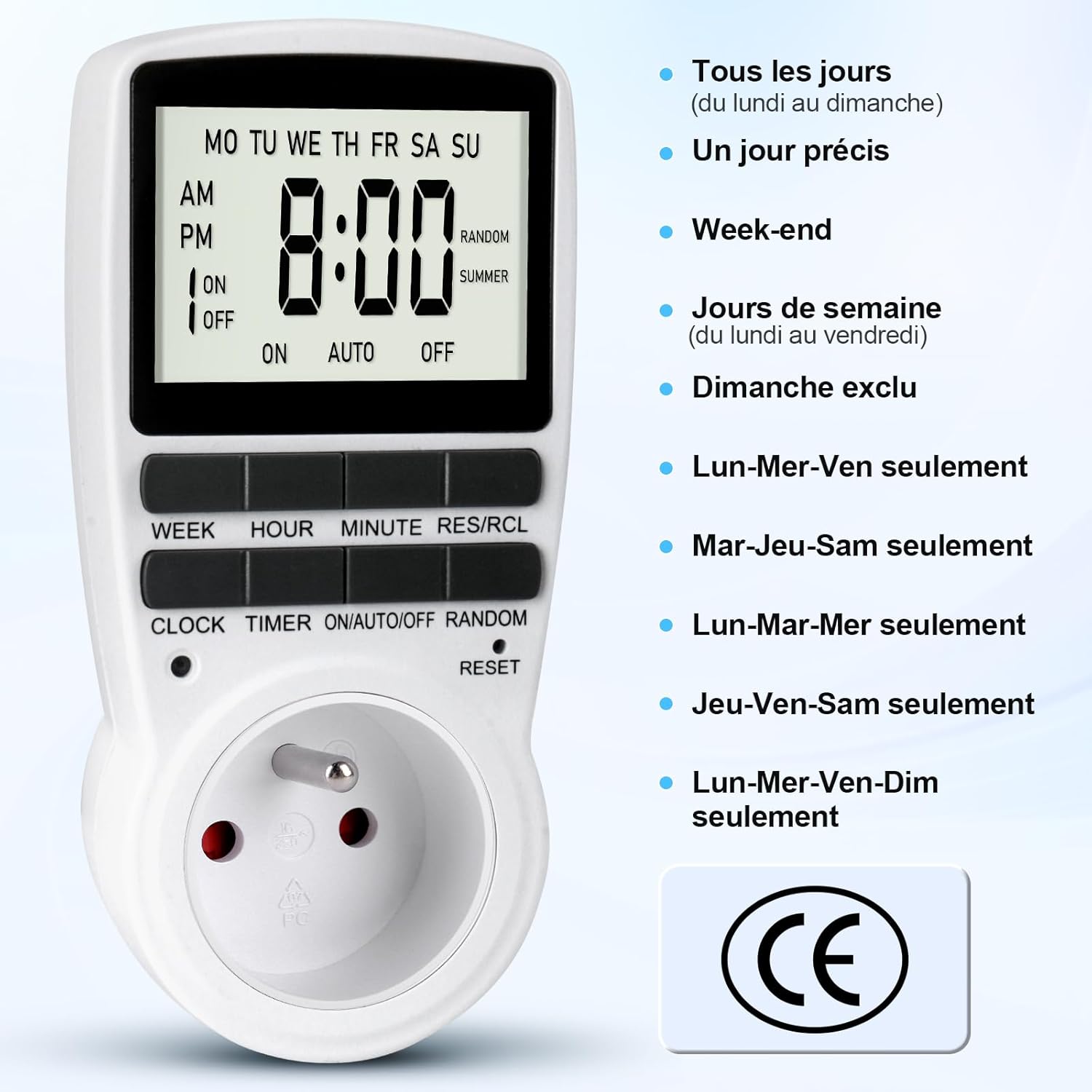
Nọmba 4: Various day combination options available for programming the timer.
- Tẹ WAKATI to set the desired hour for the ON time.
- Tẹ ISEJU to set the desired minute for the ON time.
- Tẹ Aago again. The display will show "1 OFF". This is for the first OFF program.
- Repeat steps 2-4 to set the desired day(s), hour, and minute for the OFF time.
- Tesiwaju titẹ Aago to cycle through "2 ON", "2 OFF", up to "16 ON", "16 OFF", and set additional programs as needed.
- Lẹhin ti ṣeto gbogbo awọn eto ti o fẹ, tẹ bọtini naa Aago bọtini lati pada si awọn ti isiyi akoko àpapọ.

Nọmba 5: Illustration of setting multiple On/Off programs, such as for an aquarium light or a toaster.

Nọmba 6: Example of a daily On/Off timer, such as turning on a coffee machine at 7:00 AM and off at 8:00 AM.
2. Activating Programs (ON/AUTO/OFF Mode):
Once programs are set, you need to select the operating mode:
- Tẹ awọn TAN/Afọwọṣe/PA bọtini lati yiyi nipasẹ awọn ipo:
- LATI: The connected appliance is continuously ON, ignoring all programs.
- LATIO: The connected appliance will operate according to the programmed ON/OFF times. The display will show "AUTO".
- PA: The connected appliance is continuously OFF, ignoring all programs.
- For your programs to run, ensure the timer is in AUTO mode.
3. Random Mode (Anti-Theft):
The random mode is designed to deter intruders by making it appear as if someone is home. When activated, the timer will randomly turn the connected appliance ON and OFF within a specific time window (e.g., 6:00 PM to 6:00 AM).
- Rí i dájú pé aago aago náà wà nílẹ̀ AUTO mode.
- Tẹ awọn ID button. "RANDOM" will appear on the display.
- Lati mu maṣiṣẹ, tẹ bọtini naa ID button again. "RANDOM" will disappear from the display.

Nọmba 7: Using the random mode to simulate occupancy and enhance home security while away.
4. Summer Time Adjustment:
To adjust for daylight saving time (summer time):
- Tẹ awọn Aago ati ID buttons simultaneously. The display will show "SUMMER" and the time will advance by one hour.
- Repeat the action to revert to standard time.
Itoju
The MECHEER JK-TM02-FR timer requires minimal maintenance.
- Ninu: Wipe the unit with a dry, soft cloth. Do not use abrasive cleaners or immerse in water.
- Batiri Afẹyinti: The internal NiMH 1.2V backup battery maintains your programmed settings for over 100 hours during a power outage, provided it is adequately charged. Regular use (plugged into an outlet) keeps the battery charged.
Laasigbotitusita
- Ifihan naa ṣofo tabi ko dahun:
- Rí i dájú pé aago náà ti so mọ́ ihò iná mànàmáná tó wà láàyè.
- The internal battery might be depleted. Plug the timer in for at least 30 minutes to charge.
- Perform a full reset by pressing the Tunto button with a pointed object. Note that this will erase all programmed settings.
- Àwọn ètò kò ṣiṣẹ́:
- Check if the timer is in AUTO ipo. Tẹ TAN/Afọwọṣe/PA until "AUTO" is displayed.
- Verify that the current time is set correctly.
- Review your programmed ON/OFF times to ensure they are set as intended.
- Ensure the connected appliance is switched ON (if it has its own power switch).
- Random mode is not working:
- Ensure "RANDOM" is displayed on the screen. If not, press the ID bọtini.
- Confirm the timer is in AUTO mode.
Awọn pato
| Brand | MECHEER |
| Nọmba awoṣe | JK-TM02-FR |
| Àwọ̀ | Grẹy |
| Ohun elo | Polycarbonate |
| Awọn iwọn Ọja (L x W x H) | 5 x 8 x 15 cm |
| Iwọn Nkan | 150 g |
| Ikojọpọ ti o pọju | 16A / 3680W |
| Awọn iwọn otutu ti nṣiṣẹ | -10°C si 40°C |
| Aago Eto ti o kere julọ | Iṣẹju 1 |
| Yiye | ±1 Minute/Month |
| Batiri Afẹyinti | NiMH 1.2V (>100 Hours) |
Atilẹyin ọja ati Support
For information regarding warranty coverage, please refer to the purchase documentation or contact your retailer. For technical support or further assistance, please contact MECHEER customer service through the platform where the product was purchased.