
Ọrọ Iṣaaju
This manual provides instructions for the setup, operation, and maintenance of your replacement remote control for Casio Projectors. Please read this manual thoroughly before use to ensure proper functionality and to maximize the lifespan of your device.
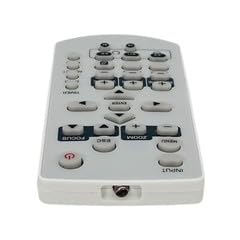
Aworan 1: Pariview of the replacement remote control.
Package Awọn akoonu
- 1 x Iṣakoso Latọna jijin rirọpo
Akiyesi: Batteries are not included and must be purchased separately. This is a replacement remote control and may not offer all functions of the original remote. Minor scratches may be present due to bulk item storage.
Ṣeto
1. Fifi sori batiri
- Wa yara batiri ni ẹhin isakoṣo latọna jijin.
- Ifaworanhan ṣii ideri batiri.
- Fi awọn batiri AAA meji sii (kii ṣe pẹlu), aridaju polarity ti o pe (+ ati -) bi itọkasi inu yara naa.
- Pa ideri batiri naa ni aabo.
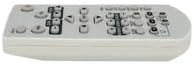
Image 2: Battery compartment for AAA batteries.
2. Pairing (Not Required)
This remote control operates via infrared (IR) technology and typically does not require pairing. It is designed to work directly with compatible Casio projector models upon battery installation.
Awọn ilana Iṣiṣẹ
Point the remote control directly at the infrared receiver on your Casio projector. Ensure there are no obstructions between the remote and the projector.
Awọn iṣẹ ipilẹ:
- Titan/Apapa: Tẹ awọn AGBARA bọtini lati tan-pirojekito tabi pa.
- Aṣayan igbewọle: Lo awọn ÀWỌN Ọ̀RỌ̀ or source buttons to cycle through available input sources (e.g., HDMI, VGA).
- Lilọ kiri: Lo awọn bọtini itọka itọsọna (DIDE, SISE, Osi, Ọtun) ati awọn WOLE or OK bọtini lati lilö kiri ni awọn akojọ aṣayan.
- Iṣakoso iwọn didun: If your projector has audio output, use the Idibo +/- buttons to adjust the sound level.
- Wiwọle Akojọ aṣayan: Tẹ awọn Akojọ button to access the projector's on-screen display (OSD) menu.
- Jade/pada: Lo awọn JADE or PADA button to close menus or return to the previous screen.
Refer to your Casio projector's original manual for specific functions and button layouts, as this replacement remote aims to replicate common controls.
Itoju
- Ninu: Mu ese isakoṣo latọna jijin kuro pẹlu asọ ti o gbẹ. Ma ṣe lo awọn olutọpa omi tabi awọn ohun elo abrasive.
- Rirọpo Batiri: Rọpo awọn batiri nigbati idahun latọna jijin ba di onilọra tabi da iṣẹ duro. Nigbagbogbo rọpo awọn batiri mejeeji ni akoko kanna pẹlu awọn tuntun ti iru kanna (AAA).
- Ibi ipamọ: Tí wọn kò bá lo iṣakoso latọna jijin fún ìgbà pípẹ́, yọ awọn batiri kuro lati dena jijo ati ibajẹ ti o le ba. Tọju si ibi ti o tutu ati gbigbẹ.
- Yago fun bibajẹ: Ma ṣe ju isakoṣo latọna jijin silẹ tabi fi han si awọn iwọn otutu to gaju, ọriniinitutu, tabi oorun taara.
Laasigbotitusita
- Latọna jijin ko ṣiṣẹ:
- Rii daju pe awọn batiri ti wa ni fi sii bi o ti tọ pẹlu polarity to tọ.
- Rọpo awọn batiri atijọ pẹlu awọn batiri AAA tuntun.
- Check for any obstructions between the remote control and the projector's IR receiver.
- Ensure you are within the maximum operating range (approximately 5 meters).
- Àwọn iṣẹ́ kan kò ṣiṣẹ́:
- This is a replacement remote. Some advanced or specific functions of your original projector remote may not be supported.
- Verify the function exists on your projector model.
Awọn pato
| Nọmba awoṣe | ATFO-RPL-RMT-070925-22182 |
| Compatible Projectors | Casio XJ-FC330XN, XJ-F210WN, XJ-UT310WN |
| Asopọmọra Technology | Infurarẹẹdi (IR) |
| Ibiti o pọju | Isunmọ awọn mita 5 (ẹsẹ 16) |
| Batiri Iru | 2 x AAA (ko si) |
| Àwọ̀ | White/Light Grey |
| Pataki Ẹya | Apẹrẹ ergonomic |
| Olupese | VieRemote |
Atilẹyin ọja ati Support
This product is a replacement remote control. For specific warranty information, please refer to the seller's policy at the time of purchase. For technical support or inquiries, please contact the seller directly through the platform where the purchase was made.