
1. Ifihan
Welcome to the OnePlus 15 user manual. This guide provides essential information for setting up, operating, maintaining, and troubleshooting your new smartphone. The OnePlus 15 is designed for high performance and extended battery life, featuring a Snapdragon 8 Elite Gen 5 processor, a 7300mAh battery, and a triple 50 MP camera system. Please read this manual thoroughly to ensure optimal use of your device.
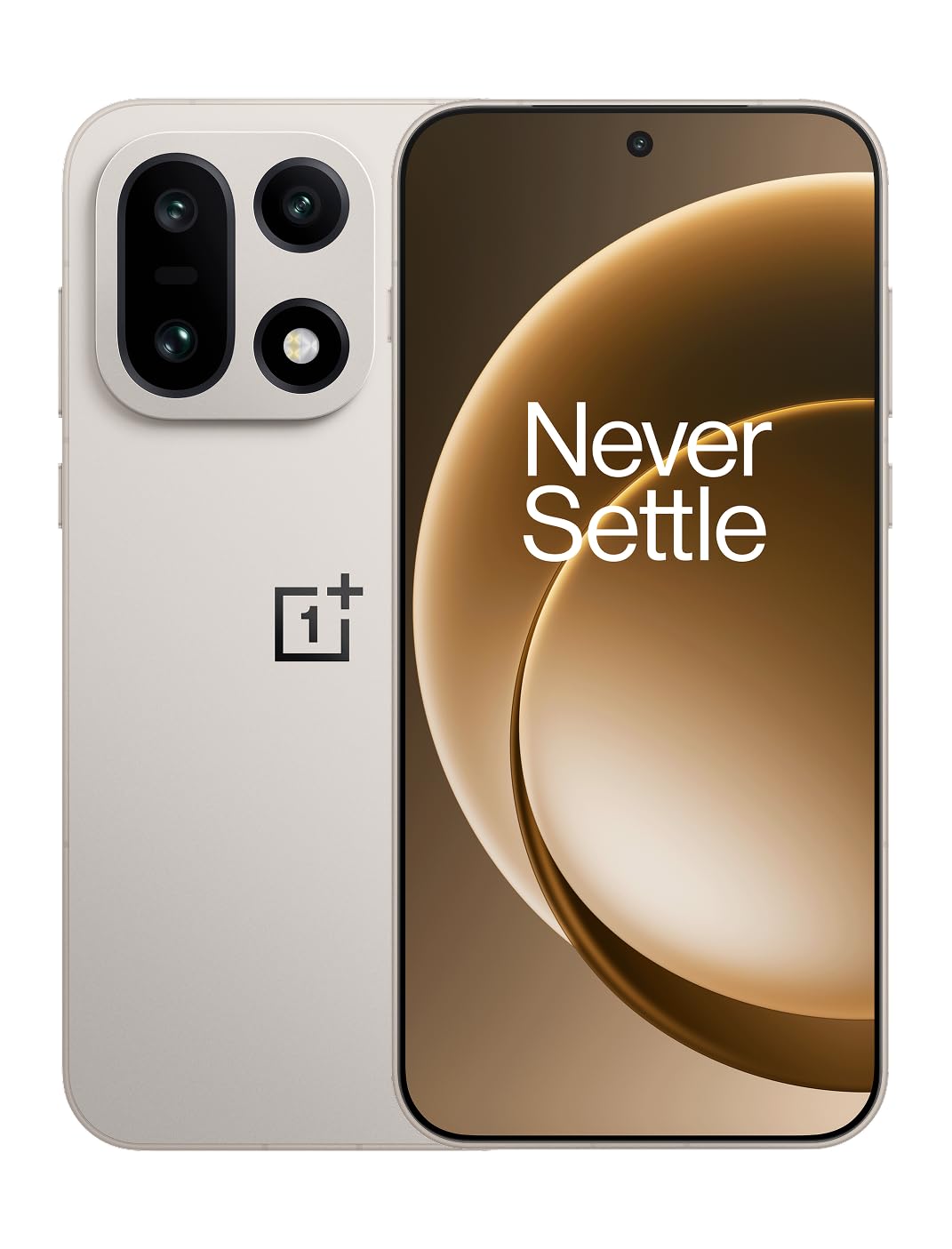
olusin 1: Iwaju view ti foonu alagbeka OnePlus 15.
2. Ohun ti o wa ninu Apoti
Daju pe gbogbo awọn ohun kan wa ninu apoti ọja rẹ:
- OnePlus 15 Smartphone (x1)
- Ṣaja (x1)
- Okùn Dátà USB (x1)
- SIM Ejector Tool (x1)
- Ìtọ́sọ́nà Kíákíá (x1)
- Safety Guide (x1)

Figure 2: Included items in the OnePlus 15 package.
3. Eto
3.1. Fifi sori kaadi SIM
The OnePlus 15 supports Dual-SIM functionality. To install your SIM card(s):
- Wa atẹ kaadi SIM ni ẹgbẹ ti ẹrọ naa.
- Fi ohun elo SIM ejector sii sinu iho kekere ti o tẹle atẹ ki o tẹ ṣinṣin titi ti atẹ naa yoo jade.
- Fi kaadi SIM Nano rẹ sinu atẹ naa pẹlu awọn ohun ti o ni goolu ti o kọju si isalẹ. Rii daju pe wọn joko daradara.
- Fi pẹ̀lẹ́pẹ̀lẹ́ tún fi àwo SIM sínú fóònù náà.

olusin 3: Apa view of the OnePlus 15, highlighting the SIM card tray.
3.2. Ibẹrẹ Agbara Tan ati Eto
Lati fi agbara sori ẹrọ rẹ fun igba akọkọ:
- Press and hold the Power button (located on the right side) until the OnePlus logo appears.
- Tẹ̀lé àwọn ìtọ́ni tó wà lójú ìbòjú láti parí ìṣètò àkọ́kọ́, títí bí àṣàyàn èdè, ìsopọ̀ Wi-Fi, wíwọlé àkọọ́lẹ̀ Google, àti àwọn ètò ààbò.
3.3. Ngba agbara si Batiri naa
The OnePlus 15 is equipped with a 7300mAh battery. To charge your device:
- Ti firanṣẹ Ngba agbara: Connect the provided USB Data Cable to the Type-C port on the bottom of the phone and the other end to the charger. Plug the charger into a power outlet.
- Gbigba agbara Alailowaya: Place the phone on a compatible wireless charging pad. Ensure the phone is centered on the pad for efficient charging.
A full charge provides approximately 68.7 hours of talk time.

Figure 4: Illustration of the 7300mAh battery capacity.
4. Ṣiṣẹ ẹrọ rẹ
4.1. Ifihan
The OnePlus 15 features a 6.78-inch AMOLED display with a 2772x1272 resolution and a 165 Hz refresh rate. This provides smooth visuals and vibrant colors. Adjust display settings such as brightness, color mode, and refresh rate in the device settings menu.
4.2. Iṣẹ ṣiṣe
Powered by the Snapdragon 8 Elite Gen 5 processor and 16GB of RAM, the OnePlus 15 delivers fast and efficient performance for multitasking, gaming, and demanding applications. The Tri-Chip System, combining the Snapdragon 8 Elite Gen 5 with a dedicated Wi-Fi chip and CPU scheduler, optimizes for speed, connectivity, and power efficiency.
Fidio 1: Pariview of the OnePlus 15's performance capabilities and user experience.
4.3. Eto kamẹra
The device is equipped with a Triple 50 MP camera system, offering wide, ultra-wide, and telephoto lenses for versatile photography. The DetailMax Engine enhances photo quality in various lighting conditions, including day, night, and motion shots. Both front and rear cameras are available for capturing images and videos.

olusin 5: Ẹyìn view ti OnePlus 15, ifihanasing the triple camera system.
Figure 6: DetailMax Engine for stunning photos.
4.4. Asopọmọra
The OnePlus 15 supports a range of connectivity options:
- Ailokun: Wi-Fi, Bluetooth, NFC, Infrared.
- Ti fiwe: USB Iru-C.
- Lilọ kiri: Dual-band GPS (L1+L5) and Galileo (E1+E5a).
- SIM: Dual SIM support for managing multiple networks.
4.5. Awọn ọna System
The device runs on Android 16 with OxygenOS 16, providing a fast and smooth user experience. Regular software updates will be provided to enhance features and security.
5. Itọju
5.1. Agbara ati Idaabobo
The OnePlus 15 is built with IP66/IP68/IP69 and IP19K ratings, offering resistance against dust and water. While designed to be durable, avoid exposing the device to extreme conditions or prolonged submersion in water.

Figure 7: OnePlus 15 demonstrating water resistance.
5.2. Ninu Rẹ Device
Use a soft, lint-free cloth to clean the screen and body of your phone. Avoid using abrasive materials or harsh chemicals, which can damage the display or finish.
5.3. Software imudojuiwọn
Periodically check for software updates in the device settings. Keeping your software up-to-date ensures you have the latest features, security patches, and performance improvements.
6. Laasigbotitusita
This section addresses common issues you might encounter with your OnePlus 15.
6.1. Ẹrọ Ko Nṣiṣẹ Tan-an
- Rí i dájú pé batiri náà ti gba agbára. So foonu náà mọ́ ẹ̀rọ amúṣẹ́ náà kí o sì dúró díẹ̀ kí o tó tún gbìyànjú láti tan agbára náà.
- Tẹ bọtini agbara ki o si mu fun o kere ju awọn aaya 10-15 lati fi agbara mu lati tun bẹrẹ.
6.2. Asopọmọra Nẹtiwọọki ti ko dara
- Ṣàyẹ̀wò bóyá a ti fi kaadi SIM rẹ sí i dáadáa.
- Verify that airplane mode is not enabled.
- Tun ẹrọ naa bẹrẹ.
- If issues persist, contact your network provider.
6.3. Awọn ohun elo jija tabi Didi
- Pa ati tun app naa ṣii.
- Clear the app's cache and data in device settings.
- Rii daju pe ohun elo naa ti ni imudojuiwọn si ẹya tuntun rẹ.
- If the issue is widespread, consider restarting the phone.
6.4. Sisọ batiri ni kiakia
- Reduce screen brightness and screen timeout duration.
- Disable unused features like Wi-Fi, Bluetooth, or GPS when not needed.
- Identify and close power-intensive applications running in the background.
- Check for recent software updates, as they often include battery optimizations.
7. Awọn pato
Detailed technical specifications for the OnePlus 15 (Model: CPH2749).
| Ẹya ara ẹrọ | Ẹ̀kúnrẹ́rẹ́ |
|---|---|
| Orukọ awoṣe | OnePlus 15 |
| Nọmba Awoṣe Nkan | CPH2749 |
| Ọja Mefa | 6.36 x 3.02 x 0.32 inches |
| Iwọn Nkan | 1.28 iwon |
| Eto isesise | Android 16 |
| Sipiyu Awoṣe | Snapdragon 8 Elite Gen 5 |
| Sipiyu Iyara | 4.61 GHz |
| Ramu Memory sori iwọn | 16 GB |
| Agbara Ibi ipamọ Iranti | 512 GB |
| Iduro iboju Iwon | 6.78 inches |
| Ipinnu | 2772*1272 |
| Oṣuwọn sọtun | 165 Hz |
| Agbara Batiri | 7300 Milionuamp Hours (7300mAh) |
| Foonu Ọrọ Time | Awọn wakati 68.7 |
| Awọn ọna ẹrọ Asopọmọra | Infrared, NFC, USB, Wi-Fi, Bluetooth |
| GPS | Dual band: GPS(L1+L5) Galileo(E1+E5a) |
| Pataki Awọn ẹya ara ẹrọ | Dual SIM, Wireless Charging |
| Jack ohun | Type-C headphones: supported Type-C digital headphones & Type-C analog headphones |
| Awọn ẹya ara ẹrọ kamẹra miiran | Front, Rear (Triple 50 MP Camera System) |
| IP Rating | IP66/IP68/IP69 and IP19K rated |
| Àwọ̀ | Sand Storm |
8. atilẹyin ọja Information
Your OnePlus 15 device is covered by a limited manufacturer's warranty. Please refer to the included Safety Guide or visit the official OnePlus website for detailed warranty terms and conditions, including coverage duration and service procedures. Keep your proof of purchase for warranty claims.
9. Atilẹyin
For further assistance, technical support, or to access additional resources, please visit the official OnePlus support website or contact customer service. You can find contact details and FAQs on the OnePlus webojula.
Awọn orisun Ayelujara: www.oneplus.com/support


